Databricks Platform Architecture
Welcome back. In this lecture, we'll look at the Databricks platform architecture.
A quick clarification before we start: this is not a solution architecture, or an architecture framework, or something you'll be building yourself. This is the architecture of the Databricks platform itself — how Databricks is structured and organized on top of the cloud platforms.
Let's start.
Databricks: A Multi-Tenant SaaS Application
Databricks is a multi-tenant Software-as-a-Service (SaaS) application, and it's available on AWS, Azure, and Google Cloud.
How did Databricks make itself available on all three clouds? It's actually quite simple:
- Databricks created a cloud account in AWS, then customized and configured their multi-tenant SaaS application to run there. That's how Databricks became available on AWS.
- They did the exact same thing in Azure — created a cloud account, took the same application, customized it for Azure's technologies, and installed it there.
- They repeated this again for Google Cloud.
From an end-user's point of view, the Databricks application looks and works the same on all three clouds. Behind the scenes, since each cloud platform is different, Databricks customizes the technology used — but that's invisible to us as users.
How Do We Access Databricks?
To access the Databricks platform, you (or your organization) first need to decide which cloud you want to use it on. Let's say we decide to go with AWS — the AWS-focused course you're taking follows this same path. Once that decision is made, Azure and GCP simply become irrelevant to us; we focus only on the AWS side.
To get started, you create your Databricks account, and tell them you want to access it on AWS. Once your account is created, you have access to the Databricks SaaS application.
Now, here's an important detail: even though we're all using the same Databricks SaaS application, our accounts are logically isolated from each other.
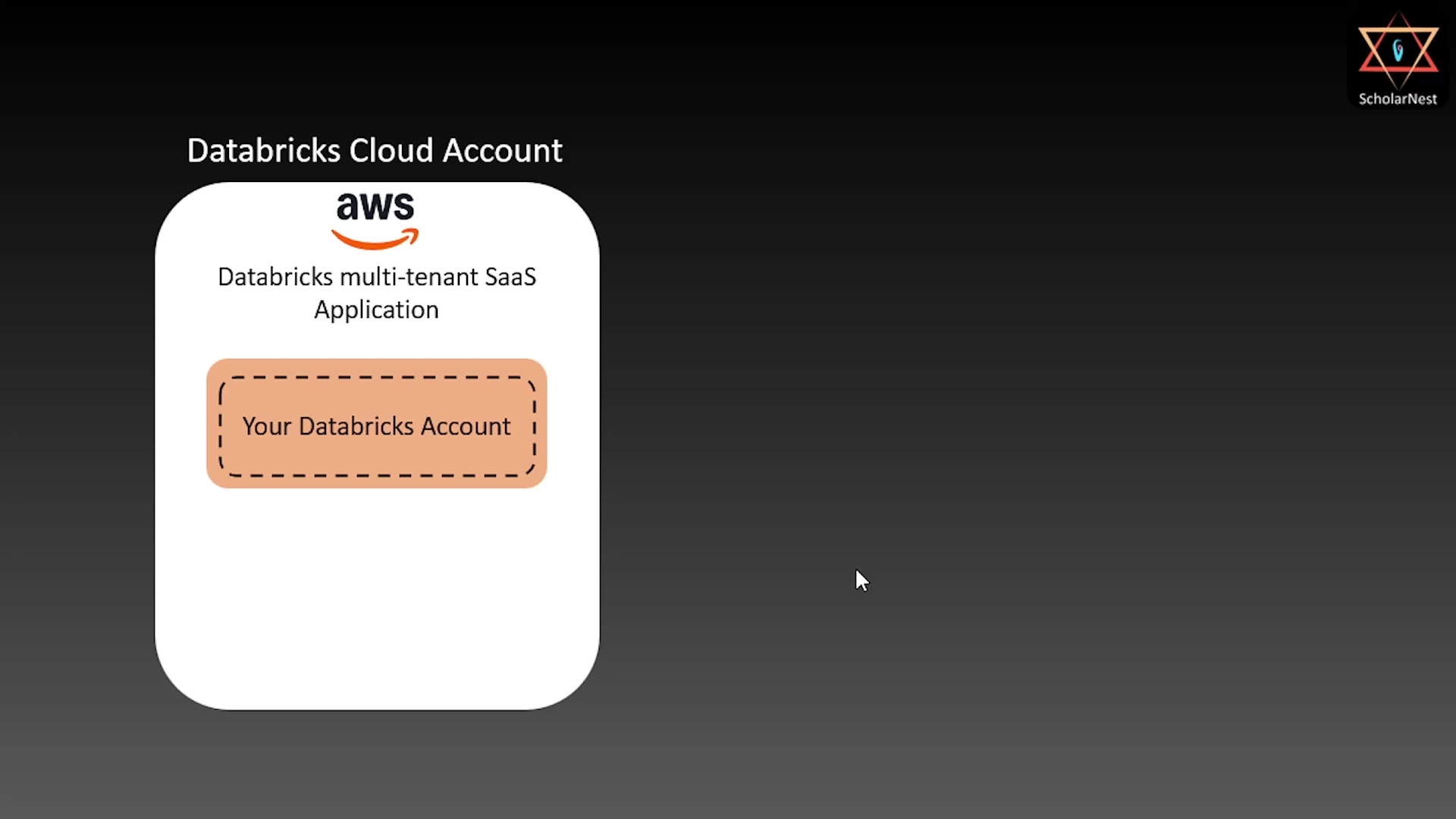 Multi-tenant isolation — Your Databricks Account inside the Databricks Cloud Account
If I create my account and you create yours, both accounts live inside the same Databricks SaaS application — but we cannot see or interfere with each other's account. That's exactly what makes it "multi-tenant."
From Account to Workspace
Here's the thing: just creating a Databricks account gives you nothing usable yet. To actually use the Databricks platform, you need to create a workspace inside your account.
By default, Databricks offers a serverless workspace — this is the recommended option today, mainly because it turns out to be the cheapest way to get started. (We'll get into why later in the course.) A serverless workspace is the bare minimum you need to start using Databricks.
Let's look at its architecture.
Serverless Workspace Architecture
Databricks implements what's called an E2, or split-plane architecture, for the serverless workspace. This means the whole system is split into two separate "planes":
- Control plane
- Serverless compute plane
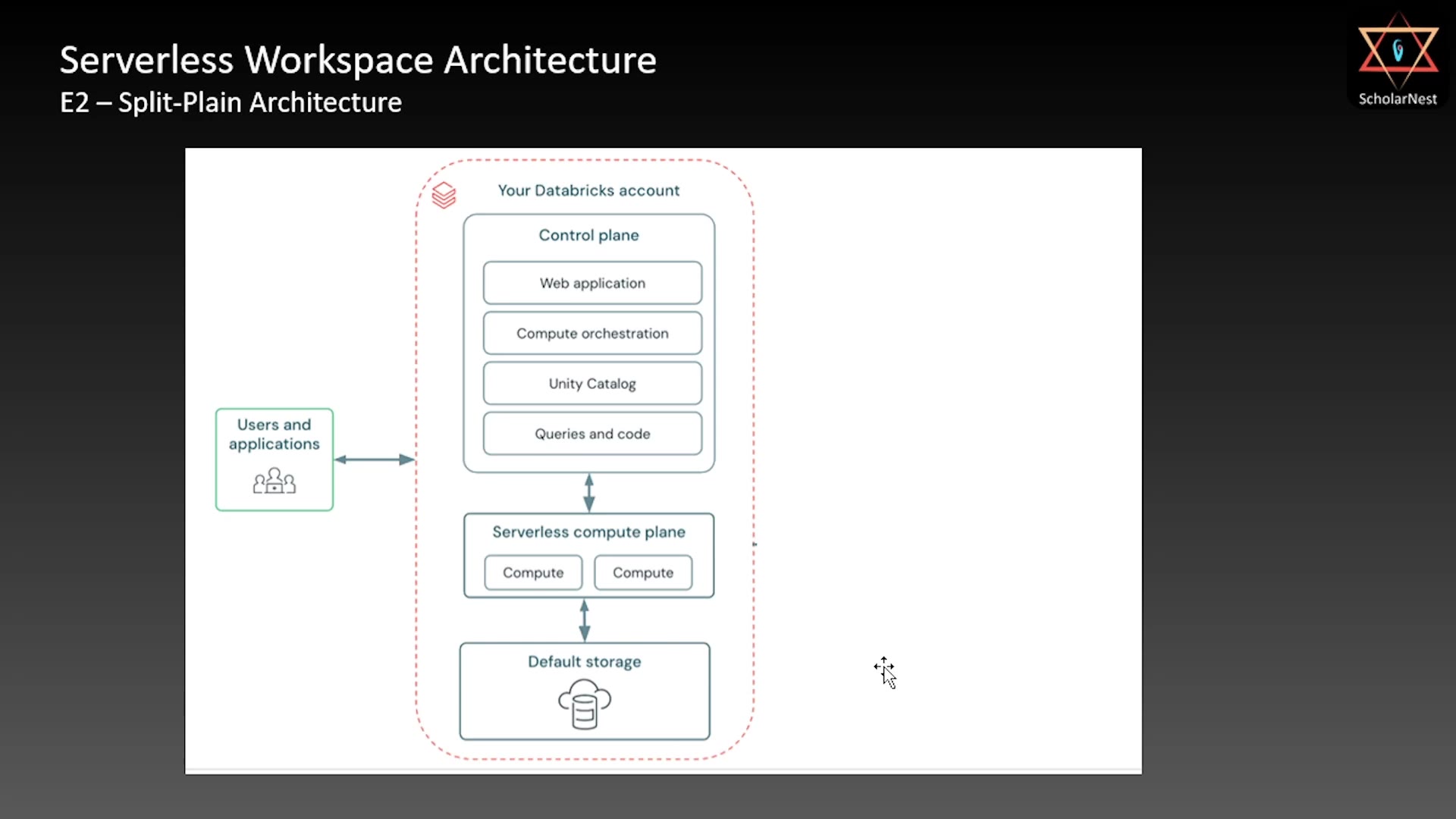 Serverless Workspace Architecture
Control plane — This holds the core Databricks software: the web application, compute orchestration, Unity Catalog, and the queries/code you write. Everything that "runs" the platform experience lives here.
Serverless compute plane — This is where the actual compute resources (the virtual machines that execute your code) live. This plane is responsible for launching compute, scaling it up or down, and releasing it when it's no longer needed.
Default storage — The serverless workspace also creates a default storage location — simply an S3 bucket, created by Databricks, inside your Databricks account. This is where your metadata, system data, and actual data get stored.
Here's the key thing to remember: everything in this architecture — control plane, compute, and storage — lives inside the Databricks AWS cloud account. Not yours.
This is the simplest, easiest, and cheapest way to use Databricks.
The Problem: Who Owns Your Data?
Some organizations aren't comfortable with the default setup. Their concern is simple: if the default storage (that S3 bucket) lives inside Databricks' cloud account, then all of your organization's data and metadata is sitting there too.
So what happens if you close your Databricks account? Your data goes with it. You don't control it — Databricks does.
For organizations that don't want this risk, Databricks offers a modified version of the same serverless workspace architecture.
Serverless Workspace with Your Own Storage
In this version, you create your own cloud account in AWS, and connect it to your Databricks account. You still get a serverless workspace — but now, your data and metadata are stored in your own cloud account, not Databricks'.
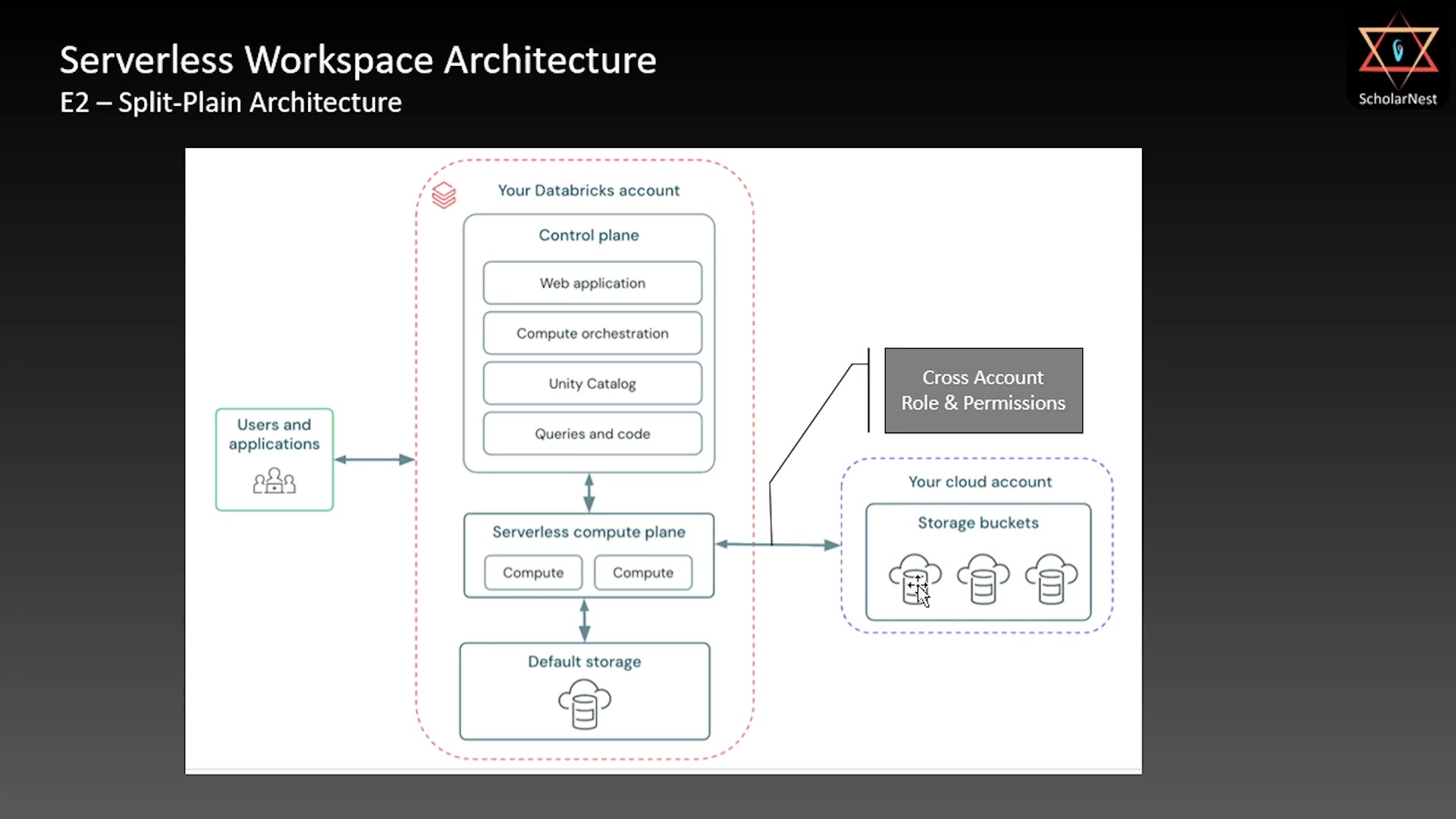 Serverless Workspace with your own cloud storage
Here's how it works:
- You create your own storage bucket(s) in your AWS cloud account.
- You connect your cloud account to your Databricks account using a cross-account role, with the right permissions.
- Through this connection, the Databricks serverless compute plane can read and write data directly into your storage buckets.
The default storage still exists in this setup — you just don't have to use it. You keep your data and metadata in your own account instead, and you pay AWS directly for that storage. If you ever close your Databricks account, your data stays safe with you.
Quick Recap: Serverless Workspace
- Simple version: control plane, compute plane, and storage — all inside Databricks' own account.
- Extended version: same control and compute planes, but storage lives in your own cloud account, connected via a cross-account role.
When You Need Dedicated Clusters
There's one more scenario to cover. Some organizations don't want serverless compute — where compute is provisioned on demand and released afterward. Instead, they want dedicated clusters — say, for running Spark jobs, pipelines, or for handing over to a specific data engineering or analytics team.
For this need, Databricks offers a different kind of workspace: the Classic (or Hybrid) Workspace.
Classic / Hybrid Workspace Architecture
The classic workspace also follows the split-plane architecture, and much of it looks similar to the serverless workspace — but with some important differences.
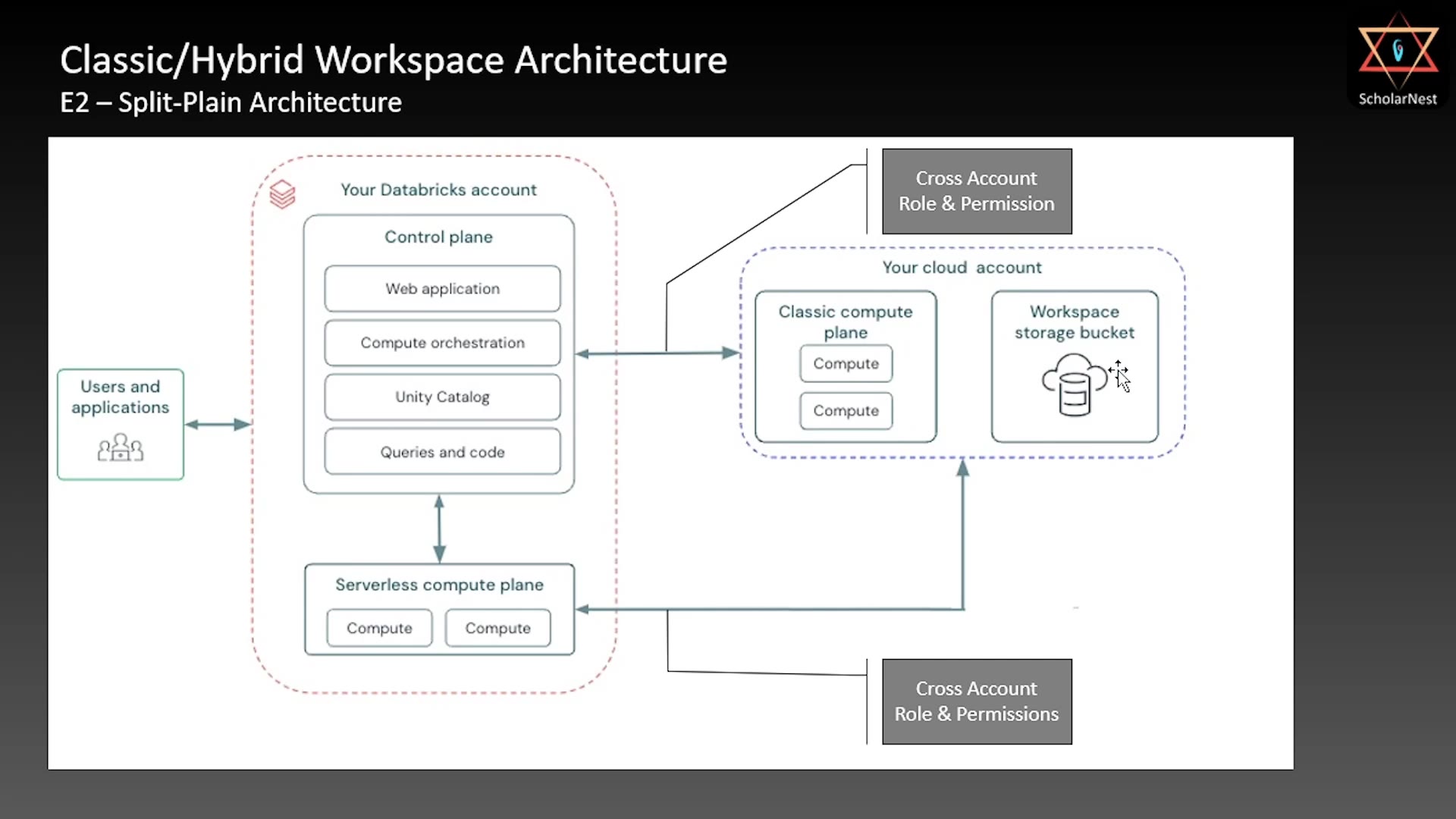 Classic/Hybrid Workspace Architecture
Here's what's the same:
- Control plane — still inside your Databricks account, same as before.
- Serverless compute plane — still available, same as before.
Here's what's different:
- No default storage. Instead, the classic workspace requires you to create your own storage — an S3 bucket in your cloud account, designated as your workspace storage bucket.
- This workspace storage bucket is accessed by the serverless compute plane too, using a cross-account role (same mechanism as before).
- Classic compute plane — this is the new piece. It's configured directly in your cloud account, and it lets you create custom, dedicated clusters — 5 nodes, 10 nodes, 50, 100, whatever your requirement is.
Since the classic compute plane and the workspace storage bucket both live in your cloud account, no special cross-account permission is needed between them — they can talk to each other directly.
But there's one more piece: the Databricks control plane still needs to manage this dedicated cluster — launching it, monitoring it, scaling it up/down, and eventually releasing it. Since the control plane lives in the Databricks account, and the cluster lives in your cloud account, Databricks needs permission to create and manage EC2 instances in your account. That requires a second cross-account role — this one specifically for EC2 permissions.
So in this architecture, you end up configuring two cross-account roles:
- One for storage — so compute (serverless or classic) can read/write your S3 bucket.
- One for EC2/compute management — so the Databricks control plane can launch, scale, and manage your dedicated cluster.
Quick Recap: Classic/Hybrid Workspace
The classic/hybrid workspace gives you both types of compute:
- Serverless compute (same as before)
- Classic/dedicated compute — clusters you fully control, sized exactly the way your organization needs
Whereas the plain serverless workspace architecture only ever gave you serverless compute.
Summary
| Architecture | Storage Location | Compute Options | Cross-Account Roles Needed |
|---|---|---|---|
| Serverless Workspace (default) | Databricks' own account (S3) | Serverless only | None |
| Serverless Workspace (your storage) | Your cloud account | Serverless only | 1 (storage) |
| Classic/Hybrid Workspace | Your cloud account (required) | Serverless + Classic/dedicated clusters | 2 (storage + EC2) |
That's the Databricks platform architecture — how it's structured as a multi-tenant SaaS application, and the different workspace options available to you depending on how much control you want over your data and compute.
See you in the next lecture. Keep learning, and keep growing!