Implementing Unity Catalog Permissions for Catalog and Schema
In the previous lecture, we covered the Unity Catalog permissions model conceptually — the securable object hierarchy, and the critical rule that privileges don't cascade. In this lecture, let's actually implement it: granting our groups the access they need on our dev and prod catalogs.
Recap of Our Environment
By now, our setup includes:
- Three groups: DBX-ENG (development), DBX-UAT (testing), DBX-PROD (production).
- Two catalogs: dev (shared by DBX-ENG and DBX-UAT) and prod (used only by DBX-PROD).
- Two external locations, each backing its own catalog's storage.
Here's exactly what we're granting in this lecture:
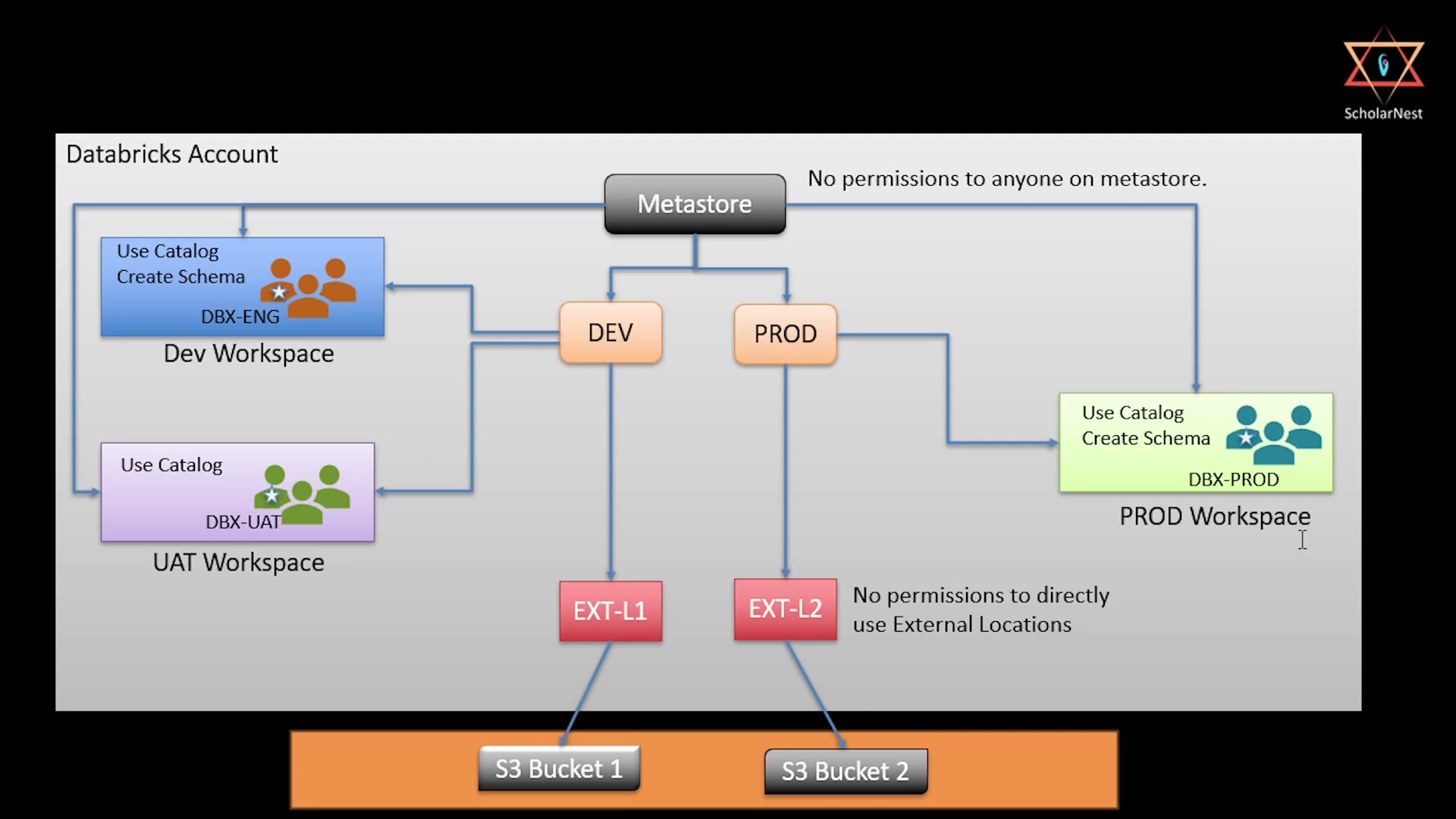 Permissions requirement diagram
- DBX-ENG →
USE CATALOGandCREATE SCHEMAon thedevcatalog. - DBX-UAT →
USE CATALOGonly on thedevcatalog (no schema creation — testers consume, they don't create structure). - DBX-PROD →
USE CATALOGandCREATE SCHEMAon theprodcatalog. - No one gets permissions on the metastore itself, and no one gets direct permissions on the external locations — access to the underlying storage should always flow through the catalog, not around it.
Granting Permissions Through the UI
Unity Catalog lets you grant permissions either through SQL (GRANT statements) or directly through the Catalog Explorer UI. Let's use the UI first, since it makes the full set of available privileges very easy to see all at once.
Go to Catalog, select the dev catalog, and open its Permissions tab. Click Grant:
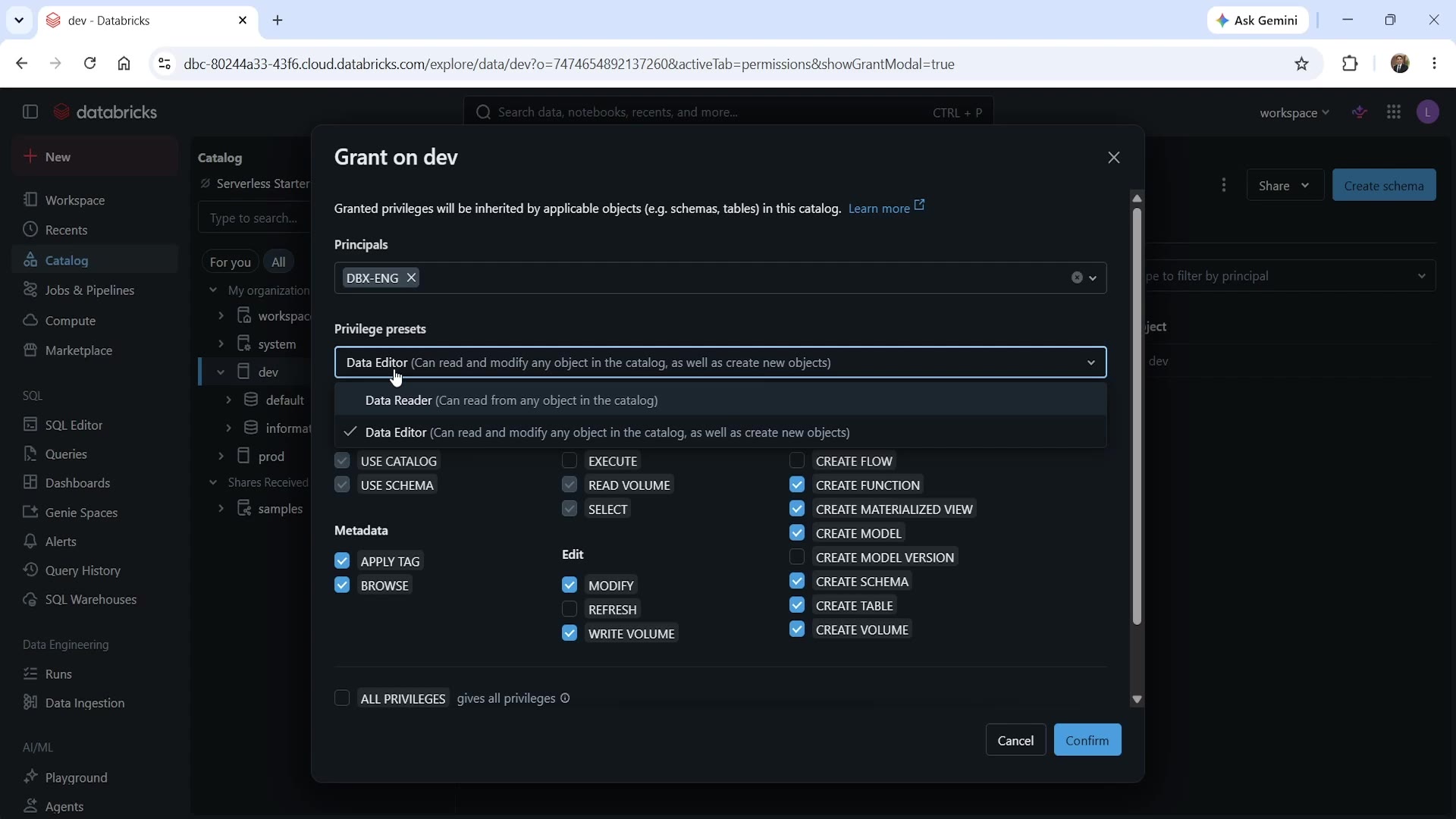 Grant dialog with privilege presets
This dialog shows you:
- Principals — who you're granting access to (in this case, the
DBX-ENGgroup). - Privilege presets — a convenient dropdown offering two common bundles:
- Data Reader — can read from any object in the catalog.
- Data Editor — can read and modify any object in the catalog, as well as create new objects.
- The full privilege checklist, organized by category:
- Prerequisite —
USE CATALOG,USE SCHEMA(the "access" privileges we covered in the last lecture). - Read —
EXECUTE,READ VOLUME,SELECT. - Metadata —
APPLY TAG,BROWSE. - Edit —
MODIFY,REFRESH,WRITE VOLUME. - Create —
CREATE FLOW,CREATE FUNCTION,CREATE MATERIALIZED VIEW,CREATE MODEL,CREATE MODEL VERSION,CREATE SCHEMA,CREATE TABLE,CREATE VOLUME. ALL PRIVILEGES— a checkbox at the bottom that grants everything at once (use with caution — this is a broad grant).
- Prerequisite —
Since we specifically need USE CATALOG and CREATE SCHEMA for DBX-ENG, we can either check those two boxes individually, or note that selecting a preset like Data Editor automatically checks a broader set of boxes (including USE CATALOG, USE SCHEMA, and the various CREATE options) — useful when you genuinely want that level of access, but worth reviewing carefully rather than blindly accepting, since it grants more than just our two target privileges.
For precision, we'll select DBX-ENG as the principal, and manually check just USE CATALOG and CREATE SCHEMA — matching exactly what our requirement calls for. Click Confirm.
Repeat this process for:
- DBX-UAT on the
devcatalog — check onlyUSE CATALOG(noCREATE SCHEMA). - DBX-PROD on the
prodcatalog — checkUSE CATALOGandCREATE SCHEMA.
Granting Permissions via SQL
The same grants can be issued through SQL, using the standard Unity Catalog GRANT syntax we covered in the previous lecture:
sqlGRANT USE CATALOG ON CATALOG dev TO `DBX-ENG`; GRANT CREATE SCHEMA ON CATALOG dev TO `DBX-ENG`; GRANT USE CATALOG ON CATALOG dev TO `DBX-UAT`; GRANT USE CATALOG ON CATALOG prod TO `DBX-PROD`; GRANT CREATE SCHEMA ON CATALOG prod TO `DBX-PROD`;
Whether you use the UI or SQL comes down to preference and context — the UI is often easier for one-off, exploratory grants (you can see every available privilege laid out clearly), while SQL is easier to script, review, and repeat consistently — especially useful if you're managing permissions as part of a version-controlled setup process.
Verifying Privileges Don't Cascade
Here's a good way to confirm, hands-on, that the "privileges don't cascade" rule from the previous lecture is real. After granting USE CATALOG on dev to DBX-ENG, go check the schema-level permissions inside that catalog — for example, the dbx_course schema:
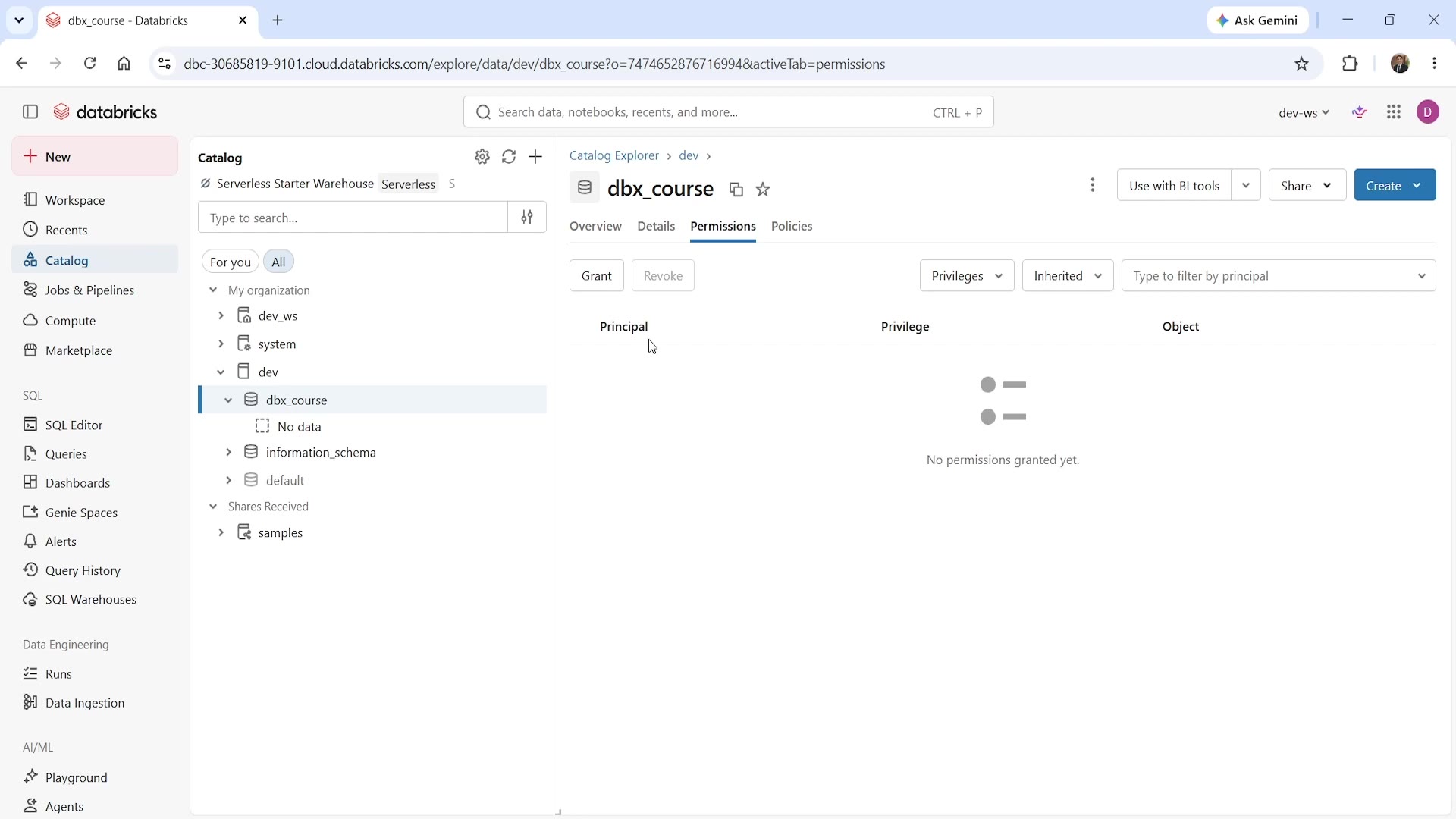 Schema-level Permissions tab — no permissions granted yet
Even though we just granted catalog-level access, the schema's own Permissions tab shows "No permissions granted yet." This is a direct, visible confirmation: granting USE CATALOG did nothing at the schema level. If a user in DBX-ENG needs to actually use a specific schema (e.g., to create tables inside it), a separate, explicit grant is required at the schema level too.
Checking and Managing Existing Grants
The same Permissions tab you used to grant access also lets you review and revoke it:
- Privileges dropdown — filter the view by specific privilege types.
- Inherited dropdown — toggle whether to show privileges inherited from a higher level in the hierarchy (e.g., a catalog-level grant showing up when viewing a schema) versus only privileges granted directly at this level.
- Filter by principal — search for a specific user, group, or service principal to see exactly what they've been granted.
- Grant / Revoke buttons — add new permissions, or remove existing ones, right from this same screen.
This makes the Permissions tab your central place to audit "who can access what" for any given catalog, schema, or object — a genuinely useful habit to build, especially before onboarding new team members or investigating unexpected access issues.
Summary
| Group | Catalog | Privileges Granted |
|---|---|---|
| DBX-ENG | dev | USE CATALOG, CREATE SCHEMA |
| DBX-UAT | dev | USE CATALOG only |
| DBX-PROD | prod | USE CATALOG, CREATE SCHEMA |
| Anyone | metastore | Nothing — no permissions granted at the metastore level |
| Anyone | external locations | Nothing — access flows only through catalogs, never directly against external locations |
Two ways to grant permissions in Unity Catalog:
- Catalog Explorer UI —
Permissionstab →Grant, with a full checklist of privileges (plus convenient presets like Data Reader / Data Editor). - SQL —
GRANT <privilege> ON <securable> TO <principal>;, useful for scripting and repeatable setup.
Both approaches produce the exact same result — pick whichever fits your workflow, and remember: every level in the hierarchy needs its own explicit grant.
See you again. Keep learning, and keep growing!