Table Constraints — NOT NULL, CHECK, and Identity Columns
In this lecture, let's learn about constraints on Delta tables, and identity columns.
Setup
Open (or create) a notebook — 12-constraints-and-identity — connect a cluster, and set your catalog/schema:
sqlUSE CATALOG workspace; USE SCHEMA default;
Constraints: One Level Deeper Than Schema Enforcement
We already learned that schema enforcement protects your table's structure — column names and data types. Constraints go one level deeper: they enforce business rules at the value level. Even when the structure is perfectly valid — right column names, right data types — a value might still violate a business rule you care about. That's what constraints are for.
Part 1: NOT NULL and CHECK Constraints
NOT NULL
sqlCREATE OR REPLACE TABLE orders ( order_id INT COMMENT 'Unique order identifier', customer_id INT NOT NULL COMMENT 'Must reference a valid customer', amount DOUBLE COMMENT 'Order total in USD', status STRING COMMENT 'Order lifecycle status', created_at TIMESTAMP COMMENT 'Order creation timestamp' ) USING DELTA COMMENT 'Order management — constraints demo';
customer_id INT NOT NULL — this is defined right in the column declaration, just like you'd expect from any relational database.
sqlINSERT INTO orders VALUES (1, 101, 149.99, 'pending', '2024-08-01 10:00:00'), (2, 102, 320.00, 'completed', '2024-08-01 10:05:00'), (3, 103, 89.50, 'processing', '2024-08-01 10:10:00');
This works fine — all values are present, all types match.
sqlINSERT INTO orders VALUES (4, NULL, 55.00, 'pending', '2024-08-01 11:00:00');
This fails: "Not null constraint violated for column customer_id." Delta simply won't let a NULL land in a column you've declared as NOT NULL — full stop.
CHECK Constraints
CHECK constraints are added after table creation, via ALTER TABLE:
sqlALTER TABLE orders ADD CONSTRAINT valid_amount CHECK (amount > 0);
Simple syntax: ADD CONSTRAINT <name> CHECK (<boolean expression>). The expression can use any SQL function — from simple range checks to more complex, multi-condition rules.
sqlINSERT INTO orders VALUES (5, 104, -50.00, 'pending', '2024-08-01 11:05:00');
This fails: "CHECK constraint valid_amount (amount > 0) violated." Notice the error names the constraint explicitly — which is exactly why giving your constraints meaningful names matters. In production, that name is what shows up in the error, making debugging far easier.
A Second CHECK Constraint — Enumerated Values
sqlALTER TABLE orders ADD CONSTRAINT valid_status CHECK (status IN ('pending', 'processing', 'completed', 'cancelled'));
This restricts status to a fixed set of allowed values.
sqlINSERT INTO orders VALUES (6, 105, 210.00, 'shipped', '2024-08-01 11:10:00');
'shipped' isn't in the allowed list, so this fails: "CHECK constraint valid_status (status IN ('pending',...)) violated."
Inspecting and Removing Constraints
Constraints are stored as table properties, and you can view them with:
sqlSHOW TBLPROPERTIES orders;
This shows both delta.constraints.valid_amount and delta.constraints.valid_status, along with their actual expressions.
To remove one:
sqlALTER TABLE orders DROP CONSTRAINT valid_status;
sqlSHOW TBLPROPERTIES orders;
Now only valid_amount remains — valid_status is gone.
An Important Limitation: Constraints Only Apply Going Forward
Constraints are enforced on new writes only. If you add a CHECK constraint to a table that already contains rows violating it, those existing rows are left untouched — Delta does not retroactively validate historical data. The practical implication: add your constraints at table creation time, ideally before any data is loaded — not as an afterthought once bad data may already be sitting in the table.
Where Constraints Live — Quick Reference
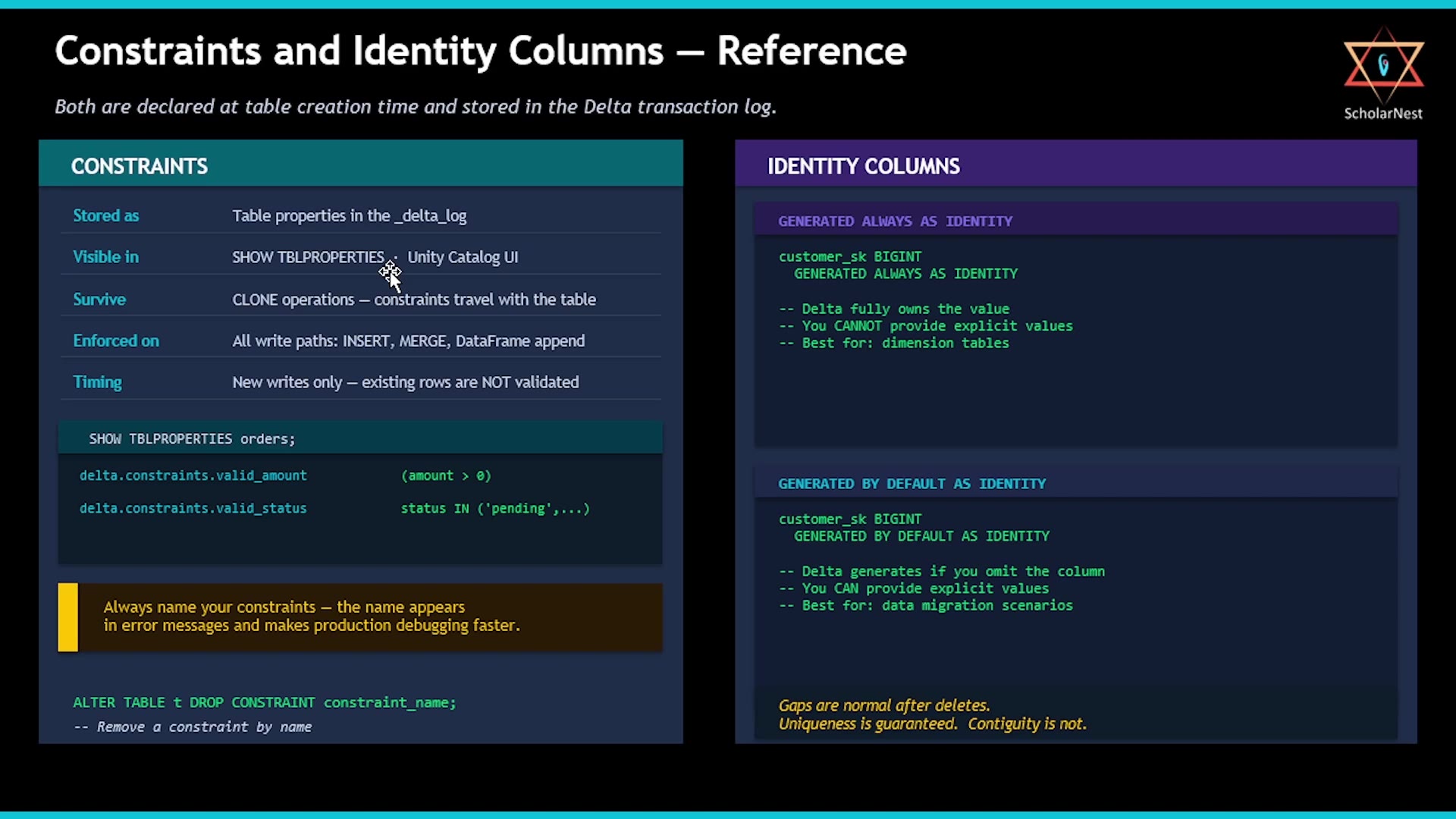 Constraints and Identity Columns — Reference
- Stored as table properties in the
_delta_log. - Visible via
SHOW TBLPROPERTIESand in the Unity Catalog UI (table details view). - Survive
CLONEoperations — if you clone a table, its constraints come along with it. - Enforced on every write path — SQL
INSERT, DataFrameappend, andMERGE— no exceptions. - Enforced on new writes only — as covered above.
Part 2: Identity Columns
The Problem: Surrogate Keys in Spark
Dimension tables in a lakehouse (just like in traditional data warehouses) typically need surrogate keys — unique, stable integer IDs that identify a row independently of its business key. Generating these in Spark has historically been awkward:
- Spark doesn't have native sequence objects.
MAX(id) + 1isn't safe under concurrent writes (two writers could compute the same "next" value).- External sequence services work, but add operational overhead you'd rather avoid.
Delta Lake solves this with two variants of identity columns.
Option A: GENERATED ALWAYS AS IDENTITY
Delta always generates the value — you can never provide your own. This is the right choice for dimension tables where application code should never be allowed to control the surrogate key directly.
sqlCREATE OR REPLACE TABLE customers_dim ( customer_sk BIGINT GENERATED ALWAYS AS IDENTITY COMMENT 'Surrogate key — Delta-managed, always auto-generated', customer_id STRING NOT NULL COMMENT 'Business key from source system', name STRING NOT NULL, email STRING, tier STRING, is_current BOOLEAN DEFAULT true ) USING DELTA COMMENT 'Customer dimension — star schema surrogate key demo' TBLPROPERTIES('delta.feature.allowColumnDefaults' = 'supported');
A couple of side notes on this table definition:
customer_id STRING NOT NULL— aNOT NULLconstraint on the business key.is_current BOOLEAN DEFAULT true— a default value feature: if this column isn't provided on insert, it defaults totrue. This requires enabling thedelta.feature.allowColumnDefaultstable property, as shown.
sqlINSERT INTO customers_dim (customer_id, name, email, tier, is_current) VALUES ('C001', 'Alice Nguyen', 'alice@example.com', 'gold', true), ('C002', 'Bob Patel', 'bob@example.com', 'silver', true), ('C003', 'Carol Santos', 'carol@example.com', 'platinum', true);
Notice: customer_sk is never provided in the insert — since it's GENERATED ALWAYS, you're not allowed to supply it.
sqlSELECT customer_sk, customer_id, name, tier FROM customers_dim ORDER BY customer_sk;
customer_sk is populated automatically: 1, 2, 3 — sequential, unique.
sqlINSERT INTO customers_dim (customer_sk, customer_id, name, email, tier, is_current) VALUES (99, 'C004', 'David Kim', 'david@example.com', 'bronze', true);
This fails: "Providing values for GENERATED ALWAYS AS IDENTITY column is not supported." With GENERATED ALWAYS, Delta simply won't let you set the value explicitly — ever.
Option B: GENERATED BY DEFAULT AS IDENTITY
Sometimes you need flexibility — auto-generate when no value is given, but allow overriding when needed. This is the right choice for data migration scenarios, where you're bringing in data from an existing system and need to preserve its original surrogate keys.
sqlCREATE OR REPLACE TABLE customers_dim_v2 ( customer_sk BIGINT GENERATED BY DEFAULT AS IDENTITY, customer_id STRING NOT NULL, name STRING NOT NULL, email STRING, tier STRING ) USING DELTA COMMENT 'Customer dim v2 — BY DEFAULT for migration scenarios';
sqlINSERT INTO customers_dim_v2 (customer_sk, customer_id, name, email, tier) VALUES (5001, 'C001', 'Alice Nguyen', 'alice@example.com', 'gold'), (5002, 'C002', 'Bob Patel', 'bob@example.com', 'silver');
This succeeds — explicit values (5001, 5002) are accepted, since this column is GENERATED BY DEFAULT, not ALWAYS.
sqlINSERT INTO customers_dim_v2 (customer_id, name, email, tier) VALUES ('C003', 'Carol Santos', 'carol@example.com', 'platinum');
This time customer_sk is omitted — and Delta generates it automatically.
sqlSELECT customer_sk, customer_id, name FROM customers_dim_v2 ORDER BY customer_sk;
You'll see both the explicitly-provided keys (5001, 5002) and the auto-generated one, sitting side by side in the same table — exactly the flexibility this variant is designed for.
Choosing Between the Two
GENERATED ALWAYS AS IDENTITY | GENERATED BY DEFAULT AS IDENTITY | |
|---|---|---|
| Can you provide your own value? | Never — Delta always generates it | Yes — provide it, or let Delta generate it |
| Best for | New dimension tables you fully control | Data migration, preserving existing keys |
One more thing to know about identity columns in general: gaps in the sequence are normal — for example, after deletes, or in certain concurrent-write scenarios. Uniqueness is guaranteed. Contiguity (no gaps) is not. Don't build logic that assumes consecutive, unbroken numbering.
Summary
Constraints give Delta a data-quality layer at the table level:
NOT NULL— declared directly in the column definition; enforced on every write path (SQLINSERT, DataFrameappend,MERGE) with no exceptions.CHECK— added viaALTER TABLE ... ADD CONSTRAINT name CHECK (expression). Any boolean SQL expression works — range checks,INlists, cross-column rules. Always name your constraints — the name shows up in error messages andSHOW TBLPROPERTIES. Enforced on new writes only — existing rows are never retroactively validated, so add constraints at table creation time.
Identity Columns:
GENERATED ALWAYS AS IDENTITY— for dimension tables where Delta should fully own the surrogate key; explicit inserts are never allowed.GENERATED BY DEFAULT AS IDENTITY— for migration scenarios where you need to preserve existing surrogate keys, while still allowing auto-generation when a value isn't provided.- Gaps in the sequence are normal (e.g., after deletes) — uniqueness is guaranteed, but contiguity is not.
See you again. Keep learning, and keep growing!