Unity Catalog Permissions for Tables and Volumes
In the previous lecture, we granted USE CATALOG and CREATE SCHEMA at the catalog level for our groups. In this lecture, let's go one level deeper — granting permissions at the schema and table/volume level, and creating actual objects for our teams to work with.
Recap: Where We Left Off
DBX-ENGandDBX-UATboth haveUSE CATALOGon thedevcatalog.DBX-ENGalso hasCREATE SCHEMAondev(since they're the ones building out the structure).- Nothing has been granted yet at the schema or object level — as we confirmed last time, those permissions don't cascade down automatically.
Step 1: Create a Schema
Since DBX-ENG has CREATE SCHEMA on the dev catalog, a member of that group can create a new schema — for example, dbx_course, under the dev catalog.
Once created, the schema shows up in the Catalog Explorer, with DBX-ENG set as its owner — and its object tabs (Tables, Volumes, Models, Functions) all start out empty.
Step 2: Grant Schema-Level Permissions
Just like at the catalog level, granting access at the schema level opens the same kind of Grant dialog — this time scoped to the schema itself:
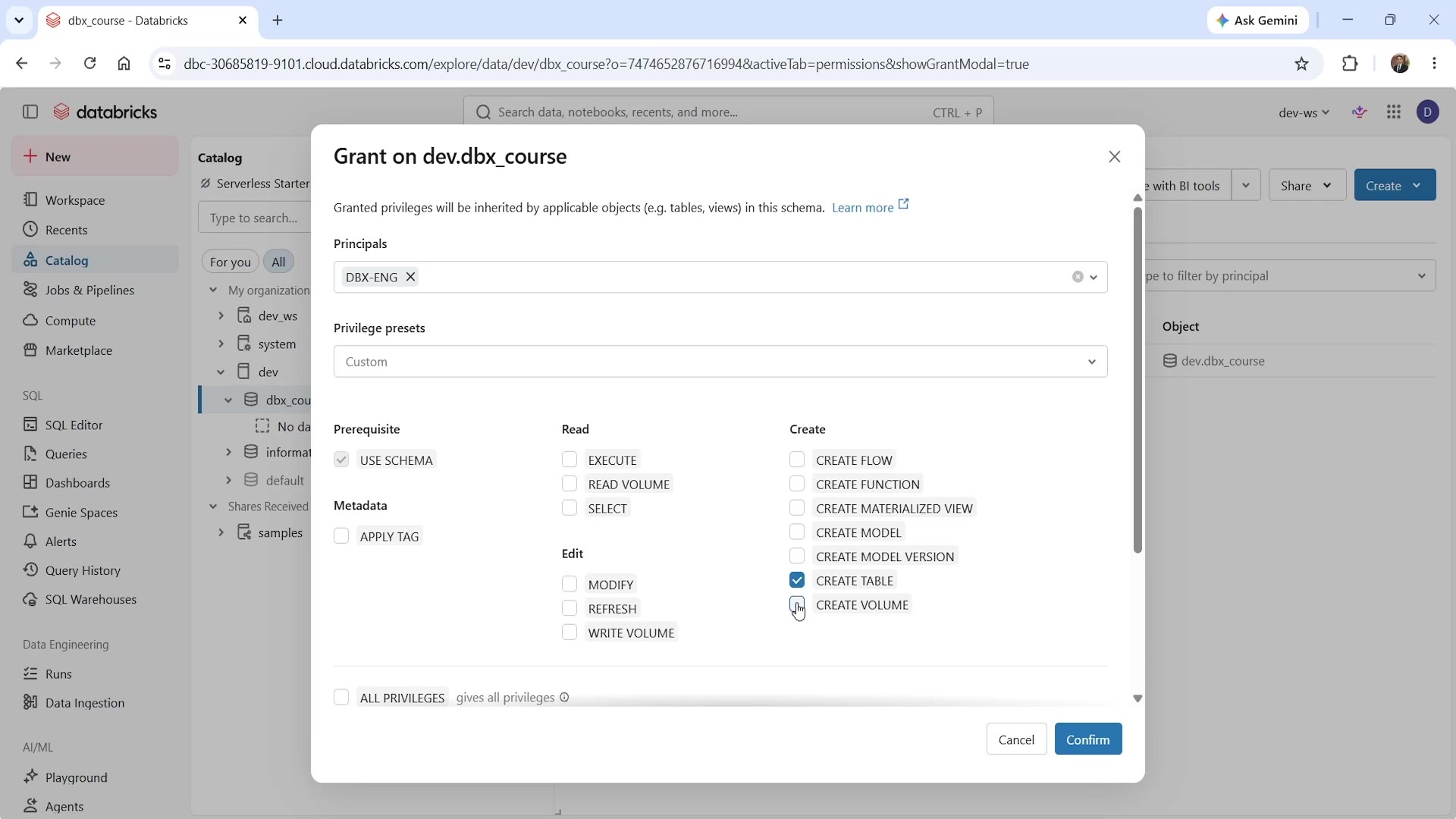 Grant on schema — USE SCHEMA, CREATE TABLE, CREATE VOLUME
For DBX-ENG on dev.dbx_course, we check:
USE SCHEMA— required for any access into this schema (same "prerequisite" pattern asUSE CATALOGat the catalog level).CREATE TABLE— lets them create tables inside this schema.CREATE VOLUME— lets them create volumes (governed file storage) inside this schema.
This is the schema-level equivalent of what we did for the catalog in the previous lecture — same dialog structure, same categories (Prerequisite, Read, Metadata, Edit, Create), just scoped one level down.
Step 3: Create a Table
With CREATE TABLE granted, a member of DBX-ENG can now create an actual table inside dbx_course — for example, a diamonds table (loaded from a sample dataset).
Checking this new table's own Permissions tab shows exactly what we'd expect based on everything we've learned so far: "No permissions granted yet." Creating a table doesn't automatically grant anyone (other than its creator/owner) access to query it — that still needs its own explicit grant, at the object level.
Step 4: Grant Table-Level Permissions
Open the Grant dialog directly on the diamonds table:
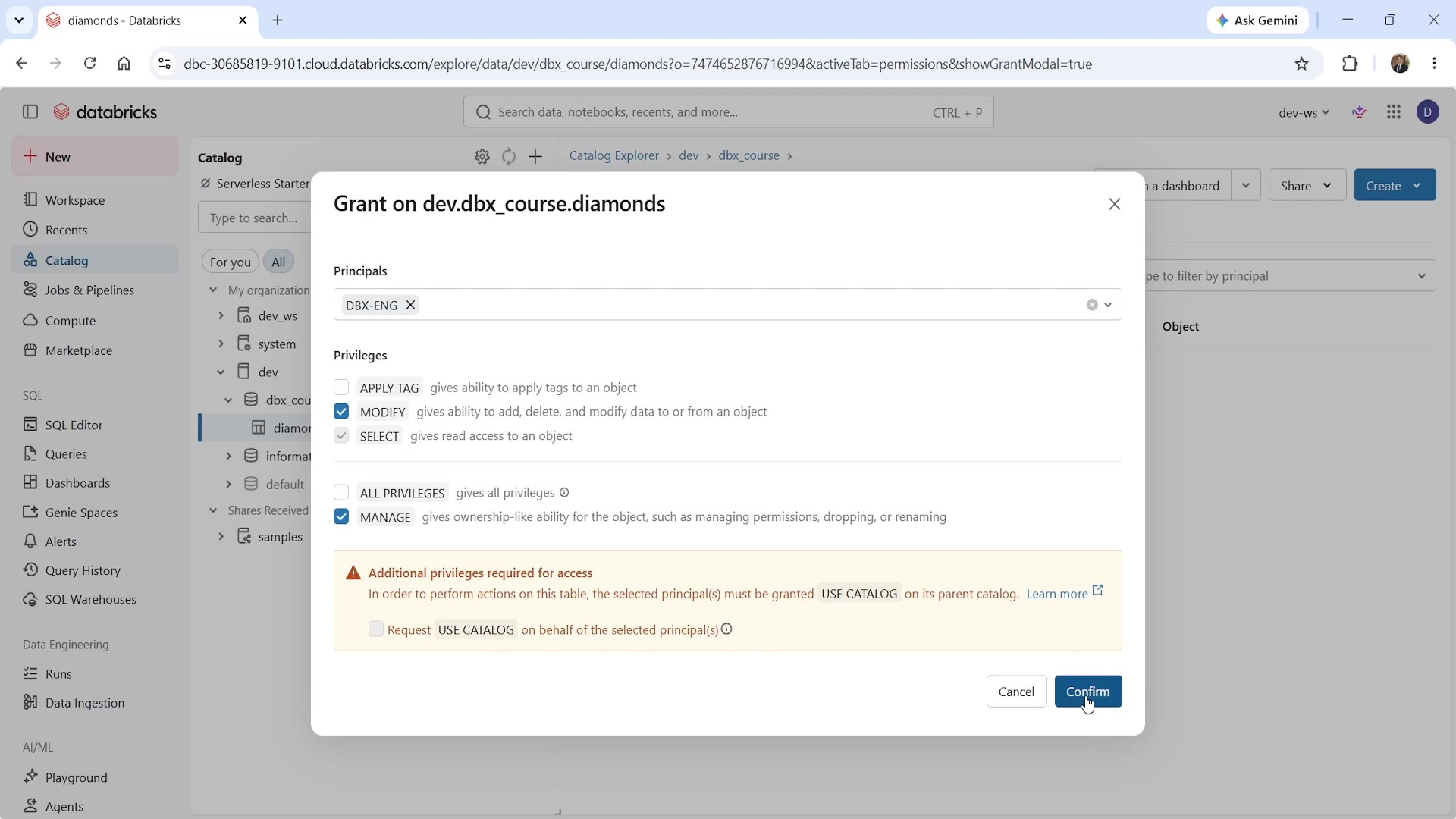 Grant on table, with the "additional privileges required" warning
At the table level, the available privileges are simpler than at the catalog/schema level:
APPLY TAG— ability to apply tags to the object.MODIFY— ability to add, delete, and modify data in the table.SELECT— read access to the table.ALL PRIVILEGES— grants everything at once.MANAGE— ownership-like ability: managing permissions, dropping, or renaming the object.
For DBX-ENG, we grant MODIFY, SELECT, and MANAGE — full working access, since they own this data.
Notice the warning Databricks shows automatically: "Additional privileges required for access — in order to perform actions on the table, the selected principal(s) must be granted USE CATALOG on its parent catalog." This is Unity Catalog proactively reminding you of exactly the "privileges don't cascade" rule from our earlier lecture — right at the point where it matters. Since DBX-ENG already has USE CATALOG on dev from the previous lecture, we don't need to do anything extra here — but this warning is exactly what you'd see if that grant were missing.
Repeat this for DBX-UAT — but with a narrower set of privileges: MODIFY and SELECT only (no MANAGE), since the testing team should be able to work with the data, but shouldn't be able to manage permissions or drop the table.
Step 5: Confirm the Final Permission State
Checking the table's Permissions tab again after both grants:
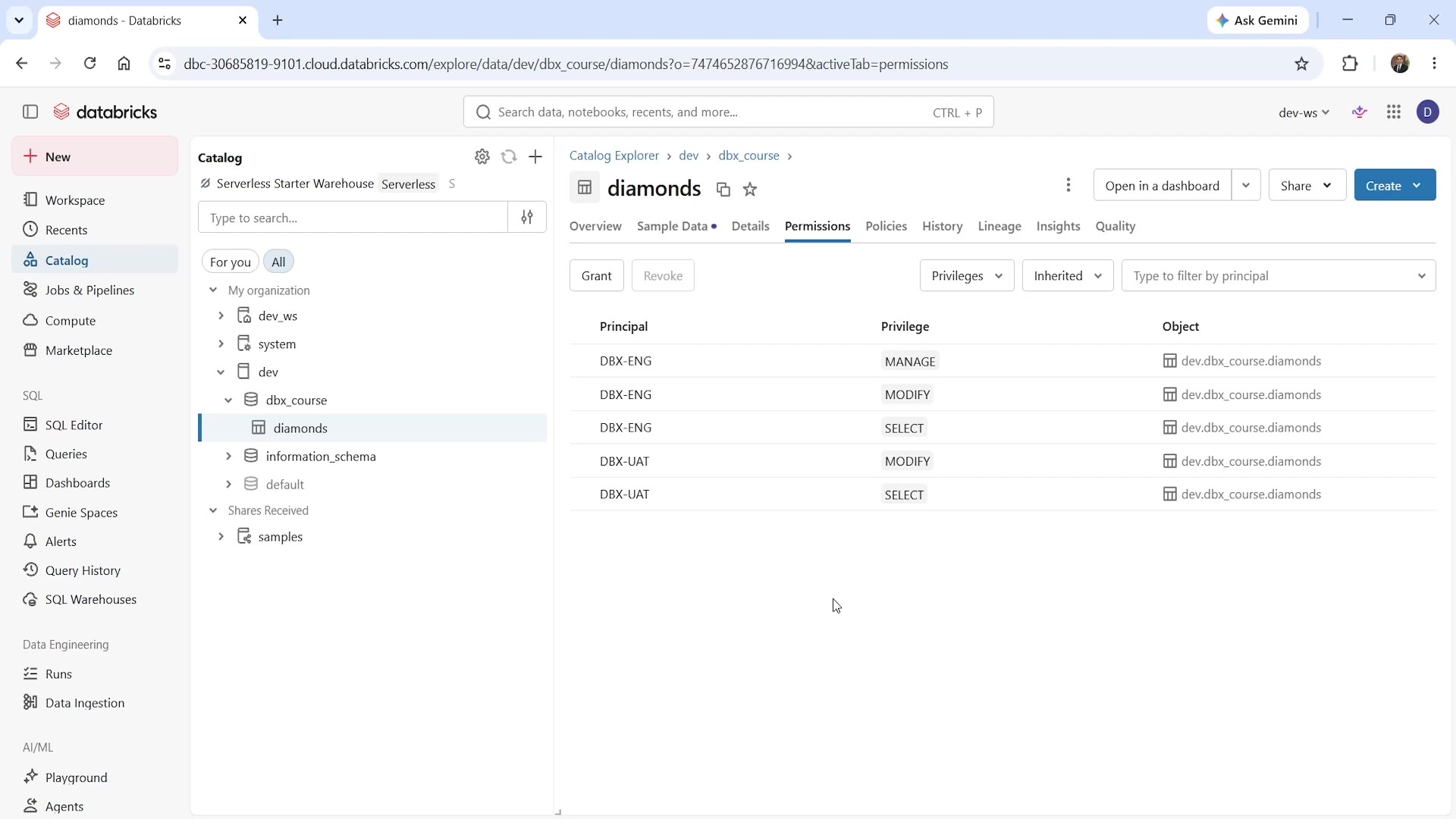 Table permissions — multiple groups, different privilege levels
You'll see a clear, itemized list:
| Principal | Privilege | Object |
|---|---|---|
| DBX-ENG | MANAGE | dev.dbx_course.diamonds |
| DBX-ENG | MODIFY | dev.dbx_course.diamonds |
| DBX-ENG | SELECT | dev.dbx_course.diamonds |
| DBX-UAT | MODIFY | dev.dbx_course.diamonds |
| DBX-UAT | SELECT | dev.dbx_course.diamonds |
This is exactly the kind of clear, auditable permission list Unity Catalog is designed to give you — at a glance, you can see precisely who has what level of access to this specific table, with DBX-ENG holding the fuller (owner-like) access, and DBX-UAT holding read/write access without management rights.
Volumes: The Same Pattern
Volumes follow the exact same permission pattern as tables — CREATE VOLUME at the schema level lets a principal create a volume, and then that volume needs its own object-level grants (READ VOLUME, WRITE VOLUME) for other principals to actually use it. Since a volume is just a governed path into cloud storage (rather than a structured table), these two privileges map to reading and writing files through that governed path, respectively — same governance model, applied to raw files instead of table rows.
The Pattern, End to End
Putting this together with the previous two lectures, here's the complete grant chain we've now built, for a DBX-ENG member to fully access the diamonds table:
USE CATALOGondev(catalog level)USE SCHEMAondev.dbx_course(schema level)SELECT/MODIFY/MANAGEondev.dbx_course.diamonds(object level)
Every single one of these three grants was necessary — miss any one, and access breaks, exactly as we saw demonstrated by the UI's own built-in warning.
Summary
| Level | What Was Granted | To Whom |
|---|---|---|
Catalog (dev) | USE CATALOG, CREATE SCHEMA | DBX-ENG |
Catalog (dev) | USE CATALOG | DBX-UAT |
Schema (dev.dbx_course) | USE SCHEMA, CREATE TABLE, CREATE VOLUME | DBX-ENG |
Table (dev.dbx_course.diamonds) | SELECT, MODIFY, MANAGE | DBX-ENG |
Table (dev.dbx_course.diamonds) | SELECT, MODIFY | DBX-UAT |
Unity Catalog will actively warn you when a grant is incomplete — as we saw with the "additional privileges required" message — but it's still on you to build the full chain deliberately, level by level, for every principal that needs access.
See you again. Keep learning, and keep growing!