Unity Catalog Permissions Model — GRANT
In this lecture, let's understand how permissions actually work in Unity Catalog — the securable object hierarchy, the GRANT command, and one of the most common gotchas people run into when setting up access control.
Securable Objects: What Can You Grant Permissions On?
In Unity Catalog, almost everything is a securable object — meaning you can grant (or revoke) specific privileges on it. This includes the metastore itself, catalogs, external locations, storage credentials, schemas, and the objects inside a schema (tables, views, volumes, functions).
The Securable Object Hierarchy
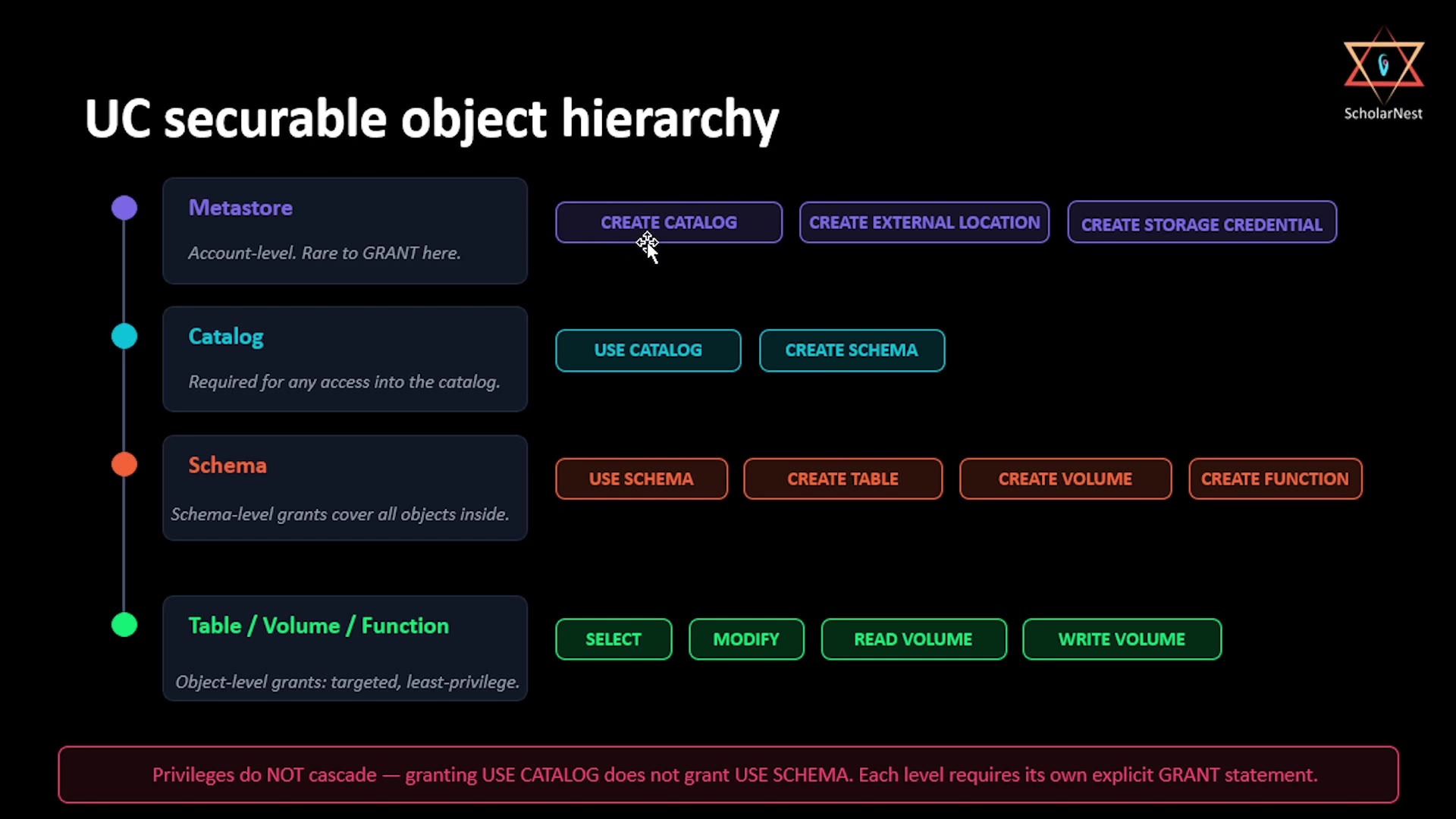
Unity Catalog's objects form a hierarchy, and each level has its own relevant set of privileges:
 UC securable object hierarchy
1. Metastore (account-level) Rarely where you actually grant permissions directly — this is the top of the hierarchy, managed mostly by account/metastore admins.
2. Catalog
CREATE CATALOG,CREATE EXTERNAL LOCATION,CREATE STORAGE CREDENTIAL— administrative privileges, typically for admins setting up the environment.USE CATALOG— required for any access into the catalog at all. Without this, nothing inside the catalog is reachable, no matter what other permissions someone has.CREATE SCHEMA— permission to create new schemas within the catalog.
3. Schema
USE SCHEMA— required to access anything inside that schema (same idea asUSE CATALOG, one level down).CREATE TABLE,CREATE VOLUME,CREATE FUNCTION— permission to create these object types within the schema.- Schema-level grants (like
SELECT) cover all objects inside the schema — a convenient way to grant broad access without listing every table individually.
4. Table / Volume / Function (object level)
SELECT,MODIFY— read and write access on tables.READ VOLUME,WRITE VOLUME— read and write access on volumes.- This is the most targeted, least-privilege level — granting access to exactly one object, and nothing more.
The Critical Rule: Privileges Do NOT Cascade
This is the single most important thing to understand about Unity Catalog's permission model, and it's the source of most real-world permission confusion:
Output / NoteGranting
USE CATALOGdoes not grantUSE SCHEMA. Each level requires its own explicitGRANTstatement.
Permissions are not inherited automatically down the hierarchy. Giving someone access to a catalog does not automatically give them access to the schemas inside it — and giving them access to a schema does not automatically give them access to the tables inside it. Each level needs its own explicit grant.
The Grant Chain: Why Three Levels Matter
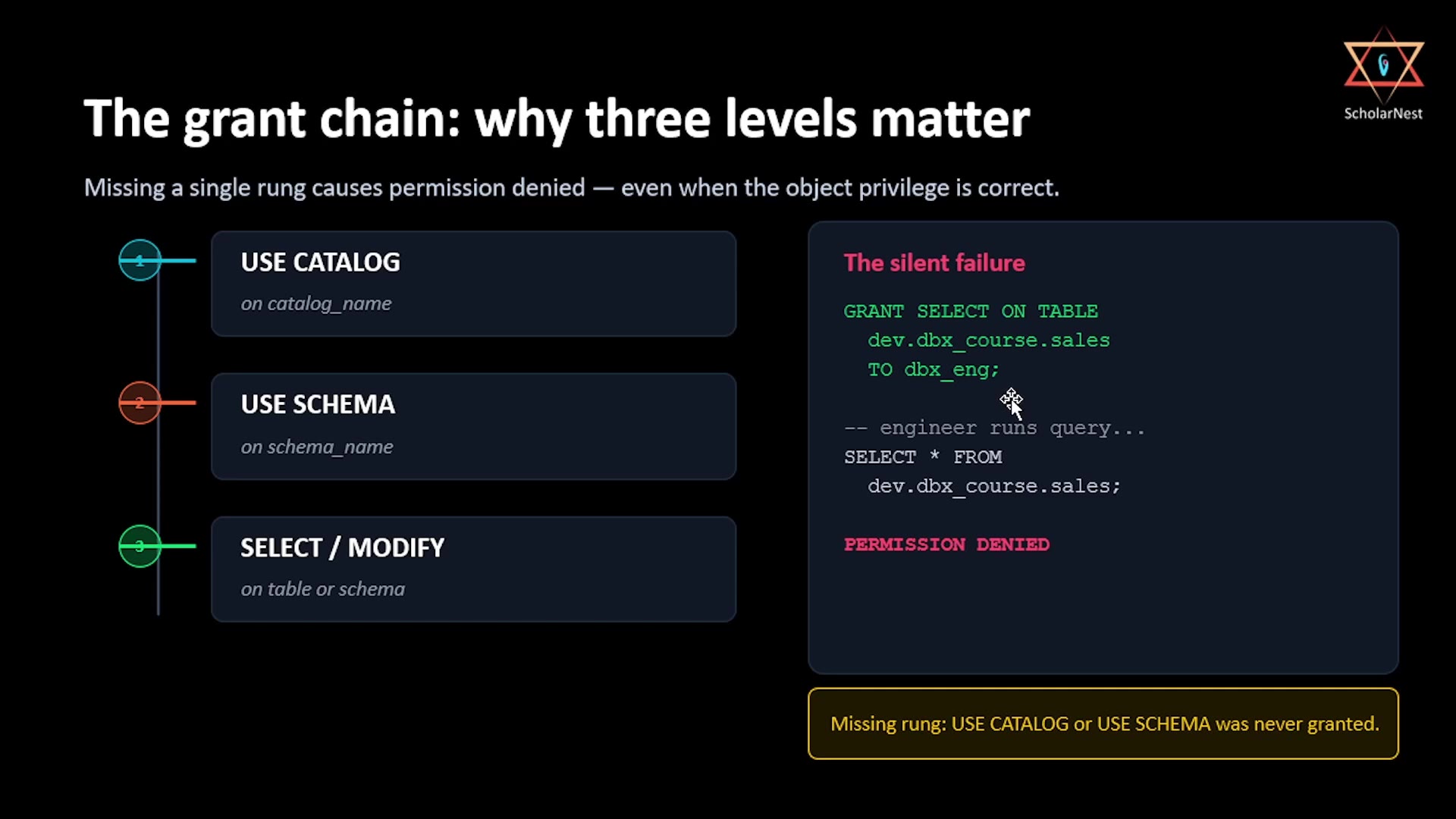
Let's see exactly how this plays out with a concrete example — and why it causes a very specific, very common failure:
 The grant chain: why three levels matter
Imagine an admin runs this:
sqlGRANT SELECT ON TABLE dev.dbx_course.sales TO dbx_eng;
This looks complete — it grants the dbx_eng group SELECT access directly on the sales table. So when an engineer in that group runs:
sqlSELECT * FROM dev.dbx_course.sales;
...you'd expect it to work. But it fails, with PERMISSION DENIED.
Why? Because table-level SELECT access alone isn't enough. To actually reach that table, the querying user also needs:
USE CATALOGondev— permission to even enter the catalog.USE SCHEMAondbx_course— permission to enter the schema.SELECTon thesalestable itself — the actual object-level access.
If either of the first two "rungs" is missing — even though the SELECT grant on the table is perfectly correct — the query fails. This is what makes it a genuinely silent failure: the error message doesn't say "you're missing USE CATALOG" — it just says permission denied, leaving you to figure out which of the three levels is the actual gap.
The Fix: Grant the Full Chain
sqlGRANT USE CATALOG ON CATALOG dev TO dbx_eng; GRANT USE SCHEMA ON SCHEMA dev.dbx_course TO dbx_eng; GRANT SELECT ON TABLE dev.dbx_course.sales TO dbx_eng;
All three grants are required together. Miss any one, and access fails — even though the other two are configured correctly.
Basic GRANT Syntax
The general pattern for GRANT in Unity Catalog is:
sqlGRANT <privilege> ON <securable_type> <securable_name> TO <principal>;
<privilege>— the specific permission (USE CATALOG,USE SCHEMA,SELECT,MODIFY,CREATE TABLE, etc.)<securable_type> <securable_name>— what you're granting access on (CATALOG dev,SCHEMA dev.dbx_course,TABLE dev.dbx_course.sales, etc.)<principal>— who's receiving the permission. This can be a user, a group, or a service principal — exactly the three identity types we covered in the previous lecture.
Practical Guidance: How to Actually Grant Access
Given that privileges don't cascade, here's a practical checklist whenever you're setting up access for someone (or some group):
- Grant
USE CATALOGon the catalog they need to reach. - Grant
USE SCHEMAon each schema they need to reach within that catalog. - Grant the specific object-level privilege they need —
SELECTfor read access,MODIFYfor write access, etc. — either on individual tables, or at the schema level if they need broad access across many objects in that schema.
Skipping any one of these three steps results in the exact silent failure shown above — correct-looking grants, but access still denied.
Summary
| Level | Key Privileges | Notes |
|---|---|---|
| Metastore | (account-level) | Rarely where you GRANT directly |
| Catalog | USE CATALOG, CREATE SCHEMA, CREATE CATALOG, CREATE EXTERNAL LOCATION, CREATE STORAGE CREDENTIAL | USE CATALOG is required for any access into the catalog |
| Schema | USE SCHEMA, CREATE TABLE, CREATE VOLUME, CREATE FUNCTION | USE SCHEMA is required for any access into the schema; schema-level grants cover all objects inside |
| Table / Volume / Function | SELECT, MODIFY, READ VOLUME, WRITE VOLUME | Object-level, targeted, least-privilege |
The one rule to remember: privileges do not cascade. Reaching any object requires the full chain — USE CATALOG → USE SCHEMA → the object-level privilege — granted explicitly, every time.
See you again. Keep learning, and keep growing!