Why Unity Catalog — The Governance Problem It Solves
In this lecture, let's understand why Unity Catalog exists — starting with the need for a metadata store in general, tracing through the Hive Metastore that Spark (and early Databricks) relied on, and finally arriving at Unity Catalog — what problems it was built to solve, and how it's architected.
Why Metadata Matters
Imagine you're writing Spark code to read a dataset into a DataFrame. There are two ways to do this:
Approach 1: Read directly from a file location.
pythondf = spark.read.format("delta").load("s3://my-bucket/orders/")
This works, but you need to know two things upfront: the file format (Parquet? Delta? CSV? JSON?) and the schema of the data. Without that, you can't load the data correctly or efficiently.
Approach 2: Read by table name.
sqlSELECT * FROM orders
This is much simpler on the surface — but Spark still needs to figure out, behind the scenes, where the orders table's files actually live, what format they're in, and what the schema is. Someone has to store that information somewhere — and that "somewhere" is the metadata store.
Why does this matter? Because it simplifies everything. You register this information once, when you create the table — after that, you never hardcode file locations, formats, or schemas into your pipeline code again. It standardizes how everyone reads data.
How Spark Got Its Metadata Store: The Hive Metastore
Before Spark existed, there was Apache Hive — a data warehouse system built on top of Hadoop. Hive needed a way to register and query tables sitting on HDFS files, so it built the Hive Metastore: a metadata store built on top of a relational database (MySQL or Postgres), storing table metadata for Hive queries.
When Apache Spark came along, it didn't build its own metastore — it simply adopted the Hive Metastore directly. Same database, same schema, same data model, same APIs. The Hive Metastore stored the bare essentials: table name, storage location, file format, and schema. That was enough to create tables and read from them.
Databricks and the Workspace Metastore
When Databricks emerged as a cloud platform, they introduced the workspace — a collaborative environment where data engineering teams could develop, test, and debug together. Databricks needed a metastore too, so they inherited Apache Spark (and, with it, the Hive Metastore) directly into the workspace.
This arrangement worked well — as long as you had one team, working in one workspace. The actual data files lived in cloud storage (e.g., Amazon S3), while the metastore lived inside the workspace itself.
Three Failure Modes: What Breaks When Workspaces Multiply
As organizations grew, they naturally started creating multiple workspaces — one for data engineering, one for analytics, separate workspaces for dev, UAT, and production. And that's when the cracks in this design became obvious.
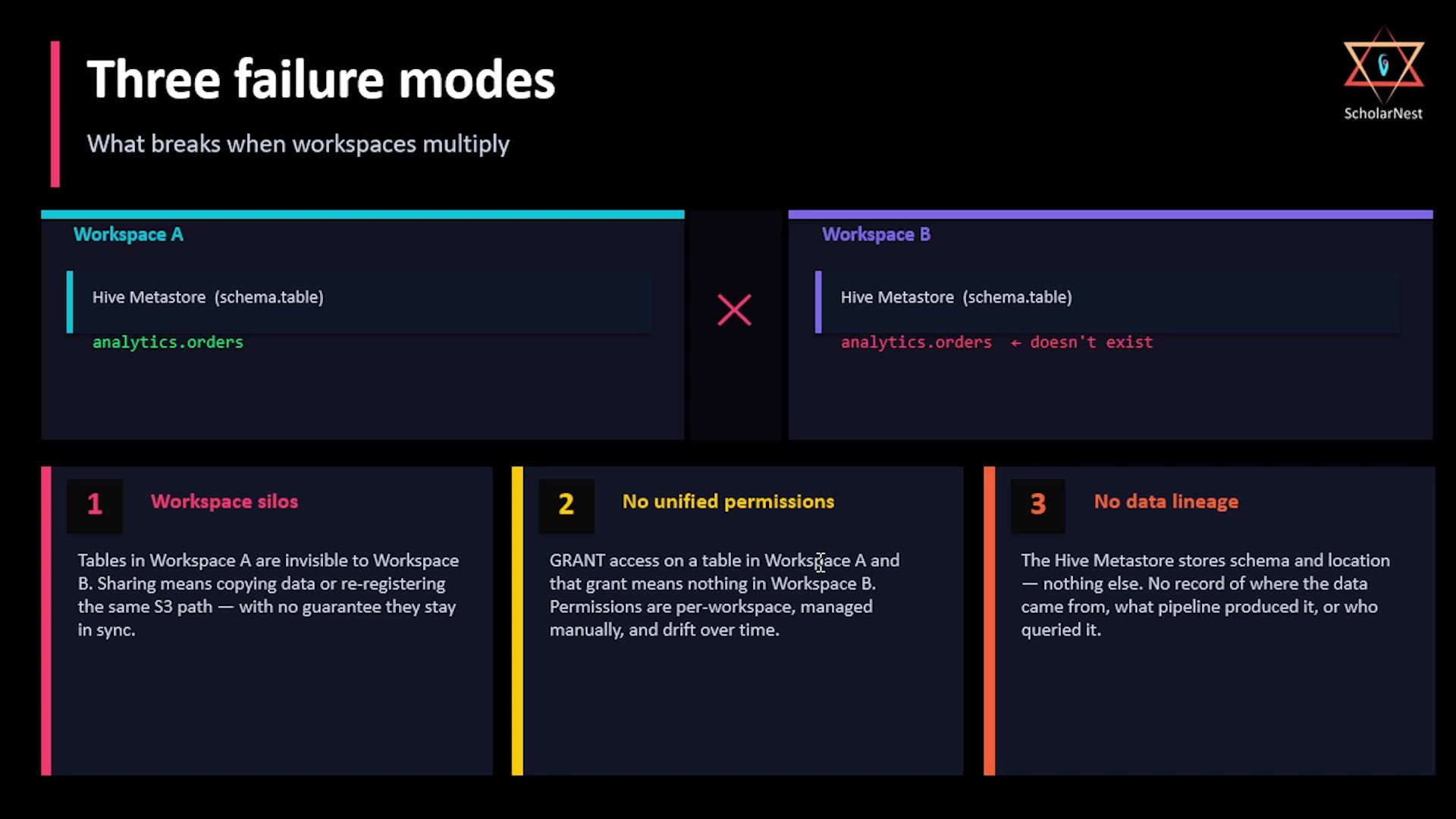 Three failure modes
The core problem: the metastore lives inside each workspace. If you create a table analytics.orders in Workspace A, it exists in Workspace A's metastore only — it simply doesn't exist as far as Workspace B is concerned. Every workspace becomes its own isolated silo.
This surfaced three specific, related failure modes:
- Workspace silos — Tables in Workspace A are invisible to Workspace B. "Sharing" means copying data or re-registering the same S3 path in the other workspace — with no guarantee the two stay in sync.
- No unified permissions — Granting access to a table in Workspace A means nothing in Workspace B. Permissions are managed per-workspace, manually, and drift over time.
- No data lineage — The Hive Metastore only ever stored schema and location — nothing about where the data came from, which pipeline produced it, or who queried it.
Databricks realized these three problems required a fundamentally new metastore — not an incremental fix. That new system is Unity Catalog.
Unity Catalog Architecture
Unity Catalog is architected in layers, with one metastore sitting above all workspaces — shared, not siloed.
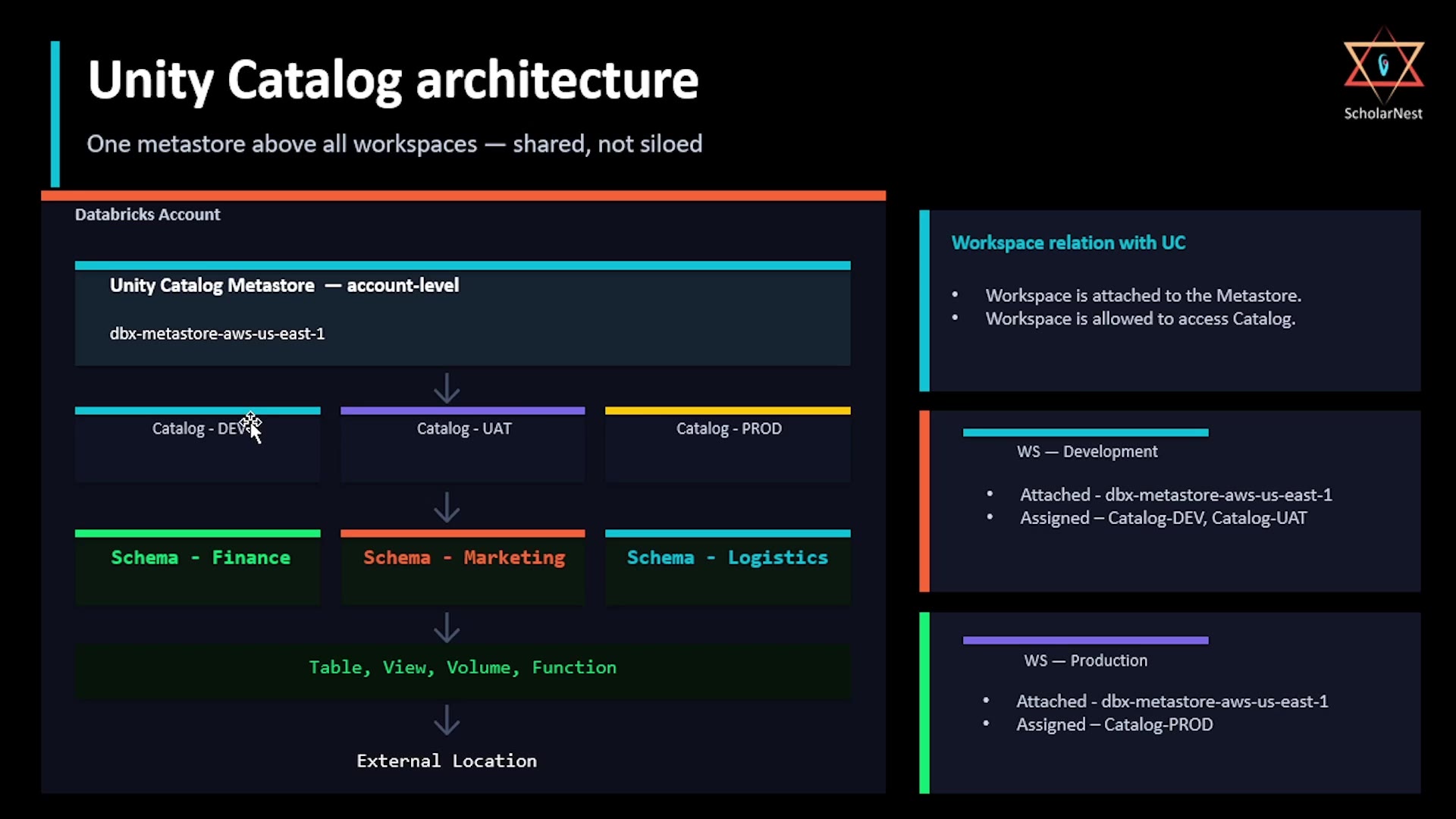 Unity Catalog architecture
Here's the structure, top to bottom:
- Unity Catalog Metastore — created at the Databricks account level. One metastore per account, shared across every workspace and every team. This is the critical architectural shift: metadata now lives outside any individual workspace.
- Catalog — a namespace within the metastore, used purely for organizing things however makes sense to you: by environment (dev/UAT/prod), by business domain (finance/marketing/logistics), or any other grouping.
- Schema — a further namespace within a catalog. For example, inside a
devcatalog, you might have separate schemas forfinance,marketing, andlogistics. - Tables, views, volumes, functions — the actual objects, always created inside a schema. Together, catalog → schema → object name form Unity Catalog's three-level namespace.
- External location — where the actual data physically lives, outside the Databricks environment (behind the scenes, this is simply a cloud storage bucket, like S3).
Connecting Workspaces to Catalogs
Workspaces relate to Unity Catalog in two steps:
- Attach the workspace to the metastore. This gives the workspace potential access to everything in that metastore.
- Assign specific catalogs to the workspace. This is where the actual access boundary is drawn.
For example: attach both a "Development" workspace and a "Production" workspace to the same metastore. Then, assign Catalog-DEV and Catalog-UAT to the Development workspace, and only Catalog-PROD to the Production workspace. Result: the development team can access dev and UAT data, but has no access to production — and vice versa — even though both workspaces share the exact same underlying metastore.
What Unity Catalog Offers
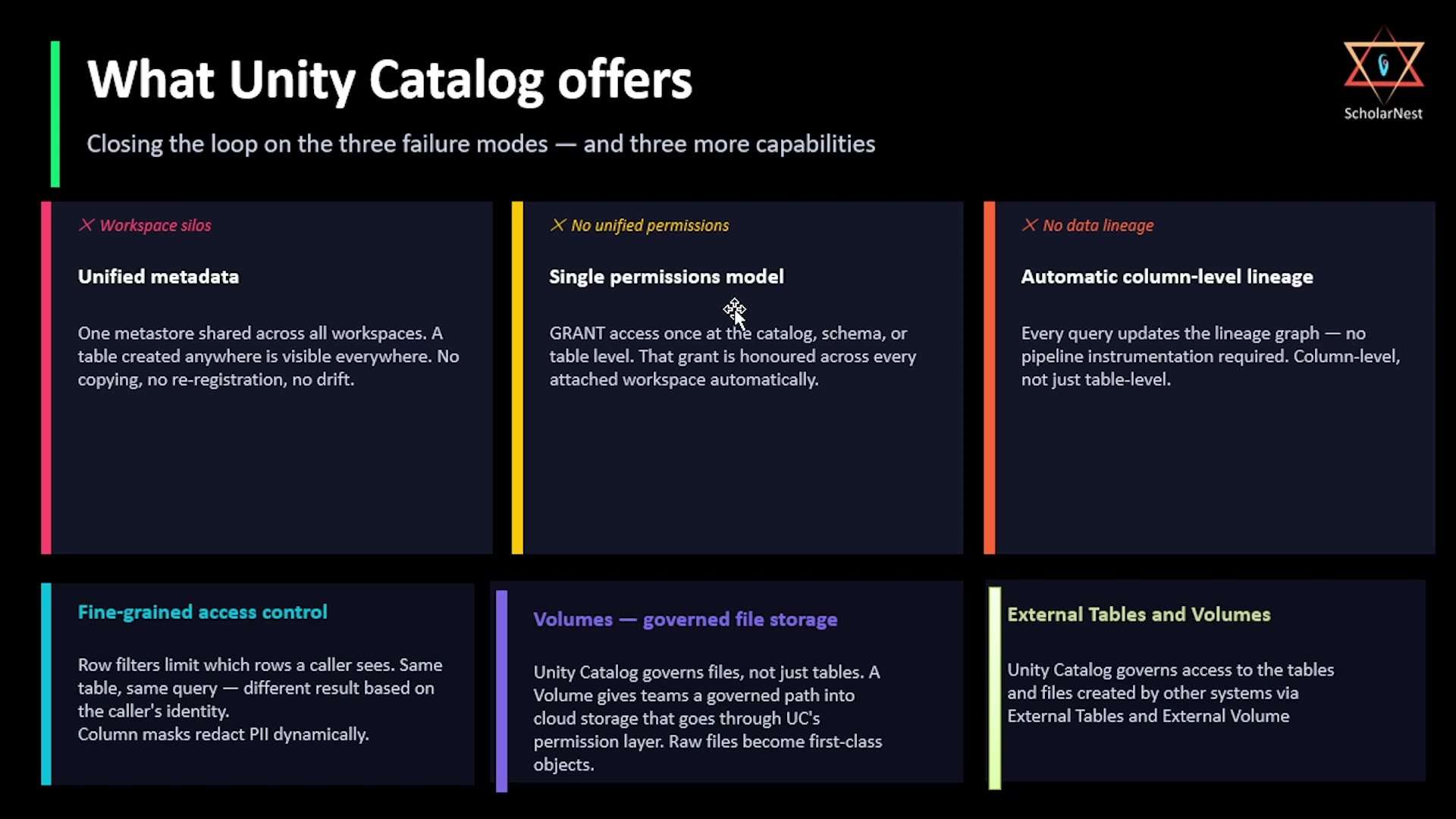 What Unity Catalog offers
Unity Catalog directly closes the loop on the three failure modes above, plus adds three further capabilities:
Solving the original three problems:
- Unified metadata — one metastore shared across all workspaces. A table created anywhere is visible everywhere. No copying, no re-registration, no drift.
- Single permissions model — grant access once, at the catalog, schema, or table level. That grant is automatically honored across every attached workspace.
- Automatic column-level lineage — every query updates the lineage graph automatically. No extra pipeline instrumentation required, and it tracks at the column level, not just the table level.
Additional capabilities:
- Fine-grained access control — row filters limit which rows a given caller sees (same table, same query, different results depending on who's asking); column masks dynamically redact sensitive fields like PII.
- Volumes — governed file storage. Unity Catalog governs files, not just tables — a Volume gives teams a governed path into cloud storage that goes through Unity Catalog's permission layer, turning raw files into first-class, permission-controlled objects.
- External tables and volumes — Unity Catalog can also govern access to tables and files created by other systems, via external tables and external volumes.
We'll explore each of these capabilities in more depth as the course progresses.
Summary
| Hive Metastore (pre-Unity Catalog) | Unity Catalog | |
|---|---|---|
| Scope | Per-workspace | Account-level, shared across all workspaces |
| Cross-workspace visibility | None — tables are siloed | Full — a table is visible to every attached workspace |
| Permissions | Managed per-workspace, manually | Single model, honored everywhere |
| Lineage | Not tracked | Automatic, column-level |
| Namespace structure | Flat (schema.table) | Three-level (catalog.schema.table) |
| Access control | All-or-nothing at the workspace | Fine-grained (row filters, column masks) down to catalog/schema/table |
Unity Catalog didn't just patch the Hive Metastore's limitations — it was a ground-up redesign, built specifically to solve the silo, permissions, and lineage problems that emerged as Databricks usage scaled beyond a single team and a single workspace.
See you again. Keep learning, and keep growing. Thank you.