The Producer API & Your First Producer — Keys, Values, and What Happens Inside
The Requirement
You are the data engineer for an e-commerce platform.
Every time a user does something on the site, an event must reach Kafka immediately. A user might view a product, search, add something to the cart, or complete a purchase.
Three systems depend on these events:
- A recommendation engine that reacts to behavior in real time.
- A fraud-detection pipeline that watches for suspicious patterns.
- An analytics warehouse that powers every business dashboard.
This happens for thousands of users at the same time, all day. Nobody sits at a screen typing these events by hand. A user clicks, and the event must go out on its own.
Why This Can't Be a CLI Job
How have you sent messages to Kafka so far?
With kafka-console-producer.sh. It is a good tool. But look at what it needs.
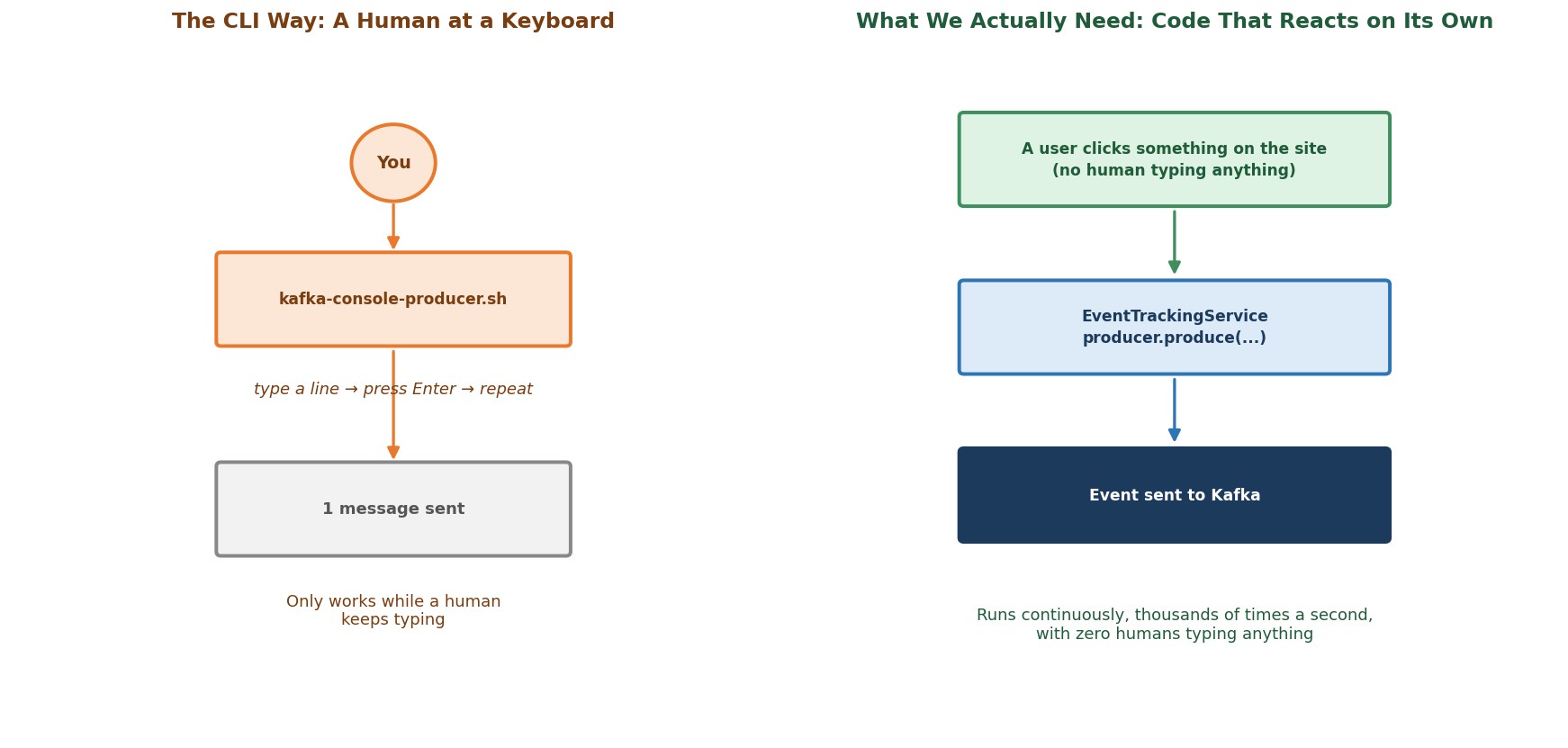 CLI vs. an application producing events on its own
Who types the messages?
A human. The console producer reads lines that a person types. It can also read from a file. But our events do not come from a file. They come from a user clicking, inside a running application, thousands of times a second.
So we need code that sends messages to Kafka from inside our own application, the moment something happens. That is what a client library gives you. You install it in your program, and your code can talk to Kafka the way the CLI tool does, but with no human in the middle.
Our language is Python. Our library is confluent-kafka.
The Plan: Six Steps
Creating a producer in your application is a six-step process. Here is the big picture first.
- Connect to the cluster. Give the producer the connection details and settings.
- Create the producer. Make an instance of the Producer class with those settings.
- Define the message. A message has a key and a value. Both must be turned into bytes (this is called serialization).
- Produce the message. Send it with the producer.
- Know when it arrived. Kafka answers with an acknowledgment. We receive it through a callback function.
- Flush. Before the program ends, wait until nothing is left behind.
We will do this in two rounds. First, we write the code and make it work. Then we open the box and look at what happened inside.
Let's Build It
Here is what we are building:
Output / NoteA script that simulates an
EventTrackingService. Every time a user interacts with the site, it publishes an event to a topic calledclickstream-events, using the user ID as the key.
Step 1: Connect to the Cluster
pythonimport time import random import json from confluent_kafka import Producer BOOTSTRAP_SERVERS = "localhost:9092,localhost:9094,localhost:9095" TOPIC = "clickstream-events" producer_config = { "bootstrap.servers" : BOOTSTRAP_SERVERS, "client.id" : "event-tracking-service-demo" }
Two settings need a closer look.
What is bootstrap.servers?
It tells the producer where the cluster is. But it is not "the list of every broker you must connect to". It is a list of starting points. The producer contacts one of them and asks the cluster: "Who are you, and which broker leads which partition?" After that, it knows the whole cluster and talks to the right broker for each message. That is why it is called bootstrap.
Then why list three brokers?
Safety. If one broker is down at the exact moment your producer starts, the producer can still use another one. Three is a good number, even if your cluster has 50 brokers. You do not need to list them all.
Why localhost and not kafka-1:29092?
The commands you ran in the broker shell ran inside Docker. Your Python script runs on your own machine, outside Docker. So it must use the external ports your docker-compose.yml publishes: 9092, 9094 and 9095.
What is client.id?
A name your producer gives itself. It has little effect on how things work. But it is sent to the broker, so in broker logs and metrics you can tell which application sent what.
Step 2: Create the Producer
pythonproducer = Producer(producer_config)
This is the moment your script becomes a Kafka client. You create it once and reuse it for every message. Remember this line. When we look inside the producer, you will see that this line does more work than it looks like.
Step 3: Define the Message
Every message can carry a key and a value. Let's decide what ours will be.
The value is the payload: the click event itself.
pythonEVENT_TYPES = ["page_view", "search", "add_to_cart", "purchase_completed"] def make_click_event(user_id: str) -> dict: return { "user_id": user_id, "event_type": random.choice(EVENT_TYPES), "event_time": time.time(), }
This function is a mock event generator. It stands in for your real website.
Is a key required?
No. A key is optional. Kafka accepts messages without one. But a key is very useful, and we choose to use one here. Also, a key is not a unique ID like a primary key in a database. Many messages can share the same key.
Why do we use a key at all?
Because the key decides which partition a message goes to. Think about what our pipeline needs. Suppose you want to rebuild a user's session: the exact order of pages they saw before buying something. Those events must stay in order. Kafka guarantees order only inside one partition. So all events of the same user must go to the same partition. The key that gives us this is the user ID.
Step 4: Produce the Message
pythonproducer.produce( topic=TOPIC, key=user_id.encode("utf-8"), value= json.dumps(event).encode("utf-8"), callback=delivery_report )
Look at the .encode("utf-8") calls. Why are they needed?
Kafka does not store Python dictionaries or strings. It stores bytes. Messages also travel over a network connection to the broker, so they must be bytes anyway. Turning your data into bytes is called serialization, and here you do it, in your own code:
- The key is a plain string, so
.encode("utf-8")is enough. - The value is a dictionary. So first
json.dumps()turns it into a JSON string, and then.encode("utf-8")turns that into bytes.
The plain Producer class has no serializer built in. It only takes bytes (or a string, which it encodes for you as a convenience). It does not look at your data or change it.
The method is called produce(), not send(). That is why we say we produce a message to Kafka.
Step 5: Know When a Message Arrived
After produce(), how do we find out whether the message really reached Kafka?
pythondef delivery_report(err, msg): """Called once for every message, to report success or failure.""" if err is not None: print(f"Delivery failed for key={msg.key()}: {err}") else: print( f"Delivered to {msg.topic()} " f"[partition {msg.partition()}] " f"offset {msg.offset()} " f"key={msg.key().decode('utf-8')}" )
This is a callback. We hand it to produce() with callback=delivery_report. Later, once Kafka has answered, the producer calls it, with two values:
err: empty (None) on success, or an error object on failure.msg: the message, now with its topic, partition and offset filled in.
So in both cases (success or failure) you get an answer.
Does the callback run by itself?
No. This surprises almost everyone. The callback runs only when your code calls producer.poll(). We do that right after produce():
pythonproducer.poll(0)
poll(0) means: "Look at the answers that have arrived. Call my callback for each one. But do not wait." If no answer has arrived yet, it returns immediately. We will see exactly why in a few minutes.
Step 6: Flush
pythonproducer.flush()
Messages are sent in the background. So your program could reach its last line and exit while some messages are still on their way. flush() waits until every message is confirmed (or failed), and calls all remaining callbacks. If you forget it, messages can be lost when the program ends.
The Complete Loop
Here is the main function of the script. The loop makes 20 events for a handful of users:
pythondef main(): user_ids = ["user-501", "user-502", "user-503", "user-504", "user-505", "user-506", "user-507"] for _ in range(20): user_id = random.choice(user_ids) event = make_click_event(user_id)
Then comes the produce() call and poll(0) from above. And, at the end of the loop:
pythonprint("Flushing after all messages sent...") producer.flush()
The file also has one print line right after each produce() call. It starts with Pooling after event is sent to Kafka (the word "Pooling" is a typo for "Polling"). We added it on purpose, to help us look inside the producer later.
Running It
Step 1: Start Your Cluster
Open a terminal in the setup directory (where your docker-compose.yml is):
bashdocker compose start docker ps
Step 2: Create the Topic
Does the topic have to exist first?
You should create it yourself. (Depending on broker settings, Kafka may create a missing topic automatically, but with default settings such as a single partition. That is not what we want.)
bashdocker exec -it kafka-1 bash export PATH=$PATH:/opt/kafka/bin
bashkafka-topics.sh --create \ --topic clickstream-events \ --bootstrap-server kafka-1:29092 \ --partitions 3 \ --replication-factor 3
Then leave the broker shell with exit.
Step 3: Get the Starter Project
This part runs on your host machine, not inside Docker.
- Download
producers-starter.zipfrom the course resources, and extract it. You get a folder01_producers. - Copy the
01_producersfolder into your Kafka course folder (next tosetup), and open it in your editor. - Make sure Python and the library are installed:
bashpython --version pip install confluent-kafka
The folder contains the files for this chapter. In this lecture we use 1-clickstream_producer.py. It is the finished script you just built, step by step.
Step 4: Run It
In a terminal, inside the 01_producers folder:
bashpython 1-clickstream_producer.py
What do you see?
First, 20 lines that start with Pooling after event is sent to Kafka, one for each event. Then Flushing after all messages sent.... And only after that, the 20 Delivered to clickstream-events [partition ...] offset ... lines.
That order is strange. Hold on to that thought. We will explain it in the next section.
Also look at the partitions. Each user always lands on the same partition. And you may notice that some partition gets only a few messages, or none at all. With only seven users and 20 events, that is perfectly normal.
Step 5: Verify From the Consumer Side
Back in the broker shell:
bashdocker exec -it kafka-1 bash export PATH=$PATH:/opt/kafka/bin
bashkafka-console-consumer.sh \ --topic clickstream-events \ --bootstrap-server kafka-1:29092 \ --from-beginning \ --property print.key=true \ --property key.separator=" : "
You should see all 20 events, each with the user ID as the key and a JSON click event as the value. (If you run the producer again, you will see 40, then 60, and so on. Every run adds more.) Press Ctrl+C to stop the consumer.
Step 6: Stop Your Cluster
bashdocker compose stop
Now — What Actually Happened Inside?
You have a working producer. But two things about its output were strange. Let's write them as questions.
Question 1. After every produce() we called poll(), which should run the callback. So why did we see no Delivered line for a long time? Every confirmation appeared only at the end, after flush().
Question 2. We never told the producer which partition to use. So who decided that some events go to partition 0, some to partition 1, and some to partition 2?
To answer both, let's follow one message all the way out to the broker, and the answer all the way back.
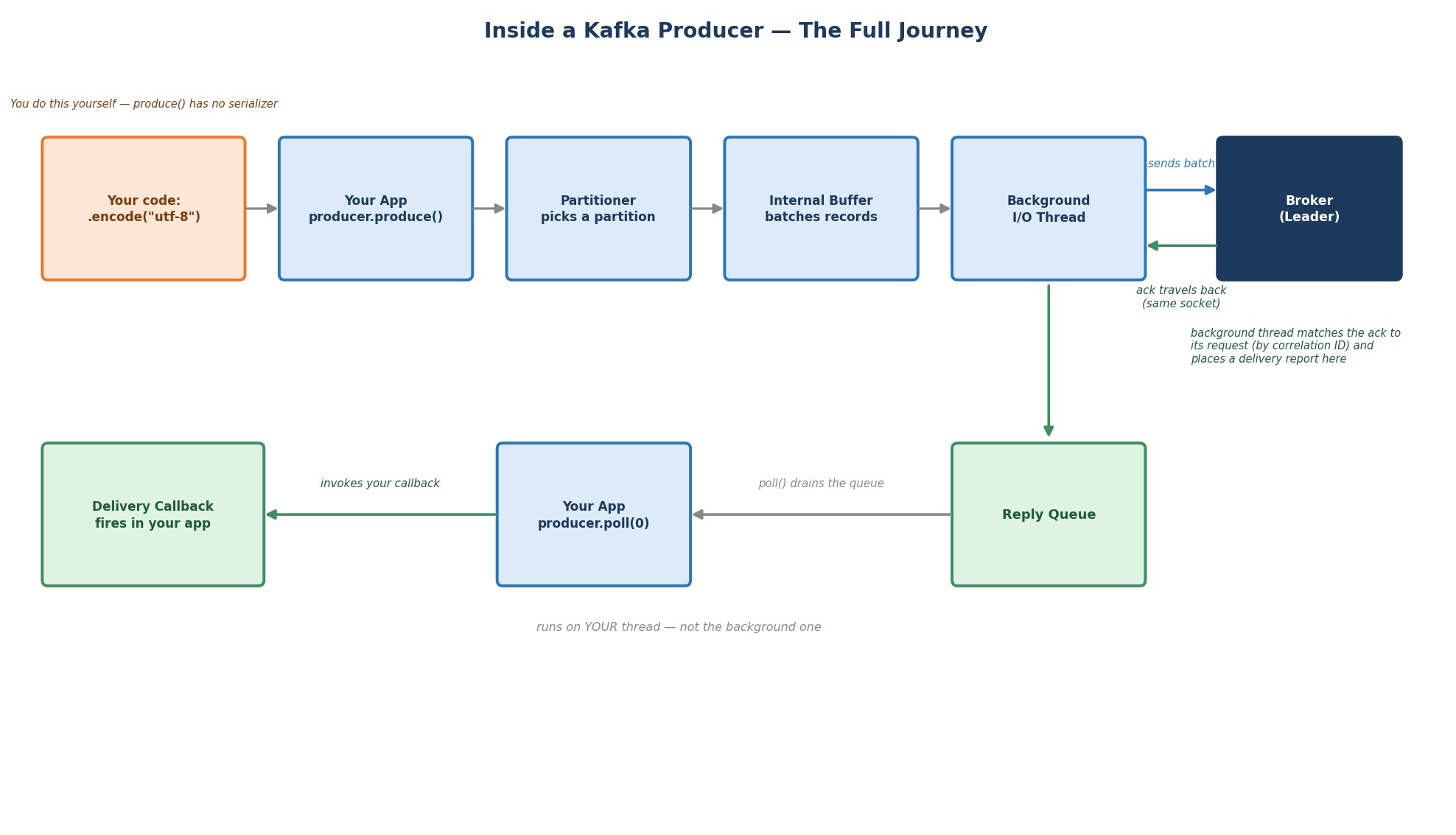 Inside a Kafka producer
The Outbound Half: Getting a Message to the Broker
Step 1. You serialize. You already did this yourself with .encode("utf-8"). By the time produce() runs, the key and value are just bytes.
Step 2. The partitioner picks the partition. Inside produce(), the producer looks at the key, runs it through a hash function, and turns it into a partition number. It knows how many partitions the topic has, so the number is always valid. Same key gives the same hash, and so the same partition, every time. That is the whole reason all events of user-501 always land together. Different keys can share a partition. But one key never moves. (This is fast, in-memory work. In the next lecture, we open this decision up completely.)
Step 3. The message goes into an internal buffer. It does not go to the network yet. It waits in memory, in a queue for its partition. Messages for the same partition wait together.
Step 4. Background threads send. When you created the Producer, the client library also started background threads (they start at that moment, not at your first produce()). They take the waiting messages, group them into a batch per partition, and send each batch to the broker that leads that partition. Then produce() is finished, and it returns.
Why do it this way? Why not send each message at once?
Because the network is slow, compared to memory. A network round trip for every single message would make the producer very slow. Instead, the producer lets messages collect for a short time, and sends them as one batch. One round trip carries many messages. That is why the design has a buffer and background threads. The waiting time is a setting called linger.ms, and its default is only 5 milliseconds. We tune it in a later lecture.
This also explains why produce() returns almost instantly. It only does the partitioner and the buffer. Both are fast, in-memory work. It does not wait for the network.
The Return Half: Finding Out What Happened
The broker writes the batch, and answers with an acknowledgment. The answer comes back over the same connection. The background thread matches it to the request it belongs to. (Many requests can be on their way at once, so every request has an ID for this purpose.)
Then the background thread puts a delivery report (success or failure, with the partition and offset) into a reply queue. That is only a holding area. Nothing has reached your code yet.
Your callback runs only when your own code calls poll(). poll() empties the reply queue, and it does so in your thread, the same one running your loop. This is on purpose:
- Your callback code never has to worry about running at the same time as your other code.
- But a slow callback slows your loop, because
poll()does not return until the callbacks are done. - One
poll()can handle several finished messages at once. It does not check for one thing. It handles whatever is ready.
This is also why the partition and offset appear only inside the callback, and never as a return value of produce(). At the moment produce() returns, the message has not even been sent, so it has no offset yet.
Answering Question 1: Why Did poll() Show Nothing?
Let's follow our loop:
produce()puts message 1 into the buffer and returns in a moment.poll(0)looks at the reply queue. It is empty. The message is still waiting in the buffer, or on its way.poll(0)does not wait, so it returns at once.- The loop repeats for all 20 messages.
The whole loop takes only a few milliseconds. That is faster than the waiting time (5 ms), plus setting up the first connection, plus the network round trip. So when the loop ends, no answer has come back yet.
Then flush() runs. It tells the background threads: "Stop waiting. Send everything now." It then keeps calling poll() until nothing is left. That is when all 20 callbacks run. That is why they all appear at the end.
So is flush() just poll() in a loop?
Almost. It also makes the client send whatever is still waiting, and it blocks until every message has an outcome. That is why we need it before the program ends. Otherwise, your script could exit before the last messages have left the buffer.
Answering Question 2: Who Picked the Partition?
The partitioner, inside the producer, using the key. You saw the proof in the output: every time the same user ID appears, it has the same partition.
Output / NoteTry it yourself. Change the loop so that it sleeps a little after each message, for example with
time.sleep(0.3). (The file has a commented-out# time.sleep(1)for this.) Run it again. Now each message has time to complete a round trip before the next one is produced, so theDeliveredlines show up between the other lines, not only at the end. The producer works the same way. Only the timing changed.
Common Mistakes at This Stage
Forgetting flush(). Messages still in the buffer are lost when the script ends.
Ignoring err in the callback. produce() not raising an error tells you nothing about delivery. Failures are reported only in the callback.
Not calling poll(). The callbacks never run, and answers pile up in memory. We come back to this when we tune the producer.
Putting slow work in the callback. It runs inside your poll(), so it slows down the loop.
Creating a new Producer for every message. Create it once and reuse it.
Checklist
- Understood why an application needs a producer client, and not the CLI tool
- Built the producer piece by piece: config, producer instance, message,
produce(), callback,flush() - Understood what
bootstrap.serversreally is, and why we list more than one broker - Understood that a key is optional, and why we chose the user ID
- Understood that serialization to bytes is done by us, before
produce() - Ran the script, and saw the delivery reports with partition and offset
- Verified the events with the console consumer
- Can explain the round trip: partitioner, buffer, background threads, the broker's answer, the reply queue, and
poll() - Can explain why the confirmations appeared only after
flush()
You built a real producer, watched it run, and now you know what it was doing the whole time. Next: we go deep on how the partitioner made its decision, and you will write your own partitioning logic.