Rebalancing — Eager vs. Cooperative-Sticky, Triggered Live
The Requirement
Your three-instance consumer group has been running smoothly. Then a routine deploy restarts one instance. This is normal. It happens all the time with rolling deploys and autoscaling.
Now the important question:
What happens to the other two instances, the ones that did not change at all?
Do they keep processing without a break? Or do they pause too?
The honest answer is: it depends on a setting that most people never check.
What a Rebalance Actually Is
You have already seen the pieces. In the last lecture, you watched JoinGroup and SyncGroup run when your group first started. A rebalance is that same protocol, running again.
When does it run again?
Any time the group changes:
| What happened | How Kafka finds out |
|---|---|
| A consumer joins the group | It sends JoinGroup |
A consumer leaves on purpose (close(), or Ctrl+C in our case) | It tells the coordinator |
| A consumer crashes | Its heartbeats stop. After session.timeout.ms (45 seconds by default), the coordinator removes it |
| A consumer is too slow | The gap between its poll() calls exceeds max.poll.interval.ms (5 minutes by default) |
| The topic changes (for example, new partitions are added) | The group is told about the new metadata |
So what is this lecture really about?
Not when a rebalance happens, but how much of the group it disturbs. There are two styles.
Eager vs. Cooperative-Sticky
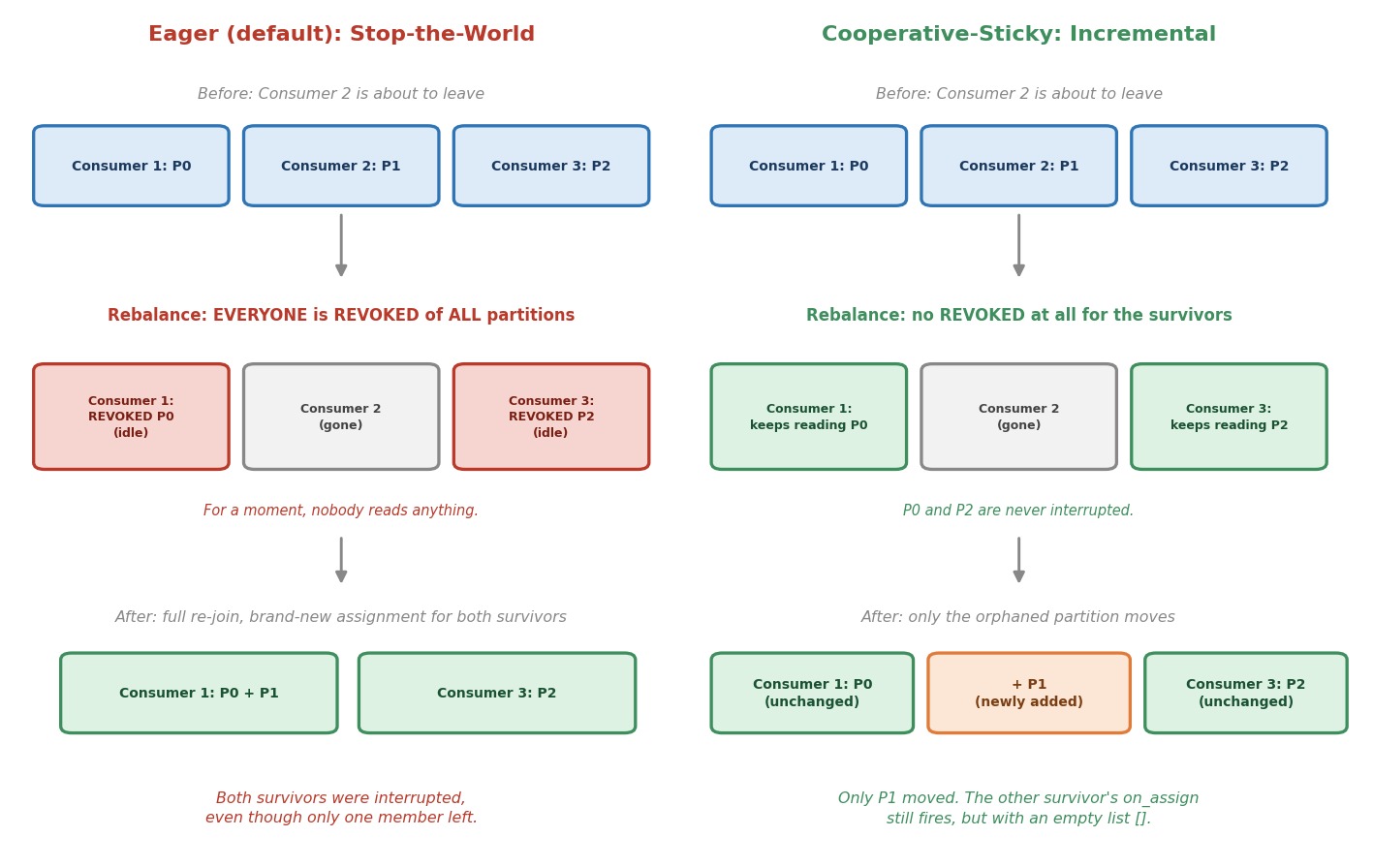 Eager vs. cooperative-sticky rebalancing
Eager is the default in confluent-kafka. With eager, every member of the group gives up all of its partitions first. Only then does the group agree on a new assignment. It does not matter that only one consumer left. Everyone stops reading, waits for a fresh JoinGroup and SyncGroup round, and then picks up a brand-new assignment. For a moment, nobody in the group reads anything. This is why people call it "stop-the-world".
Cooperative-sticky works differently. Only the partitions that must move are taken away. A consumer that keeps its partition never loses it and never stops reading. Only the orphaned partition gets picked up by one of the survivors.
Notice the word sticky. The assignment tries to keep every partition with the consumer that already has it. Fewer moves, less disruption.
Let's Build It
We extend the last lecture's script with one new idea. You choose the assignment strategy from the command line, so you can run the same code both ways without editing it.
Step 1: Accept a Strategy Argument
pythonif len(sys.argv) != 3 or sys.argv[2] not in ("eager", "cooperative-sticky"): print("Usage: python 5.3_rebalance_consumer.py <instance-name> [eager|cooperative-sticky]") sys.exit(1) instance_name, strategy = sys.argv[1], sys.argv[2]
It is the same idea as the instance name from the last lecture, just with a second argument.
Step 2: Set the Strategy Conditionally
pythonconsumer_config = { "bootstrap.servers": BOOTSTRAP_SERVERS, "group.id": GROUP_ID, "client.id": instance_name, "auto.offset.reset": "earliest", } # If you leave partition.assignment.strategy out, the client uses its # default, "range,roundrobin". Both of those are EAGER strategies. # There is no separate "eager" value. Leaving the setting out is how # you get eager behavior. cooperative-sticky has to be turned on. if strategy == "cooperative-sticky": consumer_config["partition.assignment.strategy"] = "cooperative-sticky"
Is there an "eager" value we can set?
No. Leaving the setting out is how you get eager. The default is "range,roundrobin", and both of those are eager strategies. The only line that changes anything is the one that sets "cooperative-sticky".
Output / NoteOut of scope in this course. Kafka ships a few assignors we are not going to open up:
roundrobin(deals partitions to members one at a time, in a circle, instead ofrange's equal contiguous chunks) and a plain, non-cooperativestickyassignor (tries to keep each member's existing partitions likecooperative-stickydoes, but still revokes everything up front, eagerly, before reassigning — so it keepssticky's placement but not its non-disruptive rebalance). We are skipping both, for the same reason:
- They don't teach a new concept.
roundrobinis still eager — same stop-the-world rebalance asrange, just a different way of dealing out the slices. Once you understand that eager means "everyone stops, everyone gets reassigned," you already understandroundrobin's behavior; only the seating chart changes.- Plain
stickyis a half-measure. It gives you the same placement ascooperative-stickybut not the thing you actually care about in production: consumers that keep reading during a rebalance.cooperative-stickyis strictly the better version of the same idea, so it's the one worth your practice time.- The goal here is the eager-vs-cooperative trade-off, not an assignor catalog. For a working developer, the decision that matters is "does my group freeze during every deploy or not" — and
rangevscooperative-stickydemonstrates that as clearly as any pair can. Adding two more names would cost you memorization without adding a new decision you'd ever actually make.
Step 3: Timestamps in the Callbacks
pythondef on_assign(consumer, partitions): """Runs (inside poll) when this instance is handed partitions.""" assigned = [p.partition for p in partitions] print(f"\n>>> {now()} [{instance_name}] ASSIGNED partitions: {assigned}\n") def on_revoke(consumer, partitions): """Runs (inside poll) when this instance is about to lose partitions.""" revoked = [p.partition for p in partitions] print(f"\n>>> {now()} [{instance_name}] REVOKED partitions: {revoked}\n")
The callbacks are the same as before, but now they print the time. That helps you compare what happens in different terminals. Here is the small helper they use:
pythondef now(): return time.strftime("%H:%M:%S")
One important detail: what do these lists contain?
- With eager, the lists are the full picture: everything you are given, or everything you lose.
- With cooperative-sticky, the lists are only the changes:
on_assigngets only the newly added partitions, andon_revokegets only the partitions being taken away.
Keep this in mind. It is the key to reading the output in a minute.
Everything else in the script is unchanged: the poll loop, the JSON decoding, and close().
Let's Trigger Both, Live
Step 1: Start Your Cluster
bashdocker compose start docker ps
Step 2: Round One — Eager (the Default)
Download 5.3_rebalance_consumer.py into your chapter-5 folder. Open three terminals and start three instances, all with eager:
bashpython 5.3_rebalance_consumer.py instance-1 eager
bashpython 5.3_rebalance_consumer.py instance-2 eager
bashpython 5.3_rebalance_consumer.py instance-3 eager
Wait until all three settle, with one ASSIGNED partitions: line each.
Now press Ctrl+C on instance-2 only.
Where should you look?
Do not look at instance-2. When it closes, it prints its own REVOKED line as part of shutting down. That is normal, and it is not the interesting part.
Look at instance-1 and instance-3. Neither of them changed. Yet both of them print >>> REVOKED partitions: with their partition, followed a moment later by a new >>> ASSIGNED partitions:. One of them typically ends up with two partitions. Neither one asked for this. Both got interrupted anyway.
Stop the remaining two with Ctrl+C.
Step 3: Make Sure the Group Is Empty
Before round two, let's check that the old members are really gone. Open a broker terminal:
bashdocker exec -it kafka-1 bash export PATH=$PATH:/opt/kafka/bin
bashkafka-consumer-groups.sh --describe --group recommendation-service --state --bootstrap-server kafka-1:29092
Wait until the state shows Empty. If it does not yet, wait a few seconds and run it again.
Why does this matter?
Because a group must not have eager and cooperative members at the same time. We come back to this rule below. Starting from an empty group avoids any mix.
Step 4: Round Two — Cooperative-Sticky
Same drill, but this time all three instances use the cooperative strategy:
bashpython 5.3_rebalance_consumer.py instance-1 cooperative-sticky
bashpython 5.3_rebalance_consumer.py instance-2 cooperative-sticky
bashpython 5.3_rebalance_consumer.py instance-3 cooperative-sticky
Once they settle, press Ctrl+C on instance-2 again. Again, ignore instance-2's own terminal. Watch instance-1 and instance-3.
What should you see this time?
- No
REVOKEDline on either survivor. Nothing was taken away from them. - One survivor prints
ASSIGNED partitions: [1]. This is the orphaned partition that moved to it. Only the new partition is listed, not its old one. That is the "only the changes" rule from before. - The other survivor prints
ASSIGNED partitions: [], an empty list. Its callback still fires, but there is nothing new to add. It keeps reading its own partition the whole time.
Which survivor takes the orphaned partition?
It can be either one. The two survivors are equally loaded, so the choice can differ from run to run. That is fine.
So the survivors are never interrupted. Compare this with round one, where both had to stop.
Output / NoteOptional experiment: Run a producer script from the producer chapter in another terminal while you do this. In round one you can see the consumers go quiet for a moment. In round two, the survivors keep printing events without a break.
Step 5: What About a Crash?
So far we stopped instance-2 with Ctrl+C. That is a clean exit. The consumer tells the group it is leaving, and the rebalance starts right away.
A real crash is different. A crashed consumer tells nobody. The group only finds out when its heartbeats stop, and that takes up to session.timeout.ms (45 seconds by default). During those 45 seconds, the crashed consumer's partitions are simply not read. This is one more reason to always call close(), and to keep an eye on lag.
Step 6: Stop Your Cluster
bashdocker compose stop
Why This Isn't Just a Performance Detail
On a small local cluster with test data, a short eager pause is harmless. In production, at real volume, that pause is exactly when consumer lag spikes.
If your group does something latency-sensitive, like our recommendation engine, then a stop-the-world rebalance caused by something as routine as a rolling deploy becomes a repeating, self-inflicted slowdown. With eager, a rolling deploy across many instances can trigger a whole series of such pauses, one after another.
Which Should You Actually Use?
For almost any real production group, default to cooperative-sticky. The cost of eager grows exactly as your system becomes more important: more instances, more frequent deploys, tighter latency needs. confluent-kafka does not make cooperative-sticky the default, so you have to opt in by hand, as you did today.
There are three caveats you should know, not as trivia, but because they cause real incidents.
1. You cannot mix strategies inside one group.
Eager and cooperative members cannot live in the same group. The client even protects you from a half-way setup on one instance. If you try to list both kinds in one setting, like "range,cooperative-sticky", the consumer refuses to start:
All partition.assignment.strategy (range,cooperative-sticky) assignors must have the same
protocol type, online migration between assignors with different protocol types is not supported
2. Migrating a live group needs a plan.
Because of the first rule, you cannot restart your instances one at a time with the new setting and expect them to blend in with the ones still running the old setting. For a while, both would be in the group at once. That is not supported. Instead, use a coordinated rollout:
- Stop every instance of the group, then start them all with the new setting. This causes a short, planned downtime.
- Or start the new version as a new group (a new
group.id), and retire the old group when it is done.
3. Your own rebalance code must fit the strategy.
In this course, we only print inside the callbacks, and the client does the actual assigning for us. But if you ever write code in a callback that assigns partitions yourself, remember that cooperative-sticky works with changes, so you must use incremental_assign() and incremental_unassign() instead of assign() and unassign().
When is eager still fine?
Only when you have a hard compatibility limit, for example another client in the same group that does not support cooperative-sticky. Without such a limit, there is no real reason to stay on eager.
Common Mistakes at This Stage
Assuming the default is cooperative. In confluent-kafka, it is not. You have to set it.
Switching one instance at a time in a live group. This creates a mixed group, which is not supported.
Looking at the wrong terminal. The instance you stop prints its own REVOKED. The lesson is in the other terminals.
Expecting silence from an unaffected cooperative consumer. It may still print an empty ASSIGNED partitions: []. That is not a problem. It means there was nothing to add.
Checklist
- Understood that a rebalance is the same JoinGroup and SyncGroup protocol, triggered again by a change in the group
- Know the common triggers: join, clean leave, crash (after the session timeout), a slow consumer, and topic changes
- Understood that
confluent-kafka's default strategy is eager, not cooperative-sticky - Understood how the script switches strategies with a single config line
- Watched an eager rebalance interrupt consumers that had not changed
- Watched a cooperative-sticky rebalance leave the survivors uninterrupted, with only one new partition moving
- Understood that cooperative callbacks list only the changes, and can be an empty list
- Know the practical advice, default to cooperative-sticky, and the caveats about mixing strategies and migrating a live group
You have now triggered both rebalancing strategies with your own hands. Next: we look at what a consumer does with a message once it has it. That means offset commits, and what happens when one message refuses to be processed cleanly.