Assignment: ShopStream
Part 1: Scope and requirements
The story
It is Monday morning. You are a new data engineer at ShopStream, an online shop that sells across India.
The big festival sale starts on Friday. Last year, the sales team had a problem. Their numbers came from a job that ran once every night. During the sale, they did not know how much they were selling until the next day. They could not move stock. They could not fix problems in time.
Your manager, Anita, calls you to her desk.
"This year, we use Kafka," she says. "Every order event goes into a topic. I need three things by Friday:
- Every valid order saved in a database, with its latest status.
- Live sales numbers for each delivery zone.
- A way to look back and rebuild the numbers for any period, if something goes wrong."
She also gives you a warning.
"Our partner apps send messy data. Some events are broken. Do not let one bad event stop the pipeline. And do not lose good events, even if a program crashes."
This assignment is that project. You will build it, step by step, using what you learned in the course.
What you will build
You will build five small programs.
| Program | Its job |
|---|---|
| Order Service (producer) | Sends new orders and payments to Kafka |
| Fulfilment Service (producer) | Sends shipping, delivery and cancel events to Kafka |
| Order Loader (consumer) | Checks each event, saves good ones in a database, sends bad ones to a dead-letter topic |
| Sales Aggregator (consumer) | Counts orders and sales per zone, per minute |
| Replay tool | Rebuilds the sales numbers for any time period straight from Kafka |
Here is the big picture.
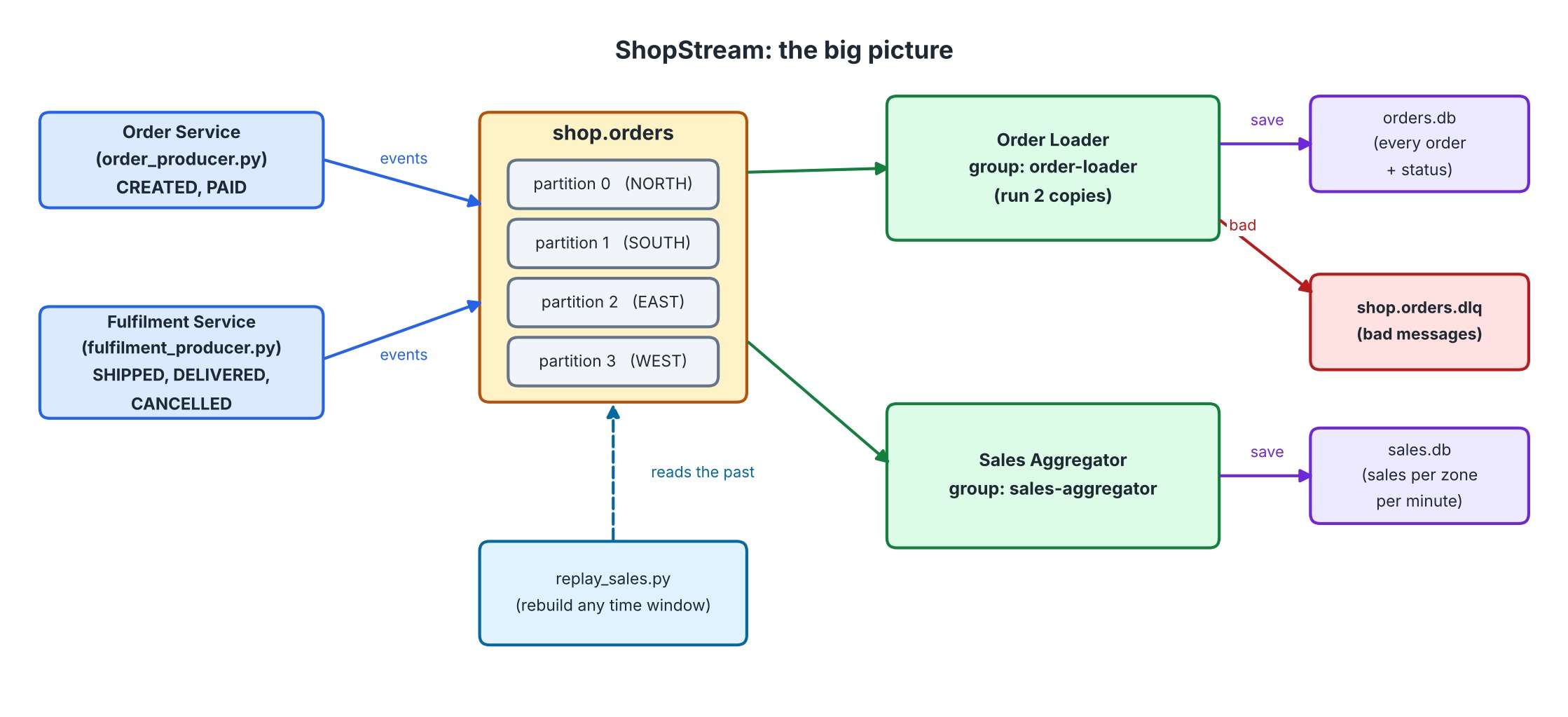 The big picture of ShopStream
How long will it take? Plan for about 3 to 4 hours. You can split it over two days.
What you need before you start
- The 3-broker Kafka cluster from the course, running
- Python 3 and the
confluent-kafkalibrary - The starter kit (a separate download)
The starter kit has:
| File | What it is |
|---|---|
config.py | Broker addresses, topic names, zones. Use it in your programs |
setup_topics.py | Creates the two topics. --reset starts again from zero |
data/orders.jsonl | Events for the Order Service to send |
data/fulfilment.jsonl | Events for the Fulfilment Service to send |
data/expected_results.json | The numbers your pipeline should produce |
verify_results.py | Checks your results against the expected numbers |
Get ready like this:
pip install -r requirements.txt
python setup_topics.py
Write all your programs in the same folder as these files.
The data
Delivery zones
ShopStream has four delivery zones: NORTH, SOUTH, EAST and WEST.
Topics
| Topic | Partitions | Replication factor | Purpose |
|---|---|---|---|
shop.orders | 4 | 3 | All order events |
shop.orders.dlq | 3 | 3 | Bad messages (the dead-letter topic) |
setup_topics.py creates both. It also sets min.insync.replicas to 2.
Event types
Every event is a JSON object. There are five types.
| Event type | Sent by | Meaning |
|---|---|---|
ORDER_CREATED | Order Service | A customer placed an order |
ORDER_PAID | Order Service | The payment came through |
ORDER_SHIPPED | Fulfilment Service | The order left the warehouse |
ORDER_DELIVERED | Fulfilment Service | The customer received it |
ORDER_CANCELLED | Fulfilment Service | The order was cancelled |
An ORDER_CREATED event looks like this:
json{"event_id": "E-CRE-0000", "event_type": "ORDER_CREATED", "order_id": "O-1001", "zone": "SOUTH", "customer_id": "C-008", "amount": 4999, "currency": "INR"}
The other four types are shorter. They have no customer and no amount:
json{"event_id": "E-SHI-0076", "event_type": "ORDER_SHIPPED", "order_id": "O-1077", "zone": "SOUTH"}
The fields
| Field | Used in | Rule for a good event |
|---|---|---|
event_id | all | Must be present. It is unique for each event |
event_type | all | Must be one of the five types above |
order_id | all | Must be present |
zone | all | Must be NORTH, SOUTH, EAST or WEST |
customer_id | ORDER_CREATED only | Must be present |
amount | ORDER_CREATED only | Must be a number greater than 0 |
currency | ORDER_CREATED only | Always INR |
event_time | all | Added by the producer when it sends the event |
The messy truth
The data files are not clean. Look inside them. You will find:
- lines that are not JSON at all
- events with a missing field
- events with a zone that does not exist
- events with an amount that is zero, negative or text
- events with an unknown event type
- the same event sent twice
- status events that arrive in the wrong order (for example,
DELIVEREDbeforeSHIPPED)
Your pipeline must deal with all of these.
Requirements
A. Both producers
| # | Requirement |
|---|---|
| A1 | Read the file line by line and send each line to shop.orders. |
| A2 | For a good JSON event, use order_id as the message key. |
| A3 | For a good JSON event, add an event_time field (the current time in UTC) if it is not there. |
| A4 | Use your own partitioning rule: one zone, one partition. NORTH goes to partition 0, SOUTH to 1, EAST to 2, WEST to 3. |
| A5 | If the zone is unknown or missing, do not pick a partition. Let Kafka decide. |
| A6 | A line that is not a JSON object must still be sent, as it is, with no key. Cleaning is the consumer's job. |
| A7 | Use safe delivery: idempotent producer and acks=all. |
| A8 | Use batching and compression: set linger.ms, batch.size and a compression type. |
| A9 | Use a delivery callback. Count the messages delivered to each partition and print the count at the end. Report any failure. |
| A10 | If the local queue is full (BufferError), wait and try again. Do not lose the message. |
| A11 | Call flush() before the program exits. Exit with a non-zero code if any message failed. |
| A12 | Accept --rate (messages per second) and --limit (stop after N messages) on the command line. |
The two producers are two separate programs. They share the same rules. You can put the shared code in one module.
B. Order Loader
| # | Requirement |
|---|---|
| B1 | Use the consumer group order-loader. Start from the earliest message when the group is new. |
| B2 | Use the cooperative-sticky assignment strategy. |
| B3 | Check every message using the rules in the field table above. |
| B4 | Save good events in the SQLite database orders.db (see "The database contract" below). |
| B5 | Ignore duplicates. If an event_id was already processed, do nothing. |
| B6 | A status must never go backwards. The order is: CREATED < PAID < SHIPPED < DELIVERED. CANCELLED is the highest. A late SHIPPED event must not change a DELIVERED order. |
| B7 | A status event can arrive before the ORDER_CREATED event of that order. Save it anyway. Fill in the missing details when ORDER_CREATED arrives later. |
| B8 | Send every bad message to shop.orders.dlq. Keep the original key and value. Add headers: error (a short reason code), source (topic, partition and offset) and failed_at. |
| B9 | Wait until Kafka confirms the DLQ copy before you move on. |
| B10 | Safe order of work: save first, mark the offset after. Turn off automatic offset storing, and mark each offset yourself only after the save (or the DLQ copy) is done. |
| B11 | Print a message when partitions are assigned and when they are revoked. When partitions are revoked, save your progress. |
| B12 | Stop cleanly when the user presses Ctrl+C. |
| B13 | Two copies of the loader must be able to run together and share the work. |
C. Sales Aggregator
| # | Requirement |
|---|---|
| C1 | Use a different consumer group: sales-aggregator. It must read all events, even though the Order Loader reads them too. |
| C2 | Count only ORDER_CREATED events. Ignore everything else, including bad messages. |
| C3 | For each zone and each minute, keep the number of orders and the total amount. Save it in sales.db. |
| C4 | Decide the minute from the timestamp stored by Kafka in the message, not from the time you read it. |
| C5 | Ignore duplicate events, using event_id. |
| C6 | Use the same safe order as the loader: save first, mark the offset after. |
| C7 | When it stops, print a small table of orders and revenue per zone. |
D. Replay tool
| # | Requirement |
|---|---|
| D1 | Accept --from and --to (UTC, like "2026-11-06 14:05"). The window includes --from and does not include --to. |
| D2 | Find where to start with offsets_for_times(). Read each partition until the end time or the end of the partition. |
| D3 | Do not use a shared group name and do not save offsets. The replay tool must never disturb the real consumers. |
| D4 | Count orders and revenue per zone for the window, with the same rules as the Sales Aggregator. |
| D5 | If sales.db exists, compare its numbers for the same window. Print MATCH or DIFFERENT. |
The database contract
Your checker (verify_results.py) reads your databases. So your tables must use these names.
orders.db, table orders
| Column | Type | Meaning |
|---|---|---|
order_id | text, primary key | The order |
zone | text | Delivery zone |
customer_id | text | The customer |
amount | integer | Order amount in rupees |
status | text | One of CREATED, PAID, SHIPPED, DELIVERED, CANCELLED |
You may add more columns or tables. These columns must exist.
sales.db, table sales_by_minute
| Column | Type | Meaning |
|---|---|---|
zone | text | Delivery zone |
minute | text | Like 2026-11-06 14:05 (UTC) |
orders | integer | Orders in that minute |
revenue | integer | Total amount in that minute |
How to check your work
Start your consumers. Send the data with both producers. Wait until the consumers have caught up. Stop them with Ctrl+C. Then run:
python verify_results.py
You will see something like this when everything is right:
1. orders.db  (made by the Order Loader)
  [PASS] number of orders
  [PASS] orders and amount per zone
  [PASS] orders per status

2. sales.db  (made by the Sales Aggregator)
  [PASS] orders and revenue per zone

3. Dead-letter topic  (bad messages)
  [PASS] number of messages in the DLQ

ALL CHECKS PASSED. Well done!
If a check fails, the checker shows what it expected and what it found.
Do these failure tests too
Passing the checker is not the end. Prove that your pipeline is strong.
- Two loaders. Start two Order Loaders. Check that each one gets different partitions.
- Stop one loader. While data is flowing, press Ctrl+C in one loader. The other must take over its partitions.
- Crash one loader. Stop a loader with
kill -9(or end the task). Start it again. Run the checker. The numbers must still be right. Note: Kafka may take up to 45 seconds to notice that a member is gone. - Stop a broker. Stop one of the three Kafka brokers while the producers run. Nothing should be lost.
- Replay. Note the time when you start the producers. When everything is done, run the replay tool for that time. It must print
MATCH.
Rules and tips
- Do not hard-code the expected numbers in your programs. Your programs must work for any valid data.
- To start again from zero, run
python setup_topics.py --reset. This deletes the topics and your two database files. - Start the consumers before the producers if you want to watch the work live.
- If something does not work, read the error first. Then check the container logs.
- Try the assignment on your own first. The next two parts help you: Part 2 explains the design, Part 3 walks you through a full solution.
Extra challenges (optional)
When you finish, try one of these on your own:
- Add a
--zoneoption to the Sales Aggregator, so one copy reads only that zone. Hint: useassign()on the zone's partition. - Make the loader save in batches of 20 events instead of one by one. What changes in your safe order?
- Add a third consumer group that writes every
ORDER_CANCELLEDevent to a text file.