Assignment: ShopStream
Part 2: Design and approach
Before you write code, think
On your first day, do not open the editor first.
Take a plain sheet of paper. Write down three questions:
- What happens to an event from the moment it is created until it is saved?
- What can go wrong on the way?
- For each problem, which Kafka feature fixes it?
This part answers those questions for ShopStream. You will see the design, and why each choice was made. There is no solution code here. The code comes in Part 3.
Read this part fully before you start building. If you get stuck later, come back to the matching section.
1. The big picture
 The big picture
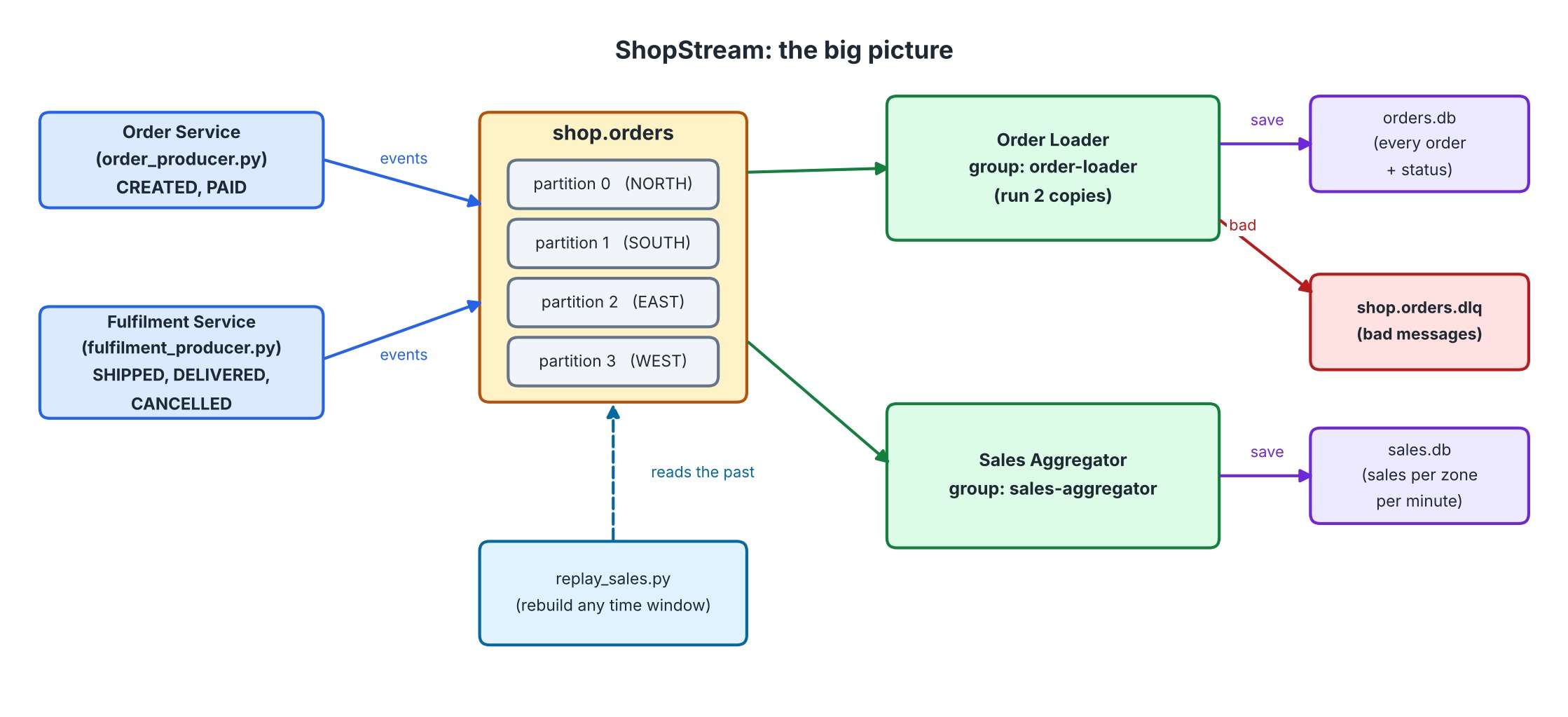
Read the picture from left to right.
- Two services send events into one topic,
shop.orders. - Two consumer groups read the topic. They do not know about each other.
- The Order Loader saves orders in
orders.db. Bad messages go to the dead-letter topic. - The Sales Aggregator saves sales per zone, per minute in
sales.db. - The Replay tool can read the past from the topic at any time.
Why one topic and not many? All of these events are about orders. One topic keeps them together. Each consumer group picks what it needs.
Why two consumer groups? The loader and the aggregator do different jobs. Each must see every event. Two groups give each of them its own copy of the stream.
2. The topics
| Topic | Partitions | Replication | min.insync.replicas |
|---|---|---|---|
shop.orders | 4 | 3 | 2 |
shop.orders.dlq | 3 | 3 | 2 |
Why 4 partitions? We have four zones. One partition for each zone is a simple rule to explain. It also lets up to four consumers share the work.
Why replication 3 and min.insync.replicas 2? Every message is stored on three brokers. A write is accepted only when at least two have it. So we can lose one broker and keep working, and we never accept a write that lives on only one broker.
Why a separate dead-letter topic? A bad message must not stop the pipeline. It must also not disappear. The dead-letter topic is a safe parking place. Someone can look at it later.
3. Keys and partitions
The key
The key is order_id.
Why? Kafka keeps the order of messages inside one partition. If all events of one order have the same key, they go to the same partition. They are then read in the order they were written.
Our own partition rule
 One zone, one partition
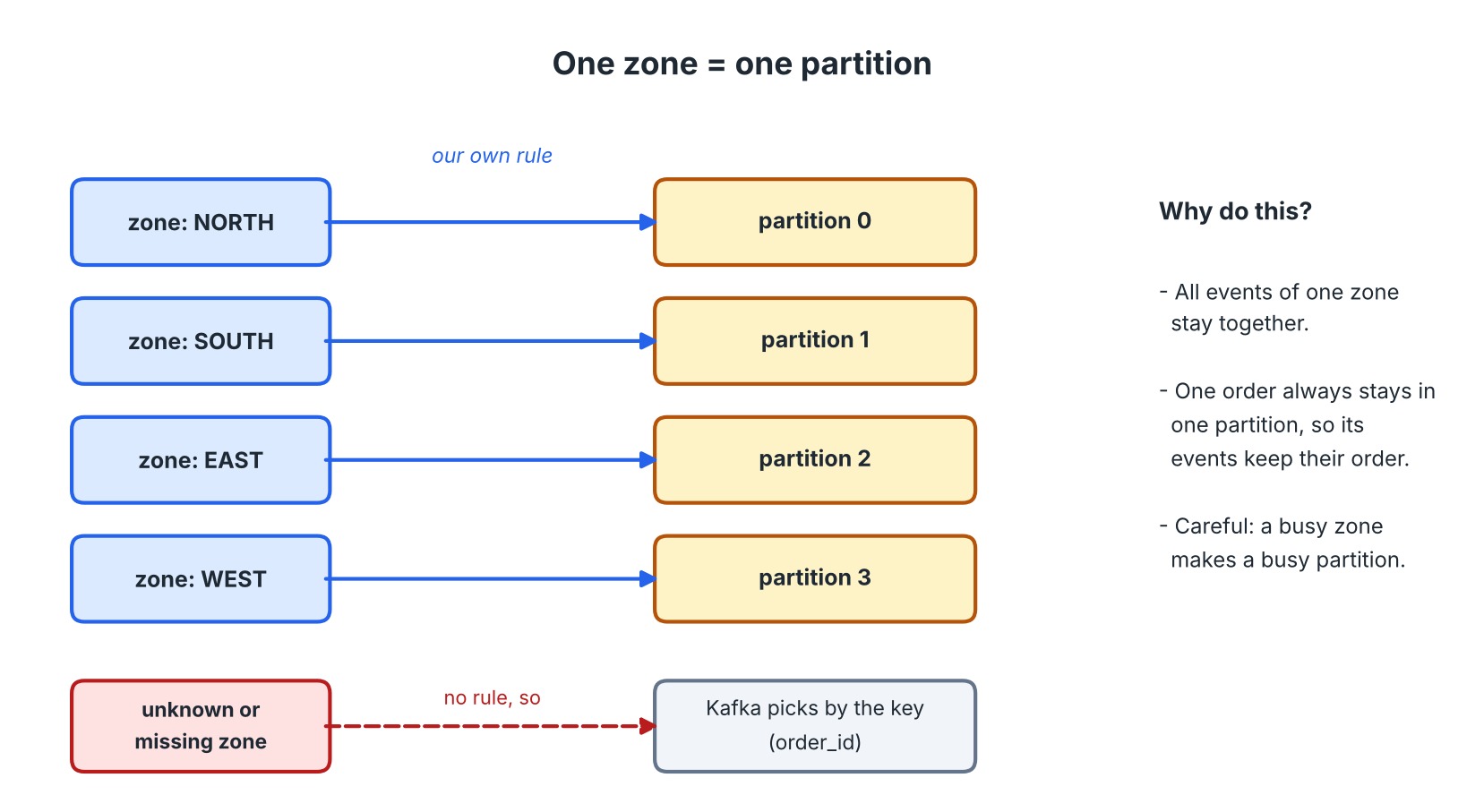
We do not leave the choice to Kafka's key rule. We say: one zone, one partition.
Why?
- All events of one zone stay together. A consumer that owns a partition sees one whole zone.
- One order always has one zone. So it still stays in one partition, and its events keep their order.
What is the cost? A zone with more orders makes a busier partition. In our data, SOUTH is busier than EAST. With the default key rule, load would be more even. We choose the simple rule on purpose, and we know the cost. This is a real design trade-off.
What about a bad zone? If the zone is missing or unknown, our rule has no answer. We do not invent one. We let Kafka decide using the key. The Order Loader will move the message to the dead-letter topic later.
Where does the rule live? In its own small function. It takes a zone and the number of partitions and returns a partition number, or None. Both producers use it. Because it has no Kafka code inside, you can test it alone.
4. The producers
Two services, shared code
The Order Service and the Fulfilment Service do the same kind of work. They read a file and send lines to Kafka. Only the file and the name are different.
So write the sending code once, in a shared module. Each service became a very short program that calls it.
Settings and why
| Setting | Value | Why |
|---|---|---|
enable.idempotence | True | A retry must never create a duplicate or change the order |
acks | all | Wait until all in-sync replicas have the message |
linger.ms | 50 | Wait a little so messages travel in groups |
batch.size | 65536 | The size of one group |
compression.type | lz4 | Smaller messages, less network |
client.id | the service name | Easy to find in logs |
What the sending loop must handle
- A good JSON event: add
event_time, useorder_idas key, use the zone rule to choose the partition. - A line that is not a JSON object: send it as it is. No key, no partition.
- A full local queue:
produce()raisesBufferError. Callpoll()to let messages leave, then try again. Do not drop the message. - Delivery results: the callback runs after Kafka answers. It counts messages per partition and records failures.
- The end:
flush()waits for the last messages. Then the program prints its counts and sets its exit code.
Why does the producer forward broken lines? Think about a real company. The producer may be a gateway that must never lose data. It does not judge. The consumer checks the data, because the consumer knows what the business needs.
5. Consumer groups
 Two groups, three consumers
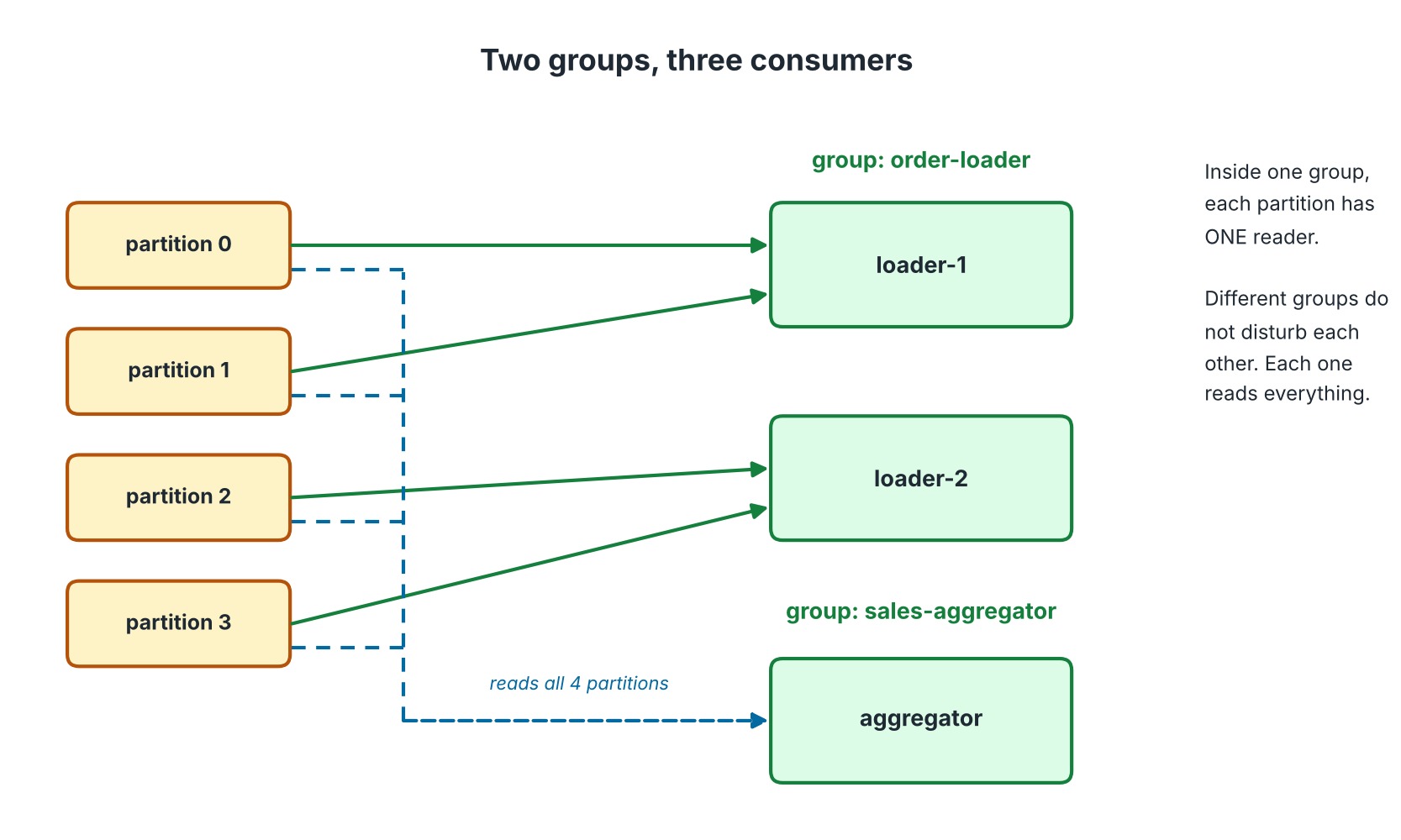
Two rules explain this picture:
- Inside one group, each partition is read by only one consumer. So two loaders share four partitions: two each.
- Different groups are independent. The aggregator reads all partitions, even while the loaders do the same.
Rebalancing
When a consumer joins or leaves, Kafka moves partitions between the members. This is a rebalance.
We use the cooperative-sticky strategy. Only the partitions that must move are moved. The others keep running. The old "stop everything" style is not used.
We add two small callbacks that print "assigned" and "revoked". They help you see the rebalance happen. In the revoked callback, we also save our progress.
6. The safe order of work
This is the most important idea in the whole assignment.
 The safe order
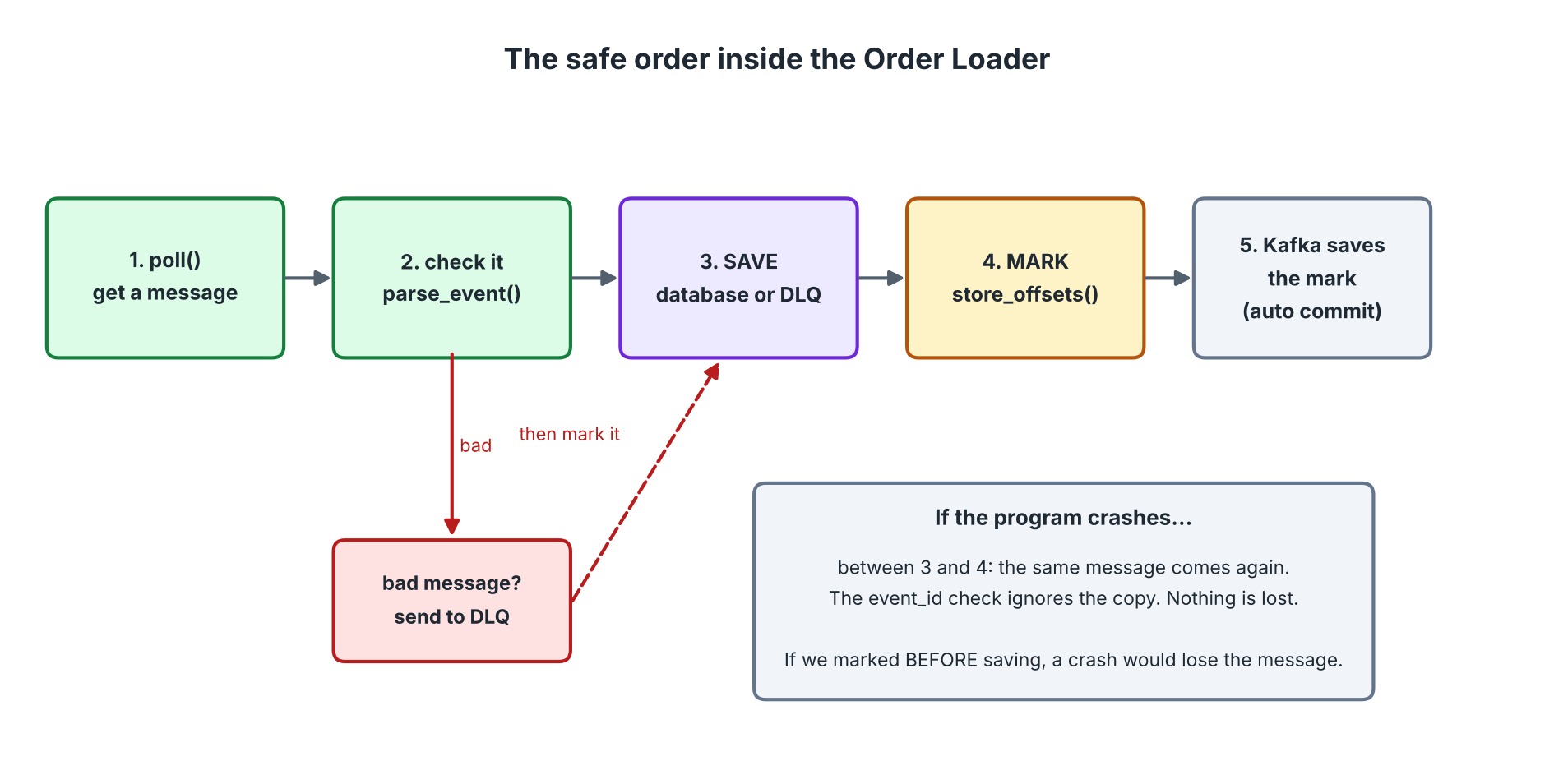
For each message, the consumer does five things in this order:
poll()gets the message.- The program checks it.
- The program saves the result: in the database, or in the dead-letter topic.
- The program marks the message as done with
store_offsets(). - Kafka saves the mark in the background (auto commit).
To make this work, the consumer is set up like this:
enable.auto.commit = True: Kafka saves marks for us every few seconds.enable.auto.offset.store = False: but we decide which messages are marked.
Why save first, mark after?
Think of two ways to crash.
| Order | Crash happens | Result |
|---|---|---|
| Mark first, save second | after the mark, before the save | The message is lost. Kafka thinks it is done. |
| Save first, mark second | after the save, before the mark | The message comes again. We have already saved it. |
A message coming twice is a problem we can solve. A lost message is not. So we always save first.
How we handle the same message twice
Every event has an event_id. We keep a table of the event IDs we have processed. For each event, the database does two things in one transaction:
- Try to insert the
event_id. If it is already there, stop. This event is a duplicate. - Otherwise, save the order or the sale.
One transaction means both steps happen, or neither does. So a crash cannot leave half a result.
7. The orders database
One row for each order
The orders table has one row for each order_id. Each event updates that row.
Status must never go backwards
Events do not always arrive in order. Two producers send events for the same order. A DELIVERED event might arrive before SHIPPED.
So each status gets a number:
| Status | Number |
|---|---|
CREATED | 1 |
PAID | 2 |
SHIPPED | 3 |
DELIVERED | 4 |
CANCELLED | 5 |
The rule is: an event can change the status only if its number is bigger than the current one. A late SHIPPED (3) cannot change DELIVERED (4).
A status can arrive before the order
A SHIPPED event may arrive before ORDER_CREATED. We still save it, as a row with a status and no amount. When ORDER_CREATED comes, it fills in the customer and the amount, and does not touch a status that is further ahead.
Hint: SQLite has INSERT ... ON CONFLICT DO UPDATE, and COALESCE() keeps an old value when the new one is empty. They are the tools for this job.
8. The dead-letter topic
When the loader finds a bad message, it:
- Copies the original key and value to
shop.orders.dlq. Nothing is changed. - Adds three headers:
| Header | Example | Why |
|---|---|---|
error | BAD_AMOUNT | A short reason code. Easy to count and search |
source | shop.orders[1]@79 | Topic, partition and offset. Find the original message |
failed_at | 2026-11-06T14:05:31+00:00 | When it failed |
- Waits until Kafka confirms the copy. Only then does it mark the offset.
Why wait? If the copy failed and we marked the offset anyway, the bad message would vanish with no record. The safe order applies here too.
Reason codes: keep them short and stable, in capital letters, like INVALID_JSON, MISSING_ZONE, UNKNOWN_ZONE, BAD_AMOUNT.
9. The Sales Aggregator
What it counts
Only ORDER_CREATED events. For each zone and each minute, it keeps the number of orders and the total amount.
Which clock?
There are two clocks:
- Processing time: when the consumer reads the message.
- Event time: when the message was written to Kafka.
We use the timestamp stored by Kafka in each message. Then the minute of a sale does not depend on when the consumer happens to run. If the aggregator is down for ten minutes and then catches up, the sales still fall into the right minutes.
Same safe order
It uses the same pattern as the loader: save to sales.db (with an event-ID check), then mark the offset.
Bad messages
The aggregator ignores them. The loader owns the dead-letter topic. If both sent the same bad message to it, you would have each one twice.
10. The replay tool
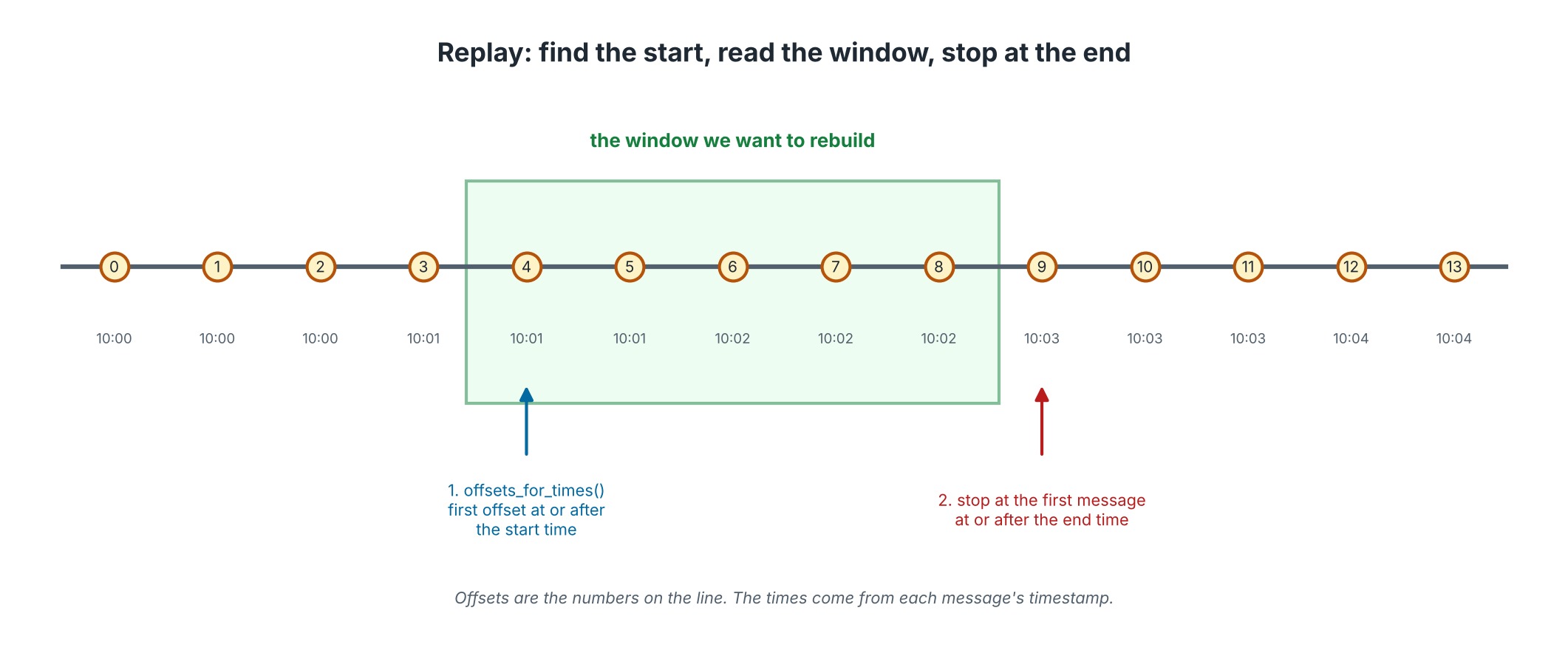 Replay window
Suppose Anita says, "The numbers between 2:05 and 2:08 look wrong. Can you rebuild them?"
The replay tool does this:
- Ask Kafka, for each partition: "What is the first offset at or after 2:05?" This is
offsets_for_times(). - Start reading each partition from that offset. Use
assign(), notsubscribe(). - Count the sales. Stop reading a partition at the first message at or after 2:08, or at the end of the partition.
- Compare with
sales.db. PrintMATCHorDIFFERENT.
Important details
- No shared group, no saved offsets. Use a random throw-away group name and turn auto commit off. The tool must not move the real consumers' position.
- How to know a partition has ended? Turn on
enable.partition.eof. Kafka then sends a special event when a partition has no more messages. - A partition with nothing after the start time returns an offset of
-1. Skip it. - Time zone: all times are UTC.
11. What can go wrong, and what saves you
| Problem | What happens | What protects you |
|---|---|---|
| A producer retries a send | Could create a duplicate | Idempotent producer |
| A broker stops | A partition leader changes | Replication 3, acks=all, retries |
| The producer's queue is full | BufferError | Wait with poll(), then retry |
| A consumer crashes after saving | The message comes again | Save first, mark after, and the event_id check |
| A consumer joins or leaves | Partitions move | Cooperative rebalancing and the revoke callback |
| A message is broken | Could stop the loader | Dead-letter topic |
| Events arrive out of order | Status could go backwards | Status numbers |
SHIPPED arrives before CREATED | A missing row | Save a partial row, fill it later |
| The numbers look wrong | You need to recheck | Replay tool |
12. A good order to build things
Build in small steps. After each step, run something and see it work.
| Step | Build | Check that |
|---|---|---|
| 1 | config.py and topics | setup_topics.py runs and the topics exist |
| 2 | Event checking | A few good and bad examples give the right answers |
| 3 | The zone rule | Each zone gives its own partition |
| 4 | The shared producer code | One service sends to Kafka and prints partition counts |
| 5 | The two producers | Both send their files. Counts add up to the lines in the file |
| 6 | The database code | Saving the same event twice changes nothing |
| 7 | The Order Loader | Good events land in orders.db. Bad ones land in the DLQ |
| 8 | The Sales Aggregator | sales.db fills up |
| 9 | Run it all and use verify_results.py | Every check passes |
| 10 | The failure tests | Still correct after a stop, a crash, a broker down |
| 11 | The replay tool | MATCH for your time window |
Part 3 follows exactly these steps.
Before you open Part 3
Try the steps yourself first. Even if you only finish steps 1 to 4, you will understand Part 3 much better.
When you are stuck for more than 20 minutes on one step, open Part 3 and read only that step. Then close it and try again.