Building a Replay Tool — Rewinding a Consumer to a Point in Time
The Requirement
In the last lecture, we compared two ways to reprocess the past. We built the first one: reset the production group's offsets, and let the real consumer redo its own work.
Now let's look at the second situation. This time:
- Production must keep running. No pause, no downtime.
- You do not want production to redo anything. You want a separate look at a time window.
- The result should go somewhere else: a separate table, a file, an analyst's notebook.
For example, the bug fix is deployed, and an analyst asks: "Show me what the corrected logic would have produced for the last two hours, without touching the live pipeline."
So far, every consumer in this chapter either started fresh or continued from where it left off. Today we add a new ability:
Output / NoteDeliberately rewind to any point you choose.
And we do it in code we control.
Why subscribe() Can't Do This
Every consumer you have built so far calls subscribe(). What does subscribe() give up?
Control. It hands the partition assignment to the group coordinator. You never choose your partitions, and you cannot choose where to start, except through the narrow auto.offset.reset case you saw in the offset lecture.
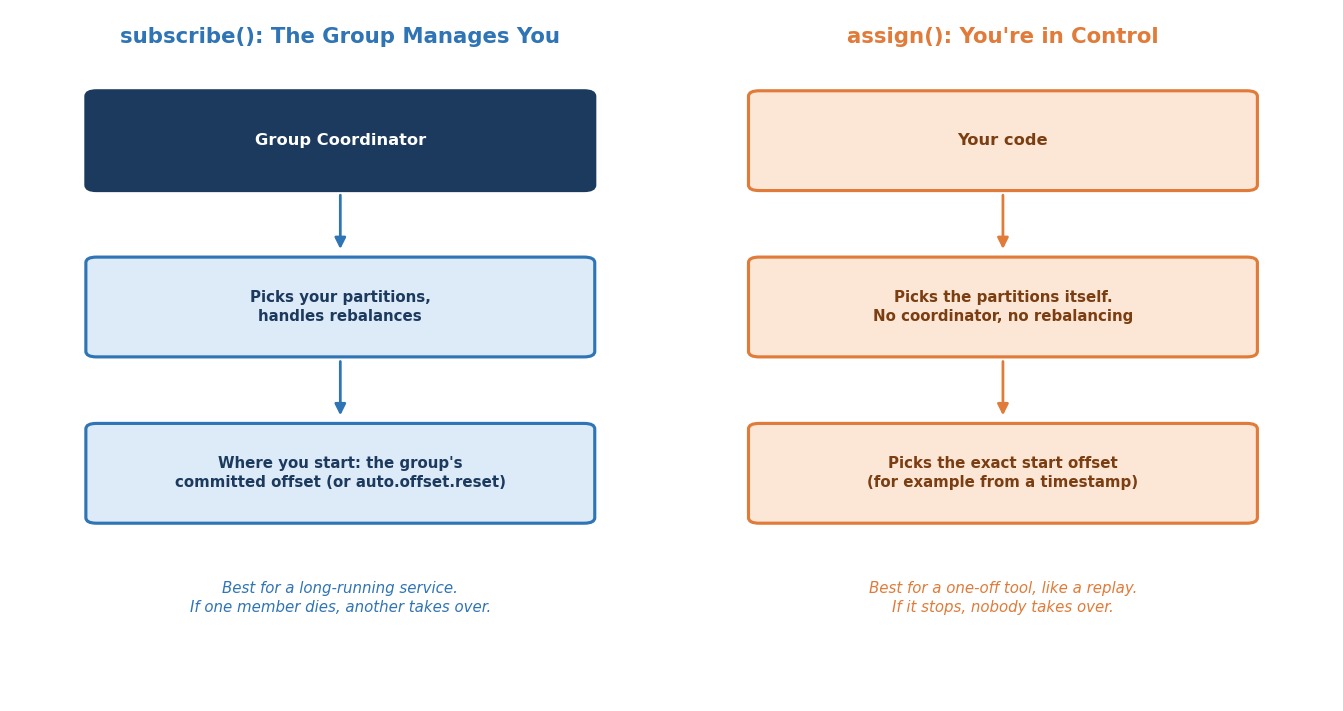 subscribe() vs. assign()
To rewind on purpose, you need the other mode: assign().
With assign(), your own code picks the partitions, and it can also pick the start offset for each one. The coordinator is not involved, and there is no rebalancing.
What is the trade-off?
You get full control, but you lose the group's help. Nobody rebalances for you, and if your tool stops, nobody takes over its partitions. That is fine for a one-off replay tool. It is not what you want for a long-running production service.
Let's Build It
Here is what we are building: a standalone replay tool. It is deliberately separate from the live recommendation-service group. It rewinds to a number of minutes ago, reprocesses everything from there up to now, and stops.
Step 1: Use a Different group.id on Purpose
pythonREPLAY_GROUP_ID = "recommendation-service-replay-tool" consumer = Consumer({ "bootstrap.servers": BOOTSTRAP_SERVERS, # A consumer object always needs a group.id, even when we assign # partitions ourselves. Here it is only a name. "group.id": REPLAY_GROUP_ID, # This tool is read-only. It should never save any position. "enable.auto.commit": False, })
Why a different group.id?
This is on purpose. A replay tool should almost never share a group.id with the production consumer it investigates. If it did, the tool could interfere with the live group's committed position. Give it its own identity.
If we assign partitions ourselves, why do we still need a group at all?
Because the consumer object always requires a group.id, even when it never joins a group. Here it is just a name.
And why turn off auto-commit?
The replay tool must only read. With auto-commit on, it would save its own positions under its own group name. That would not hurt production, but it would leave clutter behind. Turning it off keeps the tool clean.
Step 2: Find the Partitions
pythonmetadata = consumer.list_topics(TOPIC, timeout=10) partition_ids = sorted(metadata.topics[TOPIC].partitions.keys())
We ask the cluster how many partitions the topic has, instead of writing 3 in the code. If the topic grows later, the tool still works.
Step 3: Turn a Timestamp Into Real Offsets
pythonpartitions_with_timestamp = [ TopicPartition(TOPIC, p, target_timestamp_ms) for p in partition_ids ] resolved = consumer.offsets_for_times(partitions_with_timestamp, timeout=10)
Do you ever know the offset you want?
Almost never. You do not know "the offset I want is 4,821". What you know is "I want everything from 2 hours ago".
offsets_for_times() bridges that gap. You give it one TopicPartition per partition, with a timestamp in the place of the offset. It gives back the same partitions with the real offset.
Two details matter:
- The offset returned is the earliest offset whose timestamp is at or after the time you asked for.
- If no message is that recent, the offset is
-1. That simply means "nothing to replay in this partition".
Which timestamp does Kafka compare with?
The timestamp stored on each message. By default, this is the time the producer created the message (the topic setting message.timestamp.type is CreateTime). So "2 hours ago" means when the events happened, as reported by your producers.
The time we compute is in milliseconds since 1970 (time.time() is always UTC-based), so time zones do not matter here.
pythonminutes_ago = int(sys.argv[1]) target_timestamp_ms = int((time.time() - minutes_ago * 60) * 1000)
Step 4: Decide Where the Replay Stops
pythonend_offsets = {} for tp in resolved: _low, high = consumer.get_watermark_offsets(TopicPartition(TOPIC, tp.partition), timeout=10) end_offsets[tp.partition] = high
Why do we need this?
A live topic never ends. New events keep arriving. If our tool just kept reading, it would never finish. So, before we start, we note where each partition ends right now. The high value is the offset of the next message to be written, so the last existing message is high - 1. Our replay stops at that point. It processes a fixed window: from "N minutes ago" up to "the moment I started".
Step 5: Assign Directly to the Resolved Offsets
pythonconsumer.assign([tp for tp in resolved if tp.partition in pending])
Here pending is the set of partitions that actually have something to replay. Since each entry in resolved already carries the right offset, assign() alone is enough to start reading from exactly the right place.
What about seek()?
seek() is the other tool. It moves a partition you are already reading to a new offset. We do not need it here, because we pass the offsets inside assign(). But it is worth knowing, and it has one trap. This is a short example, and it is not part of our script:
pythonconsumer.assign([TopicPartition("clickstream-events", 0)]) msg = consumer.poll(timeout=5.0) # let the partition start being read first consumer.seek(TopicPartition("clickstream-events", 0, 100)) # then jump to offset 100
If you call seek() immediately after assign(), before any poll(), it fails with Local: Erroneous state, because the partition is not being read yet. Call it after the consumer has started reading, or, simpler, pass the offset in assign() as we do.
Step 6: The Same Poll Loop, With a Stopping Point
pythonwhile pending: msg = consumer.poll(timeout=1.0) if msg is None: continue if msg.error(): print(f"Consumer error: {msg.error()}") continue partition = msg.partition() if partition not in pending: continue if msg.offset() < end_offsets[partition]: event = json.loads(msg.value().decode("utf-8")) print( f"[replay] partition {partition} offset {msg.offset()} " f"user={event['user_id']} event={event['event_type']}" ) count += 1 # Reached the last message that existed when we started? if msg.offset() >= end_offsets[partition] - 1: pending.discard(partition)
From here, it is the same poll() loop you have written all chapter. Rewinding only changes where you start, not how you read once you are there. The only new part is the stopping rule: when a partition reaches its last message from the start, we remove it from pending. When pending is empty, the loop ends and the tool prints a summary.
Running It
Step 1: Start Your Cluster
bashdocker compose start docker ps
Step 2: Make Sure There Are Recent Events
The tool replays the last N minutes. If nothing was produced in that time, there is nothing to replay. So, first run one of your clickstream producer scripts from the producer chapter, to have some fresh events.
Step 3: Run the Replay Tool
Download 5.6_replay_by_timestamp.py into your chapter-5 folder and run it from your host terminal. Give it how far back to go, in minutes:
bashpython 5.6_replay_by_timestamp.py 30
First you see the starting offset for each partition. Then you see every event from roughly the last 30 minutes, reprocessed on demand. At the end, you see Replay complete with the number of messages. The tool stops by itself.
What if a partition says "nothing to replay"?
That partition has no message in your time window. It is not an error.
Try two more runs to see the edges:
bashpython 5.6_replay_by_timestamp.py 1
bashpython 5.6_replay_by_timestamp.py 100000
The first is a very small window, so you will probably see "Nothing to replay". The second is a very large window, so you replay everything the topic still holds.
Step 4: Confirm the Live Group Is Untouched
This is worth proving to yourself. Open a broker terminal:
bashdocker exec -it kafka-1 bash export PATH=$PATH:/opt/kafka/bin
Run this before and after a replay:
bashkafka-consumer-groups.sh --describe --group recommendation-service --bootstrap-server kafka-1:29092
The committed offsets of recommendation-service do not change, because the replay tool never touched that group. You can also look at the replay tool's own group:
bashkafka-consumer-groups.sh --describe --group recommendation-service-replay-tool --bootstrap-server kafka-1:29092
It has no saved positions at all, since the tool never commits anything.
Step 5: Stop Your Cluster
bashdocker compose stop
Where Does the Replayed Data Go?
Our tool only prints each event. A real replay tool would send the reprocessed result somewhere: another table, another topic, a file for analysis.
That is the whole point of this approach. The replay runs beside production. It does not change production's own output. Compare it with the previous lecture. There, the production consumer itself redid the work, and production's real output was corrected. Here, a separate reader gives you a second, independent view, and production is untouched, unless you deliberately build the tool to write there too.
Common Mistakes at This Stage
Sharing the production group.id. The replay tool could disturb the live group's position. Always use its own name.
Hard-coding the number of partitions. Ask the cluster instead. A topic that grows will silently break a hard-coded loop.
Calling seek() right after assign(). It fails with Erroneous state. Pass the offsets in assign(), or seek after the first poll().
Forgetting that -1 means "nothing there". If you pass -1 straight to assign(), that partition starts at the end and waits for new events. Filter these partitions out, as our tool does.
Trusting the timestamp blindly. It is the time your producers put on the message. If a producer has a wrong clock, the replay window will be wrong too.
Checklist
- Understood when a separate replay reader is the right choice, compared with resetting the group
- Understood why
subscribe()cannot give you deliberate control over the starting position - Understood the trade-off of
assign(): full manual control, no automatic rebalancing - Understood why a replay tool should use its own
group.idand turn off auto-commit - Used
offsets_for_times()to turn "X minutes ago" into real offsets, and know that-1means "nothing at or after that time" - Understood why the tool records the end offsets first, so the replay stops by itself
- Know what
seek()does, and the trap of calling it right afterassign() - Ran a real replay and confirmed that the live group's committed offsets did not change
Chapter Wrap-Up: The Consumer API, at a Glance
You started this chapter with a script that printed events. You end it with a consumer you could run in production, and the tools to fix things when they go wrong. Here is the whole path in one table.
| Topic | The key idea | The settings and calls to remember |
|---|---|---|
| The poll loop | A consumer pulls. poll() returns messages, reports errors, and runs callbacks | poll(), msg.error(), close() |
| Consumer groups | Within a group, each partition is read by exactly one consumer. More consumers than partitions means idle ones | group.id, client.id |
| Rebalancing | A group change re-runs JoinGroup and SyncGroup. Eager stops everyone. Cooperative moves only what must move | partition.assignment.strategy |
| Offsets | A committed offset is the next one to read. Mark it done only after success. Dead-letter poison pills | auto.offset.reset, enable.auto.offset.store, store_offsets() |
| Reprocessing | Reset the group to make production redo its work. Use a separate reader to look without touching production | --reset-offsets, assign(), offsets_for_times() |
If you had to build a production consumer tomorrow, this is the checklist you would follow:
- Choose
auto.offset.reseton purpose. Remember that it applies only when there is no valid committed offset. - Use
cooperative-stickyso a routine deploy does not stop the whole group. - Turn off
enable.auto.offset.store, and callstore_offsets()after each message succeeds. - Send messages that can never succeed to a dead-letter topic, and confirm the send worked.
- Keep the work between
poll()calls short, so the consumer stays in the group. - Always call
close()when the process ends. - Make processing safe to repeat, because at-least-once, retries and reprocessing all mean a message can be seen twice.
- Give every tool its own
group.id, so an investigation never disturbs production.
You built, scaled, rebalanced, hardened, and rewound a real Kafka consumer, and you understand what happens behind every line. That completes the Consumer API.