Offset Management & Commit Strategies — Surviving a Poison-Pill Message
The Requirement
Two problems have been sitting quietly under everything you have built so far.
Problem 1. Your consumer restarts. How does it know exactly where to continue? It must not redo everything, and it must not silently skip data it never handled.
Problem 2. Real event streams sometimes contain a bad message: broken JSON, a missing field, something a bug produced somewhere. What does your consumer do then? Does it crash? Does it get stuck on the same message forever?
Both problems come from the same mechanism: offset commits. Today we fix both.
What Committing an Offset Actually Means
Is a committed offset "the last message I read"?
No. A committed offset is the next offset you should start from.
If you have fully handled everything up to offset 40, you commit offset 41. After a restart, the consumer resumes from 41. (In confluent-kafka, when you store a message's offset, the library adds the +1 for you.)
Where does Kafka keep it?
In the internal topic __consumer_offsets, the same topic that picks your group coordinator. Each group has its own committed position per partition.
An offset actually goes through three stages. Keep these three words in mind, because the whole lecture depends on them:
| Stage | Where | Meaning |
|---|---|---|
| Received | Your code | poll() gave you the message |
| Stored | In memory, inside the client | "This offset is ready to be committed" |
| Committed | In Kafka | The official saved position |
Only a committed offset survives a restart.
auto.offset.reset — Clearing Up the Most Common Confusion
In the first lecture, you set auto.offset.reset to "earliest" with a short explanation. Now that you know what a committed offset is, the full explanation will finally make sense.
Does auto.offset.reset decide where a consumer starts every time it runs?
No. This is the biggest misconception about this setting. It matters in only one situation.
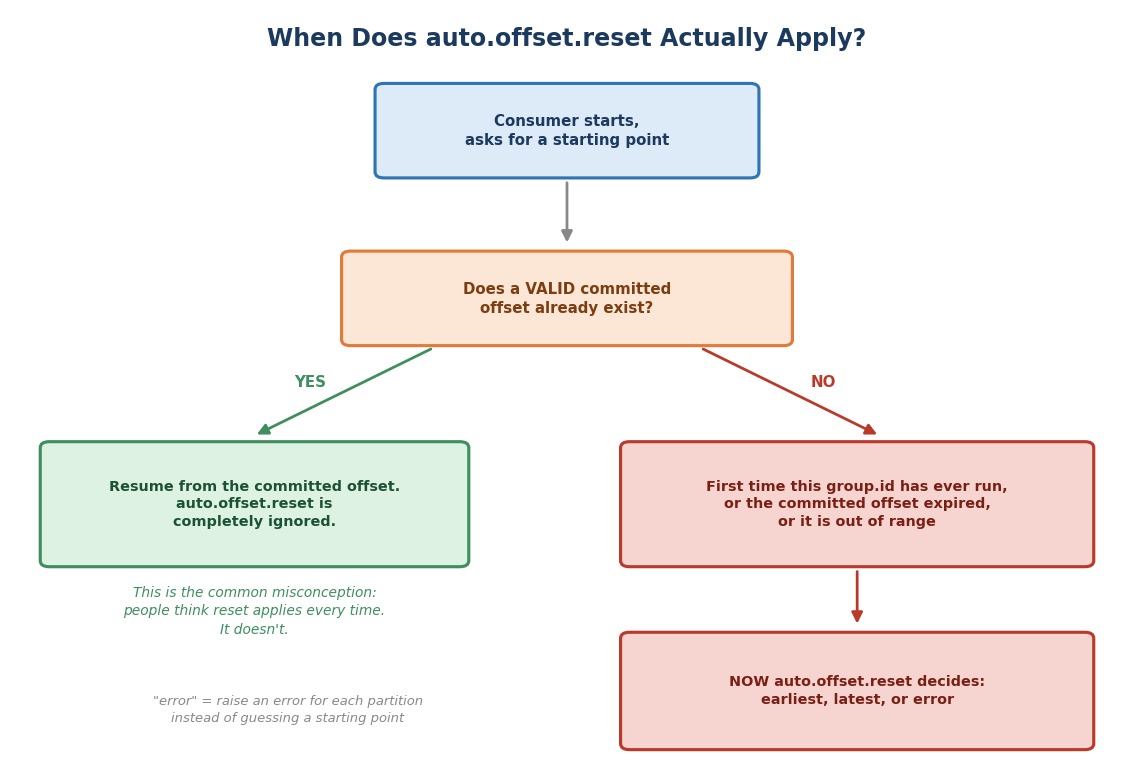 When does auto.offset.reset actually apply?
Every time a consumer starts, it asks one question for each partition: "Is there already a valid committed offset for this group.id?"
- If yes, the consumer resumes from it.
auto.offset.resetis never even looked at. - If no, only then does
auto.offset.resetdecide the starting point.
When is there "no valid committed offset"?
Three common cases:
- A brand-new group. This
group.idhas never run before. - The committed offset expired. Kafka deletes a group's committed offsets after the group has had no members for a while. The default is 7 days (the broker setting
offsets.retention.minutes). So a consumer that was switched off for a week and then restarted behaves like a brand-new group. - The offset is out of range. The data it points to no longer exists. For example, old messages were deleted by the topic's retention, or the topic was recreated with fewer messages.
That is why it is called a reset, not a default. It answers the question: "What do we do when we have no reliable position?"
The Three Options, and When to Choose Each
| Value | Behavior | Choose this when... |
|---|---|---|
earliest | Start from the beginning of the topic's retained history | You cannot afford to miss data: a new analytics or audit consumer that needs the full picture |
latest | Start from whatever is produced from now on | You only care about live activity: a real-time dashboard where old backlog is irrelevant |
error | Do not guess. Raise an error for each partition and let your code decide | High-stakes pipelines where silently picking a default could hide a real problem |
Which one is the default if I set nothing?
latest. That is why we set earliest on purpose from the start.
What does error look like in practice?
The consumer reads nothing. Instead, poll() returns an error message for each partition, with the code _AUTO_OFFSET_RESET and the text "no previously committed offset available". These errors are non-fatal.
Output / NoteCareful: the value is spelled
error, notnone. If you type"none", the consumer refuses to start withInvalid value "none" for configuration property "auto.offset.reset".
Output / NoteOptional experiment: Take the first lecture's script. Change
GROUP_IDto a brand-new name and setauto.offset.resetto"error". Run it. You will see one non-fatal error per partition, and no events. Then try"latest"(no events until you produce new ones) and"earliest"(all the history).
Let's think about it with our own pipeline. Suppose you start a new group to backfill six months of clickstream-events into an analytics table. You want earliest, because missing history defeats the purpose. But if you launch a live "what is trending right now" dashboard, replaying six months of old clicks at startup would be wrong. You want latest.
Now let's go back to committing. Even with a good starting point, the default commit behavior is more dangerous than it looks.
The Hidden Danger of the Defaults
confluent-kafka has two separate settings that work together here:
enable.auto.offset.store(defaultTrue). The momentpoll()hands you a message, this marks that message's offset as "ready to commit" in memory. Not after you finished processing. The instant you receive it.enable.auto.commit(defaultTrue). On its own timer, everyauto.commit.interval.ms(default 5 seconds), whatever is marked "ready" is written to Kafka as the committed offset.
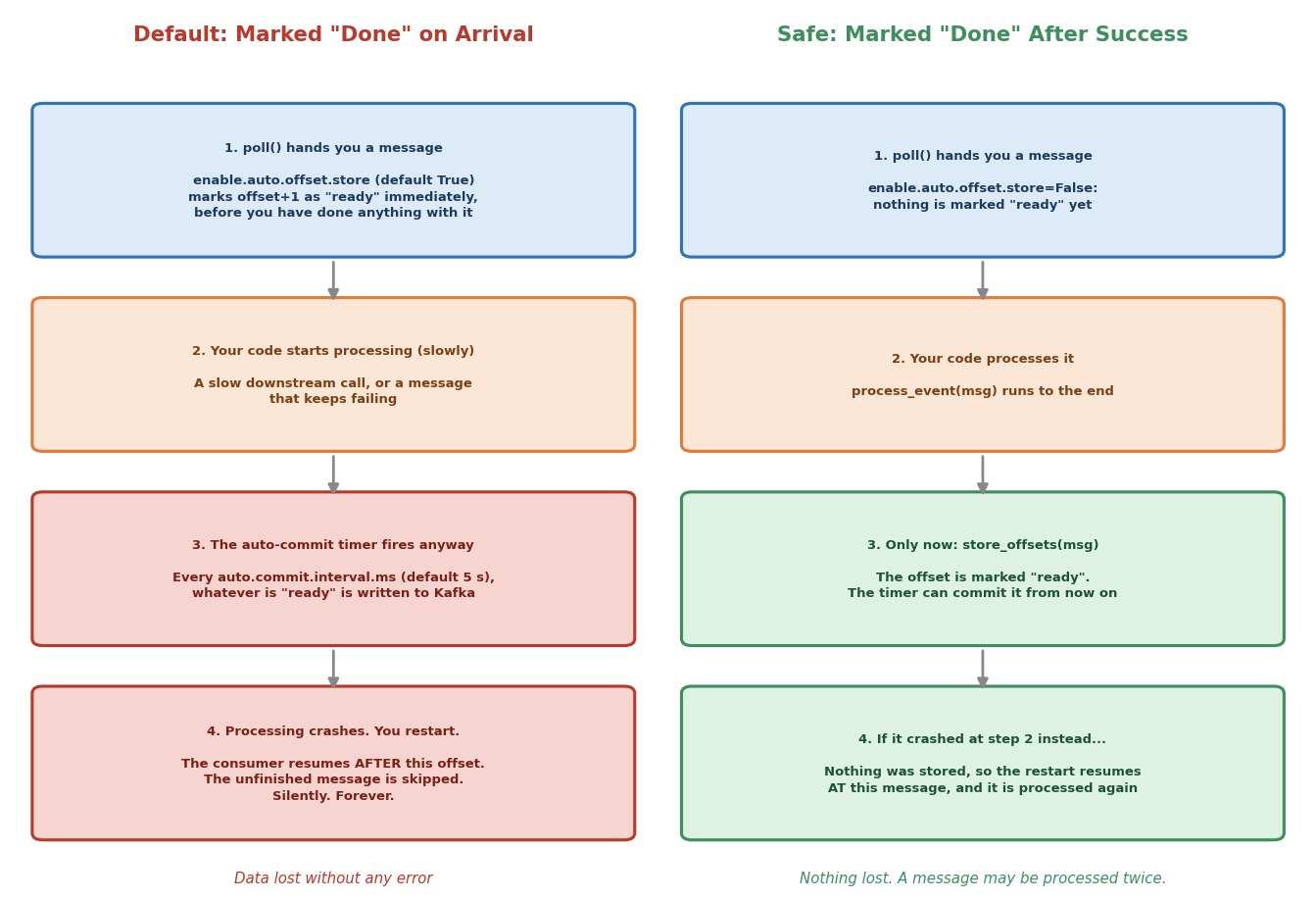 Default settings vs. the safe pattern
Let's walk through the left side of the picture.
poll()hands you a message. It is marked "ready" immediately, before you have looked at it.- Your processing starts, and takes longer than expected. Maybe a slow downstream call. Maybe the message itself causes trouble.
- While you are still working, the auto-commit timer fires anyway. It commits an offset for a message that is not finished yet.
- Processing crashes, and you restart. The consumer resumes after that offset.
What happened to that message?
It is gone. It was not retried. It was not logged as missing. It was silently skipped, because Kafka was told it was done when it never was.
This is not just theory. In a test of exactly this scenario, a consumer with default settings crashed while processing offset 4. Kafka's committed offset for that partition was 5. The unfinished message had been marked done.
Let's Build It — The Correct Pattern
The fix is small, but it needs both settings to be handled on purpose.
Step 1: Turn Off Auto-Store, Keep Auto-Commit
pythonconsumer_config = { "bootstrap.servers": BOOTSTRAP_SERVERS, "group.id": GROUP_ID, "client.id": "safe-consumer", "auto.offset.reset": "earliest", # Keep auto-commit's periodic write-to-Kafka behavior. It's simpler # than calling commit() ourselves. "enable.auto.commit": True, # But turn OFF auto-storing, which otherwise marks a message # "ready to commit" the instant poll() hands it to us, before we've # done anything with it. Now nothing is marked ready until we say so. "enable.auto.offset.store": False, }
Why keep enable.auto.commit on?
Because it is simpler than calling commit() ourselves on a schedule. What we remove is only the part that marked messages as ready too early. Now nothing is marked ready until we say so.
Step 2: Store the Offset Only After Success
pythontry: process_event(msg) # Only now, after successful processing, do we mark # this offset as safe to commit. consumer.store_offsets(msg)
What does store_offsets() do?
It is the manual version of what auto-store did automatically and too early. Called right after process_event() succeeds, it means the auto-commit timer can only ever commit offsets of messages that really finished. This one change closes the whole danger window from the picture.
The same test with the safe settings gives a different result. With the same crash at offset 4, Kafka's committed offset was 4. After a restart, the consumer starts again at message 4 and processes it properly.
Is this now perfect?
Almost, and it is good to be honest about the last gap. If the consumer crashes after processing a message but before store_offsets() runs, that message will be processed again after the restart. This pattern gives you at-least-once processing: nothing is lost, but a message can be seen twice. So write your processing to be safe when repeated, for example an "update" that gives the same result when done twice.
Is there another way?
Yes. You can turn off auto-commit and call consumer.commit() yourself, even after every message. It gives you exact control, but it is slower, because each commit is a round trip to Kafka. Auto-commit plus store_offsets() is a good balance for most consumers.
Step 3: Handle the Poison Pill
What is a poison pill?
A message that can never be processed successfully. Retrying does not help, because the message itself is the problem. For example, invalid JSON, or a missing field.
Look at the except block:
pythonexcept Exception as e: reason = f"{type(e).__name__}: {e}" print(f"[safe-consumer] POISON PILL at partition {msg.partition()} offset {msg.offset()}: {reason}") send_to_dlq(msg, error_reason=reason) # We still store the offset here. We've "handled" this # message by dead-lettering it, so the consumer should # move on rather than retrying it forever. consumer.store_offsets(msg)
Why do we call store_offsets() here too?
This is deliberate. Look at the picture:
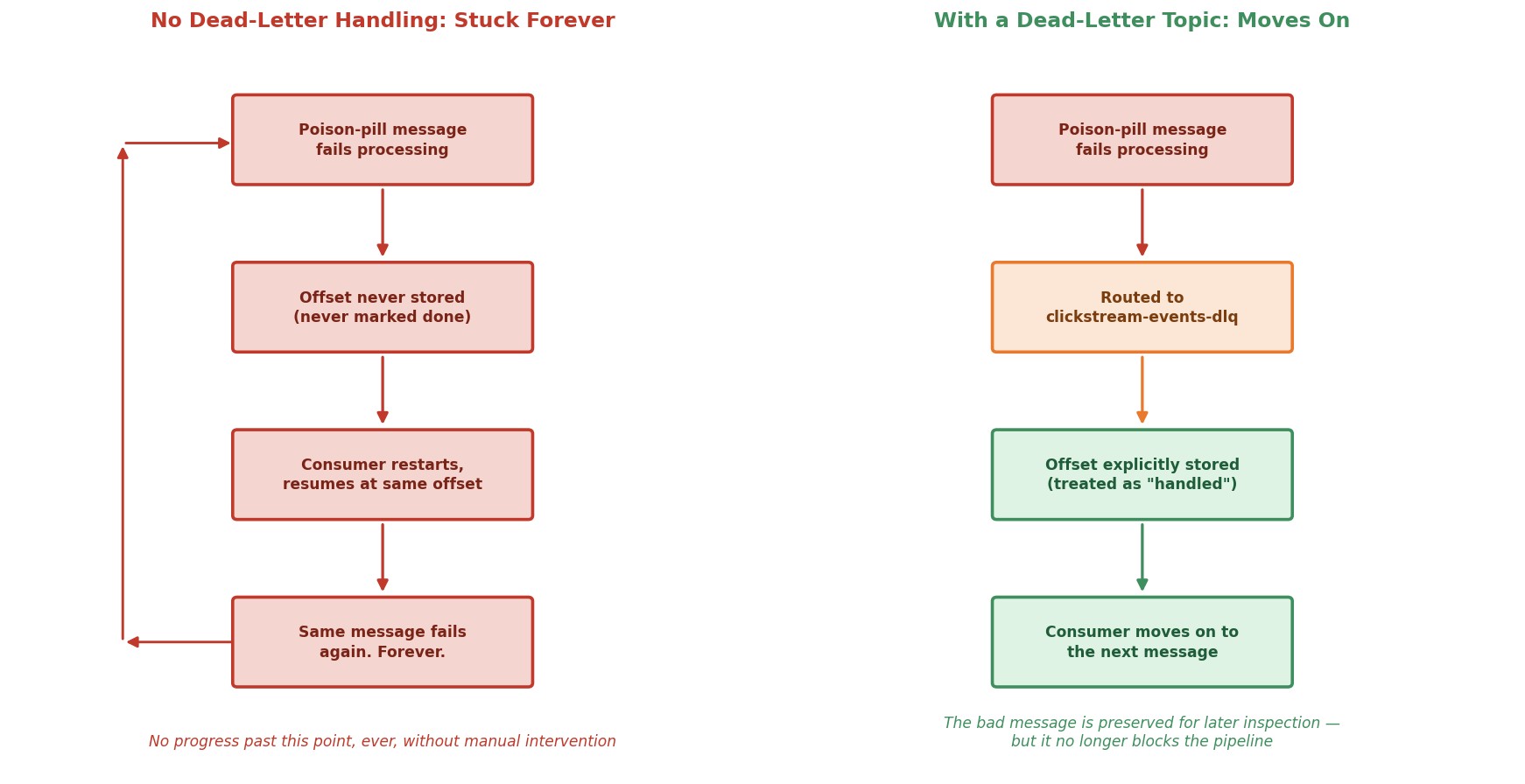 Poison pill: stuck forever vs. dead-lettered and moving on
Suppose we only logged the error and moved on, without storing the offset. We would avoid a crash right now. But on any future restart, the consumer would resume from before this message, and hit it again. And again. Forever. One message that can never succeed becomes a permanent blockage, triggered by every restart.
The fix is to send the bad message to a dead-letter topic. That is a separate topic that only holds messages which could not be processed, kept for someone to inspect later. And then we store the offset, because we have really handled the message, just not in the way we first planned.
pythondef send_to_dlq(msg, error_reason: str): """ Sends the bad message to the dead-letter topic and WAITS until Kafka confirms it. If that fails, we raise, so the caller does not store the offset. A message must never be dropped without being saved. """ failures = [] def on_delivery(err, _msg): if err is not None: failures.append(err) dlq_producer.produce( topic=DLQ_TOPIC, key=msg.key(), value=msg.value(), headers={ "error_reason": error_reason.encode("utf-8"), "source_topic": msg.topic().encode("utf-8"), "source_partition": str(msg.partition()).encode("utf-8"), "source_offset": str(msg.offset()).encode("utf-8"), }, on_delivery=on_delivery, ) still_waiting = dlq_producer.flush(10) if failures or still_waiting: raise RuntimeError(f"Could not write to the dead-letter topic: {failures or 'timed out'}")
This reuses what you already know: a producer sending a message, just aimed at a topic for failures instead of successes. Notice three details:
- Headers. We attach the error reason, and where the message came from (topic, partition, offset). Later, whoever inspects the dead-letter topic can see exactly what went wrong and where.
- We wait for confirmation.
flush()waits for the send to finish, andon_deliverytells us if it failed. - If the dead-letter write fails, we raise an error. The offset is not stored, and the consumer stops. That is intentional. If we cannot save the bad message, it is better to stop and try again after a restart than to lose the message.
Not Every Error Is a Poison Pill
One warning about except Exception. It catches everything: bad data, but also bugs in your own code, and temporary problems, like a database that is down for a minute.
- A bad message will fail every time. Dead-lettering it is right.
- A temporary problem would succeed if you tried again later. Sending those messages to the dead-letter topic would fill it with perfectly good events.
In a real system, you separate the two: retry (with a pause) for temporary failures, and dead-letter only the permanent ones. Our script keeps things simple and treats every processing error as permanent, so you can see the pattern clearly.
Running It
Step 1: Start Your Cluster
bashdocker compose start docker ps
Step 2: Create the Dead-Letter Topic
bashdocker exec -it kafka-1 bash export PATH=$PATH:/opt/kafka/bin
bashkafka-topics.sh --create \ --topic clickstream-events-dlq \ --bootstrap-server kafka-1:29092 \ --partitions 3 \ --replication-factor 3
Step 3: Start the Safe Consumer
Download 5.4_safe_consumer_dlq.py into your chapter-5 folder and run it from your host terminal:
bashpython 5.4_safe_consumer_dlq.py
Step 4: Inject Two Poison Pills
In your broker terminal, start a console producer for clickstream-events:
bashkafka-console-producer.sh --topic clickstream-events --bootstrap-server kafka-1:29092
Type these two lines, pressing Enter after each. The first is not valid JSON. The second is valid JSON, but the user_id field is missing:
this is not valid json at all
{"event_type": "click"}
Then press Ctrl+C to exit the producer.
Step 5: Watch It Survive
Go back to your consumer terminal. You should see two lines starting with POISON PILL at partition ... offset .... One says JSONDecodeError, and the other says KeyError: 'user_id'.
And most importantly, the consumer keeps running. It did not crash and it did not get stuck.
Now confirm that the bad messages reached the dead-letter topic. In the broker terminal:
bashkafka-console-consumer.sh --topic clickstream-events-dlq --bootstrap-server kafka-1:29092 --from-beginning --timeout-ms 5000 --property print.headers=true
You should see both messages, with their headers (error_reason, source_topic, source_partition, source_offset). After 5 seconds without new messages, the command stops on its own.
Step 6: Prove the Consumer Moved On
Wait about 10 seconds, so the auto-commit timer has fired. Then run:
bashkafka-consumer-groups.sh --describe --group recommendation-service --bootstrap-server kafka-1:29092
The LAG column should be 0 for every partition. The bad messages were counted as handled.
Now press Ctrl+C on the consumer, and start it again:
bashpython 5.4_safe_consumer_dlq.py
Do the poison pills come back?
No. This time there are no POISON PILL lines. Their offsets were stored, so the restart begins after them. Compare that with the "stuck forever" picture: this is the difference the store_offsets() call makes.
Step 7: Stop Everything
Press Ctrl+C on the consumer, then:
bashdocker compose stop
Common Consumer Pitfalls
Trusting default auto-commit blindly. You now know exactly why it is risky. It is not a vague warning. It is a specific gap between "received" and "actually processed".
Letting one exception crash the whole poll loop. One bad message should not take down a consumer. Always wrap processing in try/except, and decide on purpose what happens on failure.
Building a poison-pill trap without noticing. Catching an exception and just doing continue, without ever storing that offset, feels like it works. Until the next restart, when the same message fails again. Forever.
Dead-lettering without checking the send worked. If the dead-letter write fails silently and you still store the offset, the message is lost. Always confirm delivery.
Sending temporary failures to the dead-letter topic. A database outage would fill it with good messages. Retry temporary failures instead.
Never monitoring the dead-letter topic. A dead-letter topic that grows unnoticed is just a slower way to lose data. Someone has to watch it.
Checklist
- Understood what committing an offset means: the next offset to read
- Understood the three stages: received, stored, committed
- Understood that
auto.offset.resetapplies only when there is no valid committed offset, not on every start - Know when there is no valid offset: a new group, expired offsets (7 days after the group empties), or an out-of-range offset
- Know when to choose
earliest,latest, orerror(and that the default islatest) - Understood how
enable.auto.offset.storeandenable.auto.committogether can silently skip messages - Built a consumer that stores an offset only after successful processing, and know that this gives at-least-once processing
- Understood why a poison pill needs its offset stored too, through a dead-letter path
- Understood why the dead-letter write must be confirmed, and why temporary errors should not be dead-lettered
- Ran the safe consumer, injected two poison pills, and watched it survive, and stay past them after a restart
You have now built, scaled, rebalanced, and hardened a real Kafka consumer. Next: a bug is found hours after the fact, and the fixed code has to process that past window again. You will learn the ways Kafka gives you to reprocess the past, and how to choose between them.