Building a Replay Tool
The Requirement
In the last lecture, we compared two ways to reprocess the past. We built the first one: reset the production group's offsets, and let the real consumer redo its own work.
Now let's look at the second situation. This time:
- Production must keep running. No pause, no downtime.
- You do not want production to redo anything. You want a separate look at a time window.
- The result should go somewhere else: a separate table, a file, an analyst's notebook.
For example, the bug fix is deployed, and an analyst asks: "Show me what the corrected logic would have produced for the last two hours, without touching the live pipeline."
So far, every consumer in this chapter either started fresh or continued from where it left off. Today we add a new ability:
Output / NoteDeliberately rewind to any point you choose.
And we do it in code we control.
Why subscribe() Can't Do This
Every consumer you have built so far calls subscribe(). What does subscribe() give up?
Control. It hands the partition assignment to the group coordinator. You never choose your partitions, and you cannot choose where to start, except through the narrow auto.offset.reset case you saw in the offset lecture.
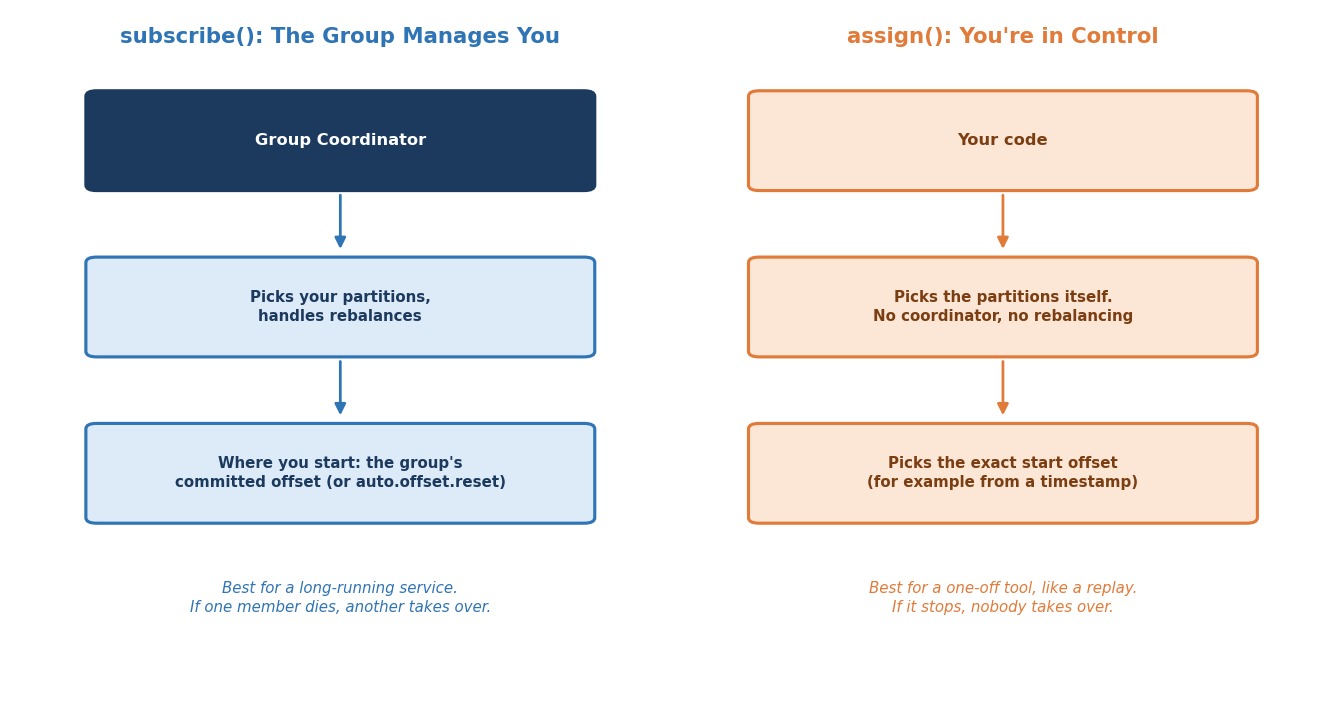 subscribe() vs. assign()
To rewind on purpose, you need the other mode: assign().
With assign(), your own code picks the partitions. And with seek(), it can pick the start offset for each one. The coordinator is not involved, and there is no rebalancing.
What is the trade-off?
You get full control, but you lose the group's help. Nobody rebalances for you, and if your tool stops, nobody takes over its partitions. That is fine for a one-off replay tool. It is not what you want for a long-running production service.
Let's Build It
Here is what we are building: a standalone replay tool. It is deliberately separate from the live recommendation-service group. It rewinds to a number of minutes ago, reprocesses everything from there up to now, and stops.
Create ReplayByTimestamp in the ch05 package. The complete file is at the end of this section.
Step 1: No group.id at All, on Purpose
javaProperties config = new Properties(); config.put(ConsumerConfig.BOOTSTRAP_SERVERS_CONFIG, BOOTSTRAP_SERVERS); config.put(ConsumerConfig.CLIENT_ID_CONFIG, "replay-tool"); config.put(ConsumerConfig.KEY_DESERIALIZER_CLASS_CONFIG, ByteArrayDeserializer.class.getName()); config.put(ConsumerConfig.VALUE_DESERIALIZER_CLASS_CONFIG, ByteArrayDeserializer.class.getName());
Look for what is missing: there is no group.id.
Is that allowed?
Yes. In every consumer so far, group.id was required, because we used subscribe(). A consumer that only uses assign() does not need a group. When there is no group.id, the consumer has no group at all. It never contacts a group coordinator. It cannot join a group, and it cannot commit offsets. Kafka even turns off auto-commit for it by itself. (If you set enable.auto.commit=true without a group.id, the consumer refuses to start.)
Why is this the best choice for a replay tool?
A replay tool should almost never share a group.id with the production consumer it investigates. If it did, the tool could interfere with the live group's committed position. Leaving the group.id out is the strongest protection: the tool simply cannot touch any group's state. It can only read.
What if I need a group anyway?
For example, because you want the tool to save its own progress. Then give it a name of its own, never the production name, and think carefully about commits. If you set a group.id and use assign(), turn off auto-commit, or the consumer will commit positions under that name.
Why do we read raw bytes?
For the same reason as in the offset lecture. The topic still holds the poison pills you injected. A read-only tool must not die on them. So we read bytes, and parse them ourselves, where we can catch the failure.
Step 2: Find the Partitions
javaList<TopicPartition> partitions = consumer.partitionsFor(TOPIC).stream() .map(info -> new TopicPartition(TOPIC, info.partition())) .toList();
We ask the cluster which partitions the topic has, instead of writing 0, 1, 2 in the code. If the topic grows later, the tool still works.
Step 3: Turn a Timestamp Into Real Offsets
javaMap<TopicPartition, Long> timestamps = new HashMap<>(); for (TopicPartition partition : partitions) { timestamps.put(partition, targetTimestampMs); } Map<TopicPartition, OffsetAndTimestamp> resolved = consumer.offsetsForTimes(timestamps);
Do you ever know the offset you want?
Almost never. You do not know "the offset I want is 4,821". What you know is "I want everything from 2 hours ago".
offsetsForTimes() bridges that gap. You give it a map: each partition, with a timestamp. It gives back, for each partition, an OffsetAndTimestamp with the real offset.
Two details matter:
- The offset returned is the earliest offset whose timestamp is at or after the time you asked for.
- If no message is that recent, the value in the map is
null. That simply means "nothing to replay in this partition".
Which timestamp does Kafka compare with?
The timestamp stored on each message. By default, this is the time the producer created the message (the topic setting message.timestamp.type is CreateTime). So "2 hours ago" means when the events happened, as reported by your producers.
The time we compute is in milliseconds since 1970, in UTC, so time zones do not matter here:
javalong minutesAgo = Long.parseLong(args[0]); long targetTimestampMs = Instant.now().minus(Duration.ofMinutes(minutesAgo)).toEpochMilli();
Does the consumer have to be assigned the partitions first?
No. offsetsForTimes() is a question to the cluster. It works before assign().
Step 4: Decide Where the Replay Stops
javaMap<TopicPartition, Long> endOffsets = consumer.endOffsets(partitions);
Why do we need this?
A live topic never ends. New events keep arriving. If our tool just kept reading, it would never finish. So, before we start, we note where each partition ends right now. The end offset is the offset of the next message to be written, so the last existing message is end - 1. Our replay stops at that point. It processes a fixed window: from "N minutes ago" up to "the moment I started".
Now we decide which partitions really have something to replay:
javaMap<TopicPartition, Long> startOffsets = new LinkedHashMap<>(); for (TopicPartition partition : partitions) { OffsetAndTimestamp found = resolved.get(partition); long end = endOffsets.get(partition); if (found == null || found.offset() >= end) { // null means: no message at or after that time. System.out.println(" partition " + partition.partition() + " -> nothing to replay"); } else { System.out.println(" partition " + partition.partition() + " -> offset " + found.offset() + " (up to " + (end - 1) + ")"); startOffsets.put(partition, found.offset()); } }
Step 5: Assign, Then Seek
javaconsumer.assign(startOffsets.keySet()); for (Map.Entry<TopicPartition, Long> start : startOffsets.entrySet()) { consumer.seek(start.getKey(), start.getValue()); }
Two calls, two jobs:
assign()says: "these are my partitions". Only the ones with something to replay.seek()says: "on this partition, the next record I want is at this offset". It overrides the position that the consumer would have used. The nextpoll()starts exactly there.
Is there a trap with seek()?
Only one. You can seek only partitions that are assigned to you. If you call seek() for a partition that is not, you get an IllegalStateException. That is why assign() comes first. You do not have to call poll() in between.
Can I use seek() in a group consumer, too?
Yes, on the partitions the group gave you, for example inside onPartitionsAssigned. It is a powerful tool, and a dangerous one in the middle of normal consumption: it can make you skip or repeat data. In a replay tool, it is exactly right.
Step 6: The Same Poll Loop, With a Stopping Point
javaSet<TopicPartition> pending = new HashSet<>(startOffsets.keySet()); int count = 0; int skipped = 0; while (!pending.isEmpty()) { ConsumerRecords<byte[], byte[]> records = consumer.poll(Duration.ofSeconds(1)); for (ConsumerRecord<byte[], byte[]> record : records) { TopicPartition partition = new TopicPartition(record.topic(), record.partition()); if (!pending.contains(partition) || record.offset() >= endOffsets.get(partition)) { continue; // beyond the window: something newer than when we started } try { ClickEvent event = MAPPER.readValue(record.value(), ClickEvent.class); if (event.userId() == null) { throw new IllegalArgumentException("missing field: user_id"); } System.out.printf("[replay] partition %d offset %d user=%s event=%s%n", record.partition(), record.offset(), event.userId(), event.eventType()); count++; } catch (Exception e) { // A read-only tool must not die on a poison pill. It reports it and goes on. System.out.printf("[replay] partition %d offset %d skipped (%s)%n", record.partition(), record.offset(), e.getClass().getSimpleName()); skipped++; } } // Reached the end that existed when we started? Stop reading that partition. for (TopicPartition partition : new ArrayList<>(pending)) { if (consumer.position(partition) >= endOffsets.get(partition)) { pending.remove(partition); consumer.pause(List.of(partition)); } } }
From here, it is the same poll() loop you have written all chapter. Rewinding only changes where you start, not how you read once you are there. The new part is the stopping rule.
How do we know a partition is finished?
We ask the consumer for its position: the next offset it will read. When the position reaches the end offset we noted at the start, everything in our window has been returned. Then we remove the partition from pending, and pause it, so poll() does not return newer records for it. When pending is empty, the loop ends and the tool prints a summary.
Why check record.offset() >= end as well?
Because a batch can contain records that arrived after we started. Those are not part of our window. We skip them.
The Complete Class
javapackage com.kafkacourse.ch05; import com.fasterxml.jackson.databind.DeserializationFeature; import com.fasterxml.jackson.databind.ObjectMapper; import com.kafkacourse.common.ClickEvent; import org.apache.kafka.clients.consumer.ConsumerConfig; import org.apache.kafka.clients.consumer.ConsumerRecord; import org.apache.kafka.clients.consumer.ConsumerRecords; import org.apache.kafka.clients.consumer.KafkaConsumer; import org.apache.kafka.clients.consumer.OffsetAndTimestamp; import org.apache.kafka.common.TopicPartition; import org.apache.kafka.common.serialization.ByteArrayDeserializer; import java.time.Duration; import java.time.Instant; import java.util.ArrayList; import java.util.HashMap; import java.util.HashSet; import java.util.LinkedHashMap; import java.util.List; import java.util.Map; import java.util.Properties; import java.util.Set; /** * Replay Tool: rewind and reprocess by timestamp. * A standalone tool, separate from the live "recommendation-service" group. * It uses assign() and seek() to pick partitions and start offsets by hand, * and rewinds to a point in time. It has no group at all, so it cannot touch * any group's committed offsets. * * It replays everything from that point up to "now" (the moment you start it), * prints a summary, and stops. * * Program argument: the number of minutes to go back, for example 30. */ public class ReplayByTimestamp { private static final String BOOTSTRAP_SERVERS = "localhost:9092,localhost:9094,localhost:9095"; private static final String TOPIC = "clickstream-events"; private static final ObjectMapper MAPPER = new ObjectMapper() .configure(DeserializationFeature.FAIL_ON_UNKNOWN_PROPERTIES, false); public static void main(String[] args) { if (args.length != 1 || !args[0].matches("\\d+")) { System.out.println("Usage: ReplayByTimestamp <minutes_ago>"); System.out.println("In IntelliJ: Run > Edit Configurations > Program arguments."); return; } long minutesAgo = Long.parseLong(args[0]); // Milliseconds since 1970, in UTC. Time zones do not matter here. long targetTimestampMs = Instant.now().minus(Duration.ofMinutes(minutesAgo)).toEpochMilli(); // Step 1: No group.id on purpose. Without one, this consumer has no group at all: // it cannot join a group and it cannot commit. It can only read. Properties config = new Properties(); config.put(ConsumerConfig.BOOTSTRAP_SERVERS_CONFIG, BOOTSTRAP_SERVERS); config.put(ConsumerConfig.CLIENT_ID_CONFIG, "replay-tool"); config.put(ConsumerConfig.KEY_DESERIALIZER_CLASS_CONFIG, ByteArrayDeserializer.class.getName()); config.put(ConsumerConfig.VALUE_DESERIALIZER_CLASS_CONFIG, ByteArrayDeserializer.class.getName()); try (KafkaConsumer<byte[], byte[]> consumer = new KafkaConsumer<>(config)) { // Step 2: Ask the cluster which partitions the topic has, instead of hard-coding them. List<TopicPartition> partitions = consumer.partitionsFor(TOPIC).stream() .map(info -> new TopicPartition(TOPIC, info.partition())) .toList(); // Step 3: Turn the timestamp into real offsets, one per partition. Map<TopicPartition, Long> timestamps = new HashMap<>(); for (TopicPartition partition : partitions) { timestamps.put(partition, targetTimestampMs); } Map<TopicPartition, OffsetAndTimestamp> resolved = consumer.offsetsForTimes(timestamps); // Step 4: Remember where each partition ends right now. The replay stops there. Map<TopicPartition, Long> endOffsets = consumer.endOffsets(partitions); System.out.println("Replaying from " + minutesAgo + " minutes ago:"); Map<TopicPartition, Long> startOffsets = new LinkedHashMap<>(); for (TopicPartition partition : partitions) { OffsetAndTimestamp found = resolved.get(partition); long end = endOffsets.get(partition); if (found == null || found.offset() >= end) { // null means: no message at or after that time. System.out.println(" partition " + partition.partition() + " -> nothing to replay"); } else { System.out.println(" partition " + partition.partition() + " -> offset " + found.offset() + " (up to " + (end - 1) + ")"); startOffsets.put(partition, found.offset()); } } if (startOffsets.isEmpty()) { System.out.println("\nNothing to replay in that time window."); return; } // Step 5: Assign the partitions ourselves, and move each one to its start offset. consumer.assign(startOffsets.keySet()); for (Map.Entry<TopicPartition, Long> start : startOffsets.entrySet()) { consumer.seek(start.getKey(), start.getValue()); } System.out.println("\nReplaying... press Stop to end early.\n"); // Step 6: The same poll loop, with a stopping point. Set<TopicPartition> pending = new HashSet<>(startOffsets.keySet()); int count = 0; int skipped = 0; while (!pending.isEmpty()) { ConsumerRecords<byte[], byte[]> records = consumer.poll(Duration.ofSeconds(1)); for (ConsumerRecord<byte[], byte[]> record : records) { TopicPartition partition = new TopicPartition(record.topic(), record.partition()); if (!pending.contains(partition) || record.offset() >= endOffsets.get(partition)) { continue; // beyond the window: something newer than when we started } try { ClickEvent event = MAPPER.readValue(record.value(), ClickEvent.class); if (event.userId() == null) { throw new IllegalArgumentException("missing field: user_id"); } System.out.printf("[replay] partition %d offset %d user=%s event=%s%n", record.partition(), record.offset(), event.userId(), event.eventType()); count++; } catch (Exception e) { // A read-only tool must not die on a poison pill. It reports it and goes on. System.out.printf("[replay] partition %d offset %d skipped (%s)%n", record.partition(), record.offset(), e.getClass().getSimpleName()); skipped++; } } // Reached the end that existed when we started? Stop reading that partition. for (TopicPartition partition : new ArrayList<>(pending)) { if (consumer.position(partition) >= endOffsets.get(partition)) { pending.remove(partition); consumer.pause(List.of(partition)); } } } System.out.println("\nReplay complete. " + count + " messages reprocessed, " + skipped + " skipped."); } } }
The tool does not need a shutdown hook. It only reads, so there is nothing to commit and nothing to say goodbye to. If you press Stop half way, the consumer is simply gone.
Notice something familiar in Step 6? Read raw bytes, parse them yourself inside a try, and on failure report and move on instead of dying — that is the exact same shape you wrote in SafeConsumerWithDlq. There, a failure went to a dead-letter topic because the message needed to be handled for good. Here, there is no production state to protect, so a failure just gets logged as skipped and the tool carries on. Same idiom, different ending, because the two tools have different jobs.
Running It
Step 1: Start Your Cluster
powershelldocker compose start docker ps
Step 2: Make Sure There Are Recent Events
The tool replays the last N minutes. If nothing was produced in that time, there is nothing to replay. So, first run ClickstreamProducer from the producer chapter, to have some fresh events.
Step 3: Run the Replay Tool
Run the class once (it prints the usage line), then open Run → Edit Configurations… and set the Program arguments of ReplayByTimestamp to 30. Name the configuration replay-30. Run it.
First you see the starting offset for each partition. Then you see every event from roughly the last 30 minutes, reprocessed on demand. At the end, you see Replay complete with the number of messages. The tool stops by itself.
If your topic still holds the poison pills from the offset lecture, and they fall into your window, you will see two lines that say skipped. The tool reported them and carried on.
What if a partition says "nothing to replay"?
That partition has no message in your time window. It is not an error.
Try two more runs to see the edges. Copy the configuration, and change the argument to 1, and then to 100000:
- With
1, the window is very small, so you will probably see "Nothing to replay". - With
100000, the window is very large, so you replay everything the topic still holds.
Step 4: Confirm the Live Group Is Untouched
This is worth proving to yourself. Open a terminal and enter a broker:
powershelldocker exec -it kafka-1 bash
bashexport PATH=$PATH:/opt/kafka/bin
Run this before and after a replay:
bashkafka-consumer-groups.sh --describe --group recommendation-service --bootstrap-server kafka-1:29092
The committed offsets of recommendation-service do not change, because the replay tool never touched that group.
And the tool did not create any group of its own:
bashkafka-consumer-groups.sh --list --bootstrap-server kafka-1:29092
The list is the same before and after the replay. There is no replay-tool group, because the tool has no group at all.
Step 5: Stop Your Cluster
Leave the broker shell with exit. Then:
powershelldocker compose stop
Where Does the Replayed Data Go?
Our tool only prints each event. A real replay tool would send the reprocessed result somewhere: another table, another topic, a file for analysis.
That is the whole point of this approach. The replay runs beside production. It does not change production's own output. Compare it with the previous lecture. There, the production consumer itself redid the work, and production's real output was corrected. Here, a separate reader gives you a second, independent view, and production is untouched, unless you deliberately build the tool to write there too.
One More Thing: The Reset, in Code
In the last lecture, you reset a group's offsets with the command-line tool. Java can do the same thing in code, with the Admin client you met in the first lecture. This is useful when the reset belongs to an automated runbook, and not to a person at a terminal.
java// Not part of the lab: the same reset as the CLI, done in code Map<TopicPartition, OffsetAndMetadata> newOffsets = new HashMap<>(); resolved.forEach((partition, found) -> { if (found != null) { newOffsets.put(partition, new OffsetAndMetadata(found.offset())); } }); admin.alterConsumerGroupOffsets("recommendation-service", newOffsets).all().get();
The resolved map is exactly what offsetsForTimes() gave us today. So you can combine both ideas: "find the offsets for six hours ago, and move the production group there."
The same rule applies as for the CLI: the group must be inactive. If it still has members subscribed to the topic, Kafka refuses, with a GroupSubscribedToTopicException. And the same advice: look before you leap. Print newOffsets first, the way --dry-run does.
Common Mistakes at This Stage
Sharing the production group.id. The replay tool could disturb the live group's position. Use no group, or a name of its own.
Setting a group.id but leaving auto-commit on. With assign(), the consumer would commit positions under that name. Turn it off.
Hard-coding the number of partitions. Ask the cluster instead. A topic that grows will silently break a hard-coded loop.
Forgetting that null means "nothing there". offsetsForTimes() returns null for a partition without a message at or after your time. Calling found.offset() on it gives a NullPointerException. Check first, as our tool does.
Seeking a partition you have not assigned. It throws an IllegalStateException. assign() first, then seek().
Never stopping. A live topic has no end. Note the end offsets at the start, and stop there.
Trusting the timestamp blindly. It is the time your producers put on the message. If a producer has a wrong clock, the replay window will be wrong too.