Rebalancing — Eager vs. Cooperative-Sticky
The Requirement
Your three-instance consumer group has been running smoothly. Then a routine deploy restarts one instance. This is normal. It happens all the time with rolling deploys and autoscaling.
Now the important question:
What happens to the other two instances, the ones that did not change at all?
Do they keep processing without a break? Or do they pause too?
The honest answer is: it depends on a setting that most people never check.
What a Rebalance Actually Is
You have already seen the pieces. In the last lecture, you watched JoinGroup and SyncGroup run when your group first started. A rebalance is that same protocol, running again.
When does it run again?
Any time the group changes:
| What happened | How Kafka finds out |
|---|---|
| A consumer joins the group | It sends JoinGroup |
A consumer leaves on purpose (close(), or the Stop button in our case) | It tells the coordinator |
| A consumer crashes | Its heartbeats stop. After session.timeout.ms (45 seconds by default), the coordinator removes it |
| A consumer is too slow | The gap between its poll() calls exceeds max.poll.interval.ms (5 minutes by default) |
| The topic changes (for example, new partitions are added) | The group is told about the new metadata |
So what is this lecture really about?
Not when a rebalance happens, but how much of the group it disturbs. There are two styles.
Eager vs. Cooperative-Sticky
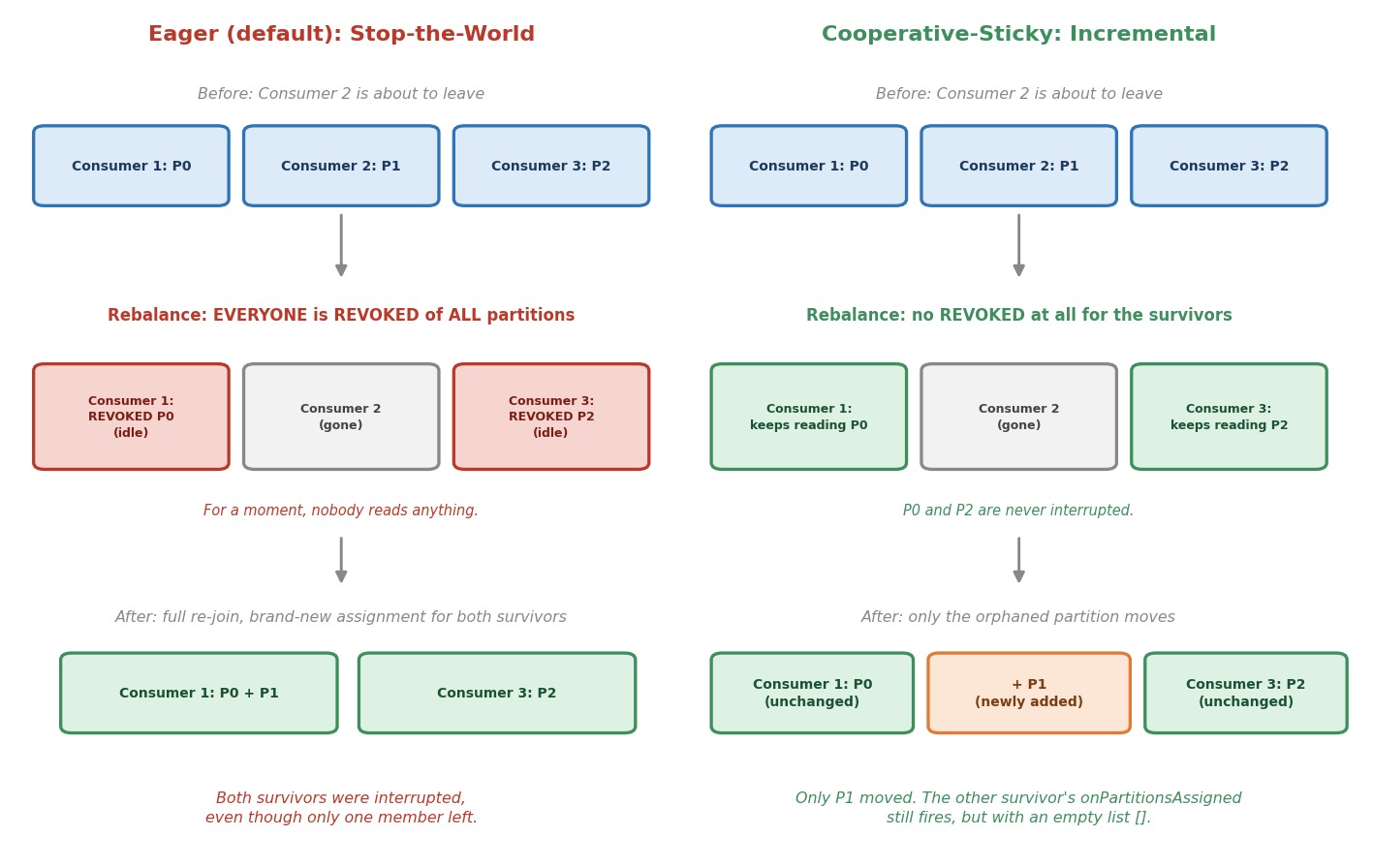 Eager vs. cooperative-sticky rebalancing
Eager is what the Java consumer does by default. With eager, every member of the group gives up all of its partitions first. Only then does the group agree on a new assignment. It does not matter that only one consumer left. Everyone stops reading, waits for a fresh JoinGroup and SyncGroup round, and then picks up a brand-new assignment. For a moment, nobody in the group reads anything. This is why people call it "stop-the-world".
Cooperative-sticky works differently. Only the partitions that must move are taken away. A consumer that keeps its partition never loses it and never stops reading. Only the orphaned partition gets picked up by one of the survivors.
Notice the word sticky. The assignment tries to keep every partition with the consumer that already has it. Fewer moves, less disruption.
Which class is which?
In the last lecture we learned that partition.assignment.strategy is a list of assignor classes. The two we care about today:
| Class | Style |
|---|---|
RangeAssignor | Eager |
CooperativeStickyAssignor | Cooperative |
The default list is [RangeAssignor, CooperativeStickyAssignor]. The group uses the first one that all members support. So, by default, the group is eager. The second entry is there only to make a later switch easy. We come back to that below.
Let's Build It
We extend the last lecture's class with one new idea. You choose the assignment strategy with a program argument, so you can run the same code both ways without editing it.
Create RebalanceConsumer in the ch05 package. The complete file is at the end of this section.
Step 1: Accept a Strategy Argument
javaif (args.length != 2 || !(args[1].equals("eager") || args[1].equals("cooperative-sticky"))) { System.out.println("Usage: RebalanceConsumer <instance-name> [eager|cooperative-sticky]"); System.out.println("In IntelliJ: Run > Edit Configurations > Program arguments."); return; } String instanceName = args[0]; String strategy = args[1];
It is the same idea as the instance name from the last lecture, just with a second argument.
Step 2: Choose the Assignor
java// Step 2: Choose the strategy. We name exactly ONE assignor. // (The default is a list of two: RangeAssignor, then CooperativeStickyAssignor.) String assignor = strategy.equals("cooperative-sticky") ? CooperativeStickyAssignor.class.getName() : RangeAssignor.class.getName(); config.put(ConsumerConfig.PARTITION_ASSIGNMENT_STRATEGY_CONFIG, assignor);
Why do we name exactly one assignor, and not use the default list?
With the default list, every run would be eager, because RangeAssignor comes first. And we want a clear choice: eager means only RangeAssignor, and cooperative-sticky means only CooperativeStickyAssignor.
Step 3: Three Callbacks, With Timestamps
javaconsumer.subscribe(List.of(TOPIC), new ConsumerRebalanceListener() { /** Runs (inside poll) when this instance is handed partitions. */ @Override public void onPartitionsAssigned(Collection<TopicPartition> partitions) { print("ASSIGNED", partitions); } /** Runs (inside poll) when this instance is about to lose partitions. */ @Override public void onPartitionsRevoked(Collection<TopicPartition> partitions) { print("REVOKED", partitions); } /** Runs when the partitions are already gone: the group removed us, for example after a timeout. */ @Override public void onPartitionsLost(Collection<TopicPartition> partitions) { print("LOST", partitions); } private void print(String what, Collection<TopicPartition> partitions) { List<Integer> numbers = partitions.stream().map(TopicPartition::partition).sorted().toList(); System.out.println("\n>>> " + LocalTime.now().format(CLOCK) + " [" + instanceName + "] " + what + " partitions: " + numbers + "\n"); } });
The first two callbacks are the same as before, but now they print the time. That helps you compare what happens in different tabs. There is also a third callback, and it is new.
What is onPartitionsLost, and how is it different from onPartitionsRevoked?
- Revoked is an orderly goodbye. The group asks you to give partitions up, and you still own them while your callback runs. So this is the last chance to save your work, for example to commit offsets.
- Lost means the partitions are already gone. The group has removed you, for example because you were too slow or your heartbeats stopped. Another consumer may already be reading them. Trying to commit offsets now would be wrong.
By default, onPartitionsLost simply calls onPartitionsRevoked. We override it here, only to make the difference visible.
One important detail: what do the lists contain?
- With eager, the lists are the full picture: everything you are given, or everything you lose.
- With cooperative-sticky, the lists are only the changes:
onPartitionsAssignedgets only the newly added partitions, andonPartitionsRevokedgets only the partitions being taken away.
Keep this in mind. It is the key to reading the output in a minute.
The Complete Class
javapackage com.kafkacourse.ch05; import com.kafkacourse.common.ClickEvent; import com.kafkacourse.common.JsonDeserializer; import org.apache.kafka.clients.consumer.ConsumerConfig; import org.apache.kafka.clients.consumer.ConsumerRebalanceListener; import org.apache.kafka.clients.consumer.ConsumerRecord; import org.apache.kafka.clients.consumer.ConsumerRecords; import org.apache.kafka.clients.consumer.CooperativeStickyAssignor; import org.apache.kafka.clients.consumer.KafkaConsumer; import org.apache.kafka.clients.consumer.RangeAssignor; import org.apache.kafka.common.TopicPartition; import org.apache.kafka.common.errors.WakeupException; import org.apache.kafka.common.serialization.StringDeserializer; import java.time.Duration; import java.time.LocalTime; import java.time.format.DateTimeFormatter; import java.util.Collection; import java.util.List; import java.util.Properties; /** * Watching a rebalance happen live. The same consumer as before, with one addition: * you choose the partition assignment strategy with the second program argument, * so you can compare eager (RangeAssignor) with cooperative-sticky. * * Program arguments: instance-1 eager or instance-1 cooperative-sticky * * Every instance in a group must use the SAME strategy while you run this lecture's experiment. */ public class RebalanceConsumer { private static final String BOOTSTRAP_SERVERS = "localhost:9092,localhost:9094,localhost:9095"; private static final String TOPIC = "clickstream-events"; private static final String GROUP_ID = "recommendation-service"; private static final DateTimeFormatter CLOCK = DateTimeFormatter.ofPattern("HH:mm:ss"); public static void main(String[] args) { // Step 1: Accept a strategy argument if (args.length != 2 || !(args[1].equals("eager") || args[1].equals("cooperative-sticky"))) { System.out.println("Usage: RebalanceConsumer <instance-name> [eager|cooperative-sticky]"); System.out.println("In IntelliJ: Run > Edit Configurations > Program arguments."); return; } String instanceName = args[0]; String strategy = args[1]; Properties config = new Properties(); config.put(ConsumerConfig.BOOTSTRAP_SERVERS_CONFIG, BOOTSTRAP_SERVERS); config.put(ConsumerConfig.GROUP_ID_CONFIG, GROUP_ID); config.put(ConsumerConfig.CLIENT_ID_CONFIG, instanceName); config.put(ConsumerConfig.AUTO_OFFSET_RESET_CONFIG, "earliest"); // Step 2: Choose the strategy. We name exactly ONE assignor. // (The default is a list of two: RangeAssignor, then CooperativeStickyAssignor.) String assignor = strategy.equals("cooperative-sticky") ? CooperativeStickyAssignor.class.getName() : RangeAssignor.class.getName(); config.put(ConsumerConfig.PARTITION_ASSIGNMENT_STRATEGY_CONFIG, assignor); KafkaConsumer<String, ClickEvent> consumer = new KafkaConsumer<>( config, new StringDeserializer(), new JsonDeserializer<>(ClickEvent.class)); Thread mainThread = Thread.currentThread(); Runtime.getRuntime().addShutdownHook(new Thread(() -> { System.out.println("\n[" + instanceName + "] stopping..."); consumer.wakeup(); try { mainThread.join(); } catch (InterruptedException e) { Thread.currentThread().interrupt(); } })); try { // Step 3: Timestamps in the callbacks consumer.subscribe(List.of(TOPIC), new ConsumerRebalanceListener() { /** Runs (inside poll) when this instance is handed partitions. */ @Override public void onPartitionsAssigned(Collection<TopicPartition> partitions) { print("ASSIGNED", partitions); } /** Runs (inside poll) when this instance is about to lose partitions. */ @Override public void onPartitionsRevoked(Collection<TopicPartition> partitions) { print("REVOKED", partitions); } /** Runs when the partitions are already gone: the group removed us, for example after a timeout. */ @Override public void onPartitionsLost(Collection<TopicPartition> partitions) { print("LOST", partitions); } private void print(String what, Collection<TopicPartition> partitions) { List<Integer> numbers = partitions.stream().map(TopicPartition::partition).sorted().toList(); System.out.println("\n>>> " + LocalTime.now().format(CLOCK) + " [" + instanceName + "] " + what + " partitions: " + numbers + "\n"); } }); System.out.println("[" + instanceName + "] joining group '" + GROUP_ID + "' using strategy '" + strategy + "'... press Stop to end."); while (true) { ConsumerRecords<String, ClickEvent> records = consumer.poll(Duration.ofSeconds(1)); for (ConsumerRecord<String, ClickEvent> record : records) { ClickEvent event = record.value(); System.out.printf("[%s] partition %d offset %d user=%s event=%s%n", instanceName, record.partition(), record.offset(), event.userId(), event.eventType()); } } } catch (WakeupException e) { // Expected: this is how wakeup() ends a poll() that is waiting. } finally { consumer.close(); } } }
Let's Trigger Both, Live
Step 1: Start Your Cluster
powershelldocker compose start docker ps
Step 2: Round One — Eager
You need three run configurations, like in the last lecture. Run the class once (it prints only the usage line), then open Run → Edit Configurations… and create three configurations from it:
| Name | Program arguments |
|---|---|
rebalance-1 | instance-1 eager |
rebalance-2 | instance-2 eager |
rebalance-3 | instance-3 eager |
Start all three, one after the other. Wait until all three settle, with one ASSIGNED partitions: line each.
Now press the red Stop button in the tab of instance-2 only.
Where should you look?
Do not look at instance-2. When it closes, it prints its own REVOKED line as part of shutting down. That is normal, and it is not the interesting part.
Look at instance-1 and instance-3. Neither of them changed. Yet both of them print >>> REVOKED partitions: with their partition, followed a moment later by a new >>> ASSIGNED partitions:. One of them typically ends up with two partitions. Neither one asked for this. Both got interrupted anyway.
Stop the remaining two with the Stop button.
Step 3: Make Sure the Group Is Empty
Before round two, let's check that the old members are really gone. Open a terminal and enter a broker:
powershelldocker exec -it kafka-1 bash
bashexport PATH=$PATH:/opt/kafka/bin
bashkafka-consumer-groups.sh --describe --group recommendation-service --state --bootstrap-server kafka-1:29092
Wait until the state shows Empty. If it does not yet, wait a few seconds and run it again.
Why does this matter?
Because the members of a group must share at least one strategy. Our round-one members list only RangeAssignor, and our round-two members list only CooperativeStickyAssignor. If an old member were still in the group, a new one could not join. Starting from an empty group avoids any mix.
Step 4: Round Two — Cooperative-Sticky
Same drill, but this time all three instances use the cooperative strategy. Open Run → Edit Configurations…, and change the Program arguments of the three configurations:
| Name | Program arguments |
|---|---|
rebalance-1 | instance-1 cooperative-sticky |
rebalance-2 | instance-2 cooperative-sticky |
rebalance-3 | instance-3 cooperative-sticky |
Start all three. Once they settle, press Stop on instance-2 again. Again, ignore instance-2's own tab. Watch instance-1 and instance-3.
What should you see this time?
- No
REVOKEDline on either survivor. Nothing was taken away from them. - One survivor prints
ASSIGNED partitions: [1]. This is the orphaned partition that moved to it. Only the new partition is listed, not its old one. That is the "only the changes" rule from before. - The other survivor prints
ASSIGNED partitions: [], an empty list. Its callback still fires, but there is nothing new to add. It keeps reading its own partition the whole time.
Which survivor takes the orphaned partition?
It can be either one. The two survivors are equally loaded, so the choice can differ from run to run. That is fine.
So the survivors are never interrupted. Compare this with round one, where both had to stop.
Output / NoteOptional experiment: Run
ClickstreamProducerin another tab while you do this. In round one you can see the consumers go quiet for a moment. In round two, the survivors keep printing events without a break.
Step 5: What About a Crash?
So far we stopped instance-2 with the Stop button. That is a clean exit. The consumer runs close(), tells the group it is leaving, and the rebalance starts right away.
A real crash is different. A crashed consumer tells nobody. The group only finds out when its heartbeats stop, and that takes up to session.timeout.ms (45 seconds by default). During those 45 seconds, the crashed consumer's partitions are simply not read.
Let's see it. Start all three instances again, with cooperative-sticky. Then, in a terminal on your machine, list the running Java programs:
powershelljps -m
Find the line that ends with instance-2 cooperative-sticky. The number at the start of the line is its process ID. Now kill that process hard, with no goodbye:
powershelltaskkill /F /PID <the number>
(On macOS or Linux, use kill -9 <the number>.)
Note the time. Then watch the tabs of instance-1 and instance-3. For a long moment, nothing happens. Then, after up to 45 seconds, one of them prints ASSIGNED partitions: [1]. The timestamp in the line shows exactly how long the partition was left alone.
That is the price of a crash. And it is one more reason to call close(), to keep an eye on lag, and, for some systems, to look at the setting in the last section of this lecture.
Step 6: Optional — A Consumer That Is Too Slow
There is one more way to lose partitions: being too slow. Let's make it happen quickly, by lowering the limit. In RebalanceConsumer, add this line to the configuration:
java// Not part of the class: an experiment config.put(ConsumerConfig.MAX_POLL_INTERVAL_MS_CONFIG, 10000); // only 10 seconds between polls
And, inside the for loop, after the printf, add a line that makes the consumer stuck for a while. The method must then say throws InterruptedException:
java// Not part of the class: an experiment Thread.sleep(15_000); // "slow work": 15 seconds
Run one instance with cooperative-sticky, and produce a few events. After the first record, your loop stops calling poll() for 15 seconds. The limit is 10. So the consumer decides that it is stuck, and leaves the group. When the sleep ends and poll() runs again, the consumer notices that it is no longer a member. You should see a LOST partitions: line, and then a new ASSIGNED.
That is onPartitionsLost in action. Remove both lines again when you are done.
Step 7: Stop Your Cluster
powershelldocker compose stop
Why This Isn't Just a Performance Detail
On a small local cluster with test data, a short eager pause is harmless. In production, at real volume, that pause is exactly when consumer lag spikes.
If your group does something latency-sensitive, like our recommendation engine, then a stop-the-world rebalance caused by something as routine as a rolling deploy becomes a repeating, self-inflicted slowdown. With eager, a rolling deploy across many instances can trigger a whole series of such pauses, one after another.
Which Should You Actually Use?
For almost any real production group, default to cooperative-sticky. The cost of eager grows exactly as your system becomes more important: more instances, more frequent deploys, tighter latency needs. The Java consumer does not make it the first choice by default, so you opt in on purpose. There are three points you should know, not as trivia, but because they cause real incidents.
1. All members of a group must share at least one strategy.
Each member offers its list of strategies. The group uses one that everybody supports. If two members have lists with nothing in common, for example one has only RangeAssignor and the other only CooperativeStickyAssignor, the second one cannot join, and it gets an InconsistentGroupProtocolException. That is why we emptied the group between our two rounds.
2. Migrating a live group is easy in Java, if you use the default list.
Remember the default: [RangeAssignor, CooperativeStickyAssignor]. The Kafka documentation describes it this way: the group uses RangeAssignor by default, but it allows an upgrade to cooperative rebalancing with a single rolling bounce that removes RangeAssignor from the list. You restart the instances one at a time, each with only CooperativeStickyAssignor. The two lists always share one strategy, so the group never breaks. This is one of the biggest practical advantages of the Java consumer. And it is a reason not to list a single assignor in production code, unless you mean it.
3. Your own rebalance code must fit the strategy.
In this course, we only print inside the callbacks. But in real code, listeners often do work, for example keeping per-partition state, or committing offsets for the partitions that go away. The rule is: with eager, the lists are everything, so you can clear all your state in onPartitionsRevoked and rebuild it in onPartitionsAssigned. With cooperative-sticky, the lists are only the changes. If you clear everything on every callback, you throw away the state of partitions you never lost. Touch only the partitions in the list.
When is eager still fine?
Only when you have a hard compatibility limit, for example another client in the same group that does not support cooperative-sticky. Without such a limit, there is no real reason to stay on eager.
One More Tool: Static Membership
Look again at the story of this lecture. A routine restart of one instance causes a rebalance, twice: once when it leaves, and once when it comes back. Even with cooperative-sticky, partitions move away and come back.
Kafka has a way to say: "this restart is nothing special, please wait for me." It is called static membership. You give every instance a permanent name, with the setting group.instance.id:
java// Not part of the class: just to show the idea config.put(ConsumerConfig.GROUP_INSTANCE_ID_CONFIG, "recommendation-service-pod-1");
The documentation says: a consumer with this setting is a static member. Only one instance with this ID may be in the group at a time. Combined with a larger session.timeout.ms, it avoids rebalances caused by short interruptions, such as a process restart. If the instance comes back with the same ID within the session timeout, it simply gets its old partitions back. No rebalance for anyone.
What is the price?
If the instance never comes back, its partitions are unread until the session timeout runs out, just like a crash. So you pick a session timeout that is longer than a normal restart, but not so long that a real failure goes unnoticed. It is a trade-off, and you now know how to see it, with the timestamps in your callbacks.
Optional: See a Restart Cause Nothing
The rest of this chapter has you trigger everything live, so let's do the same here instead of taking it on faith.
In RebalanceConsumer, add the static member ID and a longer session timeout, alongside the config you already set:
java// Not part of the class: an experiment config.put(ConsumerConfig.GROUP_INSTANCE_ID_CONFIG, instanceName + "-static"); config.put(ConsumerConfig.SESSION_TIMEOUT_MS_CONFIG, 60000); // give a restart up to 60 seconds
Start all three instances again with cooperative-sticky. Once they settle, press Stop on instance-2, and start that same member-2 configuration again within a few seconds, before the session timeout runs out.
What should you see?
- Instance-1 and instance-3 print nothing at all. No
REVOKED, noASSIGNED. They never found out anything changed. - Instance-2 comes back and gets the same partition it had before, without a
JoinGroupround costing anyone else a pause.
Compare that with Step 2 of this lecture, where stopping instance-2 made the two survivors print REVOKED and ASSIGNED even on cooperative-sticky. That is the difference static membership buys you: a planned restart stops looking like a membership change at all, as long as the instance returns inside the session timeout.
Remove both lines again when you are done, so the group goes back to ordinary (non-static) membership for the next lecture.
Common Mistakes at This Stage
Assuming the default is cooperative. In the Java consumer, the default list starts with RangeAssignor. The group is eager until you change it.
Giving two members lists with nothing in common. The second one cannot join.
Looking at the wrong tab. The instance you stop prints its own REVOKED. The lesson is in the other tabs.
Expecting silence from an unaffected cooperative consumer. It may still print an empty ASSIGNED partitions: []. That is not a problem. It means there was nothing to add.
Clearing all state in every callback under cooperative-sticky. The lists contain only the changes. Touch only those partitions.
Committing offsets in onPartitionsLost. The partitions are already gone. Another consumer may own them. Do not try.