Log Segments, Retention & Compaction
Your payments cluster is now durable. Every partition is replicated, with a leader and followers, honestly tracked through the ISR. Broker failures won't lose data anymore.
But there's a question we've been quietly ignoring: this system runs 24 hours a day, every day, forever. Thousands of payment events, every second, continuously written to disk. What happens to Partition 0's log after a month? After a year? Disks aren't infinite.
The Problem: One Giant, Ever-Growing File
Imagine Kafka stored each partition as a single, unbroken file, forever appending to it. Two problems show up almost immediately.
First, that file never stops growing — nothing is removing anything, so disk usage climbs endlessly. Second, even if you wanted to delete old data to free up space, you'd be stuck opening a single massive file and surgically removing old records from somewhere in the middle, while new writes are still landing at the end. That's slow, risky, and exactly the kind of operation you don't want happening on a live production system handling payments.
The Fix: Split the Log Into Segments
Kafka's actual approach: don't store a partition as one file. Split it into segments — smaller files, created one after another as data comes in. The newest one, still accepting writes, is the active segment. Once it hits a certain size or age, Kafka seals it and starts a fresh active segment. The sealed ones just sit there, holding their share of history.
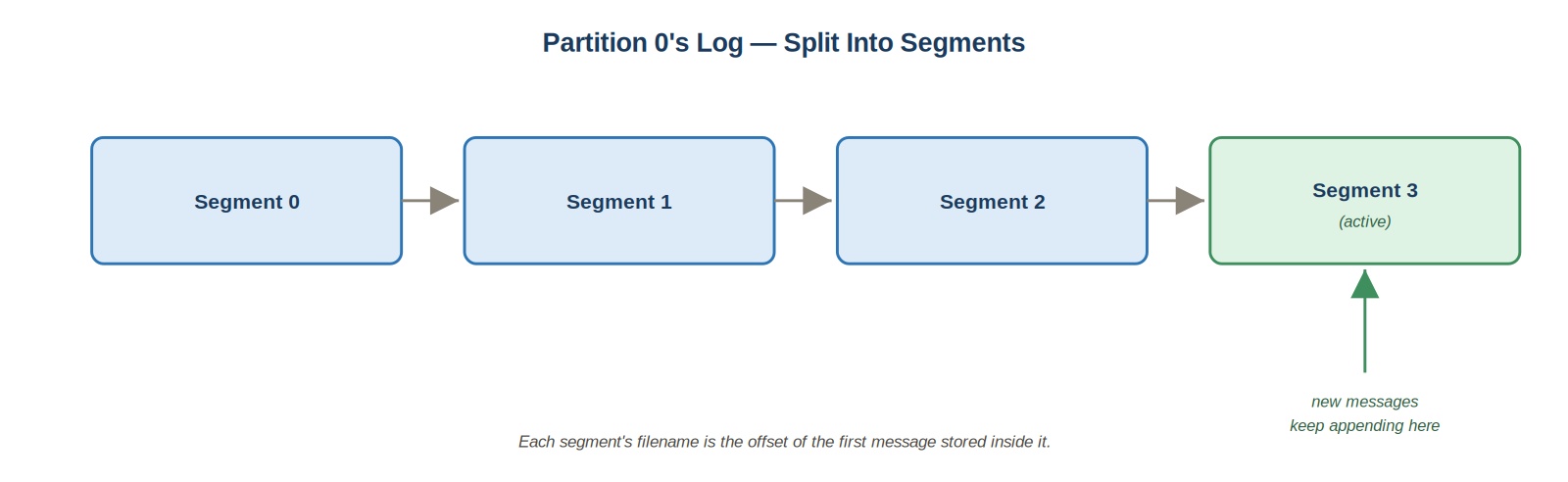 Partition 0's log split into segments
Notice what this buys you: deleting old data no longer means editing a file. It means deleting an entire sealed segment file outright — instant, and completely safe, since the active segment being written to right now is untouched.
That's the whole idea of a segment: a manageable, individually-deletable slice of one partition's log. What actually decides when a sealed segment gets deleted is a separate question — and it's the one we look at next.
Now the Disk Still Fills Up — Enter Retention
Segments solve the editing problem, but not the forever-growing problem on their own. Something still has to decide when old segments actually get deleted.
Kafka gives you two fundamentally different ways to make that decision — one based on how old data is, and one based on whether it's still needed, regardless of age.
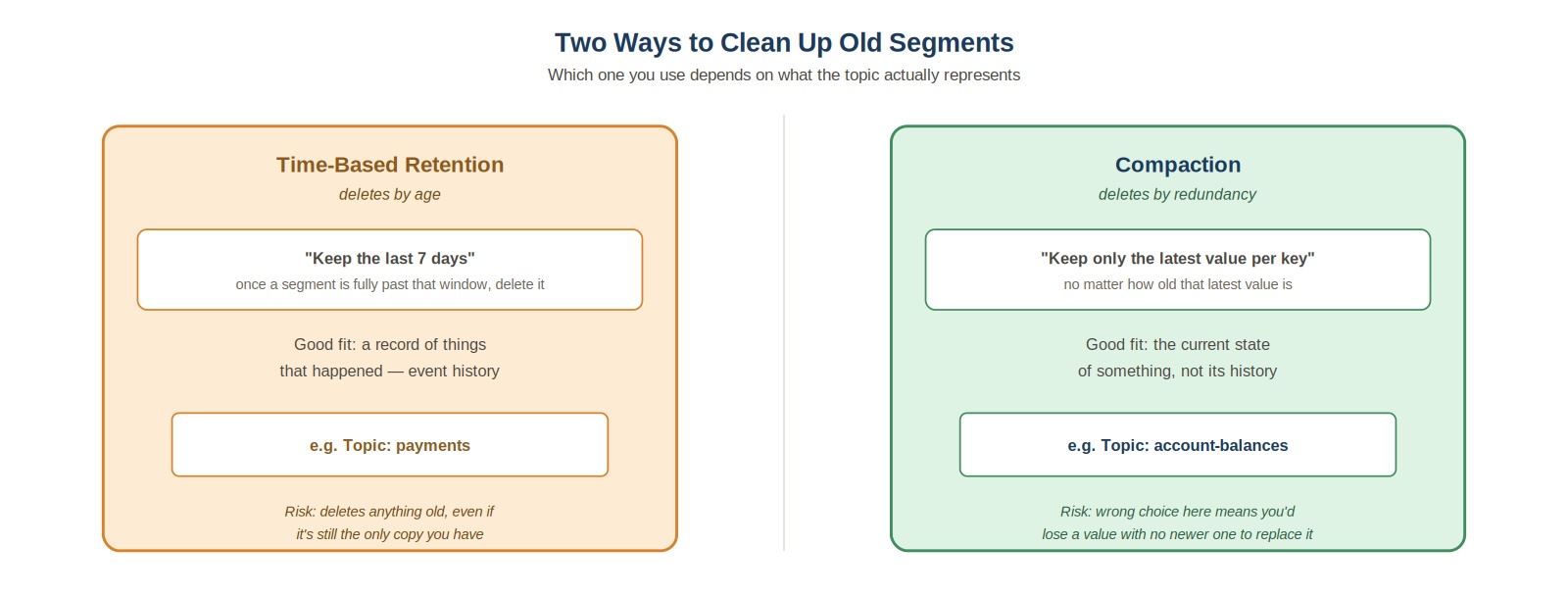 Two ways to clean up old segments
Which one you reach for depends entirely on what the topic actually represents. Let's look at both.
Time-Based Retention
This is the more common approach, and it's what most people mean by default when they say "Kafka retention." You set a time limit — commonly something like "keep 7 days of data." Once every message in a sealed segment is older than that window, Kafka deletes the whole file.
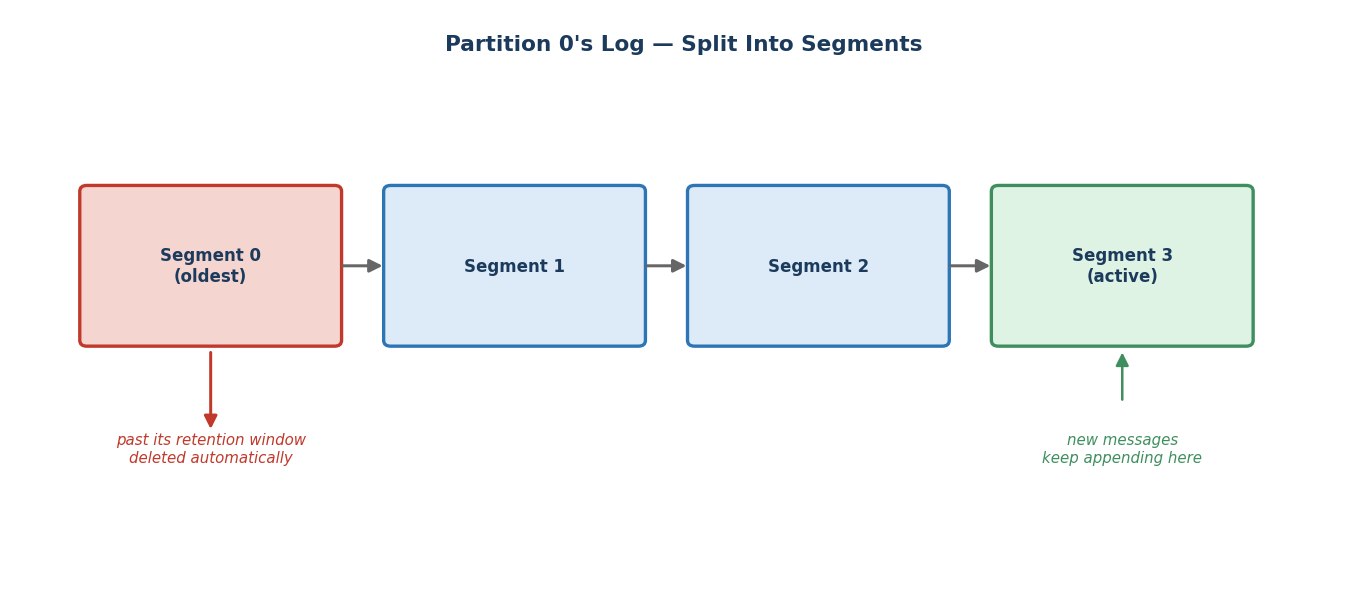 Log segments and retention
For a topic like payments, this works well. This is a deliberate design choice worth internalizing: Kafka is not meant to be a permanent archive. Once payment events have flowed through to the data warehouse, the fraud detection system, and anywhere else that needs them, Kafka doesn't need to keep holding onto them forever — the warehouse is the long-term home for that history. Kafka's job is reliable, fast transport for a rolling recent window, not eternal storage.
Compaction
But not every topic wants to be cleaned up this way. Suppose this same company also has a topic called account-balances — every time a customer's balance changes, a new event is written, keyed by customer ID: user123 → $340.
This topic doesn't represent a history of things that happened, like payments does. It represents current state — and current state creates a real problem for time-based retention. If your retention window deletes anything older than 7 days, and a customer's balance hasn't changed in 8 days, you'd delete their only known balance — the one piece of information you still actually need, gone, purely because of its age, not because it was outdated.
Time-based retention is the wrong tool here. What you actually want is: for each key, keep only its latest value, regardless of how old it is. This is exactly what log compaction does.
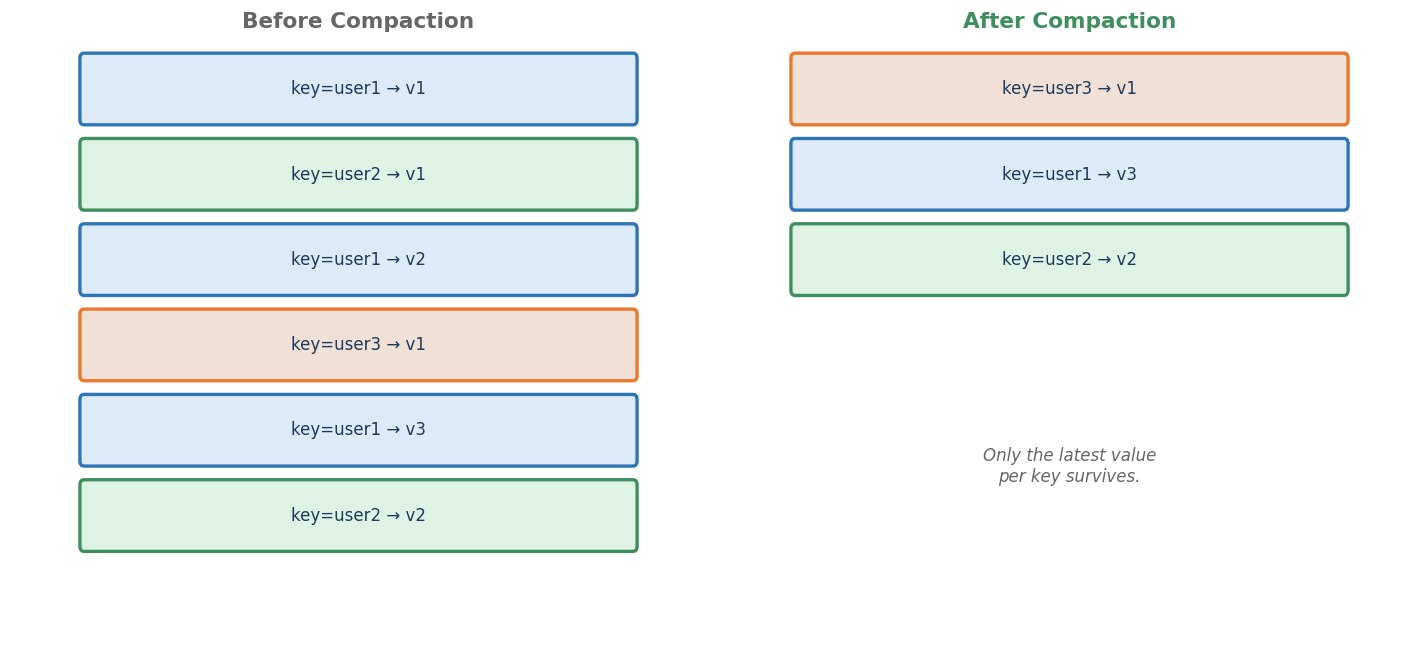 Log compaction before and after
Look at the difference in approach. Retention asks "how old is this segment?" and deletes by age. Compaction asks "is this the latest value for this key?" and deletes by redundancy — an old balance for user1 gets removed once a newer one exists, no matter how recently it was written. You'll use this exact pattern later in this course when we build stateful stream processing.
Hands-On: Inspecting Real Segments on Disk
You already created payments a couple of lectures back, with default settings. Those defaults are exactly what you'd use in production — but they also mean segment files stay large (roughly a gigabyte before Kafka seals one), so you'd need to send an enormous amount of test data before you'd ever see more than one. Let's reset payments with much smaller segments, purely so we can watch this happen live, in real time.
Step 1: Start Your Cluster
bashdocker compose start docker ps
Step 2: Open a Terminal Inside Broker 1
bashdocker exec -it kafka-1 bash export PATH=$PATH:/opt/kafka/bin
Step 3: Reset payments With Small Segments
First, remove the version you created earlier:
bashkafka-topics.sh --delete --topic payments --bootstrap-server kafka-1:29092
Output / NoteIf this says the topic doesn't exist, that's fine — it just means there's nothing to remove right now. Skip straight to the create command below.
Now recreate it — same 3 partitions, same replication factor 3 — but this time, deliberately telling Kafka to seal a new segment every half second, regardless of size:
bashkafka-topics.sh --create \ --topic payments \ --bootstrap-server kafka-1:29092 \ --partitions 3 \ --replication-factor 3 \ --config segment.ms=500
In real production, segment.ms is left at its default (7 days) — we're only shrinking it here so this lab doesn't require sending gigabytes of test data or waiting a real week to see it happen.
Output / NoteNote: You might expect to shrink
segment.bytesinstead, to force small segments by size. On current Kafka versions,segment.byteshas a hard minimum of 1,048,576 (1 MB) — anything smaller is rejected outright. That's far too much test data for a quick demo, so we usesegment.msinstead, and roll segments by time.
While we're here, let's check in on replication too. Run:
bashkafka-topics.sh --describe --topic payments --bootstrap-server kafka-1:29092
You'll see three lines, one per partition. Each line shows a Leader — the broker currently handling reads and writes for that partition — a Replicas list — every broker that's supposed to hold a copy — and an Isr list — the brokers that are actually caught up right now. Since we just recreated this topic fresh, Replicas and Isr should match exactly, all three brokers, for every partition. This is the same leader, follower, and ISR picture from the last lecture — except this time, it's your own cluster's real output, not a diagram.
Step 4: Send Enough Messages to Roll Multiple Segments
This time, the messages need to be spread out over a few real seconds — not sent all at once — so Kafka's half-second timer actually has time to roll over more than once while you're producing. Send 100 messages, with a short pause between each:
bash( for i in $(seq 1 100); do echo "payment-event-$i-amount-$((RANDOM % 500))"; sleep 0.1; done ) | \ kafka-console-producer.sh --topic payments --bootstrap-server kafka-1:29092
This takes about 10 seconds. With segment.ms=500, that's enough real time for Kafka to seal several segments along the way and keep starting fresh ones.
Step 5: Go Look at the Actual Segment Files
Every broker holds a full replica of every partition now — that's replication factor 3 at work. So right here on Broker 1, you can see all three partitions' data:
bashls /var/lib/kafka/data
You'll see folders named payments-0, payments-1, and payments-2. Pick one and look inside:
bashls -la /var/lib/kafka/data/payments-0
You should see several files, in sets of three, named with long numbers — something like:
00000000000000000000.log
00000000000000000000.index
00000000000000000000.timeindex
00000000000000000037.log
00000000000000000037.index
00000000000000000037.timeindex
That naming isn't random. Each .log file's name is the offset of the first message stored in it. The first segment starts at offset 0. The next segment's name tells you exactly which offset it picked up from — proof that this partition really is one continuous, ordered log, just split into pieces on disk, exactly as described earlier in this lecture.
The .index and .timeindex files are small helper files Kafka uses to find a specific offset or timestamp quickly, without scanning the whole segment. We won't go deeper into these in this course — just know they exist alongside every segment.
Output / NoteHeads up: because we set
segment.ms=500for this demo, a segment only rolls when a new message actually arrives and Kafka checks whether enough time has passed since that segment opened — there's no background timer rolling segments while the topic sits idle. While the loop in Step 4 is still running, new messages keep arriving every 100ms, so segments keep rolling and the exact filenames you see can shift from one moment to the next. Once the loop finishes, the layout stops changing — so it's worth running the commands below promptly, right after production completes, rather than in the middle of it.
Step 6: Read a Segment's Actual Contents
Let's prove these files really do hold your messages. Kafka ships a tool that can print a segment's contents in a human-readable form. Rather than typing one specific filename — which may no longer exist by the time you run this, since segments keep rolling — dump every .log file currently in the folder:
bashfor f in /var/lib/kafka/data/payments-0/*.log; do echo "== $f ==" kafka-dump-log.sh --files "$f" --print-data-log done
You'll see each record printed with its offset, timestamp, and payload — the same offsets from earlier in this chapter, now sitting right in front of you as real bytes on disk. Some segments may print nothing at all under their header line — that's fine, it just means that particular segment sealed before any message happened to land in it, which can easily happen with a rolling window this fast.
Step 7: Stop Your Cluster
bashdocker compose stop
Checklist
- Reset
paymentswith 3 partitions, replication factor 3, and fast time-based segment rolling - Ran
--describeand identified the leader, replicas, and ISR for each partition - Sent 100 messages using the loop-into-producer pattern
- Saw multiple
.logsegment files insidepayments-0 - Understood that each segment's filename is its starting offset
- Used
kafka-dump-log.shto read a segment's actual contents
You've now seen, physically, exactly what this lecture described — a topic's log, genuinely split into segments, sitting right there on disk.