Kafka Core Concepts: Producer, Broker & Consumer
Think about how YouTube works.
A creator uploads a video. YouTube stores it on its servers, safely, exactly as uploaded. Anyone who wants to watch it — you, your neighbor, someone across the world — can open it and watch, whenever they want. Next week, next month, three years from now, the video is still sitting there, ready.
The creator never sends the video directly to each viewer. YouTube doesn't chase down viewers to push the video at them. Each side just does its own job, and YouTube itself sits in between, doing the real work: storing the video reliably, and serving it to anyone who comes looking, on their own schedule.
Kafka works on almost exactly this idea. Let's name the three roles properly, and then walk through what each one actually does.
Look at the diagram below. A producer writes into a broker, and a broker serves out to consumers — and notice the broker doesn't just pass events straight through. It stores them, in order, so that different consumers can come read them whenever they're ready.
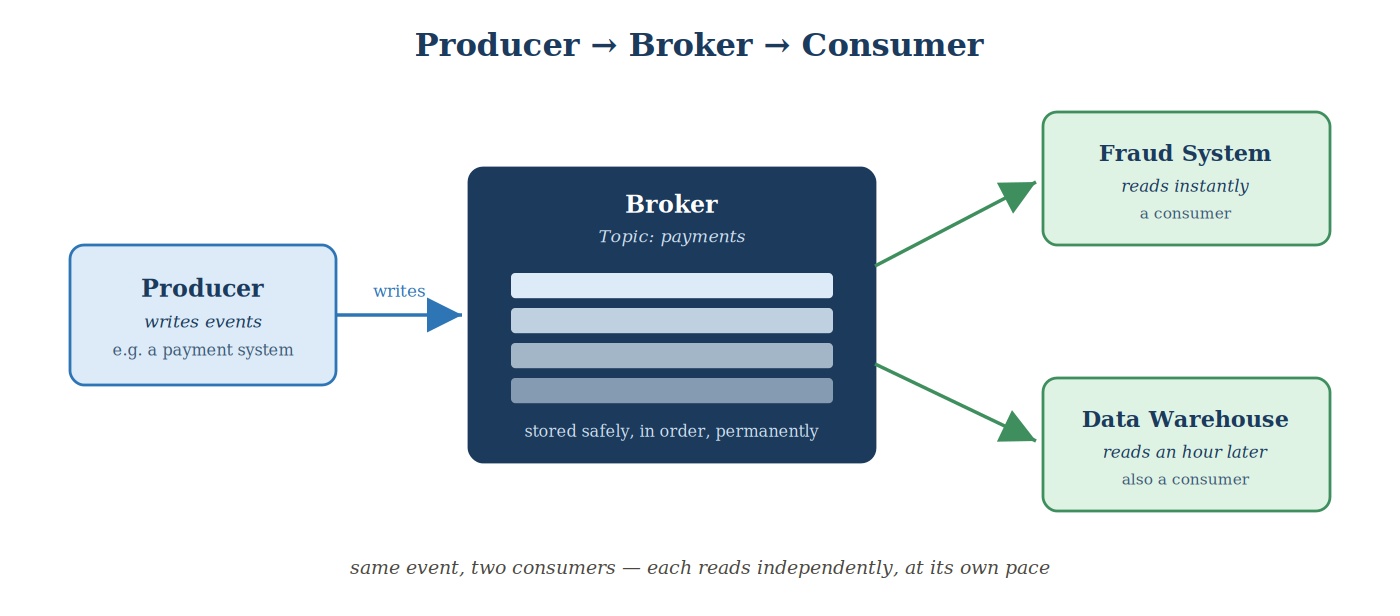 Producer, Broker, Consumer core flow
Producer: The One Who Writes
A producer is any application or system that sends data into Kafka — the "creator uploading a video" in our analogy. It could be:
- A website sending "user clicked this button"
- A payment system sending "transaction completed"
- A database sending "this row just changed" — a pattern called CDC, which we'll cover properly a bit later in this course
The producer's job ends the moment it hands the event to Kafka. It doesn't need to know who's going to read it, or when, or how many readers there will be. It just writes, and moves on — exactly like a creator who uploads a video and logs off, with no idea who'll watch it or when.
Broker: The One Who Stores
A broker is a Kafka server. This is YouTube itself in our analogy — the thing that actually stores the video and serves it out. A broker receives events from producers and stores them safely, in order, exactly as they arrived.
A real Kafka setup doesn't use just one broker. It uses several, working together as a cluster. Multiple brokers working together means two things: the system can handle far more data than one machine ever could, and if one broker goes down, the others keep things running.
Events aren't just dumped into one giant pile on the broker, either. They're organized into named categories called topics — think of a topic as a specific channel on YouTube. A payment system would write to a topic like payments, not mix its events in with, say, website clicks, just like a cooking channel doesn't upload gaming videos. For now, just hold onto this: producers write to a topic, and that's where the broker stores it. We'll go much deeper into how topics actually work later in this course.
Consumer: The One Who Reads
A consumer is any application that reads data from Kafka — the "viewer watching the video" in our analogy. Going back to systems we've already talked about — the fraud detection system, the recommendation engine, the data warehouse — each of these is a consumer, reading from whichever topic has the data it cares about.
Here's the important part: a consumer reading an event doesn't remove it or use it up. Just like a YouTube video doesn't disappear once one person watches it, the same event in Kafka can be read by many different consumers, independently, each at their own pace. Look again at the diagram above — the fraud system reads a payment event the instant it arrives, while the data warehouse might read that exact same event an hour later. Both are completely fine. Kafka doesn't care who's "first," exactly like YouTube doesn't care whether you watch a video the second it's uploaded or three weeks later.
Putting It Together
So the full picture is simple:
Producer writes → Broker stores → Consumer reads.
That's it. That's the entire foundation Kafka is built on. Everything else — partitions, replication, consumer groups, exactly-once delivery — is really just answering one question in more and more detail: how does Kafka do this reliably, at massive scale, without losing data?
That question is exactly where we're headed next.
How Kafka Scales
Let's stretch this picture until it almost breaks.
Imagine a large e-commerce company during a big sale day. Every click, every add-to-cart, every payment, across millions of shoppers, all happening at once. On the producing side, that could easily mean thousands of servers writing events, every second. On the reading side, you might have hundreds of different consumers — fraud checks, recommendation engines, live dashboards, warehouse pipelines — all needing that same data, simultaneously.
If Kafka only had one broker and one line of storage, this would collapse in minutes. Look at the numbers in the picture below: thousands of producers on one side, a cluster of brokers in the middle, hundreds of consumers on the other side, all running at once. So how does it actually hold up?
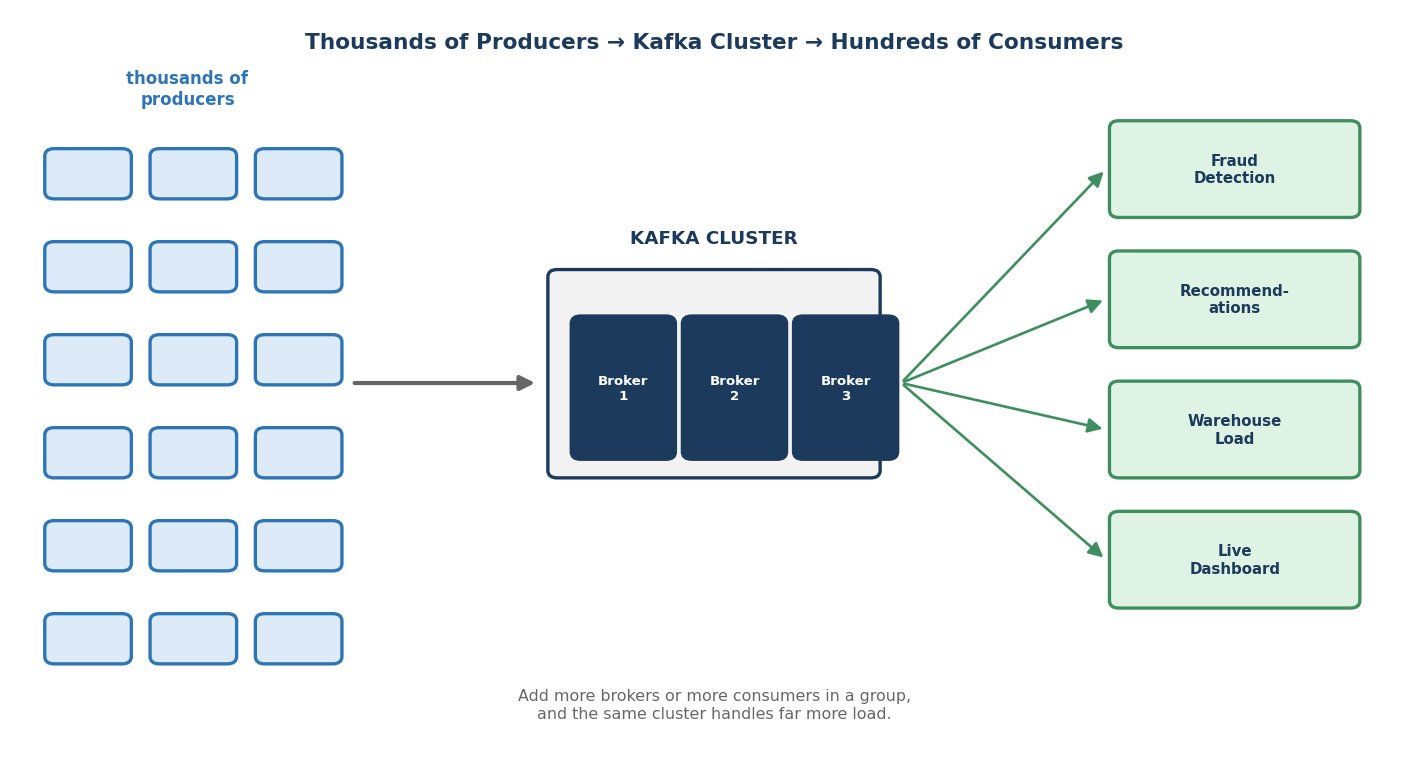 Thousands of producers, a Kafka cluster, hundreds of consumers
The answer comes down to two separate scaling tricks — one for writing, one for reading.
Scaling the Writing Side: Spreading Producers Across Brokers
Remember from earlier in this lecture — Kafka doesn't run on one broker, it runs on a cluster of brokers working together.
A topic isn't stored as one single, giant line of data on one machine. It's split into partitions — smaller, independent slices of the topic — and those partitions are spread across the different brokers in the cluster. So instead of every producer writing to one broker and bottlenecking there, different producers end up writing to different partitions, on different brokers, all at the same time.
This is the first big scaling trick: more brokers and more partitions means more parallel writing capacity.
Scaling the Reading Side: Consumer Groups Sharing the Load
Now flip to the reading side. If hundreds of consumers all needed to read every single event on their own, that would be wasteful and slow.
Instead, Kafka lets consumers organize into consumer groups. Think of it like a group of warehouse workers unloading a truck together — instead of every worker trying to unload every box, they naturally split the work: worker one takes these boxes, worker two takes those. Nobody duplicates effort, and the truck gets unloaded far faster than if one worker did it alone.
That's exactly what a consumer group does with a topic's partitions. Different consumers in the same group take responsibility for different partitions, and together, they process the full topic's worth of data much faster than any single consumer could alone. Add more consumers to the group, and — up to a point — you can process even more data in parallel.
The diagram below shows both levers side by side: on the write side, three producers, three partitions, three brokers, all working in parallel. On the read side, a consumer group with three consumers, each one responsible for its own partition — like each warehouse worker taking their own share of the truck.
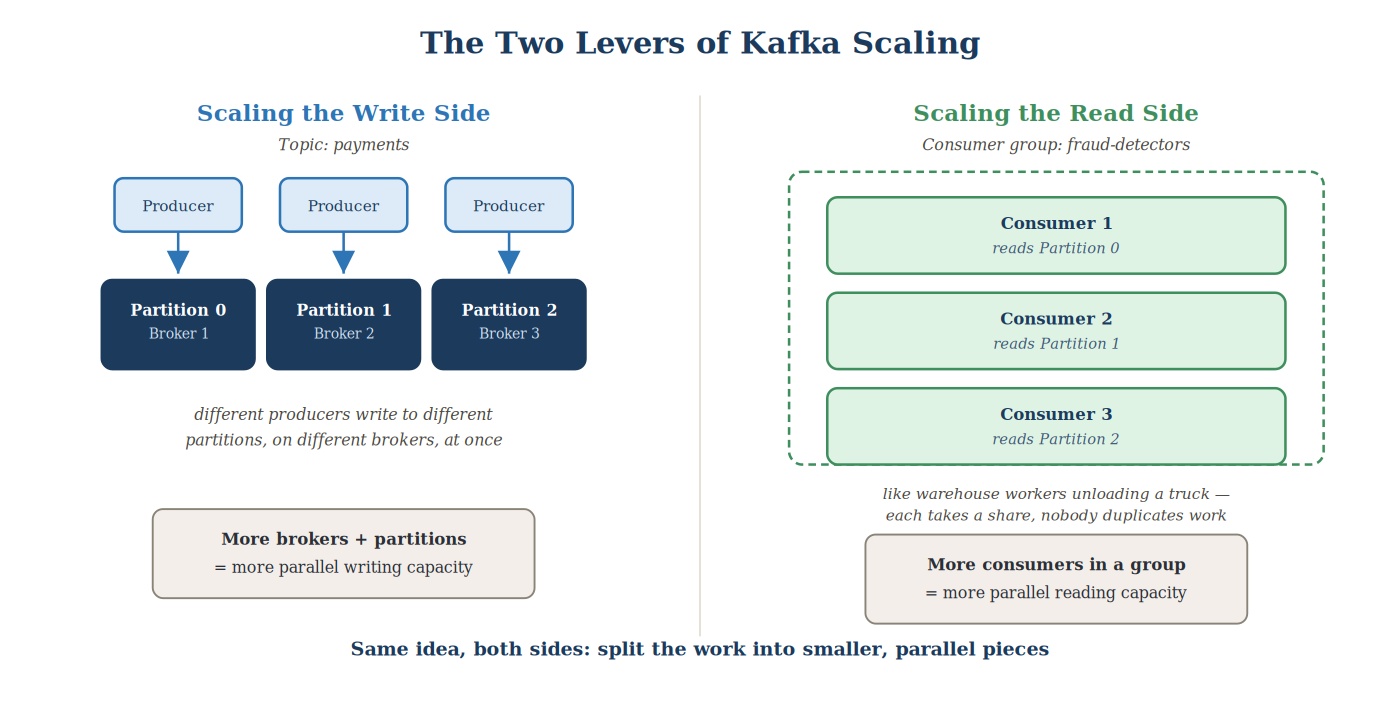 The two levers of Kafka scaling
The Two Levers, Together
So when you zoom out, Kafka's scaling story really comes down to two levers, working on either side of the broker:
- More brokers and partitions → handle more incoming data from producers.
- More consumers in a group → process outgoing data faster on the reading side.
This is why a single Kafka cluster can realistically support thousands of producers and hundreds of consumers without falling over. It's not magic — it's just splitting the work into smaller, parallel pieces, on both ends.
Quick Recap
- Kafka has three core roles: a producer writes events, a broker stores them safely and in order, and a consumer reads them.
- The producer doesn't know or care who reads its events. The consumer doesn't remove or use up an event by reading it — many consumers can read the same event independently, each at its own pace.
- Brokers work together as a cluster, and events are organized into named topics.
- A topic is split into partitions, spread across brokers — this is what lets many producers write in parallel.
- Consumers organize into consumer groups, splitting a topic's partitions between them — this is what lets many consumers read in parallel.
- Two levers, one on each side of the broker, are what let a single Kafka cluster support thousands of producers and hundreds of consumers at once.