Surviving Failure: Leader Election vs. Follower Loss
This is the lab that makes the last two lectures real. You've read about controllers, Raft, leaders, followers, and the ISR. Today you're going to kill brokers yourself — twice, in two different ways — and watch the cluster respond differently each time, live, in your own terminal.
You'll need three terminal windows open for this lab. We'll call them Terminal 1, Terminal 2, and Terminal 3 throughout — keep track of which is which. This setup stays the same for both experiments, so you'll only need to do it once.
Setup: Start the Cluster and Identify the Leader
In any terminal:
bashdocker compose start docker ps
Confirm all three brokers are Up.
Terminal 1 — your control terminal.
bashdocker exec -it kafka-1 bash export PATH=$PATH:/opt/kafka/bin
Check who currently leads each partition of payments:
bashkafka-topics.sh --describe --topic payments --bootstrap-server kafka-1:29092
⚠️ Important: Broker assignment can vary depending on your cluster's history. Look at your own output and find the line for Partition 1. Note which broker number is listed as Leader, and note a different broker number listed as a follower. The rest of this lab assumes the leader is Broker 2 and a follower is Broker 3 — if your output shows different numbers, substitute them wherever you see "Broker 2" and "Broker 3" below.
Terminal 2 — a continuous producer. Open a second terminal window and get into the same container:
bashdocker exec -it kafka-1 bash export PATH=$PATH:/opt/kafka/bin
Start a producer that keeps sending messages, one every fifth of a second, forever, until you stop it. This time, every message carries the same key — c. With 3 partitions, that specific key deterministically lands on Partition 1 every time, so you know for certain the traffic you're watching is actually hitting the partition you're about to kill, not just some of the traffic that happens to land there:
bash( i=1; while true; do echo "c:payment-event-$i"; i=$((i+1)); sleep 0.2; done ) | \ kafka-console-producer.sh --topic payments --bootstrap-server kafka-1:29092 \ --reader-property "parse.key=true" \ --reader-property "key.separator=:"
Leave this running for the entire lab. This is your "mid-write" traffic — real, ongoing writes, exactly like a live production system, all deliberately aimed at Partition 1.
Terminal 3 — your host terminal. Open a third terminal — but this one stays on your actual machine (PowerShell, Command Prompt, or Mac Terminal). Don't docker exec into anything here. This terminal talks to Docker itself, not to a broker. You'll use it to kill and restart brokers in both experiments below.
Experiment 1: Killing the Leader
Kill It
In Terminal 3, kill the broker you identified as Partition 1's leader:
bashdocker kill kafka-2
docker kill stops the container immediately, with no graceful shutdown — this is what a real, sudden crash looks like, not a clean shutdown.
Watch the Recovery — Terminal 1
Immediately switch to Terminal 1 and re-run:
bashkafka-topics.sh --describe --topic payments --bootstrap-server kafka-1:29092
Run it again a few times, a couple of seconds apart. You should see, for Partition 1:
- The
Leaderfield changes to a different broker number — a new leader was elected, automatically, without you doing anything. - The
Isrlist has shrunk — Broker 2 is gone from it.
This is KRaft and the controller doing exactly what the last lecture described: detecting the failure, and reassigning partition leadership.
Check Your Producer — Terminal 2
Switch to Terminal 2. You may see a brief pause, or a warning or two about the broker being unavailable, right around when you ran the kill command. That's expected — for a short moment, the producer's messages had nowhere to go.
But keep watching: it should recover on its own and keep sending, without you restarting anything. The producer automatically discovered the new leader and reconnected. This is the client-side behavior that makes the server-side failover you just watched actually useful.
Bring the Broker Back — Terminal 3
bashdocker start kafka-2
Confirm Full Recovery — Terminal 1
Keep re-running the --describe command every few seconds:
bashkafka-topics.sh --describe --topic payments --bootstrap-server kafka-1:29092
Watch the Isr list for Partition 1 grow back to include Broker 2 again, once it's finished catching up. This can take anywhere from a few seconds to around a minute, depending on how much data it needs to replay.
Experiment 2: Killing a Follower Instead
Leave everything running exactly as it is — same three terminals, same producer still going in Terminal 2. This time, we're testing something quieter but just as important: what happens when a follower, not the leader, goes down?
Kill It
In Terminal 3:
bashdocker kill kafka-3
We're killing Broker 3 here — a follower for Partition 1, not its leader.
Check What Changed — and What Didn't — Terminal 1
bashkafka-topics.sh --describe --topic payments --bootstrap-server kafka-1:29092
Look closely at Partition 1. Two things to notice:
- The
Isrlist shrinks — Broker 3 drops out, exactly like last time. - But the
Leaderfield doesn't change at all. Broker 2 is still the leader. No election happened.
This is the contrast worth understanding clearly: losing a follower shrinks the ISR, but only losing the leader triggers an election. The leader was never affected — it just now has one less replica keeping pace with it.
Why This Still Matters
Right now, Partition 1 is running with a smaller safety margin than before. If Broker 2 — the leader — failed right now, only Broker 1 remains as a fully in-sync copy to take over. You'd survive it, but you'd have zero room left for a second failure until Broker 3 comes back and catches up.
This is exactly why production systems monitor the ISR closely, not just whether brokers are technically "up." A cluster can be running with every broker alive and still be one failure away from real trouble, if enough followers have quietly fallen behind.
Bring Broker 3 Back
In Terminal 3:
bashdocker start kafka-3
Back in Terminal 1, re-run --describe every few seconds and watch Broker 3 rejoin the ISR once it catches up:
bashkafka-topics.sh --describe --topic payments --bootstrap-server kafka-1:29092
The Two Failures, Side by Side
You've now watched both scenarios happen live, with your own eyes, on your own cluster. Here's the same contrast, summarized in one picture.
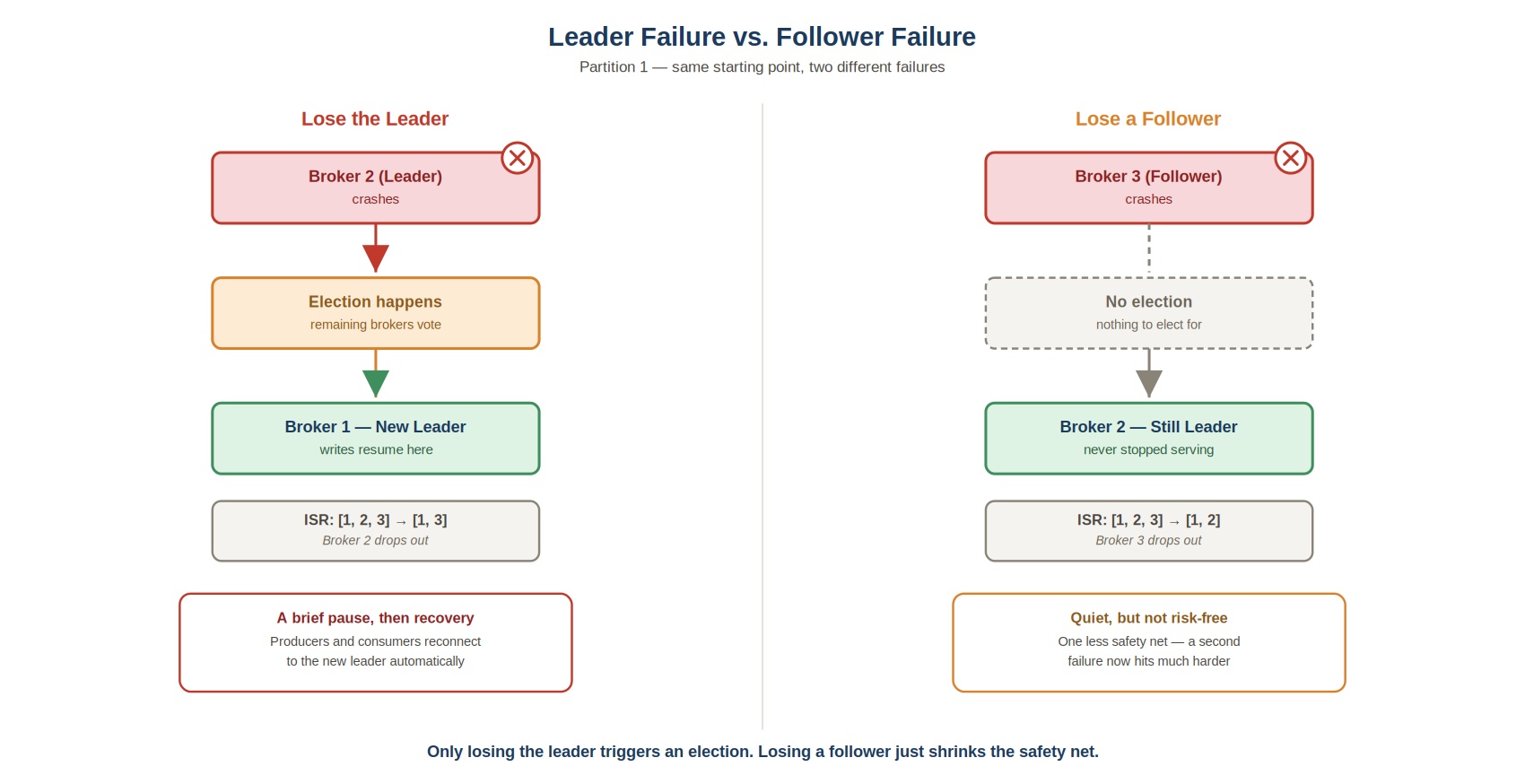 Leader failure vs. follower failure
Same starting point, same partition, two different outcomes — because Kafka only ever needs to elect a new leader when the leader is the one that disappears. Losing a follower is quieter, and recoverable without any coordination at all, but it still costs you real safety margin until that follower catches back up.
Cleaning Up
Stop the producer loop in Terminal 2 with Ctrl+C.
Then, from any terminal inside a broker:
bashdocker compose stop
Checklist
- Identified the actual leader and a follower for Partition 1 on your own cluster
- Kept a continuous producer running throughout both experiments
- Killed the leader broker and watched a new leader get elected, the ISR shrink, and the producer recover on its own
- Restarted the broker and watched it rejoin the ISR
- Killed a follower broker and confirmed the ISR shrank, but the leader did not change
- Understood why a shrunk ISR is a real risk, even with no visible outage
- Watched the follower rejoin the ISR after restarting
You now know, hands-on, the difference between losing a leader and losing a follower — a distinction that comes up constantly in real production incidents, and in interviews.