Partitioning Strategy — Default Behavior & Building a Custom Partitioner
What Happened Last Time
Look back at the delivery reports from your EventTrackingService class.
Every time user-501 sent an event, it landed on the same partition number. You never chose that partition. Kafka's default behavior decided it for you.
Today we open that decision up completely. Then we take control of it ourselves.
How the Default Partitioner Works
How does the producer choose a partition when a message has a key?
It runs the key through a hash function. A hash function is a piece of math that turns a key into a number, and it gives the same number every time for the same key. That number is then mapped onto one of the topic's partitions.
partition = hash(key) % number_of_partitions
Same key in, same partition out. That is why all events of one user stayed together.
Which hash function does the Java producer use?
Murmur2. It runs on the key after serialization, so it hashes the key's bytes. For our seven users and a topic with three partitions, the result is this:
| User | Default partition (Murmur2 % 3) |
|---|---|
| user-501 | 2 |
| user-502 | 1 |
| user-503 | 1 |
| user-504 | 0 |
| user-505 | 0 |
| user-506 | 0 |
| user-507 | 0 |
Compare this table with the delivery reports from the last lecture. They match.
What about messages that have no key?
There is nothing to hash. The producer then sends a whole batch to one partition, and moves on to another partition for the next batch. Over time, messages spread across the topic.
There are two things to remember about this default.
1. The hash is consistent, but it is opaque. It is always the same for a key, but it is not meaningful to you. You cannot look at it and say "I want this key on partition 0". It lands wherever the math says.
2. Not every Kafka client uses the same hash function. Some clients written in other languages use a different hash. So the same key can land on a different partition depending on which client wrote it. If a Java producer and another kind of producer write to the same topic, and something downstream assumes that "same key means same partition", you can get a quiet bug. Remember this when several teams write to one topic.
And remember: the mapping holds only while the number of partitions stays the same. If you add partitions to a topic later, hash % number_of_partitions gives different answers, and keys move to new partitions.
Today's Requirement
Your platform just launched a real-time personalization model. It updates a shopper's recommendations the instant they click, not overnight.
Product wants to roll it out to premium subscribers first. The plan is a dedicated communication channel:
Output / NoteEvery clickstream event from a premium-tier subscriber must always go to partition 0. A dedicated, low-latency consumer will read only that partition and feed the personalization model. All other users' events keep spreading over the remaining partitions, read by the shared consumer.
Can the default partitioner do this?
No. It has no idea what "premium" means. And you cannot force one key onto one partition.
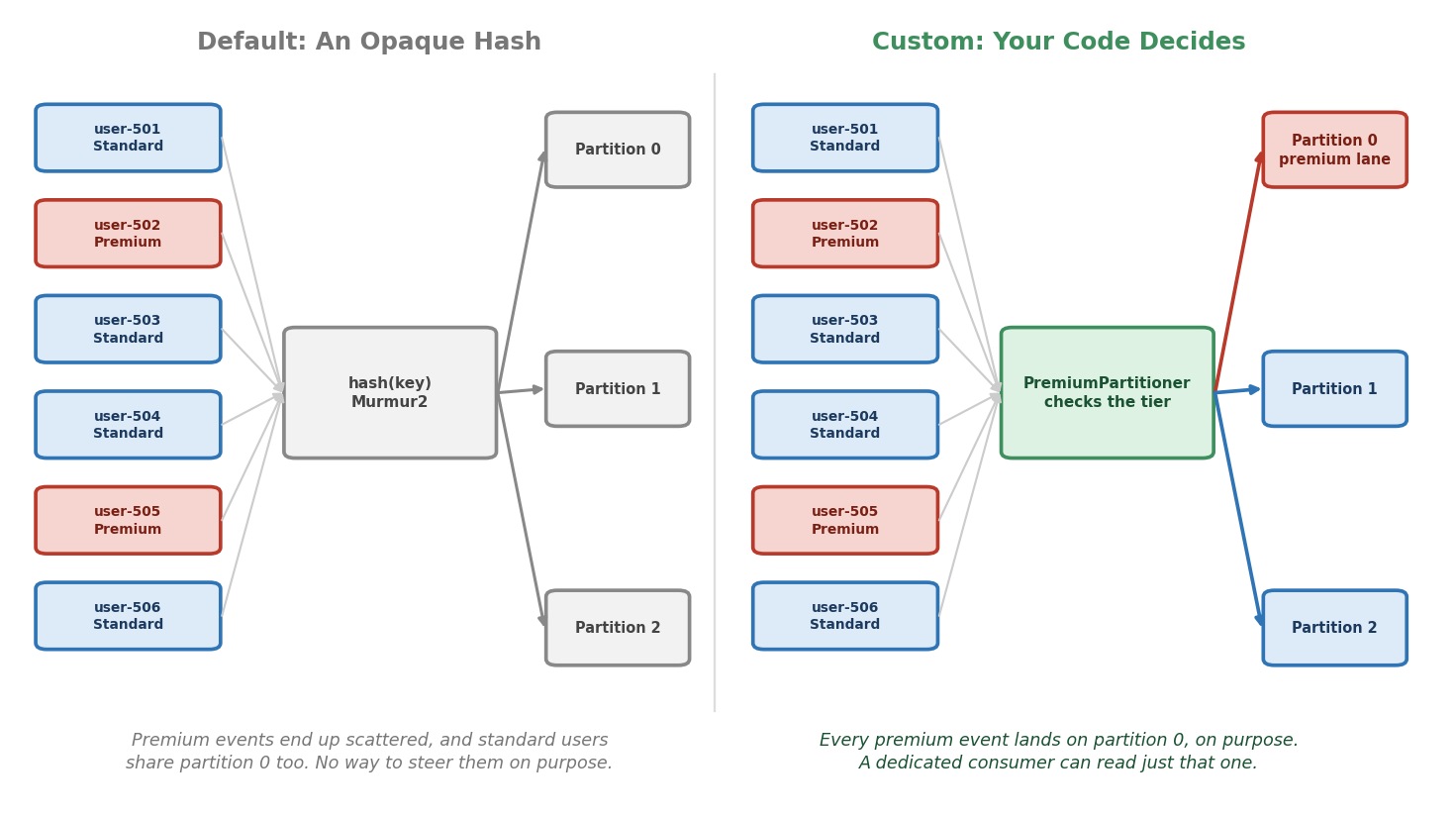 Default hashing vs. custom partitioning logic
Let's see how bad it is. Look at the table again. With three partitions and default hashing:
user-502is a premium user, but goes to partition 1. Wrong.user-504is a standard user, but goes to partition 0. Wrong.
Only user-505 is on partition 0, by luck. The default partitioner cannot meet our requirement.
The Real Mechanism
How do we take control?
The Java producer gives us two ways.
Way 1: Name the partition in the record. The ProducerRecord has a constructor that takes a partition number:
java// Not part of today's lab, just to show the idea new ProducerRecord<>(TOPIC, 0, userId, event); // topic, partition, key, value
If a record names its partition, the producer uses it and skips every partitioner. It is a per-message choice. It works, but the rule then sits in every place that calls send(). Someone will forget it.
Way 2: Write your own partitioner. A partitioner is a class that the producer calls for every message, to ask: "Which partition?" You write the rule once, and the producer applies it to every send(). Nobody can forget it.
We take Way 2. It is cleaner, and it is how real systems do it.
How does the producer know about our class?
Through one more setting:
javaconfig.put(ProducerConfig.PARTITIONER_CLASS_CONFIG, PremiumPartitioner.class.getName());
That is all. The producer creates one instance of our class when it starts, and calls it for every message.
Which wins if both are used?
The partition named in the record. It is checked first. Our partitioner is asked only for records that do not name a partition.
The Partitioner Interface
A partitioner is any class that implements org.apache.kafka.clients.producer.Partitioner. That interface has three methods.
javapublic interface Partitioner extends Configurable, Closeable { int partition(String topic, Object key, byte[] keyBytes, Object value, byte[] valueBytes, Cluster cluster); void close(); // plus: void configure(Map<String, ?> configs) (from Configurable) }
configure()is called once, when the producer starts. It gets the producer's settings. Use it to read your own settings.partition()is the important one. It runs for every message. It returns the partition number.close()is called when the producer closes. Use it to release anything you opened.
Look at the arguments of partition(). They are very useful:
| Argument | What it is |
|---|---|
topic | The topic name |
key, keyBytes | The key as your object, and as bytes |
value, valueBytes | The value as your object, and as bytes |
cluster | What the producer knows about the cluster: topics, partitions, brokers |
Why does the partitioner get both the object and the bytes?
Because it is called after the serializers ran. So you can use whichever is easier. To hash, use the bytes. To read a field, like the tier, use the object. This is exactly what we need.
Does cluster mean a network call for every message?
No. cluster is a snapshot of the metadata the producer already holds. Asking it "how many partitions does this topic have?" is instant, and it is as fresh as the producer's last metadata refresh. We do not need to ask the broker ourselves.
Because partition() runs inside send(), on your own thread, keep it fast. No database calls. No web requests.
Building It
We start from the same producer as before: same config, same callback, same flush(). We add three things: an event that carries a tier, the partitioner class, and the setting that connects it.
Step 1: Give the Event a Tier
Our events now need a tier, so the partitioner has something to check. In the common package, create a Record named TieredClickEvent:
javapackage com.kafkacourse.common; import com.fasterxml.jackson.annotation.JsonProperty; /** * A click event that also says which tier the user belongs to * ("premium" or "standard"). JSON: {"user_id":"user-502","tier":"premium",...} */ public record TieredClickEvent( @JsonProperty("user_id") String userId, @JsonProperty("tier") String tier, @JsonProperty("event_type") String eventType, @JsonProperty("event_time") double eventTime) { }
It is ClickEvent plus one field. We keep ClickEvent as it is, so last lecture's class still compiles and runs.
Step 2: Write the Partitioner
In the ch04 package, create a Java Class named PremiumPartitioner:
javapackage com.kafkacourse.ch04; import com.kafkacourse.common.TieredClickEvent; import org.apache.kafka.clients.producer.Partitioner; import org.apache.kafka.common.Cluster; import org.apache.kafka.common.utils.Utils; import java.util.Map; import java.util.concurrent.ThreadLocalRandom; /** * Our own partitioning rule: * - premium users always go to partition 0 * - standard users are spread over all the other partitions, by hashing the key */ public class PremiumPartitioner implements Partitioner { private static final int PREMIUM_PARTITION = 0; @Override public void configure(Map<String, ?> configs) { // Nothing to configure in this lecture. } @Override public int partition(String topic, Object key, byte[] keyBytes, Object value, byte[] valueBytes, Cluster cluster) { // The producer gives us the value as our own object, before serialization. if (value instanceof TieredClickEvent event && "premium".equals(event.tier())) { return PREMIUM_PARTITION; } // How many partitions does the topic have right now? The producer already knows. int partitionCount = cluster.partitionCountForTopic(topic); int remainingPartitions = partitionCount - 1; if (remainingPartitions < 1) { throw new IllegalStateException( "Topic '" + topic + "' needs at least 2 partitions: one for premium, one for the rest."); } // A message without a key has nothing to hash: pick one of the other partitions at random. if (keyBytes == null) { return ThreadLocalRandom.current().nextInt(remainingPartitions) + 1; } // Same hash as Kafka's default partitioner, but over the remaining partitions only. int hash = Utils.toPositive(Utils.murmur2(keyBytes)); return hash % remainingPartitions + 1; // + 1 skips partition 0 } @Override public void close() { // Nothing to clean up. } }
Let's read partition() slowly.
- Premium user: return
0. Always. (value instanceof TieredClickEvent eventchecks the type and gives us the object in one step.) - Standard user: we must pick partition 1 or 2, but always the same one for the same user. So:
remainingPartitionsis the number of partitions, minus partition 0. With three partitions, it is 2.Utils.murmur2(keyBytes)is Kafka's own Murmur2 hash.Utils.toPositive()makes sure the number is not negative.hash % remainingPartitionsgives 0 or 1. It is a hash, so the same user gives the same answer every time.+ 1shifts it into partitions 1 and 2, and skips partition 0.
Why do we run the hash ourselves, and not only for premium users?
Because the default partitioner cannot express our rule. It hashes over all partitions, including partition 0. If we let it handle standard users, some of them would land on partition 0 by chance. That would ruin the reserved partition.
Why the same hash function as the default?
So our standard users keep the same "same key, same partition" property. We did not remove hashing. We took over the choice, so that partition 0 is excluded.
What are those extra if blocks?
Two safety nets.
- With one partition, there is nothing left after partition 0, and the
%would fail. We stop with a clear message, instead of a confusing crash. - A message without a key has no bytes to hash. We spread those at random over the other partitions.
Output / NoteNote for real systems.
Utilslives in the packageorg.apache.kafka.common.utils. It ships insidekafka-clientsand has been stable for years, but it is a helper, not a promised public API. If you prefer not to depend on it, any stable hash works for the standard users, for exampleMath.floorMod(Arrays.hashCode(keyBytes), remainingPartitions). Just remember that it is then a different hash than the default.- The producer creates your partitioner with a public constructor that takes no arguments. Keep it that way.
Step 3: Connect It to the Producer
Now the producer class. Create PremiumClickstreamProducer in the ch04 package. The config is the one you know, with one new line:
javaconfig.put(ProducerConfig.PARTITIONER_CLASS_CONFIG, PremiumPartitioner.class.getName());
The producer is now KafkaProducer<String, TieredClickEvent>, because our events carry a tier. Everything else is unchanged: the serializers, the callback, flush(). Custom partitioning is not a different way of producing. It is one extra decision, on top of what you know.
Step 4: Give Users a Tier
java/** A user and the tier the user belongs to. */ private record User(String id, String tier) { } private static final List<User> USERS = List.of( new User("user-501", "standard"), new User("user-502", "premium"), new User("user-503", "standard"), new User("user-504", "standard"), new User("user-505", "premium"), new User("user-506", "standard"), new User("user-507", "standard"));
The Complete Class
javapackage com.kafkacourse.ch04; import com.kafkacourse.common.JsonSerializer; import com.kafkacourse.common.TieredClickEvent; import org.apache.kafka.clients.producer.KafkaProducer; import org.apache.kafka.clients.producer.ProducerConfig; import org.apache.kafka.clients.producer.ProducerRecord; import org.apache.kafka.clients.producer.RecordMetadata; import org.apache.kafka.common.serialization.StringSerializer; import java.util.List; import java.util.Properties; import java.util.Random; /** * Same producer as before, but with our own partitioner: * premium users always land on partition 0. */ public class PremiumClickstreamProducer { private static final String BOOTSTRAP_SERVERS = "localhost:9092,localhost:9094,localhost:9095"; private static final String TOPIC = "clickstream-events"; private static final List<String> EVENT_TYPES = List.of("page_view", "search", "add_to_cart", "purchase_completed"); /** A user and the tier the user belongs to. */ private record User(String id, String tier) { } private static final List<User> USERS = List.of( new User("user-501", "standard"), new User("user-502", "premium"), new User("user-503", "standard"), new User("user-504", "standard"), new User("user-505", "premium"), new User("user-506", "standard"), new User("user-507", "standard")); private static final Random RANDOM = new Random(); public static void main(String[] args) throws InterruptedException { Properties config = new Properties(); config.put(ProducerConfig.BOOTSTRAP_SERVERS_CONFIG, BOOTSTRAP_SERVERS); config.put(ProducerConfig.CLIENT_ID_CONFIG, "premium-event-tracking-service-demo"); config.put(ProducerConfig.KEY_SERIALIZER_CLASS_CONFIG, StringSerializer.class.getName()); config.put(ProducerConfig.VALUE_SERIALIZER_CLASS_CONFIG, JsonSerializer.class.getName()); // The only new line: tell the producer to use our partitioner config.put(ProducerConfig.PARTITIONER_CLASS_CONFIG, PremiumPartitioner.class.getName()); try (KafkaProducer<String, TieredClickEvent> producer = new KafkaProducer<>(config)) { for (int i = 0; i < 30; i++) { User user = USERS.get(RANDOM.nextInt(USERS.size())); TieredClickEvent event = makeClickEvent(user); producer.send(new ProducerRecord<>(TOPIC, user.id(), event), (metadata, exception) -> deliveryReport(user, metadata, exception)); Thread.sleep(1000); } System.out.println("Flushing after all messages sent..."); producer.flush(); } } private static TieredClickEvent makeClickEvent(User user) { String eventType = EVENT_TYPES.get(RANDOM.nextInt(EVENT_TYPES.size())); return new TieredClickEvent(user.id(), user.tier(), eventType, System.currentTimeMillis() / 1000.0); } private static void deliveryReport(User user, RecordMetadata metadata, Exception exception) { if (exception != null) { System.out.println("Delivery failed for key=" + user.id() + ": " + exception); } else { System.out.printf("Delivered to %s [partition %d] offset %d key=%s tier=%s%n", metadata.topic(), metadata.partition(), metadata.offset(), user.id(), user.tier()); } } }
(Thread.sleep(1000) makes the loop slow on purpose: one event per second, so you can watch the reports arrive. That is also why main now says throws InterruptedException.)
Running It
Step 1: Start Your Cluster
powershelldocker compose start docker ps
The clickstream-events topic already exists from the last lecture. You do not need to create it again.
Step 2: Run the Producer
Open PremiumClickstreamProducer, click the green triangle next to main, and choose Run 'PremiumClickstreamProducer.main()'.
It sends 30 events, one per second. So it runs for about 30 seconds. Watch the delivery reports.
What should you see?
With three partitions, the delivery reports must match this table:
| User | Tier | Partition |
|---|---|---|
| user-502 | premium | 0 |
| user-505 | premium | 0 |
| user-501 | standard | 1 |
| user-503 | standard | 1 |
| user-507 | standard | 1 |
| user-504 | standard | 2 |
| user-506 | standard | 2 |
Both premium users go to partition 0, every time. No standard user ever goes to partition 0. And each standard user goes to the same partition every time. The last part is the rule that Kafka's default partitioner gave us, and we kept it.
Output / NoteTry it yourself. Put
//in front of thePARTITIONER_CLASS_CONFIGline, and run again. Nothing else changed, but now the reports follow the default table from the beginning of this lecture:user-502on partition 1, anduser-504on partition 0. One line switches the whole rule on or off. Remove the//again when you are done.
Step 3: Verify From the Consumer Side
powershelldocker exec -it kafka-1 bash
bashexport PATH=$PATH:/opt/kafka/bin
bashkafka-console-consumer.sh \ --topic clickstream-events \ --bootstrap-server kafka-1:29092 \ --from-beginning \ --timeout-ms 5000 \ --property print.key=true \ --property print.partition=true \ --property key.separator=" | " | tail -30
Why tail -30?
The topic also holds the events from the last lecture, which used the default hashing. We only want the 30 newest events, the ones from this run. --timeout-ms 5000 makes the consumer stop by itself after 5 seconds without new messages.
Look for user-502 and user-505. In these 30 lines, every one of them shows partition 0. Then type exit to leave the broker shell.
Step 4: Stop Your Cluster
powershelldocker compose stop
Things to Keep in Mind in Real Systems
Reserving a partition is a real, common pattern. But it comes with trade-offs.
- The rule lives in your code. Every producer that writes to this topic must use the same rule. A producer that uses the default partitioner can put a standard user's event on partition 0.
- If a user changes tier, their events start going to a different partition. Ordering across that change is no longer guaranteed.
- A reserved partition is a skewed partition. Partition 0 may carry much less (or much more) traffic than the others.
- The dedicated consumer that reads only partition 0 must be told to read that partition explicitly. A normal group subscription would not do that. You will see how in the consumer chapter.
- Adding partitions changes the mapping of standard users, just as it does for the default hashing.