Introduction to Kafka Components
Over the last few lectures, we built a solid picture of Kafka's core: producers write, brokers store, consumers read, and the whole thing scales through partitions and consumer groups. That core — the brokers themselves — is what Kafka actually is at its heart.
But in the real world, when people say "we use Kafka," they rarely mean just the brokers. Over time, a whole ecosystem of tools has grown up around that core, each one solving a different problem you'll run into once you start using Kafka seriously. In this lecture, we're going to meet that ecosystem, understand what each piece is for, and — just as importantly — figure out when you'd actually reach for each one.
Look at the diagram below. Kafka Brokers sit at the center, exactly as we've discussed. Around it are five tools that either build on top of the brokers or plug into them: the Producer and Consumer API, the Kafka Streams API, ksqlDB, Kafka Connect, and Schema Registry.
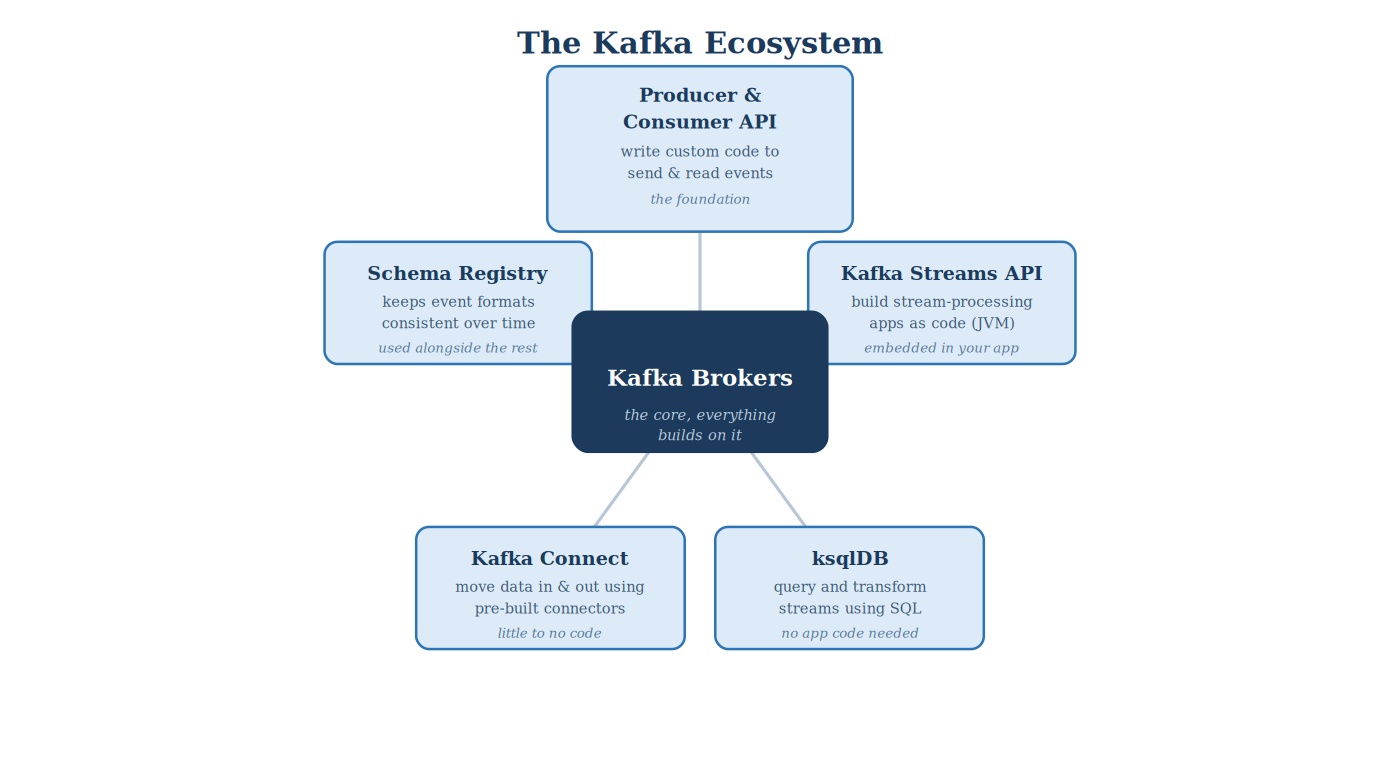 The Kafka ecosystem
Let's walk through each one.
Producer & Consumer API: The Foundation
This is the one we already understand — it's exactly what we covered in the last lecture. The Producer and Consumer API is the lowest-level way to work with Kafka: you write code that explicitly produces events into a topic, or explicitly consumes events from one.
This is the foundation everything else is built on. Kafka Streams, ksqlDB — under the hood, they're all built using this same API. When you use the Producer and Consumer API directly, you get complete control: you decide exactly what happens to every event, in whatever language you're writing in. The tradeoff is that you're responsible for writing that logic yourself.
For us, this means the KafkaProducer and KafkaConsumer classes — the same classes the Kafka project itself ships as the official, reference Java client. There's no wrapper library sitting between you and Kafka here. You're using the exact client that most of the rest of the ecosystem, including Kafka Streams, is built on top of.
Kafka Streams API: Processing Data In-Flight, as Code
Sometimes you don't just want to move events from one place to another — you want to transform them along the way. Filter out irrelevant events. Join two streams together. Keep a running count of something. That's what the Kafka Streams API is for.
It's a library — not a separate server you install, but code you write directly inside your own application — that lets you build these transformations as a continuous, ongoing process. Your application reads from one topic, applies some logic, and often writes the result to another topic, all as part of one running program.
The important thing to know: Kafka Streams is JVM-based. It's built for Java, Scala, and other JVM languages. This is worth pausing on, because it means Kafka Streams isn't a "supported language" the way it is for Python or Go — it's a first-class citizen, written for exactly the platform you're already working in. If your team is writing Java applications, embedding stream-processing logic directly into that application with Kafka Streams is about as natural a fit as Kafka offers.
ksqlDB: Querying Streams with SQL
Now imagine you want to do something similar — filter, transform, aggregate — but you don't want to write and deploy an entire application to do it. This is where ksqlDB comes in.
ksqlDB lets you write SQL-like queries directly against Kafka topics. Instead of writing Java code with the Streams API, you write something that looks almost like a database query, and ksqlDB continuously runs it against the live stream of events. It's a separate server that you send these queries to, rather than a library embedded in your own code.
This matters a lot for accessibility: a lot more people know SQL than know Java. ksqlDB opens up stream processing to analysts and engineers who are comfortable with SQL but wouldn't necessarily want to write and maintain a full streaming application.
Kafka Connect: Moving Data In and Out, Without Writing Code
Think back to our very first lecture on Kafka — sources feeding in, Kafka in the middle, consumers reading out. In practice, a huge number of those sources and consumers are common, well-known systems: a Postgres database, an Elasticsearch index, an S3 bucket, a Snowflake warehouse. Writing custom producer or consumer code for every single one of these, at every company that uses them, would be enormous wasted effort.
Kafka Connect solves this with pre-built, reusable connectors. A source connector pulls data from an external system into Kafka — for example, capturing every row change from a database, the CDC pattern we've talked about already. A sink connector pushes data from Kafka out into an external system — for example, loading events into a data warehouse.
With Kafka Connect, you're typically not writing application code at all. You're configuring an existing connector — pointing it at your database, your warehouse, your search index — and Kafka Connect handles the actual movement of data. Worth knowing: Connect itself, and the connector plugin interface, is Java — so on the rare occasion you do need a custom connector, that's a Java project too.
Schema Registry: Keeping Data Consistent Over Time
Here's a problem that shows up the moment more than one team is producing and consuming from the same topic. Say a producer starts sending events with a field called amount. Six months later, someone on that producing team renames it to transaction_amount, without telling anyone. Every consumer expecting amount silently breaks.
Schema Registry exists to prevent exactly this. It's a central place where the structure — the schema — of your events is registered and enforced. Producers and consumers both check with Schema Registry to make sure the data they're writing or reading matches an agreed-upon shape, and it manages how that shape is allowed to change, safely, over time. This is sometimes called schema evolution.
Notice that Schema Registry isn't really an alternative to the other tools — it's used alongside whichever of them you're already using. Whether you're writing raw producer code, using Kafka Streams, or setting up a Connect pipeline, Schema Registry sits underneath, keeping the data itself trustworthy.
Supported Languages: Where Each Tool Lives
A natural question at this point is: what language do I actually need to know to use each of these? The honest answer is, it depends on the tool — but you'll notice a pattern specific to Java that's worth calling out directly.
| Component | How you actually use it | Language(s) |
|---|---|---|
| Producer & Consumer API | Write client code that sends and reads events | Native: Java, Scala. Also strong official and community clients for Python, Go, C/C++, .NET, Node.js, and more |
| Kafka Streams API | Embed a stream-processing library inside your own application | JVM only: Java, Scala, Kotlin |
| ksqlDB | Send SQL-like statements to a ksqlDB server | The engine itself is JVM-based, but you interact with it through SQL, via its CLI or REST API — no JVM code required, from any language |
| Kafka Connect | Configure pre-built connectors, usually through JSON and a REST API | No coding needed for standard use; Java if you're writing a custom connector plugin |
| Schema Registry | Register and fetch schemas through a REST API | REST API is accessible from any language; official and community serializer libraries exist for Java, Python, C#, Go, and more — the Java serializers are the reference implementation |
Notice the pattern: every single row on this table either is Java, or fully supports Java as a first-class option. That's not a coincidence — Kafka itself is written in Java and Scala, so Java isn't "one of the supported languages" here, it's the language the rest of the ecosystem is designed around. Kafka Streams makes that most obvious: it's tied firmly to the JVM, with no equivalent for non-JVM languages at all.
When to Use What: A Decision Guide
Now let's put this together practically. None of these tools are "better" than the others in some absolute sense — they solve different problems, and most real Kafka setups use several of them together.
| If you need to... | Reach for... |
|---|---|
| Full custom control over exactly how events are produced or consumed, in your language of choice | Producer & Consumer API |
| In-app real-time transformations, joins, or aggregations, and your team is JVM-based | Kafka Streams API |
| Fast, SQL-style continuous queries, without writing and deploying a full application | ksqlDB |
| To move data in or out of Kafka to/from a database, cloud storage, or search engine — without custom code | Kafka Connect |
| To keep data formats consistent and safe to evolve across many producers and consumers, over time | Schema Registry — alongside whichever of the above you're using |
If you take one thing away from this table, let it be this: reach for Kafka Connect before you write a custom producer or consumer for a well-known system, reach for ksqlDB or Kafka Streams before you build an entire custom application just to transform a stream, and use Schema Registry from day one, not as an afterthought once something has already broken.
What This Course Covers
Given everything we've just walked through, it's worth being precise about what this course actually focuses on — and just as importantly, what it doesn't.
This course covers Kafka Brokers, the Producer API, the Consumer API, and Schema Registry — and we'll do all of it in a secured setup, using authentication and encryption, the way a real production system is actually run, not a toy local demo.
We will not be covering Kafka Streams, ksqlDB, or Kafka Connect in this course. That's not because they're unimportant — you've just seen exactly what problems they solve, and as a Java developer, Kafka Streams in particular will likely be a natural next step once you're comfortable with the fundamentals here. It's a deliberate choice about where to spend your time first: getting the Producer and Consumer API right, and understanding the broker underneath it, before layering anything else on top.
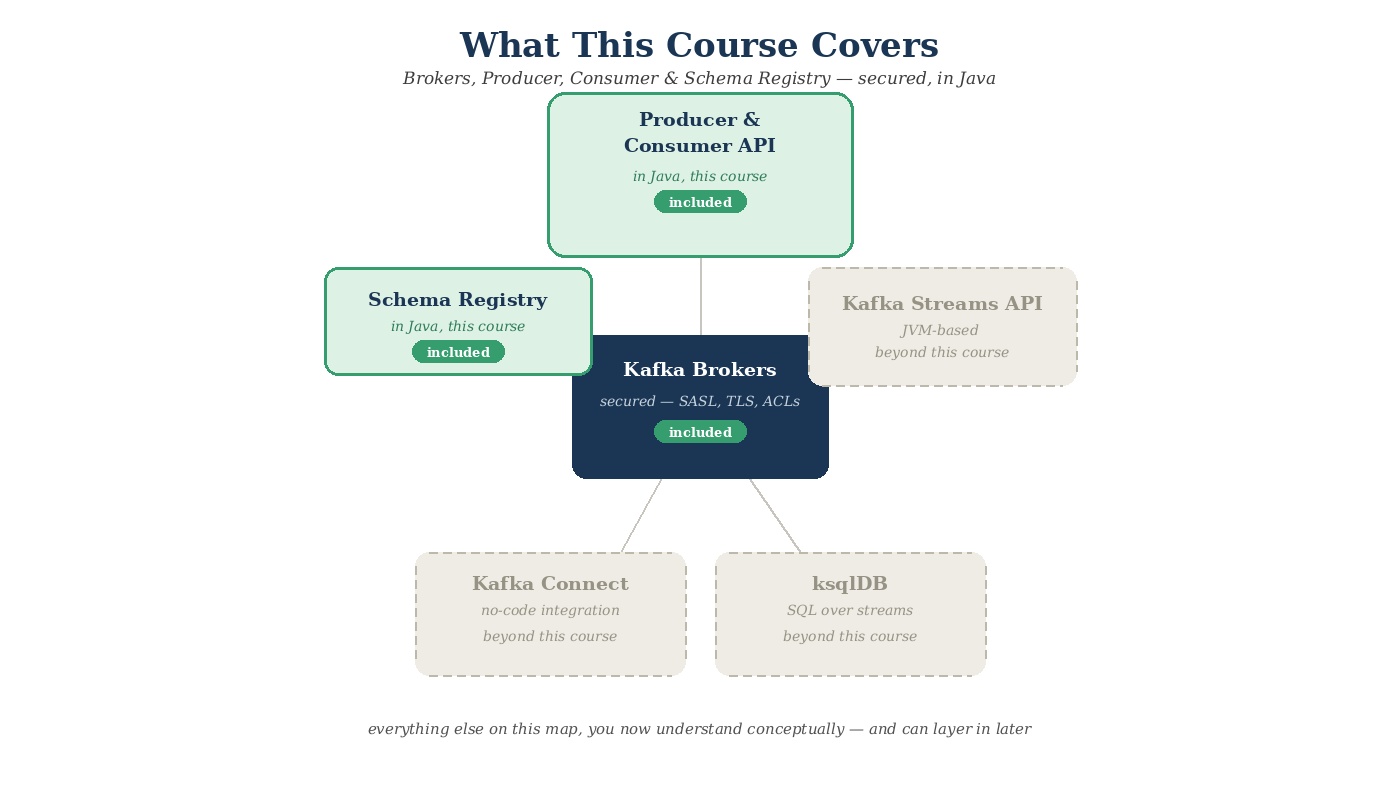 What this course covers within the ecosystem
Why Java for This Course
Kafka itself is written in Java and Scala. That's not a trivia fact — it directly shapes why Java is the language this course is built around.
You're learning Kafka in its native language, not a translation of it. The official Java client isn't one option among many equally-supported clients — it's the reference implementation. New Kafka features, protocol changes, and configuration options land in the Java client first, and every other language's client is, in effect, built to match what Java already does. Learning Kafka through Java means the documentation, the source code, and the behavior you observe all line up directly, with nothing translated or reimplemented in between.
This is where enterprise Kafka already lives. If you look at large-scale, production Kafka deployments — the kind running in banks, telecoms, and established enterprises — Java is overwhelmingly the language you'll find at the producer and consumer layer. If you're a Java developer moving into data engineering, or a backend engineer whose team is being asked to own a Kafka pipeline, this is very likely the exact stack you'll be working in on the job.
Kafka Streams is a genuine next step, not a footnote. Because Kafka Streams is JVM-only, everything you learn here about producers, consumers, topics, and brokers transfers directly into it later — same client concepts, same configuration patterns, just wrapped in a higher-level library. That's not true in reverse for every other language.
The tooling around Java and Kafka is mature and battle-tested. Build tools like Maven and Gradle, dependency management, IDE integration, and the surrounding observability and testing ecosystem for Kafka are all deeply developed on the JVM, because that's where Kafka's own ecosystem grew up.
None of this means other languages are the wrong choice — plenty of serious Kafka deployments are built on Python, Go, or other clients, and if you end up on a team using one of those, everything you're learning here about brokers, producers, and consumers still applies directly. It's the same Kafka underneath. We're simply choosing the language that lets you learn Kafka closest to the metal, with the fewest layers between you and how the system actually works.
Quick Recap
- Kafka is more than just brokers — it's grown into an ecosystem of tools, each solving a different problem.
- The Producer & Consumer API is the foundation everything else is built on — and in Java, you're using the same reference client the rest of the ecosystem is built on top of.
- Kafka Streams API lets you build stream-processing logic as code, embedded in your own application — JVM only, and a natural next step from what this course covers.
- ksqlDB lets you query and transform streams using SQL, without writing or deploying a full application.
- Kafka Connect moves data in and out of Kafka using pre-built connectors — little to no code required, and Java when you do need a custom one.
- Schema Registry keeps event formats consistent and safe to evolve, and it's used alongside whichever of the other tools you choose.
- Language support varies by tool, but Java is the one language that shows up as a first-class option across every single row — because Kafka itself is written in Java and Scala.
- This course focuses on Brokers, Producer, Consumer, and Schema Registry, secured, in Java — the language Kafka was actually built in.