Introduction to Kafka
Let's picture a mid-sized company. It has a website, a mobile app, a fraud system, a data warehouse, an analytics dashboard, and an app database. That's a pretty normal setup — nothing exotic about it.
Now here's the question I want you to sit with: how does the fraud system find out about a new transaction the moment it happens? How does the data warehouse stay updated when the app database changes? How does the dashboard show live numbers instead of yesterday's numbers?
The naive answer is: connect each system directly to every other system that needs its data.
That sounds simple enough — until you actually draw it out.
Look at the left side of the picture below. Six systems, all wired directly to each other. Count the lines — that's already 15 separate connections, just for six systems. Now imagine a real company with 30, 50, or 200 systems. Every new system you add means wiring it to every other system it needs to talk to. Every single connection is its own little project, with its own failure points, its own retry logic, its own headaches. People call this "spaghetti architecture," and honestly, once you see the picture, the name makes perfect sense.
Now look at the right side. Same six systems. But instead of wiring them to each other, every system connects to one central hub, once. That hub is Kafka.
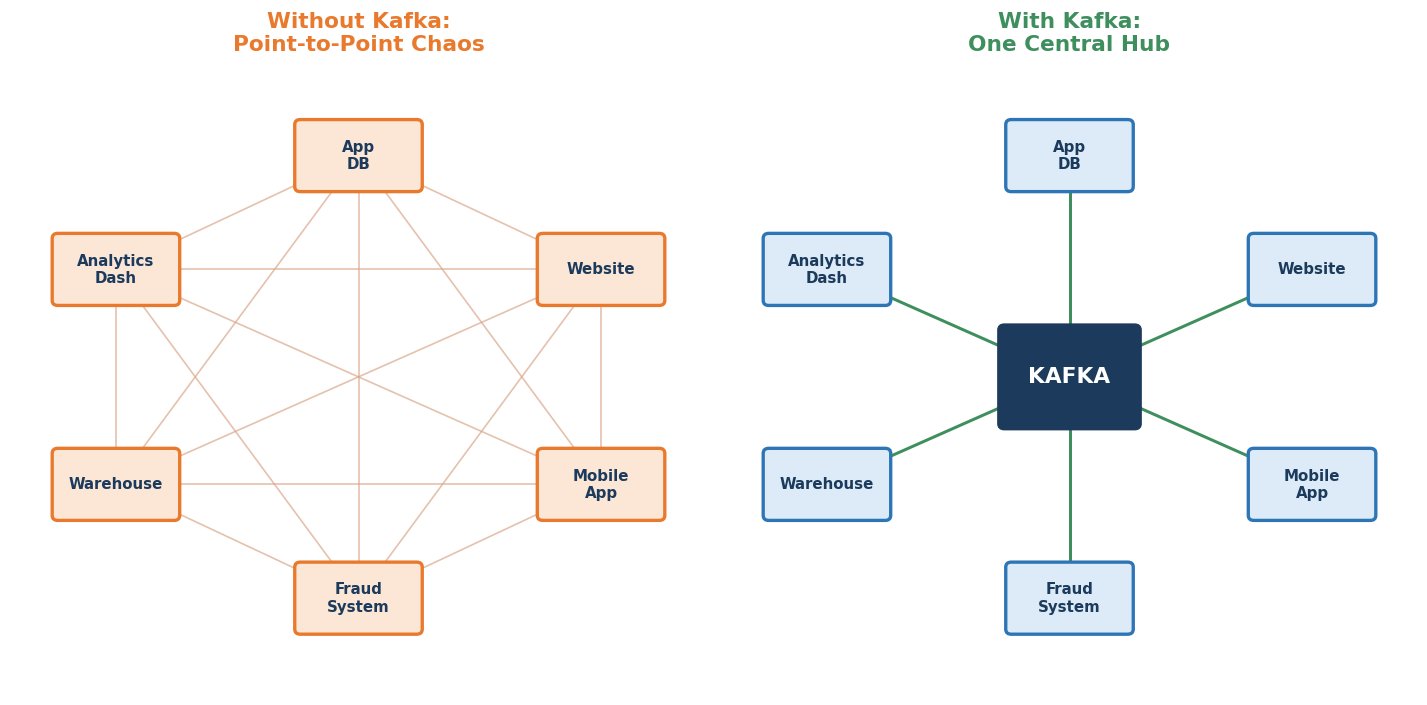 Point-to-point chaos vs Kafka as a central hub
Kafka's Real Job: One Place Everyone Talks Through
Here's the shift in thinking. Instead of System A calling System B directly, System A just writes its data to Kafka. Any system that cares about that data — B, C, D, whoever — simply reads it from Kafka. System A doesn't need to know who's listening. New systems can start listening anytime, without System A changing anything at all.
That's Kafka's core value, in one sentence: it decouples the systems that produce data from the systems that use it.
That word "decouples" is doing a lot of work, so let's make it concrete. Without Kafka, if you want to add a new system that needs transaction data, you have to go find every existing system that has that data and build a new connection to it. With Kafka, that new system just starts reading from the hub. Nobody else has to change anything. That's the entire reason this architecture wins as a company grows.
So... Is Kafka a Database? A Queue? What Exactly Is It?
This confuses a lot of people starting out, so let's be precise about it.
Kafka is often described as a distributed commit log. That's a technical phrase, so let's unpack it piece by piece:
- Log — think of a notebook where every new event just gets written on the next line. You never go back and edit old lines. You only ever add new ones at the end.
- Commit — once something is written to that notebook, it's permanent. It stays there safely until you choose to remove it.
- Distributed — this notebook isn't sitting on one machine. It's spread across many machines, so if one machine fails, the notebook doesn't disappear.
So is it a database? Not really — you don't run complex queries against it the way you would with a database. Is it a queue? Not exactly that either — in a traditional queue, a message vanishes once someone reads it, but in Kafka, multiple readers can each read the same data independently, and it stays around for others to read too.
Kafka is really its own category of tool, built for one job: moving large volumes of events, reliably, from the systems that create them to the systems that need them.
Where Kafka Sits in a Real Architecture
In a typical company using Kafka today, you'll usually find it sitting right in the middle of everything, doing three things at once:
- Sources feeding in — application databases (through CDC, which we'll get to shortly), website clickstreams, mobile app events, IoT devices, third-party APIs.
- Kafka in the middle — storing all of this safely, and in the order it arrived.
- Consumers reading out — the data warehouse, real-time dashboards, fraud detection systems, recommendation engines, and, increasingly, AI systems that need fresh, live data to work well.
That last point matters a lot for where this course is headed. As we go further, you'll see Kafka show up again and again right at the boundary between raw business data and AI systems that depend on that data being current.
What Kafka Actually Gets Used For
Now that we know what Kafka is and where it sits, let's ground this in reality. What do companies actually build with it? These are the use cases that matter most for a data engineer moving toward AI-focused roles, since that's exactly the audience this course is built for.
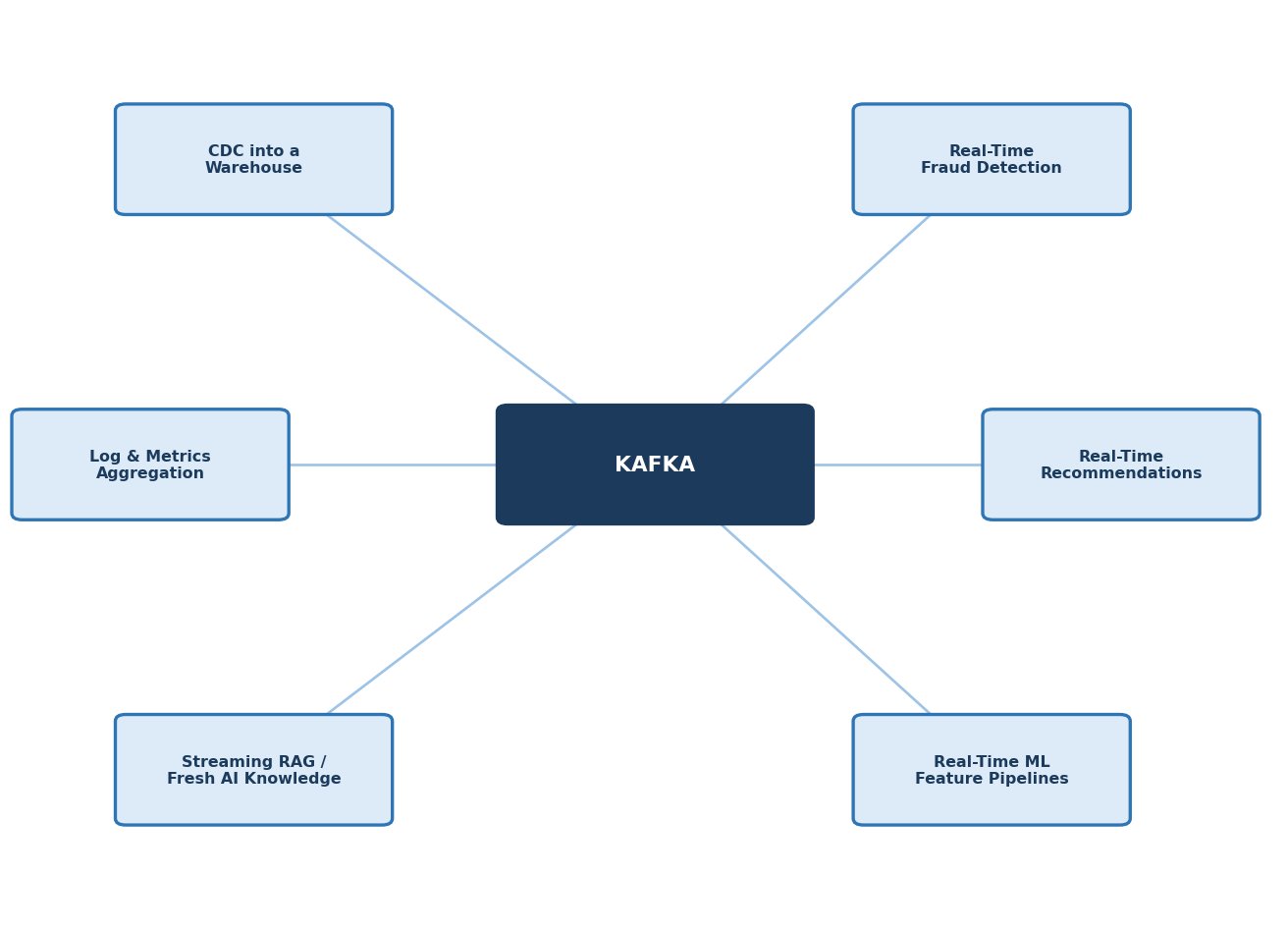 Six real-world Kafka use cases, all connected through Kafka
CDC into a Warehouse
Change Data Capture, or CDC, means capturing every change made to a database — every insert, update, delete — the moment it happens, and streaming it into a data warehouse. Instead of running a nightly batch job to copy data over, the warehouse stays continuously up to date. This is one of the single most common real-world Kafka use cases for data engineers, and it's one we'll build hands-on, end to end, later in this course.
Real-Time Fraud Detection
This is the example we opened this whole course with. A transaction happens, Kafka carries that event instantly to a fraud-scoring system, and a decision gets made in milliseconds — before the transaction even finishes. This is only possible because the event doesn't sit and wait in a batch queue; it's handled the moment it arrives.
Real-Time Recommendations
When you're browsing a shopping site and you see "customers who viewed this also viewed…" updating based on what you're doing right now, that's usually powered by a stream of your click events flowing through something like Kafka, feeding a recommendation engine in near real time.
Real-Time ML Feature Pipelines
Machine learning models often need "features" — computed values like "number of purchases in the last 10 minutes" — and those features go stale fast. Kafka is commonly used to compute and serve these features continuously, so a model is always scoring against current behavior, not last night's snapshot.
Streaming RAG: Keeping AI Knowledge Fresh
This one is newer, but it's growing fast. AI systems that answer questions using a knowledge base — a pattern called RAG, or Retrieval-Augmented Generation — are only as good as how current that knowledge base is. If your company's policies or product details change and your AI is still answering from yesterday's data, it will confidently give you wrong answers. Kafka is increasingly used to stream fresh information into these systems continuously, instead of relying on slow, periodic re-indexing.
Log & Metrics Aggregation
Large systems produce enormous volumes of logs and performance metrics, from many different services, all at once. Kafka is a natural fit for collecting all of this centrally and reliably, so monitoring and alerting tools always have a live, complete picture of what's happening across the system.
The Common Thread
Look back at all six of these use cases. Every single one shares the same shape: data that loses value the longer you wait to act on it. A fraud check, a stale feature, an outdated AI answer — the problem is never "we don't have the data." It's "we didn't get to it in time."
That's the real reason Kafka exists. It's the same idea we started this course with — the value of data decays — and Kafka is the tool built specifically to act on data before that value disappears.
Quick Recap
- Wiring every system directly to every other system doesn't scale — it turns into "spaghetti architecture" fast.
- Kafka fixes this by acting as one central hub. Systems write to Kafka once; any number of systems can read from it independently.
- Kafka's core value: it decouples producers of data from consumers of data.
- Kafka is best described as a distributed commit log — an append-only, permanent, multi-machine notebook of events. It's not quite a database, and not quite a traditional queue.
- In a real architecture, Kafka sits in the middle: sources feed in, Kafka stores it safely, and consumers — including AI systems — read it out.
- Six use cases show up constantly: CDC into a warehouse, real-time fraud detection, real-time recommendations, real-time ML feature pipelines, streaming RAG for fresh AI knowledge, and log and metrics aggregation.
- The common thread across all of them: data that loses value the longer you wait to act on it.