Delivery Semantics & Idempotent Producers
Today's Requirement
Your purchase_completed events do not just sit in Kafka. They feed two live systems.
- A revenue dashboard adds them up in real time for the business.
- A fraud-detection feature pipeline counts "purchases by this user in the last 10 minutes". It uses this to catch account takeovers and card testing.
Both systems need the stream to be exactly right. What does that mean?
Output / NoteNo missing events, and no duplicate events.
Think about what a mistake does:
- A missing event makes the revenue dashboard show a number that is too low. It can also hide a pattern that a fraud model should have caught.
- A duplicate event makes the revenue number too high. It also corrupts the fraud feature, and can flag an innocent customer as a fraud suspect.
In a pipeline that feeds live dashboards and live features, a bad event is not cosmetic. It is wrong data flowing into decisions. Today we learn exactly why duplicates and gaps happen, and we test how Kafka prevents them.
What Do We Mean by "Duplicate"?
We have to be precise, because it is easy to picture the wrong scenario.
We are not talking about your own code calling send() twice for the same purchase. Suppose your checkout service has a bug and calls chargeCustomer() twice, and each call sends an event. Kafka sees two deliberate instructions from your code, and it writes both. That is correct behavior. No messaging system can guess that two calls were "meant" to be one. Nothing in this lecture fixes that kind of bug. Good application logic does, for example a unique order ID that stops a double charge.
What we are talking about is narrower and stranger:
Output / NoteThe producer's own retry mechanism accidentally creating a second copy of a message that you sent only once.
Your code calls send() one time. Somewhere between your code and the topic, a duplicate appears anyway. It is not your mistake.
How Kafka Protects You From Missing Events
What if a message does not reach the broker?
Kafka's answer is two things working together: acknowledgment and retry.
- The producer sends a batch to the broker.
- The broker saves it and sends back an acknowledgment.
- If the acknowledgment arrives, the producer knows the message is safe.
- If it does not arrive, the producer automatically sends the message again (a retry).
You did not write any retry code. The producer does it for you. It is a deliberate reliability feature. Without it, a small network problem could silently drop real data.
How a Retry Actually Works
Let's look at the retry step by step, because it explains both the protection and the risk.
How does the producer decide that something failed?
There are three kinds of failure:
- The connection to the broker breaks, and the client gets an error.
- The connection stays open, but no answer comes back for too long.
- The broker answers with a temporary error. For example, the partition leader just moved to another broker, or there are not enough in-sync replicas at this moment.
These settings control the timing:
| Setting | Default | What it does |
|---|---|---|
request.timeout.ms | 30 seconds | How long the client waits for the answer to one request. If nothing comes, that request has failed, and it can be retried |
retry.backoff.ms | 100 ms | The pause before a retry. It grows step by step, up to retry.backoff.max.ms (1 second by default) |
retries | about 2 billion | How many retries are allowed. Effectively unlimited |
delivery.timeout.ms | 2 minutes | The total time a message may take, counted from the moment send() returns. It includes the wait in the buffer, every attempt, and every pause. After this, the producer gives up |
So the flow is:
- Send the batch, and wait for the answer.
- A failure is detected.
- Wait for the backoff time (about 100 ms, a little longer each time).
- Send the same batch again.
- Repeat until success, or until
delivery.timeout.mshas passed.
If the time runs out, the producer gives up, and your callback receives an exception. It is a TimeoutException, and its message says something like Expiring 27 record(s) for purchase-events-unsafe-1:120004 ms has passed since batch creation. That is why we always check exception in the callback.
So "at-least-once" does not mean "always delivered, whatever happens". It means: the producer tries as hard as it can, and tells you if it failed.
Then why is retries so large, and why do we hardly touch it?
Because the time limit is the real control. Kafka's own advice is to leave retries alone and use delivery.timeout.ms to decide how long a message may keep trying. For most systems, these defaults are well chosen. But it is important to know how they work.
How a Good Feature Causes a Real Problem
Now picture exactly what can go wrong.
Your producer's sender thread sends a batch. The broker receives it and writes it successfully. It sends the acknowledgment back. But that acknowledgment gets lost on the way. It could be a network blip, or the broker could crash right after writing.
What does the producer see?
Silence. It cannot tell the difference between "the write failed" and "the write worked, but the answer got lost". Both look the same.
So what should it do? Giving up is not safer, because it could lose a real purchase. So it retries.
But look at the side effect. The original write did succeed. The broker has no way to know that this new request is a resend. So it does the only thing it can do: it writes the message again.
Output / NoteA feature that exists to protect your data just created two copies of it.
How the Broker Recognizes a Retry
This is the fix, and it is elegant. It is called an idempotent producer. (Idempotent means: doing it twice has the same result as doing it once.)
When idempotence is on, two things happen that you never see:
- When the producer starts, the broker gives it a unique Producer ID (PID).
- Every message the producer sends to a partition gets a sequence number: 0, then 1, then 2, growing by one, separately for each partition.
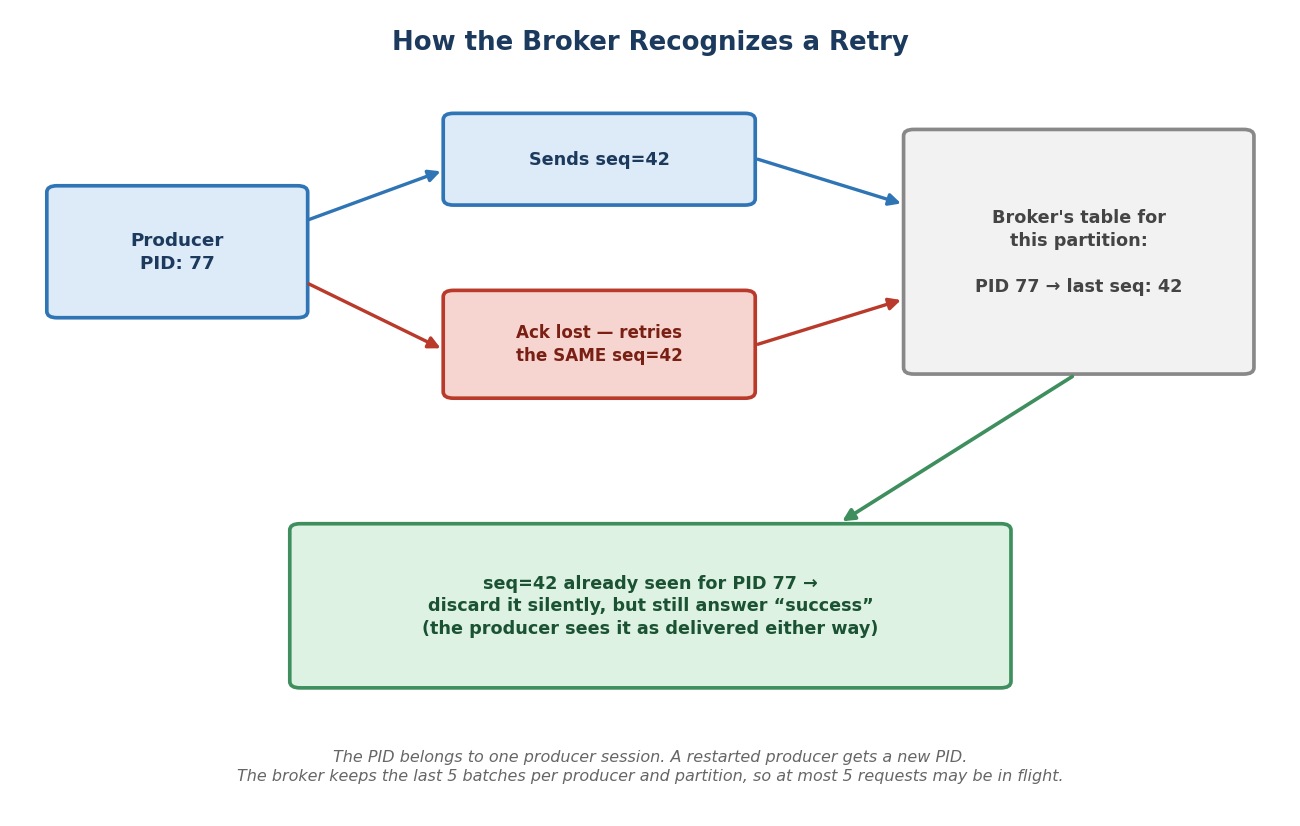 How the broker recognizes a retry
The broker remembers, for each producer and each partition, the latest sequence numbers it has accepted. For example: "from PID 77, I accepted up to sequence 42".
Now the lost-acknowledgment story again:
- The producer sends sequence 42 from PID 77. The broker writes it.
- The acknowledgment is lost.
- The producer retries. It sends sequence 42 from PID 77 again.
- The broker checks: "I already have that." It does not write it again. But it still answers "success", because as far as the producer needs to know, it was delivered.
The retry is safe. No duplicate. The sequence numbers are added by the producer's sender thread, and the checking is done by the broker. You write no extra code.
Does the broker remember every sequence number forever?
No. It keeps the details of the last 5 batches for each producer and partition. This is the reason for a rule you will meet in a moment: an idempotent producer may have at most 5 requests in flight on one connection. With more than 5, the broker could already have forgotten an old batch when its retry arrives.
The Important Fine Print
Why did we say "your own duplicate send() calls" are not covered?
Because this guarantee works only when the same producer resends the exact same attempt. Two send() calls from your code get two different sequence numbers, on purpose. The broker cannot know they were "supposed" to be the same. Idempotence does not look at the message content to find look-alikes. It tracks attempts, by sequence number, per PID.
Three more points about the scope:
- It works within one producer session. If the producer process restarts, it gets a new PID, and the broker's memory of the old one does not help.
- It protects against duplicates from retries. It does not promise delivery. If the message cannot be delivered within
delivery.timeout.ms, it fails, and your callback tells you. - It is exactly-once at the level of one producer writing to one partition. Full end-to-end exactly-once (a consumer reads, transforms, and produces again) is a bigger subject with transactions. That comes later in the course.
Does idempotence give us anything else?
Yes, one bonus: ordering. Without idempotence, if two batches for the same partition are in flight, and the first one fails and is retried, the second one can be written first. The messages end up out of order. With idempotence, the broker uses the sequence numbers to keep the original order, even across retries.
Three Ways a Producer Can Handle Retries
Now you know the mechanism. Here are the three named choices, and the settings behind each.
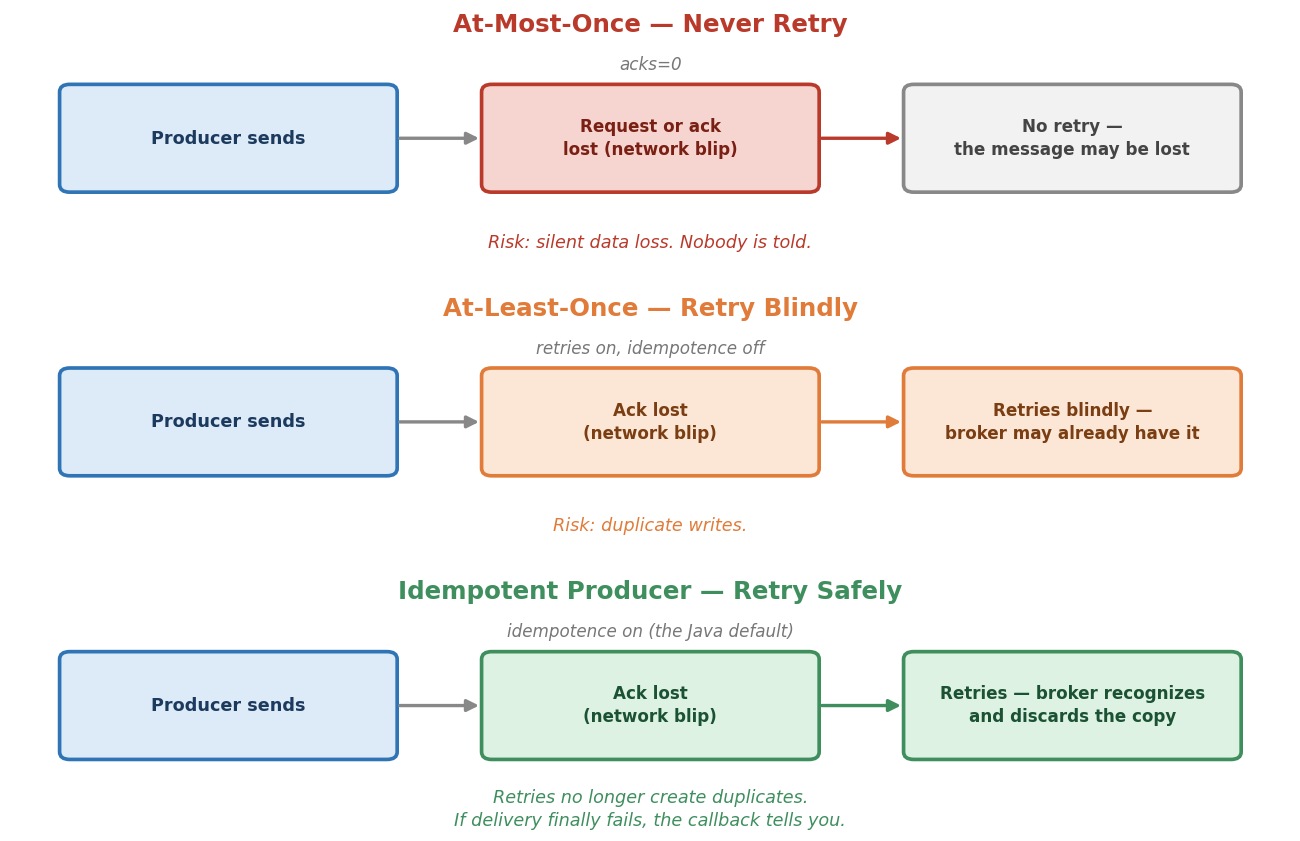 Three delivery semantics
At-Most-Once: Send and Forget
Do not wait for any answer, so there is nothing to retry. The setting is acks=0. The producer does not expect an acknowledgment. The retries setting has no effect, because the client would not even know about a failure.
- It can never create a duplicate.
- But a message can vanish, and nobody knows. For our fraud feature, a real purchase would silently not be counted.
- It is the fastest option. (The offset in the callback is always
-1, because the broker never answered.)
Good for data you can afford to lose a little of. For example, sensor readings from a million devices, where you only look for trends, and losing 0.1% changes nothing.
At-Least-Once: Retry Whenever in Doubt
This is what most people mean by "reliable". The producer sends, waits for the acknowledgment, and retries if it does not come.
- If the producer reports success, the broker has the message.
- But, exactly as we just saw, a retry can create a duplicate.
Good when duplicates are harmless. For example, an "order confirmed" status event. If you send it three times, the latest status is still "order confirmed". Nothing breaks.
Output / NoteCareful with old advice. Many articles and older Kafka versions say that the default is
acks=1and that idempotence is off. That is not true for the client in this course. In Kafka 4.3.1, the producer starts withacks=alland idempotence switched on. It is already safe out of the box. So to see the danger of plain at-least-once, we must switch idempotence off ourselves. That is exactly what our unsafe class does.
What is acks?
acks decides how many confirmations the broker collects before it answers. acks=1 means only the partition leader. acks=all means all the in-sync replicas.
There is one more thing to know about acks=1. The leader confirms the write before the followers have copied it. If the leader crashes at that moment, the message can be lost even though the producer was told it succeeded. So acks=1 at-least-once can lose data in a leader failure. acks=all protects against this. min.insync.replicas (next section) decides how strong that protection really is. We say more about acks in the tuning lecture.
Idempotent Delivery: The Safe Retry
Set enable.idempotence=true, and the client does the rest. In our client it is the default. It requires three things, and it will not accept anything else:
acks=all,retriesabove 0 (the default is unlimited),- at most 5 requests in flight per connection (
max.in.flight.requests.per.connection, default 5), so the sequence numbers stay meaningful.
Retries still happen exactly as before. They are simply safe.
Two Traps: A Loud One and a Quiet One
The producer checks these three settings when it starts. What happens if you break the rules?
The loud trap. You explicitly write enable.idempotence=true, and also acks=1. The producer refuses to start. It throws a ConfigException:
Must set acks to all in order to use the idempotent producer. Otherwise we cannot guarantee idempotence.
The same happens with retries=0, and with max.in.flight.requests.per.connection above 5. (That last one throws even if you never mention idempotence, because idempotence is on by default.)
The quiet trap. You say nothing about idempotence, but you set acks=1 (or retries=0). Now the producer does not complain. It silently switches idempotence off. The only trace is one line in the client's log, at INFO level: Idempotence will be disabled because acks is set to 1, not set to 'all'.
This is dangerous. Someone changes acks for "speed", and the protection against duplicates disappears, with no error. That is why the safe habit is to write enable.idempotence=true explicitly in the config of any producer that matters. Then a conflicting setting fails loudly, at startup, and not quietly, in production.
You can see the loud trap yourself in a moment, in a small class that needs no cluster.
One Broker-Side Setting: min.insync.replicas
With acks=all, the leader waits for every replica that is currently in sync (the ISR, which you met when we studied replication). But what if only the leader is left in the ISR? Then "all in-sync replicas" is just the leader, and acks=all is no stronger than acks=1.
min.insync.replicas (a topic or broker setting) sets the minimum size of the ISR for a write to be accepted. For example, 2 means: if fewer than two replicas are in sync, the write is refused, so you do not get a false sense of safety. The producer sees a temporary error, and retries until the write works or delivery.timeout.ms runs out. min.insync.replicas does not change anything about duplicates. But it decides how meaningful acks=all is.
Let's Build It
We build two nearly identical producers, one without idempotence and one with it, so we can watch the difference and not just take it on trust. And we build one tiny class that shows the loud trap.
The Event
Every purchase has a unique number. That will let us count the messages in the topic later. In the common package, create a Record named PurchaseEvent:
javapackage com.kafkacourse.common; import com.fasterxml.jackson.annotation.JsonProperty; /** * One completed purchase. The purchase id is unique, so we can count * events in a topic and spot duplicates or missing events at once. */ public record PurchaseEvent( @JsonProperty("purchase_id") int purchaseId, @JsonProperty("user_id") String userId, @JsonProperty("amount") double amount, @JsonProperty("purchased_at") double purchasedAt) { }
The Unsafe Version
In the ch04 package, create PurchaseProducerNoIdempotence. Its settings start like every producer you have built, with the same bootstrap servers and serializers, and then:
javaprivate static final String TOPIC = "purchase-events-unsafe"; config.put(ProducerConfig.CLIENT_ID_CONFIG, "purchase-producer-unsafe"); config.put(ProducerConfig.ENABLE_IDEMPOTENCE_CONFIG, false); // in Java it is ON by default, so we switch it off config.put(ProducerConfig.ACKS_CONFIG, "1"); // only the leader confirms config.put(ProducerConfig.DELIVERY_TIMEOUT_MS_CONFIG, 300000); // 5 minutes for a message, retries included
Three settings matter here:
enable.idempotenceisfalse. We switch it off on purpose, to get plain at-least-once.acksis1. We choose it on purpose, to get the weaker, faster kind of at-least-once.delivery.timeout.msis 300000 milliseconds: five minutes. The default is two minutes. We give the producer more time to keep retrying, so that short broker outages do not make it give up.
The Idempotent Version
In the same package, create PurchaseProducerIdempotent:
javaprivate static final String TOPIC = "purchase-events-idempotent"; config.put(ProducerConfig.CLIENT_ID_CONFIG, "purchase-producer-idempotent"); config.put(ProducerConfig.ENABLE_IDEMPOTENCE_CONFIG, true); // already the default in Java; we say it out loud config.put(ProducerConfig.DELIVERY_TIMEOUT_MS_CONFIG, 300000); // 5 minutes for a message, retries included
Two differences. enable.idempotence is true. And the acks line is gone, because idempotence needs acks=all, which is already the default. Everything else is the same.
Why write true if it is already the default?
For the reason we just learned. An explicit line means that a conflicting setting, added later by someone else, fails loudly at startup.
The Shared Loop: 100,000 Uniquely Numbered Events
Both classes send events in the same way:
javaAtomicInteger failures = new AtomicInteger(); try (KafkaProducer<String, PurchaseEvent> producer = new KafkaProducer<>(config)) { for (int purchaseId = 0; purchaseId < 100000; purchaseId++) { PurchaseEvent event = new PurchaseEvent( purchaseId, "user-501", 49.99, System.currentTimeMillis() / 1000.0); producer.send(new ProducerRecord<>(TOPIC, String.valueOf(purchaseId), event), (metadata, exception) -> { if (exception != null) { failures.incrementAndGet(); System.out.println("Delivery failed: " + exception); } }); if ((purchaseId + 1) % 10000 == 0) { System.out.println("Sent " + (purchaseId + 1) + " events"); } Thread.sleep(10); } producer.flush(); } System.out.println("All purchase events sent. Failed deliveries: " + failures.get() + ". Now count the events in the topic.");
A few things to notice:
- The callback prints only failures. With 100,000 messages, we do not want the screen full of success lines. A quiet screen means no failures.
- It also counts the failures, with an
AtomicInteger. Why not a plainint? Remember who runs the callback: the producer's sender thread, notmain. Two threads use the same counter, so it must be thread-safe. - Every event has a unique
purchaseId. So counting the messages in the topic tells us at once whether something was duplicated or lost. We do not have to inspect each one. Thread.sleep(10)waits 10 milliseconds after each message. So 100,000 messages take about 17 minutes, and a little more on some machines. That is on purpose: it gives us a long time window to break things.- A
Sent ... eventsline appears every 10,000 messages, so you can see that the program is alive.
The Complete Files
The two complete classes are in the course resources: PurchaseProducerNoIdempotence.java and PurchaseProducerIdempotent.java. They differ only in the lines you saw above.
The Loud Trap in a Tiny Class
Create IdempotenceConflictDemo in the ch04 package:
javapackage com.kafkacourse.ch04; import org.apache.kafka.clients.producer.KafkaProducer; import org.apache.kafka.clients.producer.ProducerConfig; import org.apache.kafka.common.config.ConfigException; import org.apache.kafka.common.serialization.StringSerializer; import java.util.Properties; /** * Asks for idempotence AND acks=1 at the same time. * The producer checks its settings when it is created, and refuses to start. * No cluster is needed for this demo. */ public class IdempotenceConflictDemo { public static void main(String[] args) { Properties config = new Properties(); config.put(ProducerConfig.BOOTSTRAP_SERVERS_CONFIG, "localhost:9092"); config.put(ProducerConfig.KEY_SERIALIZER_CLASS_CONFIG, StringSerializer.class.getName()); config.put(ProducerConfig.VALUE_SERIALIZER_CLASS_CONFIG, StringSerializer.class.getName()); config.put(ProducerConfig.ENABLE_IDEMPOTENCE_CONFIG, true); config.put(ProducerConfig.ACKS_CONFIG, "1"); // conflicts with idempotence try { new KafkaProducer<String, String>(config).close(); System.out.println("The producer started. (It should not have.)"); } catch (ConfigException e) { System.out.println("The producer refused to start:"); System.out.println(e.getMessage()); } } }
Run it. You should see:
The producer refused to start:
Must set acks to all in order to use the idempotent producer. Otherwise we cannot guarantee idempotence.
Now delete the line config.put(ProducerConfig.ACKS_CONFIG, "1"); and run again. This time the producer starts. That is the safe configuration.
Output / NoteTry the quiet trap too. Change the line
config.put(ProducerConfig.ENABLE_IDEMPOTENCE_CONFIG, true);into a comment, and put theacksline back. Set the log level toinfoinsimplelogger.properties(you did this once before). Run again. The producer starts without any error. Look through the log forIdempotence will be disabled because acks is set to 1. Nobody stopped you. Change the log level back towarnafterwards.
Let's Prove It
Now let's watch this against your own cluster. We will run each producer for about 17 minutes, and kill brokers while it runs, to force retries.
Step 1: Start Your Cluster
In a terminal, in your setup folder:
powershelldocker compose start docker ps
Step 2: Create Two Topics
We use two separate topics, so the "before" and "after" runs never mix. We give them their own topics because purchase events need stricter durability than a page view.
powershelldocker exec -it kafka-1 bash
bashexport PATH=$PATH:/opt/kafka/bin
bashkafka-topics.sh --create --topic purchase-events-unsafe \ --bootstrap-server kafka-1:29092 --partitions 3 --replication-factor 3 kafka-topics.sh --create --topic purchase-events-idempotent \ --bootstrap-server kafka-1:29092 --partitions 3 --replication-factor 3
Leave the broker shell with exit.
Step 3: Run the Experiment Without Idempotence
In IntelliJ, open PurchaseProducerNoIdempotence and run it with the green triangle. You will see a Sent 10000 events line about every 100 seconds.
While it runs, open a second terminal. In IntelliJ, press Alt+F12 for the Terminal window, and open a new tab with the + icon. This terminal is on your machine, not in Docker. Create some failures. Kill two brokers, wait a little, then start them again:
powershelldocker kill kafka-1 docker kill kafka-3
Wait 20 to 30 seconds. Then:
powershelldocker start kafka-3 docker start kafka-1
Wait a few minutes, then do it again with a different broker, for example:
powershelldocker kill kafka-2
and later
powershelldocker start kafka-2
Check with docker ps that all three brokers are up again. You can repeat this as many times as you like during the run. The more failures, the better the test.
What will you see?
While brokers are down, the Run window fills with warnings from the producer. For example:
Connection to node 1 (localhost/127.0.0.1:9092) could not be established. Node may not be available.
Got error produce response with correlation id 1234 on topic-partition purchase-events-unsafe-0, retrying (2147483646 attempts left). Error: NOT_LEADER_OR_FOLLOWER
That is normal. It is the client noticing failures and retrying. (Your numbers, and the exact error name, will differ.) Look at the second line: the number of attempts left is almost two billion. That is the "unlimited retries" from the table. When the brokers come back, the producer recovers and continues.
A few rules to follow:
- Keep each outage short, well under 5 minutes. If it is longer than
delivery.timeout.ms, the producer gives up on some messages, and you will seeDelivery failed: ...TimeoutException...lines. - With two of three brokers down, the cluster may stop accepting some writes until you start at least one again. That is fine. The producer keeps retrying.
Wait for the class to finish. It prints All purchase events sent. Failed deliveries: N. If N is 0, every message was reported as delivered.
Step 4: Count What Landed
In a terminal, enter the broker shell again (docker exec -it kafka-1 bash, then export PATH=$PATH:/opt/kafka/bin). Then:
bashkafka-console-consumer.sh \ --topic purchase-events-unsafe \ --bootstrap-server kafka-1:29092 \ --from-beginning \ --timeout-ms 5000 | wc -l
We sent exactly 100,000 uniquely numbered events. What can the count tell us?
- Exactly 100,000: nothing was lost or duplicated in this run.
- More than 100,000: a retry created duplicates. Your revenue dashboard would be inflated.
- Fewer than 100,000, with
Failed deliveries: 0: a message was acknowledged and then lost, for example when a leader crashed before the followers had copied it. That is theacks=1risk.
Be honest about what you see. A duplicate needs a very exact timing: the write must succeed, and the acknowledgment must be lost, and then the retry must happen. Failures like this are hard to reproduce on purpose. If you see exactly 100,000, that is fine. It does not mean the risk does not exist. In production, with far more messages and constant network noise, it does happen. You can repeat the experiment, with more kills, to try to catch one.
Step 5: Run the Same Experiment With Idempotence
Run PurchaseProducerIdempotent from IntelliJ.
Create the same kind of failures while it runs (kill and restart kafka-1, kafka-3, and kafka-2, as before). Wait for it to finish.
Step 6: Count Again
bashkafka-console-consumer.sh \ --topic purchase-events-idempotent \ --bootstrap-server kafka-1:29092 \ --from-beginning \ --timeout-ms 5000 | wc -l
This count can never be higher than 100,000, however many times you repeat the experiment, because duplicates from retries are stopped. It will be exactly 100,000, unless a Delivery failed line printed. That would mean a message could not be delivered within delivery.timeout.ms, and the callback told you so.
Repeating an Experiment
Each run adds its 100,000 events to the topic. If you run a class again on the same topic, the count doubles. To start clean, delete and recreate the topic in the broker shell, for example:
bashkafka-topics.sh --delete --topic purchase-events-unsafe --bootstrap-server kafka-1:29092 kafka-topics.sh --create --topic purchase-events-unsafe \ --bootstrap-server kafka-1:29092 --partitions 3 --replication-factor 3
Step 7: Stop Your Cluster
powershelldocker compose stop
Common Mistakes at This Stage
Believing idempotence catches your own duplicate send() calls. It only makes the producer's own retries safe.
Believing at-least-once can never lose data. With acks=1, a leader crash can lose an acknowledged message.
Changing acks and forgetting that idempotence depends on it. If you did not write enable.idempotence explicitly, the producer quietly turns it off. Write it explicitly, and a wrong combination fails at startup.
Raising max.in.flight.requests.per.connection above 5 for "more throughput". With idempotence on, the producer refuses to start.
Never checking the callback. A failed delivery is reported only there. A quiet screen is good only if your callback really reports failures.
Expecting idempotence to survive a restart. A new producer process has a new Producer ID.