The Consumer API & Poll Loop Internals — Building Your First Consumer
The Requirement
In the producer chapter, you sent clickstream events into Kafka. Now let's ask a simple question.
Who is reading them?
Right now, nobody. So today we build the reader. It will be the first piece of a real-time recommendation engine. It reads each click the moment it happens, so recommendations can update live instead of overnight.
Why This Can't Be a CLI Job Either
You have already read events with kafka-console-consumer.sh. It works well for checking your work. But let's look at what it really does.
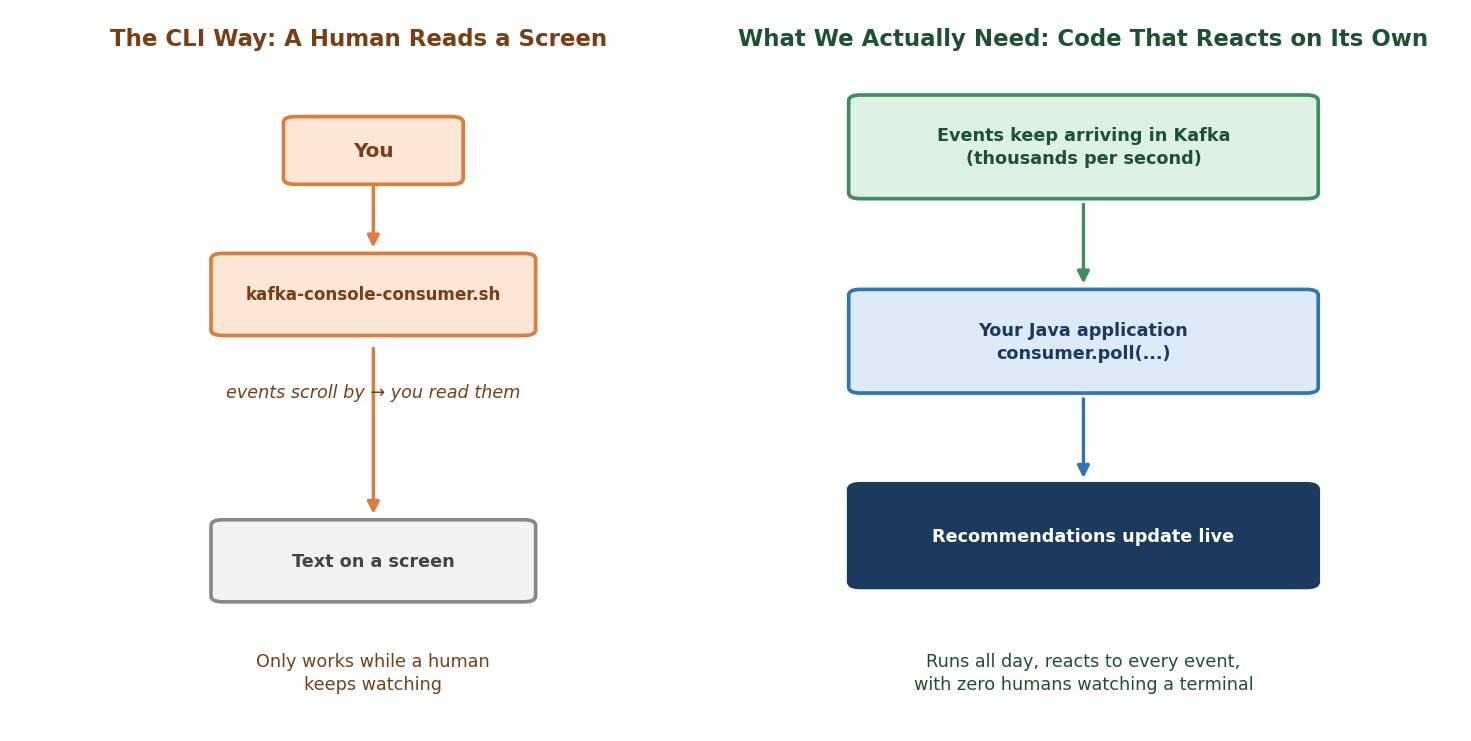 CLI vs. an application consuming events on its own
Who is reading the output of the CLI tool?
A human. It prints events on a screen and you look at them.
Can a recommendation engine work like that?
No. There is no person sitting in front of a terminal, updating recommendations by hand. We need code that reads every event and reacts on its own. It must run all day, every day.
It is the same story as producers. We need the client library, this time on the reading side. It is the same kafka-clients library that is already in your project. It contains the producer, the consumer and the admin client. So there is nothing new to add to pom.xml.
Let's Build It
Here is what we are building:
Output / NoteA class that plays the ingestion layer of a
RecommendationConsumer. It reads every clickstream event as it arrives and reacts to it. To start simple, "react" means "print it".
We build it in four steps. We put it in a new package, com.kafkacourse.ch05, next to the ch04 package from the producer chapter.
Step 1: Configure the Consumer
javaprivate static final String BOOTSTRAP_SERVERS = "localhost:9092,localhost:9094,localhost:9095"; private static final String TOPIC = "clickstream-events"; private static final String GROUP_ID = "recommendation-service"; Properties config = new Properties(); config.put(ConsumerConfig.BOOTSTRAP_SERVERS_CONFIG, BOOTSTRAP_SERVERS); config.put(ConsumerConfig.GROUP_ID_CONFIG, GROUP_ID); config.put(ConsumerConfig.AUTO_OFFSET_RESET_CONFIG, "earliest"); KafkaConsumer<String, ClickEvent> consumer = new KafkaConsumer<>( config, new StringDeserializer(), new JsonDeserializer<>(ClickEvent.class));
You know bootstrap.servers from the producer chapter. It is the same idea. There are two more settings, and two deserializers. Let's look at them.
What is group.id?
It is the name of the group this consumer belongs to. It is required. Every consumer belongs to a group, even a "group" of one. In the next lecture we will see what a group really does. For now, just remember: no group.id, no working consumer.
What is auto.offset.reset?
Let's ask a question first. Suppose you start a consumer with a brand-new group.id. Kafka has never seen this group. Where should it start reading?
That is exactly what this setting answers.
"earliest"means start from the beginning of the topic."latest"means start from events produced from now on.
What if I don't set it?
Then the default is "latest". Your consumer would start, show nothing, and you would think it is broken. So it is a good habit to always set this on purpose. (There are two more values, none and by_duration. We meet them later.)
Does this setting apply every time the consumer starts?
No. It only matters when the group has no saved position yet. Once the group has saved its position, that position is used instead. We will prove this in a minute, in the "run it twice" test.
What are the deserializers?
Remember the producer side. There, a serializer turned our Java object into bytes. Here we need the opposite: a deserializer turns the bytes back into a Java object.
StringDeserializerreads the key. It comes with Kafka.JsonDeserializerreads the value. It is a small class of our own, in thecommonpackage, next to theJsonSerializeryou already have. You tell it which class to create:ClickEvent.
Why do we pass the deserializers directly, and not by class name in the config?
On the producer side, we gave class names in the config. Here, our JsonDeserializer must know the target class, ClickEvent. Passing an object that already knows it is the simplest way, and the compiler checks the types for us. That is also why the consumer is KafkaConsumer<String, ClickEvent>: key type first, value type second.
Create the JsonDeserializer in the common package:
javapackage com.kafkacourse.common; import com.fasterxml.jackson.databind.DeserializationFeature; import com.fasterxml.jackson.databind.ObjectMapper; import org.apache.kafka.common.errors.SerializationException; import org.apache.kafka.common.serialization.Deserializer; import java.io.IOException; /** * Turns JSON bytes back into a Java object of the type we ask for. * Kafka calls deserialize() for us, inside consumer.poll(). */ public class JsonDeserializer<T> implements Deserializer<T> { // Fields we do not know (for example "tier" in some events) are ignored, not an error. private final ObjectMapper mapper = new ObjectMapper() .configure(DeserializationFeature.FAIL_ON_UNKNOWN_PROPERTIES, false); private final Class<T> targetType; public JsonDeserializer(Class<T> targetType) { this.targetType = targetType; } @Override public T deserialize(String topic, byte[] data) { if (data == null) { return null; } try { return mapper.readValue(data, targetType); } catch (IOException e) { throw new SerializationException("Could not read the JSON into " + targetType.getSimpleName(), e); } } }
Why ignore unknown fields?
Some events in our topic come from the partitioner lecture. They carry an extra field, tier. Our ClickEvent does not have it. Without this setting, Jackson would stop with an error at the first such event.
Output / NoteGood to know: Kafka 4 has a newer protocol for consumer groups, chosen with the setting
group.protocol. In this course we use the classic protocol, which is the default. It is the one you will meet in most real systems today.
Step 2: Subscribe to the Topic
javaconsumer.subscribe(List.of(TOPIC), new ConsumerRebalanceListener() { @Override public void onPartitionsAssigned(Collection<TopicPartition> partitions) { System.out.println("Partitions assigned to this consumer: " + partitions.stream().map(TopicPartition::partition).sorted().toList() + " (thread: " + Thread.currentThread().getName() + ")"); } @Override public void onPartitionsRevoked(Collection<TopicPartition> partitions) { // Nothing to do yet. We look at this callback in the rebalancing lecture. } });
Notice that subscribe() takes a list. A consumer can subscribe to many topics at once.
The second argument is a rebalance listener. It is a small object with two methods. Kafka calls onPartitionsAssigned when this consumer receives its partitions. It calls onPartitionsRevoked when partitions are taken away. Java requires both methods, so we write the second one empty for now.
Don't worry about the details. Our listener is only here so you can see something happen when the consumer joins. We explain it fully in the next two lectures.
Why does it print the thread name?
For a surprise, in a few minutes.
Step 3: The Poll Loop
This is the heart of every Kafka consumer you will ever write.
javawhile (true) { ConsumerRecords<String, ClickEvent> records = consumer.poll(Duration.ofSeconds(1)); for (ConsumerRecord<String, ClickEvent> record : records) { ClickEvent event = record.value(); System.out.printf("[partition %d offset %d] user=%s event=%s%n", record.partition(), record.offset(), event.userId(), event.eventType()); count++; } }
(The full file also has int count = 0; before the loop.)
Let's go through it slowly.
Does Kafka push data to the consumer?
No. A consumer pulls. It keeps calling poll(), again and again, and asks: "Do you have something for me?"
What does poll() return?
A ConsumerRecords object. It is a collection of ConsumerRecord, one for each message that arrived. It is never null. If nothing arrived within the timeout (here, 1 second), you simply get an empty collection. Our for loop then does nothing, and the while loop polls again.
Is an empty result a problem?
No. It is normal. It only means "quiet second".
And what about errors?
In Java, errors are exceptions. There is no "error message object" to check. If something goes wrong that the client cannot handle, poll() throws an exception, and your loop stops. For example, we will see what happens with a message that cannot be deserialized, in a later lecture.
Most problems are temporary, such as a broker that is not reachable for a moment. The client does not throw for those. It retries on its own, and writes a warning to the log.
Output / NoteTip: If your cluster is not running,
poll()will not throw anything. You will see warnings in the Run window, likeConnection to node -1 could not be established. Node may not be available.If you see those, checkdocker psfirst.
What does the loop body do?
It reads each record. record.value() is already a ClickEvent, because the deserializer did the work inside poll(). We print the partition and offset, the same ones you saw from the producer side.
Wait, why does poll() do more than return messages?
Good catch. In the Java client, poll() has three jobs:
- It returns the next records.
- It runs your rebalance callbacks, such as
onPartitionsAssigned. - It does all the group work: joining the group, staying a member, and saving offsets. And it asks the brokers for data.
So your onPartitionsAssigned method does not run on its own. It runs inside your poll() call, on your own thread. Remember this. It will matter a lot in the next two lectures.
Stopping the Loop
Our loop says while (true). How do we ever leave it?
We need a way to say: "stop, please". The consumer has one special method for this: wakeup(). It makes a waiting poll() throw a WakeupException, and that ends our loop.
Why a special method? Because a KafkaConsumer is not thread-safe. You must only use it from one thread. wakeup() is the only method you may call from another thread.
We call it from a shutdown hook. That is a small thread that Java runs when the program is asked to stop:
javaThread mainThread = Thread.currentThread(); Runtime.getRuntime().addShutdownHook(new Thread(() -> { System.out.println("\nStopping consumer..."); consumer.wakeup(); try { mainThread.join(); } catch (InterruptedException e) { Thread.currentThread().interrupt(); } }));
The hook does two things. It calls wakeup(). And it waits (join) for the main thread to finish, so that the program does not end before the consumer has closed properly. This pattern is standard in every Java consumer.
Step 4: Shut Down Cleanly
javatry { // subscribe and the poll loop } catch (WakeupException e) { // Expected: this is how wakeup() ends a poll() that is waiting. } finally { consumer.close(); System.out.println("Done. This run consumed " + count + " messages."); }
Why do we always call close()?
Because close() does three things:
- It stops consuming.
- It commits the final offsets (with the default settings).
- It tells the group: "I am leaving on purpose."
What happens if we skip it?
The final offsets are not committed, and the group does not know you left. It waits until your session times out (45 seconds by default) before it notices. Until then, your partitions sit unread.
The Complete Class
Create RecommendationConsumer in the ch05 package:
javapackage com.kafkacourse.ch05; import com.kafkacourse.common.ClickEvent; import com.kafkacourse.common.JsonDeserializer; import org.apache.kafka.clients.consumer.ConsumerConfig; import org.apache.kafka.clients.consumer.ConsumerRebalanceListener; import org.apache.kafka.clients.consumer.ConsumerRecord; import org.apache.kafka.clients.consumer.ConsumerRecords; import org.apache.kafka.clients.consumer.KafkaConsumer; import org.apache.kafka.common.TopicPartition; import org.apache.kafka.common.errors.WakeupException; import org.apache.kafka.common.serialization.StringDeserializer; import java.time.Duration; import java.util.Collection; import java.util.List; import java.util.Properties; /** * Recommendation Consumer: your first Kafka consumer. * Reads clickstream events as they arrive and reacts to each one. * To start simple, "react" means "print it". */ public class RecommendationConsumer { private static final String BOOTSTRAP_SERVERS = "localhost:9092,localhost:9094,localhost:9095"; private static final String TOPIC = "clickstream-events"; private static final String GROUP_ID = "recommendation-service"; public static void main(String[] args) { // Step 1: Configure the consumer Properties config = new Properties(); config.put(ConsumerConfig.BOOTSTRAP_SERVERS_CONFIG, BOOTSTRAP_SERVERS); // Every consumer must belong to a group, even a "group" of one. config.put(ConsumerConfig.GROUP_ID_CONFIG, GROUP_ID); // Used ONLY when this group has no saved position yet. // "earliest" = start from the beginning of the topic. "latest" (the default) = only new events. config.put(ConsumerConfig.AUTO_OFFSET_RESET_CONFIG, "earliest"); KafkaConsumer<String, ClickEvent> consumer = new KafkaConsumer<>( config, new StringDeserializer(), new JsonDeserializer<>(ClickEvent.class)); // Shutdown: when the program is asked to stop (for example by the Stop button), // wake the consumer up, so that the poll loop below ends and we can close cleanly. Thread mainThread = Thread.currentThread(); Runtime.getRuntime().addShutdownHook(new Thread(() -> { System.out.println("\nStopping consumer..."); consumer.wakeup(); try { mainThread.join(); } catch (InterruptedException e) { Thread.currentThread().interrupt(); } })); int count = 0; try { // Step 2: Subscribe to the topic (a list: one consumer can read many topics) consumer.subscribe(List.of(TOPIC), new ConsumerRebalanceListener() { @Override public void onPartitionsAssigned(Collection<TopicPartition> partitions) { System.out.println("Partitions assigned to this consumer: " + partitions.stream().map(TopicPartition::partition).sorted().toList() + " (thread: " + Thread.currentThread().getName() + ")"); } @Override public void onPartitionsRevoked(Collection<TopicPartition> partitions) { // Nothing to do yet. We look at this callback in the rebalancing lecture. } }); System.out.println("Listening on '" + TOPIC + "'... press Stop to end."); // Step 3: The poll loop while (true) { ConsumerRecords<String, ClickEvent> records = consumer.poll(Duration.ofSeconds(1)); for (ConsumerRecord<String, ClickEvent> record : records) { ClickEvent event = record.value(); System.out.printf("[partition %d offset %d] user=%s event=%s%n", record.partition(), record.offset(), event.userId(), event.eventType()); count++; } } } catch (WakeupException e) { // Expected: this is how wakeup() ends a poll() that is waiting. } finally { // Step 4: Shut down cleanly consumer.close(); System.out.println("Done. This run consumed " + count + " messages."); } } }
Running It
Step 1: Start Your Cluster
powershelldocker compose start docker ps
Step 2: Run the Consumer
Open RecommendationConsumer, click the green triangle next to main, and choose Run 'RecommendationConsumer.main()'.
If clickstream-events already has data from your producer runs, you will first see the assigned partitions, and then all the old events scroll by. That is auto.offset.reset = earliest at work. It may take a few seconds before the first line appears, because a new consumer needs a moment to join its group.
Look at the Partitions assigned line. It ends with (thread: main). That is the surprise. Our callback ran on the main thread, the same one that runs our loop, inside poll(). Nobody else called it.
Want to see events arrive live? Run the ClickstreamProducer class from the producer chapter. Each new event should appear here within about a second.
Now press the red Stop button in the Run window. Look at the last lines. You should see Stopping consumer..., and then Done. This run consumed N messages. Remember that number.
Output / NoteIf you do not see those two lines: some IntelliJ versions end a program without giving it the chance to run the shutdown hook. The process is then simply killed, as if it had crashed. Nothing is broken, but two things change. Our
close()never runs, so your position is saved only up to the last automatic save (they happen every 5 seconds, from insidepoll()), and the group needs up to 45 seconds to notice you are gone. Both are exactly whatclose()prevents, and you will see them again when we talk about failures.
Step 3: Run It Again (Important!)
Run the very same class a second time.
What do you see?
Almost nothing. You see the assigned partitions, and then silence. Press Stop, and the last line says This run consumed 0 messages.
Is the consumer broken?
No. It is working exactly as designed. Think about it:
- On the first run, this group had no saved position. So
auto.offset.resetstarted us at the beginning. - When we pressed Stop,
close()saved our position in Kafka. - On the second run, the group had a saved position. So Kafka said "you already read everything up to here" and
auto.offset.resetwas ignored.
Let's confirm this from the cluster's side. Open a terminal:
powershelldocker exec -it kafka-1 bash
bashexport PATH=$PATH:/opt/kafka/bin
bashkafka-consumer-groups.sh --describe --group recommendation-service --bootstrap-server kafka-1:29092
Look at the CURRENT-OFFSET and LAG columns. The lag should be 0 for every partition. The group is fully caught up. (No consumer is running now, so the consumer columns will show -. That is fine.)
Now produce a few new events with ClickstreamProducer, and run the consumer once more. This time you will see only the new events.
Output / NoteOptional experiment: Change
GROUP_IDin the class to a brand-new name, like"my-experiment", and run it. Since this group has no saved position, you will see the whole history again. Change it back to"recommendation-service"afterwards, because the next lectures use that name.
This is a preview of two big topics. Soon we will look at offsets in detail, and we will also learn how to push a group's position back on purpose.
Step 4: Stop Your Cluster
Leave the broker shell with exit. Then:
powershelldocker compose stop
Now — What's Actually Happening Inside That Loop?
You watched a consumer read data continuously. Let's look at its whole life: start, running, and stop.
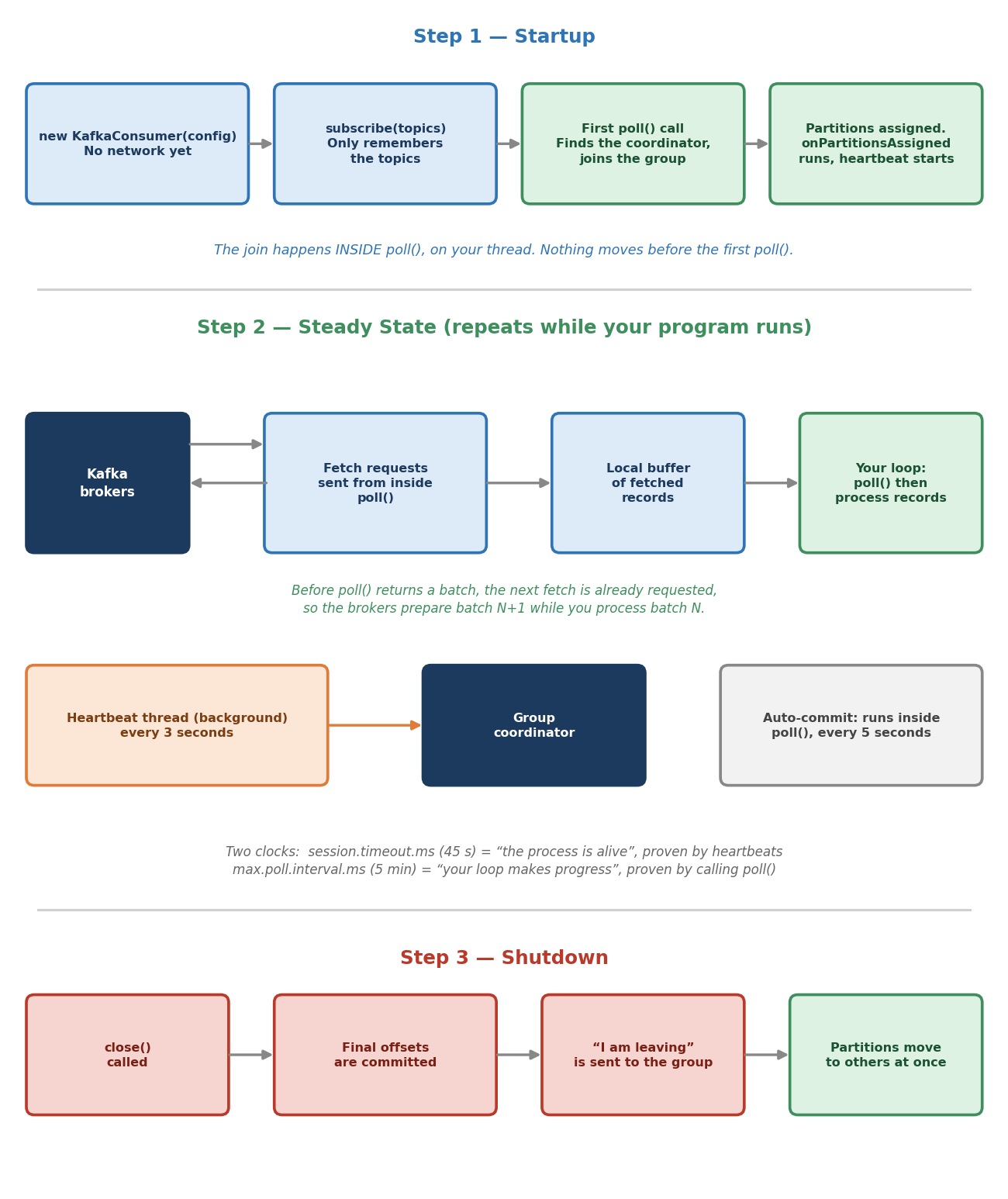 Consumer lifecycle: startup, steady state, shutdown
Step 1: Startup
What happens when you write new KafkaConsumer(...) and subscribe()?
Almost nothing. The consumer is created, and subscribe() only remembers the topics you want. There is no network activity yet. If your cluster were down, you would not notice until the first poll().
So when does the consumer join the group?
In the first poll(). Inside that call, on your own thread, the consumer finds the group coordinator (a broker that manages the group), joins the group, and receives its partitions. Then it calls your onPartitionsAssigned listener. That is why the "Partitions assigned" line appears just before the first message, and not before. Then it looks up where the group stopped last time, and applies auto.offset.reset if there is no saved position. During the first poll(), the consumer also starts its heartbeat thread, which we meet in a moment.
So the correct picture is: nothing happens before the first poll(). Everything starts inside it.
Step 2: Steady State
This is where your program spends almost all of its time. Two things happen side by side.
Where do messages come from when you call poll()?
If the consumer already holds fetched records, poll() returns them at once. If not, it asks the brokers for more and waits, up to your timeout. The asking happens inside poll().
There is a clever detail. Just before poll() returns a batch to you, it sends the request for the next batch. So while your code processes batch number one, the brokers are already preparing batch number two. Most of the time, the data is already on its way when you come back.
How does Kafka know your consumer is still alive?
Through heartbeats. A background thread sends a small "I am alive" signal to the group coordinator. By default, this happens every 3 seconds (heartbeat.interval.ms). You can even find this thread by name: kafka-coordinator-heartbeat-thread | recommendation-service. If the coordinator hears nothing for 45 seconds (session.timeout.ms), it decides your consumer is dead and gives its partitions to someone else.
Does calling poll() send the heartbeat?
No. Heartbeats run on their own thread. A long pause in your loop does not stop them.
So can a consumer stay alive forever without calling poll()?
No, and this is the second clock. There is another setting, max.poll.interval.ms. Its default is 5 minutes. If your code goes longer than that between two poll() calls, the client decides your processing loop is stuck. It leaves the group, and the partitions move to another consumer.
Let's put the two clocks side by side:
| Clock | Setting | Default | What it proves |
|---|---|---|---|
| Heartbeat send rate | heartbeat.interval.ms | 3 seconds | How often the background thread sends its "I am alive" signal |
| Heartbeat timeout | session.timeout.ms | 45 seconds | How long the coordinator waits without a heartbeat before deciding the process is dead |
| Poll gap | max.poll.interval.ms | 5 minutes | Your loop is making progress |
Notice the first two rows are related, not independent: heartbeat.interval.ms is how often the signal goes out, session.timeout.ms is how long the coordinator tolerates silence before giving up on you. As a rule of thumb, Kafka's own default keeps the interval at roughly a third of the timeout, so a few heartbeats can be missed before the group overreacts.
Why does this matter for us?
Because of a very common bug: "my consumer keeps leaving the group." Usually the reason is slow work inside the loop, such as a slow database call or a long calculation. The process is alive and heartbeats are fine, but poll() is not called often enough. Keep this in mind whenever you add processing to the loop.
There is a related setting: max.poll.records, 500 by default. It limits how many records one poll() returns. If your processing per record is slow, a smaller batch means a shorter gap between two polls.
Step 3: Shutdown
What happens at close()?
We saw it already: stop consuming, commit the final offsets, and leave the group. Because the group is told right away, it can give your partitions to another consumer immediately. It does not have to wait for a timeout and guess whether you crashed. (close() waits up to 30 seconds for this to finish. And you cannot interrupt it with wakeup().)
One more thing to notice.
By default, offsets are saved by automatic commits: every 5 seconds (auto.commit.interval.ms), your consumer saves its position. The saving is done inside poll(), not by a separate timer. Once 5 seconds have passed, the next poll() commits the position reached so far. That is why close() could save your position, and it is also a risk: the commit happens without asking whether you finished processing your records. We will look at this danger properly when we cover offset management.
Common Mistakes at This Stage
Not setting auto.offset.reset on purpose. The default is latest. A new group then sees nothing until new events arrive.
Forgetting close(). The group needs up to 45 seconds to notice you left, and your last offsets may not be committed.
Using one KafkaConsumer from several threads. It is not thread-safe. You get a ConcurrentModificationException. Only wakeup() may be called from another thread.
Doing slow work inside the loop. Long gaps between poll() calls can push the consumer out of the group.
Not handling WakeupException. It is not an error. It is how a shutdown request reaches your loop. Catch it, and close.
Assuming poll() never throws. It throws when something is wrong, for example when a message cannot be deserialized. A loop without any handling stops at the first one.