Consumer Groups & Partition Assignment
The Requirement
Clickstream volume just tripled.
Your single RecommendationConsumer from the last lecture reads all three partitions of clickstream-events, alone. It is falling behind, and recommendations are stale by the time they update.
The fix product wants is simple: add more consumer capacity, so the work is shared.
So can we just start two more copies of our class?
Careful. It depends on how you start them. If the three copies are unrelated, each one reads everything. All three process every event, and your engine reacts to each click three times. That is not sharing the work. That is tripling it.
Why a Group, Not Just More Consumers
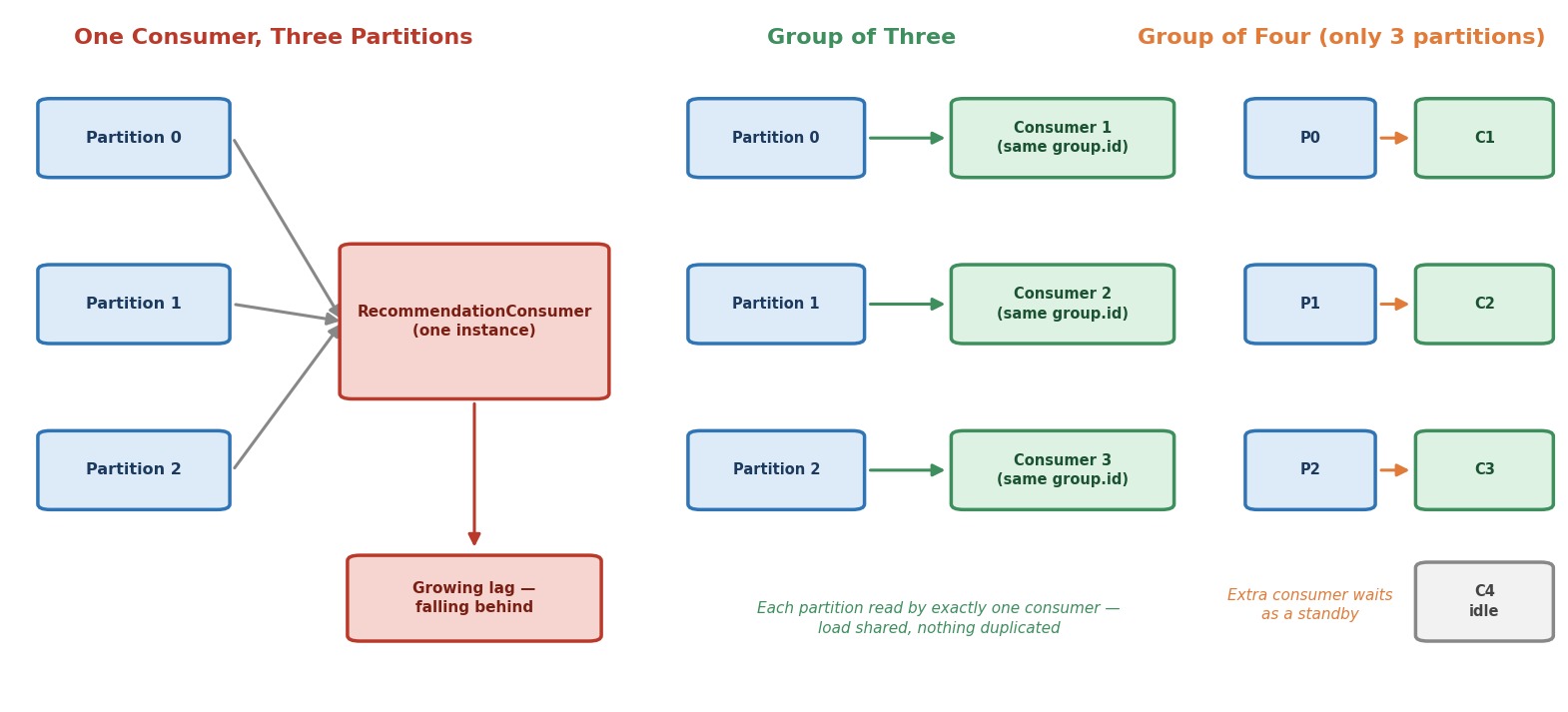 One consumer, a group of three, and a group of four
What makes consumers "related"?
One thing: the group.id. You set it in the last lecture ("recommendation-service") without a full explanation. Here is the explanation.
Output / NoteWithin one group, each partition is read by exactly one consumer.
Kafka splits the partitions between the members of the group. Three partitions and three consumers: each consumer gets one partition. Nothing is read twice, and you get the three-way parallelism you wanted.
Let's answer some questions you may already have.
What if I add a fourth consumer to this group?
A topic with 3 partitions can keep only 3 consumers of one group busy. The fourth one gets no partition. It sits idle as a standby, ready to take over if another member fails. So more consumers than partitions does not add speed.
So how do I scale beyond three consumers?
Add partitions to the topic. The number of partitions is the ceiling for parallelism inside one group.
What if the same order of events matters?
Good thinking. Kafka keeps order inside one partition. Since one partition goes to only one consumer, that consumer sees its events in order. If you use a key (for example the user ID), all events of one user land in one partition, and so with one consumer.
What about a second group, like an analytics service?
Groups are independent. A group named analytics-service reads the same topic on its own, and gets every message again, with its own position. So:
- Same
group.id= share the work. - Different
group.id= each group gets a full copy of the data.
Let's Build It
We reuse almost everything from the last lecture: same config shape, same poll loop, same shutdown hook. There are only two additions. First, a way to tell running copies apart. Second, a way to see which partitions each copy receives.
Create a new class ConsumerGroupMember in the ch05 package. The complete file is at the end of this section.
Step 1: Accept an Instance Name
javaif (args.length != 1) { System.out.println("Usage: ConsumerGroupMember <instance-name>"); System.out.println("In IntelliJ: Run > Edit Configurations > Program arguments."); return; } String instanceName = args[0];
This is not a Kafka idea. It only helps you tell the output of three running copies apart. The name comes from the program argument, which you set in a run configuration, just like in the benchmark lecture.
Step 2: Same group.id, Different client.id
javaProperties config = new Properties(); config.put(ConsumerConfig.BOOTSTRAP_SERVERS_CONFIG, BOOTSTRAP_SERVERS); // The same group.id in every instance is what makes them share the work. config.put(ConsumerConfig.GROUP_ID_CONFIG, GROUP_ID); // Only a label, so we can tell instances apart in the output and in kafka-consumer-groups.sh. config.put(ConsumerConfig.CLIENT_ID_CONFIG, instanceName); config.put(ConsumerConfig.AUTO_OFFSET_RESET_CONFIG, "earliest");
Which line makes the magic happen?
group.id. Every instance uses the exact same value. That is all Kafka needs. There is no other signal, and the instances never talk to each other directly.
Then what is client.id for?
It is a label. It has no effect on how work is shared. But it shows up in Kafka's own tools, so you can see which instance owns which partition.
Step 3: Watch Assignment Happen, Live
In the last lecture, our listener printed one line. This time, let's watch both sides of the story, when partitions come and when they go:
javaconsumer.subscribe(List.of(TOPIC), new ConsumerRebalanceListener() { /** Runs (inside poll) when this instance is handed partitions. */ @Override public void onPartitionsAssigned(Collection<TopicPartition> partitions) { List<Integer> assigned = partitions.stream().map(TopicPartition::partition).sorted().toList(); if (assigned.isEmpty()) { System.out.println("\n>>> [" + instanceName + "] ASSIGNED no partitions (idle standby)\n"); } else { System.out.println("\n>>> [" + instanceName + "] ASSIGNED partitions: " + assigned + "\n"); } } /** Runs (inside poll) when this instance is about to lose partitions. */ @Override public void onPartitionsRevoked(Collection<TopicPartition> partitions) { List<Integer> revoked = partitions.stream().map(TopicPartition::partition).sorted().toList(); System.out.println("\n>>> [" + instanceName + "] REVOKED partitions: " + revoked + "\n"); } });
What is this object?
It is a rebalance listener, the same kind you met in the last lecture. You give it to Kafka, and Kafka calls its methods at the right moment:
onPartitionsAssignedruns when this instance is handed partitions.onPartitionsRevokedruns when this instance is about to lose partitions.
Who calls them?
Your own poll() does, on your own thread. Remember from the last lecture: poll() also runs the callbacks. So these messages appear only while your loop is running.
Everything else in the class is the same as before: the poll loop, the deserializers, the shutdown hook, and close().
The Complete Class
javapackage com.kafkacourse.ch05; import com.kafkacourse.common.ClickEvent; import com.kafkacourse.common.JsonDeserializer; import org.apache.kafka.clients.consumer.ConsumerConfig; import org.apache.kafka.clients.consumer.ConsumerRebalanceListener; import org.apache.kafka.clients.consumer.ConsumerRecord; import org.apache.kafka.clients.consumer.ConsumerRecords; import org.apache.kafka.clients.consumer.KafkaConsumer; import org.apache.kafka.common.TopicPartition; import org.apache.kafka.common.errors.WakeupException; import org.apache.kafka.common.serialization.StringDeserializer; import java.time.Duration; import java.util.Collection; import java.util.List; import java.util.Properties; /** * Recommendation Consumer, now built to run as several instances at once, * all sharing the same group.id. Start this class more than once, each time * with a different instance name (the program argument): * instance-1, instance-2, instance-3. * Kafka gives each instance its own share of the topic's partitions. */ public class ConsumerGroupMember { private static final String BOOTSTRAP_SERVERS = "localhost:9092,localhost:9094,localhost:9095"; private static final String TOPIC = "clickstream-events"; private static final String GROUP_ID = "recommendation-service"; public static void main(String[] args) { // Step 1: Accept an instance name. This is not a Kafka idea. It only helps us tell the windows apart. if (args.length != 1) { System.out.println("Usage: ConsumerGroupMember <instance-name>"); System.out.println("In IntelliJ: Run > Edit Configurations > Program arguments."); return; } String instanceName = args[0]; // Step 2: Same group.id, different client.id Properties config = new Properties(); config.put(ConsumerConfig.BOOTSTRAP_SERVERS_CONFIG, BOOTSTRAP_SERVERS); // The same group.id in every instance is what makes them share the work. config.put(ConsumerConfig.GROUP_ID_CONFIG, GROUP_ID); // Only a label, so we can tell instances apart in the output and in kafka-consumer-groups.sh. config.put(ConsumerConfig.CLIENT_ID_CONFIG, instanceName); config.put(ConsumerConfig.AUTO_OFFSET_RESET_CONFIG, "earliest"); KafkaConsumer<String, ClickEvent> consumer = new KafkaConsumer<>( config, new StringDeserializer(), new JsonDeserializer<>(ClickEvent.class)); Thread mainThread = Thread.currentThread(); Runtime.getRuntime().addShutdownHook(new Thread(() -> { System.out.println("\n[" + instanceName + "] stopping..."); consumer.wakeup(); try { mainThread.join(); } catch (InterruptedException e) { Thread.currentThread().interrupt(); } })); try { // Step 3: Watch assignment happen, live consumer.subscribe(List.of(TOPIC), new ConsumerRebalanceListener() { /** Runs (inside poll) when this instance is handed partitions. */ @Override public void onPartitionsAssigned(Collection<TopicPartition> partitions) { List<Integer> assigned = partitions.stream().map(TopicPartition::partition).sorted().toList(); if (assigned.isEmpty()) { System.out.println("\n>>> [" + instanceName + "] ASSIGNED no partitions (idle standby)\n"); } else { System.out.println("\n>>> [" + instanceName + "] ASSIGNED partitions: " + assigned + "\n"); } } /** Runs (inside poll) when this instance is about to lose partitions. */ @Override public void onPartitionsRevoked(Collection<TopicPartition> partitions) { List<Integer> revoked = partitions.stream().map(TopicPartition::partition).sorted().toList(); System.out.println("\n>>> [" + instanceName + "] REVOKED partitions: " + revoked + "\n"); } }); System.out.println("[" + instanceName + "] joining group '" + GROUP_ID + "'... press Stop to end."); while (true) { ConsumerRecords<String, ClickEvent> records = consumer.poll(Duration.ofSeconds(1)); for (ConsumerRecord<String, ClickEvent> record : records) { ClickEvent event = record.value(); System.out.printf("[%s] partition %d offset %d user=%s event=%s%n", instanceName, record.partition(), record.offset(), event.userId(), event.eventType()); } } } catch (WakeupException e) { // Expected: this is how wakeup() ends a poll() that is waiting. } finally { consumer.close(); } } }
Running It
Step 1: Start Your Cluster
powershelldocker compose start docker ps
Step 2: Check the Partition Count
Our whole demo assumes the topic has three partitions. Let's confirm it. Open a terminal and enter a broker:
powershelldocker exec -it kafka-1 bash
bashexport PATH=$PATH:/opt/kafka/bin
bashkafka-topics.sh --describe --topic clickstream-events --bootstrap-server kafka-1:29092
You should see PartitionCount: 3. Keep this terminal open. We will use it again.
Step 3: Create Three Run Configurations
We need three copies of the class running at the same time, each with its own name. In IntelliJ, that means three run configurations.
- Open
ConsumerGroupMember, click the green triangle next tomain, and run it once. It only prints the usage message, but it creates a run configuration for us. - Open Run → Edit Configurations…, and select
ConsumerGroupMember. In the Program arguments field (use Modify options if it is hidden), typeinstance-1. Change the Name tomember-1. Click Apply. - Click the Copy icon. Name the copy
member-2, with the argumentinstance-2. - Copy again:
member-3, with the argumentinstance-3. Click OK.
Now start them one by one. Select member-1 in the list at the top and click the green triangle. Then member-2, and then member-3. Each one opens in its own tab in the Run window, so you can watch all three.
Now watch the ASSIGNED partitions lines.
What should you see?
With three partitions and three instances, each instance ends up with exactly one partition. No overlaps, nothing left out.
Did instance-1 first get all three partitions, and then lose two?
It can happen, depending on how fast you start the instances. The first one to join may briefly own everything. Then, when the next one joins, you see REVOKED followed by a new ASSIGNED. This is normal. Kafka rearranged the split because the group changed. That is called a rebalance, and it is the topic of the next lecture. For now, just watch the final result.
Will instance-1 always get partition 0?
Not guaranteed, but very often yes with these names. The default strategy sorts the members by their member ID, and that ID starts with the client.id. So instance-1, instance-2, instance-3 usually get partitions 0, 1, 2 in this order.
Step 4: Watch the Load Split
The group already read all the old events in the last lecture. So the three tabs will stay quiet. That is expected.
Now run ClickstreamProducer from the producer chapter, to send new events. Watch the three consumer tabs. Each one prints only the events from its own partition, and never from the others. (You can check this with the partition table from the partitioning lecture. For example, user-501 should show up only in the instance that owns partition 2.)
Step 5: Confirm It From the Cluster's Side
Go back to your broker terminal:
bashkafka-consumer-groups.sh --describe --group recommendation-service --bootstrap-server kafka-1:29092
This is the cluster's own view of the group. Look at three columns: PARTITION, CLIENT-ID, and LAG. You can see which instance owns which partition, and how far behind each one is. This is the exact tool you will use in production to check the health of a consumer group.
Two more views of the same group:
bashkafka-consumer-groups.sh --describe --group recommendation-service --members --bootstrap-server kafka-1:29092
This lists the members and how many partitions each one has.
bashkafka-consumer-groups.sh --describe --group recommendation-service --state --bootstrap-server kafka-1:29092
This shows the group's state (it should be Stable), its assignment strategy (range), and its coordinator: a specific broker. Remember this line. We explain it in the next section.
Step 6: Try a Fourth Instance (Optional)
Add one more run configuration, member-4, with the argument instance-4, and start it.
You should see the group rebalance, and the new instance report that it has no partitions (idle standby). Re-run the --members command: the fourth instance appears with 0 partitions. This proves the rule from earlier: more consumers than partitions adds no speed.
Look at the other three tabs too. Each one printed REVOKED and then ASSIGNED again, even though they end up with the same partition as before. Remember that. It is a hint for the next lecture.
Step 7: Stop Everything
Press the red Stop button in each consumer tab. Then leave the broker shell with exit, and:
powershelldocker compose stop
How Group Coordination Actually Works
You just watched three separate programs reach a clean, non-overlapping split, and they never talked to each other. How?
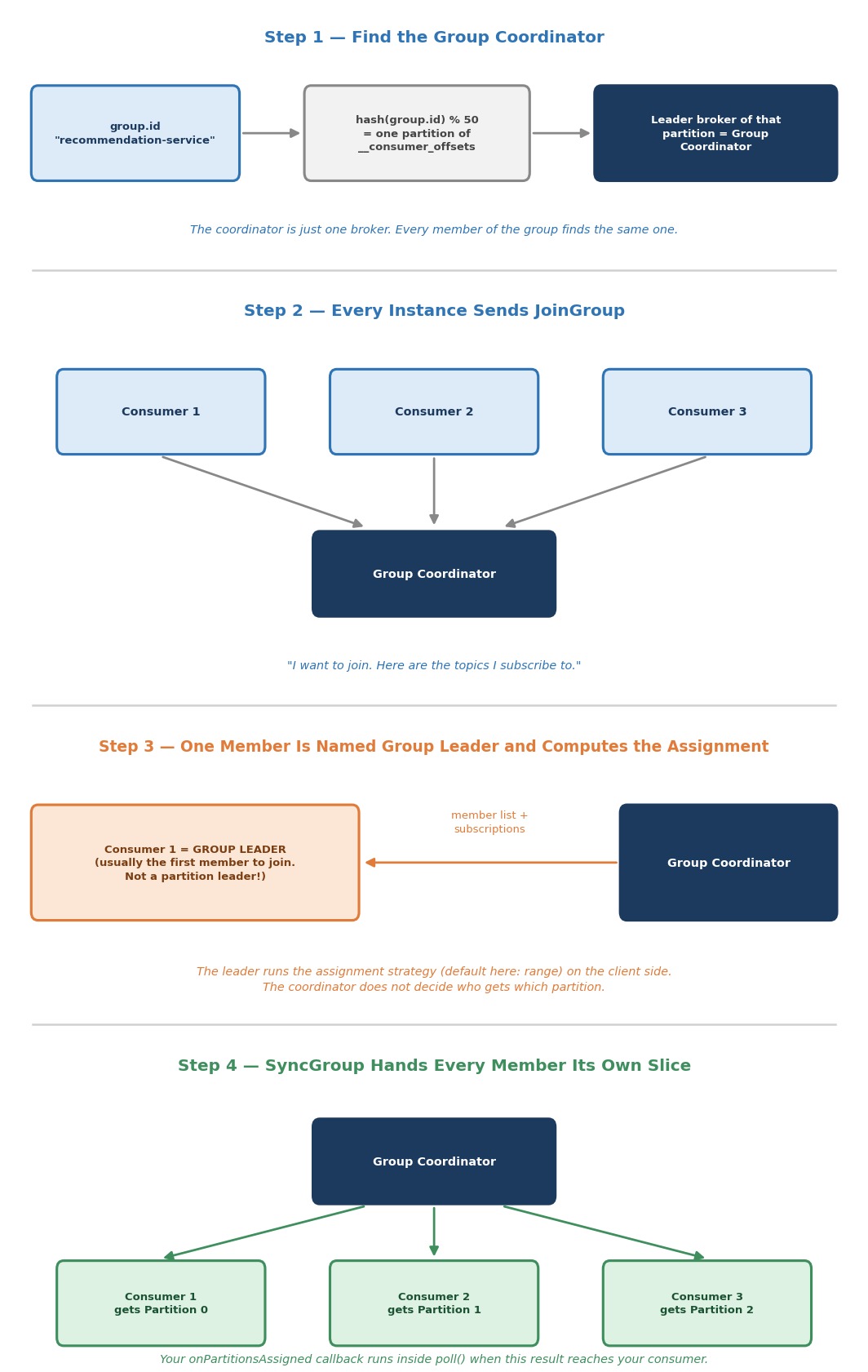 How a consumer group coordinates
Step 1: Find the Group Coordinator
Every group has a Group Coordinator. Who is it?
It is one specific broker. Kafka picks it with a simple rule:
- Take the
group.idand hash it. - Map the hash to one partition of the internal topic
__consumer_offsets(50 partitions by default). - The broker that is the leader of that partition is the coordinator.
This is the same leader and partition idea you learned when we studied brokers. It is just applied to an internal topic. And every member gets the same answer, because the rule uses only the group.id. That is why the coordinator column in your --state output showed one broker.
Step 2: Every Instance Sends JoinGroup
Each instance sends a JoinGroup request to the coordinator. It says: "I want to join this group, and here are the topics I subscribe to." In the Java consumer, this happens inside your poll().
Step 3: One Member Becomes the Group Leader
Does the coordinator decide who gets which partition?
No, and this surprises many people. The coordinator picks one member of the group and names it the group leader. Usually this is the first member that joined. The coordinator sends the leader the full member list and the subscriptions. Then the leader itself runs the assignment strategy, on the client side, inside its own poll().
Do not mix up two ideas:
| Term | What it is |
|---|---|
| Partition leader | The broker that holds the main copy of a partition |
| Group leader | One consumer in the group that computes the assignment |
Which strategy does it run?
The Java consumer has a setting, partition.assignment.strategy. Its default is a list of two: RangeAssignor first, and CooperativeStickyAssignor second. Each member offers this list, and the group uses the first strategy that all members support. Here that is range, which is what the --state output showed. (Why two? The second one prepares the way for the next lecture.)
For one topic, range sorts the members and splits the partitions into equal chunks:
| Partitions | Members | Result |
|---|---|---|
| 3 | 3 | Each member gets exactly one |
| 3 | 2 | The first member gets two partitions, the second gets one |
| 3 | 4 | The extra member gets none — it sits idle |
The pattern: range hands out whole partitions, never splits one, and never leaves a partition unassigned while a member could take it. When the numbers don't divide evenly, the imbalance (an extra partition, or an idle member) always falls on one end of the sorted member list, not spread around.
Step 4: SyncGroup Delivers the Result
The group leader sends the finished assignment back to the coordinator, in a SyncGroup request. The other members send SyncGroup too, and the coordinator answers each member with its own slice of the plan.
When that answer reaches your consumer, your poll() calls onPartitionsAssigned. That is the exact moment you saw >>> ASSIGNED partitions in your output. It was not a coincidence. It is the visible result of this handshake.
Output / NoteGood to know: Newer Kafka brokers (the
apache/kafka:4.3.1in our cluster is one) also offer a second protocol, where the broker computes the assignment and there is no group leader. The Java consumer uses the classic protocol described above unless you switch the new one on withgroup.protocol. Everything in this course uses the classic one.
And when does all this run again?
Not just at startup. Whenever the group changes, it runs again. That is the subject of the next lecture.
Common Mistakes at This Stage
Starting "more consumers" with different group.id values. Each one then gets every event, and the work is duplicated instead of shared.
Expecting more consumers than partitions to go faster. The extra ones just wait.
Giving every instance the same client.id. It works, but the tool output becomes hard to read. Use a unique label per instance.
Thinking the coordinator assigns the partitions. The group leader, one of your own consumers, computes the assignment.
Sharing one KafkaConsumer object between threads to "scale". A consumer is not thread-safe. To scale, run more consumers in the same group: threads, processes or machines, each with its own KafkaConsumer.