Automating Jobs — REST API and Databricks CLI
Every job trigger we've used so far — manual runs, "Run now with different settings," schedules — happens from inside the Databricks UI. That covers a lot of ground, but not everything. What if the job needs to be triggered from an AWS Lambda function reacting to an external event? What if a parameter value simply isn't available as a dynamic value reference? What if a bigger system needs to trigger this job as one step in a larger pipeline outside Databricks entirely?
For all of these, Databricks offers two programmatic ways in: the REST API and the Databricks CLI. The REST API is what you'd reach for from a programming language like Python; the CLI is what you'd reach for from a shell script.
Authentication: Host and Token
Both approaches need two things to authenticate: a host (the workspace URL) and an access token.
The host is just the workspace's own URL — visible directly in the browser address bar
(https://<your-workspace-id>.cloud.databricks.com).
The token comes from Settings → Developer → Access tokens → Generate new token. When generating one, scope its permissions to only what's needed — in this case, jobs and pipelines (since the job's pipeline task internally calls the pipeline API too). Scoping tokens narrowly rather than granting broad access is good practice regardless of what you're building.
A token is a credential, not something to hardcode into shared or committed code. In a real notebook or script, the token would come from a secret scope, an environment variable, or (for external systems specifically) a service principal's personal access token — never typed in plaintext next to code that might get shared, copied, or checked into source control.
Triggering a Job via the REST API
Here's the shape of the notebook used for this (with the token represented as a placeholder — never put a real token in code you intend to share):
python# ============================================================ # REST API demo # # Triggers medallion-orchestration-job with a specific run_date. # Auth is injected automatically inside Databricks workspace. # In external systems, replace token with a service principal PAT. # ============================================================ import requests import json import time host = "https://<your-workspace-id>.cloud.databricks.com" token = "<YOUR_ACCESS_TOKEN>" headers = { "Authorization": f"Bearer {token}", "Content-Type": "application/json" }
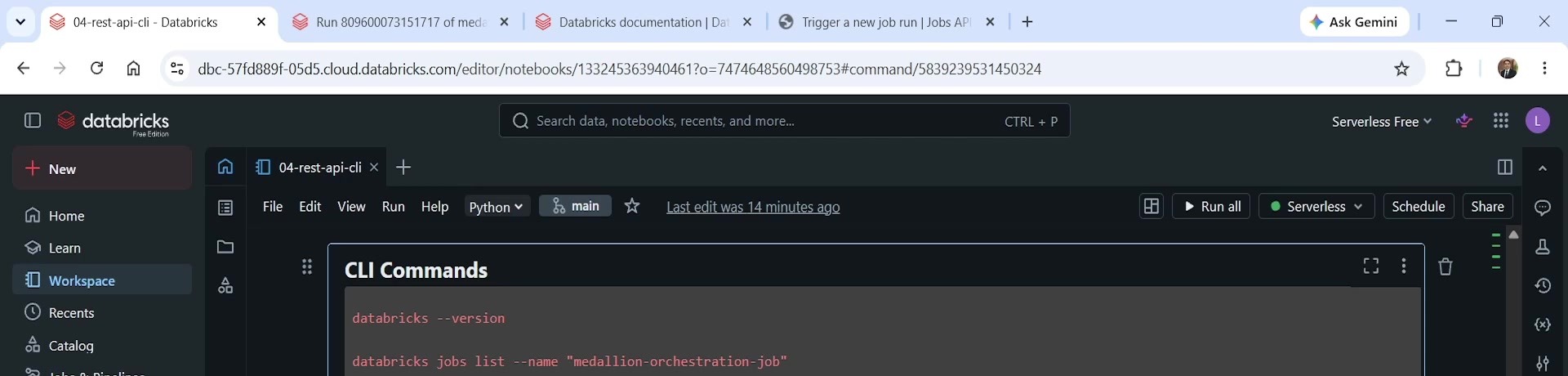 The CLI Commands reference cell
Step 1 — find the job ID
The UI shows a job's name, but the API needs its internal job ID. The jobs/list endpoint finds
it by name:
python# List jobs and find medallion-orchestration-job response = requests.get( f"{host}/api/2.1/jobs/list", headers=headers, params={"name": "medallion-orchestration-job"} ) data = response.json() job_id = data["jobs"][0]["job_id"] print(f"\nJob ID: {job_id}")
This is a GET request. The response is JSON, with a top-level jobs array — since job names are
searched by the name parameter, the first (and in this case, only) match holds the job_id.
Step 2 — trigger the run
With the job ID in hand, jobs/run-now triggers a new run — the direct API equivalent of clicking
"Run now with different settings" in the UI:
python# Trigger a job run — equivalent to "Run now with different parameters" payload = { "job_id": job_id, "job_parameters": { "run_date": "2024-03-01" } } response = requests.post( f"{host}/api/2.1/jobs/run-now", headers=headers, json=payload ) run_data = response.json() run_id = run_data["run_id"] print(f"\nRun ID: {run_id}")
This is a POST request, not a GET — it actually causes something to happen, rather than just
reading state. The payload carries both the job ID and any job parameters to override for this run —
here, run_date. The response includes a run_id, which uniquely identifies this specific
execution and is what the next step polls against.
Step 3 — poll for completion
python# Poll for run completion # In production: use a webhook instead of polling — # configure webhook_notifications.on_success / on_failure # on the job to receive a callback when the run finishes. # Polling is fine for demos and simple scripts. print(f"Polling run {run_id}...") while True: response = requests.get( f"{host}/api/2.1/jobs/runs/get", headers=headers, params={"run_id": run_id} ) run = response.json() state = run["state"]["life_cycle_state"] print(f" State: {state}") if state in ("TERMINATED", "SKIPPED", "INTERNAL_ERROR"): result = run["state"].get("result_state", "UNKNOWN") print(f"\nRun completed. Result: {result}") break time.sleep(15)
This loop calls jobs/runs/get every 15 seconds, checking life_cycle_state until the run reaches a
terminal state (TERMINATED, SKIPPED, or INTERNAL_ERROR), then reports the final result_state
(success or failure). The code's own comment is worth taking seriously: polling is fine for a demo or
a simple script, but a production integration should prefer a webhook —
webhook_notifications.on_success / on_failure configured directly on the job — so the calling
system gets a callback the moment the run finishes, rather than repeatedly asking "are you done yet?"
Running this end to end: the first call returns the job's internal ID, the second call triggers a new run and returns its run ID, and checking the workspace's Runs tab confirms a new run with that exact run ID actually started — the API call is doing the same thing "Run now" does in the UI, just from code instead of a button.
Triggering a Job via the Databricks CLI
The same two operations — find the job, trigger it — have direct CLI equivalents, useful anywhere a shell script is a more natural fit than Python: local terminals, CI/CD pipelines, cron jobs on other infrastructure.
bashdatabricks --version databricks jobs list --name "medallion-orchestration-job" databricks jobs run-now --json '{"job_id": 119866108986758, "job_parameters": {"run_date": "2025-03-02"}}'
databricks --versionconfirms the CLI is installed and reports its version.databricks jobs list --name "..."returns the job ID for a job by name — the CLI equivalent of thejobs/listAPI call.databricks jobs run-now --json '{...}'triggers a run, passing the job ID and any job parameters as an inline JSON payload — the CLI equivalent ofjobs/run-now.
Unlike the notebook example, this command doesn't need an explicit host or token passed in — when the
CLI is run from inside a Databricks workspace terminal (or configured with databricks auth login on
a local machine), authentication is already set up. The run-now command doesn't return immediately
either — it waits for the triggered run to complete before printing a result, which is convenient for
scripts that need to know the outcome before moving to their next step.
Running this triggered a real job run for run_date = 2024-03-02 — and, notably, that run failed,
with AssertionError: dev.dbx_course.gold_daily_revenue has 0 rows. That's expected, not a bug in the
demo: the landing zone only had test data for dates in 2024, and 2024-03-02 (typed with a 2025 date
elsewhere in the same testing session) simply had no matching rows to validate. It's a good reminder
that triggering a job programmatically doesn't change any of its underlying logic — a run_date with
no data behaves exactly the same whether it's passed from the UI, the REST API, or the CLI.
Finding More Commands and Endpoints
Both interfaces cover far more than list and run-now. The full Databricks REST API reference
documents every endpoint (search Databricks docs for "REST API reference"), including example
request/response payloads for each one. The Databricks CLI documentation's command reference
covers the equivalent surface for the CLI — databricks jobs --help, or the docs site directly, lists
commands for creating jobs, deleting runs, managing permissions, and effectively everything else
available in the UI. As a rule: anything doable through the Jobs UI has a corresponding REST API
call, and in most cases a corresponding CLI command too.
Summary
| Concept | Key point |
|---|---|
| Why automate triggering | Jobs may need to run from external systems (Lambda, CI/CD, event-driven architectures), not just on a schedule or manual click |
| Authentication | Host (workspace URL) + access token; scope the token narrowly (jobs + pipelines here, not "all APIs") |
| Token handling | Never hardcode a real token in shared/committed code — use a secret scope, environment variable, or service principal PAT |
GET /api/2.1/jobs/list?name=... | Finds a job's internal ID by name |
POST /api/2.1/jobs/run-now | Triggers a run; payload carries job_id and any job_parameters — the API equivalent of "Run now with different settings" |
GET /api/2.1/jobs/runs/get?run_id=... | Checks a specific run's status; poll until life_cycle_state is terminal |
| Polling vs. webhooks | Polling is fine for demos/scripts; production integrations should prefer webhook_notifications for a callback instead |
databricks jobs list --name / databricks jobs run-now --json | CLI equivalents of the same two API calls |
| CLI authentication | Already configured inside a workspace terminal, or via databricks auth login elsewhere — no explicit host/token needed in the command |
| Coverage | Nearly everything doable in the Jobs UI has both a REST API endpoint and a CLI command |
See you again. Keep learning, and keep growing!