MERGE INTO — the Delta Upsert Engine
In this lecture, let's learn about MERGE — one of the most powerful and flexible commands Delta Lake offers.
What Is MERGE?
The MERGE command lets you perform upserts — simultaneously updating existing rows and inserting new ones — along with deletes, all in a single atomic transaction. This is especially useful for Change Data Capture (CDC) pipelines, and it prevents data duplication while giving you full ACID guarantees.
Setup
Open (or create) a notebook — 08-merge-into-the-delta-upsert-engine — connect a cluster, and set your catalog/schema:
sql%sql USE CATALOG workspace; USE SCHEMA default;
MERGE always works with two datasets: a target table (what you're updating) and a source (the incoming data). Let's build both.
Setting Up: Target and Source
The Target Table
sql%sql DROP TABLE IF EXISTS customers; CREATE OR REPLACE TABLE customers ( customer_id INT COMMENT 'Primary key', name STRING COMMENT 'Full name', email STRING COMMENT 'Contact email', tier STRING COMMENT 'bronze / silver / gold', updated_at TIMESTAMP COMMENT 'Last modified timestamp' ) USING DELTA COMMENT 'Customer master — target for MERGE demos'; INSERT INTO customers VALUES (1, 'Alice Nguyen', 'alice@example.com', 'silver', '2024-06-01 08:00:00'), (2, 'Bob Patel', 'bob@example.com', 'bronze', '2024-06-01 08:00:00'), (3, 'Carol Santos', 'carol@example.com', 'gold', '2024-06-01 08:00:00'), (4, 'David Kim', 'david@example.com', 'bronze', '2024-06-01 08:00:00'), (5, 'Eva Müller', 'eva@example.com', 'silver', '2024-06-01 08:00:00');
The Source Batch
In a typical pipeline, your source arrives as a DataFrame. Let's simulate that, and expose it as a temp view so we can use it in SQL:
pythonfrom pyspark.sql import Row from datetime import datetime updates = [ # customer_id 2: email changed, upgrade to silver Row(customer_id=2, name='Bob Patel', email='bob.patel@newdomain.com', tier='silver', updated_at=datetime(2024, 6, 15, 9, 0, 0)), # customer_id 3: tier upgraded to platinum Row(customer_id=3, name='Carol Santos', email='carol@example.com', tier='platinum', updated_at=datetime(2024, 6, 15, 9, 0, 0)), # customer_id 6: brand new customer Row(customer_id=6, name='Frank Osei', email='frank@example.com', tier='bronze', updated_at=datetime(2024, 6, 15, 9, 0, 0)), ] df_updates = spark.createDataFrame(updates) df_updates.createOrReplaceTempView("customer_updates") print("Source batch ready — 2 updates, 1 new record.")
sql%sql select * from customer_updates
Three rows: customer_id 2 and 3 already exist in the target (Bob upgraded to silver, Carol upgraded to platinum), and customer_id 6 is a brand-new record.
The Basic MERGE: Insert-or-Update
sql%sql MERGE INTO customers AS target -- the table being modified USING customer_updates AS source -- the incoming batch ON target.customer_id = source.customer_id -- the join key WHEN MATCHED THEN -- source row found a match in target UPDATE SET target.name = source.name, target.email = source.email, target.tier = source.tier, target.updated_at = source.updated_at WHEN NOT MATCHED THEN -- source row has no match in target INSERT (customer_id, name, email, tier, updated_at) VALUES (source.customer_id, source.name, source.email, source.tier, source.updated_at);
Breaking this down:
MERGE INTO ... AS target USING ... AS source ON ...— theONclause defines the join key: how Delta matches source rows to target rows.WHEN MATCHED THEN UPDATE— for rows that match, update the specified columns.WHEN NOT MATCHED THEN INSERT— for source rows with no match, insert them as new rows.
sql%sql SELECT * FROM customers ORDER BY customer_id;
Result: 6 records now instead of 5. Bob and Carol were updated (upgraded tiers), and the new customer was inserted — 3 rows affected, in one atomic transaction.
A Critical Warning About the Join Key
NULL never equals NULL in SQL. If your join key contains NULL values in any row, that row will always be treated as unmatched — silently. Before using MERGE in production, always confirm your join key is a genuine primary/unique key, and that it's never null. Getting this wrong doesn't throw an error — it just silently corrupts your target table.
The Full MERGE Clause Reference
MERGE is far more flexible than the basic example above. Here's the complete picture:
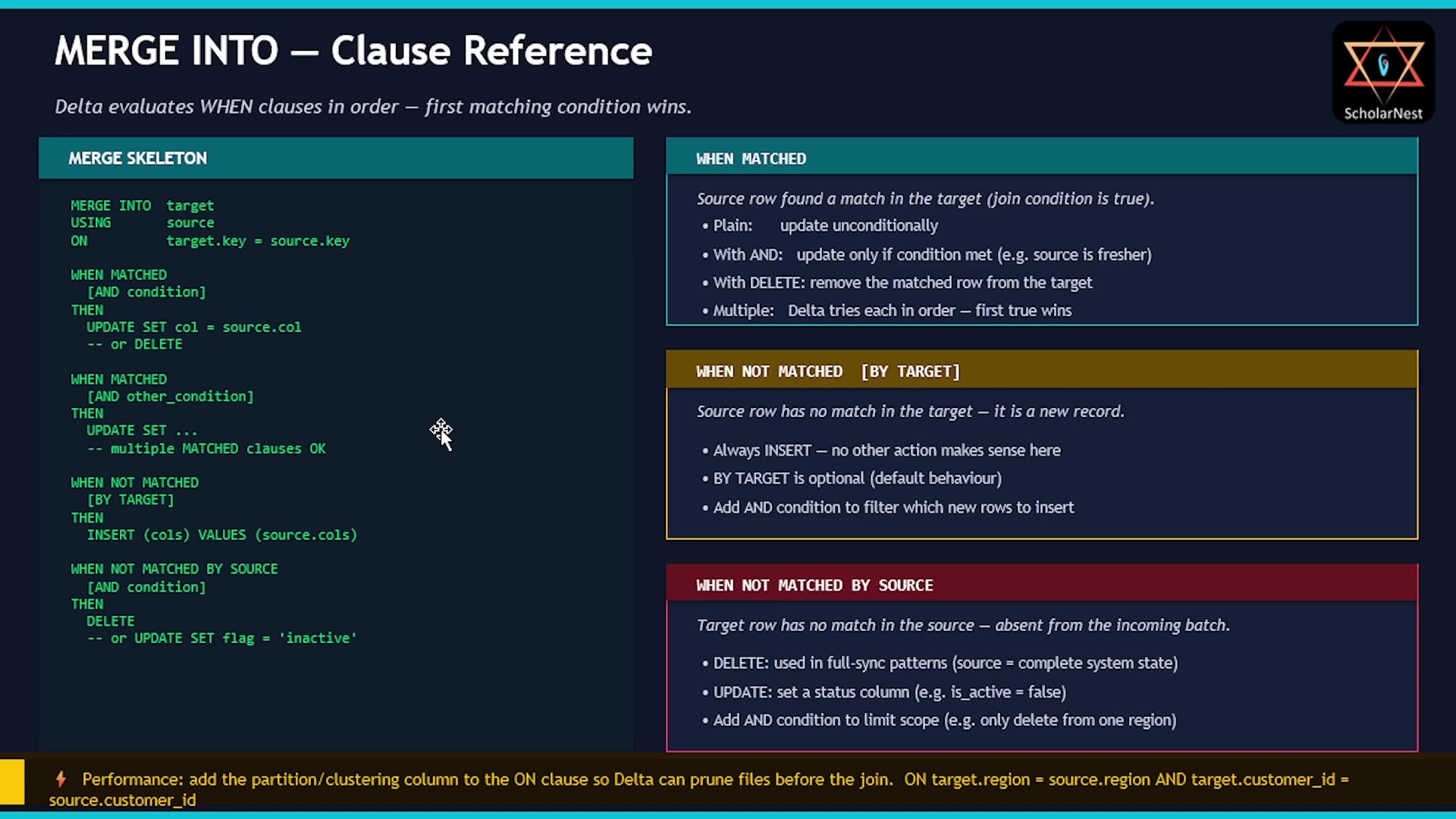 MERGE INTO — Clause Reference
WHEN MATCHED
Triggered when a source row matches a target row. You can:
- Update unconditionally.
- Update conditionally, by adding an
ANDcondition (e.g., only if the source is fresher). - Delete the matched row instead.
- Use multiple
WHEN MATCHEDclauses — Delta evaluates them in order, and the first one whose condition is true wins. All but the lastWHEN MATCHEDin the sequence must have anANDcondition (the last one can be unconditional, acting as a catch-all).
This is useful, for example, when you want to update a record if it's active, but delete it if it's not — two WHEN MATCHED clauses, each with a different AND condition, handle this cleanly.
WHEN NOT MATCHED (a.k.a. WHEN NOT MATCHED BY TARGET)
Triggered when a source row has no match in the target — i.e., it's genuinely new. BY TARGET is the default, so you rarely need to write it explicitly. The only sensible action here is INSERT (there's nothing to update or delete, since the row doesn't exist in the target yet).
WHEN NOT MATCHED BY SOURCE
The reverse case: a target row exists, but has no corresponding row in the source. This typically means the record was deleted upstream. Common actions: DELETE the row, or UPDATE it (e.g., mark it as inactive).
Pattern 1: SCD Type 1 With Late-Arriving Records
Here's a realistic problem: your pipeline syncs from an upstream CRM. The source always sends the full record — but due to network delays, retries, or out-of-order delivery, you sometimes receive a record that's older than what's already in your target. A naive MERGE would overwrite your target's newer data with this stale data — silently reversing a legitimate change. That's a real problem.
The fix: add a condition to WHEN MATCHED — only update if the source is actually newer.
Setup
sql%sql CREATE OR REPLACE TABLE customers ( customer_id INT, name STRING, email STRING, tier STRING, updated_at TIMESTAMP ) USING DELTA; INSERT INTO customers VALUES (1, 'Alice Nguyen', 'alice@example.com', 'silver', '2024-06-15 09:00:00'), (2, 'Bob Patel', 'bob@example.com', 'silver', '2024-06-15 09:00:00'), (3, 'Carol Santos', 'carol@example.com', 'platinum', '2024-06-15 09:00:00'), (4, 'David Kim', 'david@example.com', 'bronze', '2024-06-15 09:00:00'), (5, 'Eva Müller', 'eva@example.com', 'silver', '2024-06-15 09:00:00');
pythonfrom pyspark.sql import Row from datetime import datetime late_batch = [ # ID 1: fresh update — should be applied Row(customer_id=1, name='Alice Nguyen', email='alice.new@example.com', tier='gold', updated_at=datetime(2024, 6, 20, 10, 0, 0)), # ID 2: stale — source timestamp is OLDER than target (late arrival) # target has 2024-06-15, source has 2024-05-28 — should be SKIPPED Row(customer_id=2, name='Bob Patel', email='bob.stale@example.com', tier='bronze', updated_at=datetime(2024, 5, 28, 6, 0, 0)), # ID 6: new customer — should be inserted Row(customer_id=6, name='Grace Lin', email='grace@example.com', tier='bronze', updated_at=datetime(2024, 6, 20, 10, 0, 0)), ] df_late = spark.createDataFrame(late_batch) df_late.createOrReplaceTempView("crm_sync") print("CRM sync batch ready.")
Three source records: ID 1 is genuinely fresh (June 20, newer than target's June 15), ID 2 is stale (May 28, older than target's June 15 — a late-arriving retry), and ID 6 is a new customer.
The Conditional MERGE
sql%sql MERGE INTO customers AS target USING crm_sync AS source ON target.customer_id = source.customer_id WHEN MATCHED AND source.updated_at > target.updated_at THEN UPDATE SET target.name = source.name, target.email = source.email, target.tier = source.tier, target.updated_at = source.updated_at WHEN NOT MATCHED THEN INSERT (customer_id, name, email, tier, updated_at) VALUES (source.customer_id, source.name, source.email, source.tier, source.updated_at);
sql%sql SELECT * FROM customers ORDER BY customer_id;
Result: Alice is now gold with her new email (genuinely fresher record applied). Bob is still silver with his original email — the stale source record was correctly skipped. Grace is a new row. This is SCD Type 1 done right: update in place if fresher, skip if stale, insert if new — all in one MERGE statement.
Pattern 2: Full-Sync With Delete
Sometimes, instead of receiving only the changed records (a typical CDC feed), your source system sends you a complete snapshot every time — the full current state of every record. In this case, you have to figure out deletions yourself: any record that exists in your target but is absent from this full sync must have been deleted upstream.
pythonfrom pyspark.sql import Row from datetime import datetime full_sync = [ Row(customer_id=1, name='Alice Nguyen', email='alice.new@example.com', tier='gold', updated_at=datetime(2024, 6, 21, 8, 0, 0)), Row(customer_id=2, name='Bob Patel', email='bob@example.com', tier='silver', updated_at=datetime(2024, 6, 21, 8, 0, 0)), Row(customer_id=3, name='Carol Santos', email='carol@example.com', tier='platinum', updated_at=datetime(2024, 6, 21, 8, 0, 0)), Row(customer_id=4, name='David Kim', email='david@example.com', tier='bronze', updated_at=datetime(2024, 6, 21, 8, 0, 0)), Row(customer_id=5, name='Eva Müller', email='eva@example.com', tier='silver', updated_at=datetime(2024, 6, 21, 8, 0, 0)), # customer_id 6 (Grace) is deliberately absent — deleted upstream ] df_full = spark.createDataFrame(full_sync) df_full.createOrReplaceTempView("full_sync_source") # Show current target count before MERGE current_count = spark.table("customers").count() print(f"Target row count before MERGE: {current_count}")
The target currently has 6 customers; this full-sync source has only 5 — Grace is missing, meaning she was deleted upstream. Our MERGE needs to handle all three cases at once: update existing, insert genuinely new records, and delete anything missing from the source.
sql%sql MERGE INTO customers AS target USING full_sync_source AS source ON target.customer_id = source.customer_id WHEN MATCHED AND source.updated_at > target.updated_at THEN UPDATE SET target.name = source.name, target.email = source.email, target.tier = source.tier, target.updated_at = source.updated_at WHEN NOT MATCHED BY TARGET THEN INSERT (customer_id, name, email, tier, updated_at) VALUES (source.customer_id, source.name, source.email, source.tier, source.updated_at) WHEN NOT MATCHED BY SOURCE THEN DELETE;
The new piece here is WHEN NOT MATCHED BY SOURCE THEN DELETE — this fires for target rows with no corresponding source row (i.e., Grace), and removes them.
sql%sql SELECT * FROM customers ORDER BY customer_id;
Grace is gone; everyone else is intact, updated as appropriate. One important detail: MERGE only ever modifies the target table — it never writes back to the source. WHEN NOT MATCHED BY SOURCE THEN DELETE deletes the row from the target, not from anywhere else.
This full-sync-with-delete pattern is a genuinely safer alternative to a truncate-and-reload approach, since it's a single atomic transaction rather than a destructive wipe followed by a separate reload.
Performance: MERGE Can Be Expensive at Scale
By default, MERGE scans the entire target table to find matches — even if your source batch only touches a tiny fraction of it. On a huge table (say, billions of rows), with a source batch of just 100 changed records, this full-table scan is a serious performance problem.
The fix: make sure your target table supports file pruning/skipping — via partitioning or Liquid Clustering — and include that pruning column in your ON clause, alongside your actual join key:
sqlMERGE INTO customers AS target USING source ON target.region = source.region -- partition pruning happens here AND target.customer_id = source.customer_id -- then the actual join key
When Delta sees a column it can use for file pruning in the join condition, it skips files that can't possibly contain a match, before the join even runs. A MERGE that took an hour on a full scan can drop to seconds with this one addition.
Final Notes
The join condition is everything. The ON clause defines what "matching" means. If it's wrong — a non-unique key, a nullable column, or simply the wrong column — MERGE produces silently incorrect results, with no error or warning. Before writing any MERGE in production: confirm your join key uniquely identifies one row in the target, and confirm it's never NULL. These two checks prevent the vast majority of MERGE bugs.
MERGE is atomic. Every insert, update, and delete inside a single MERGE statement executes as one Delta transaction — this is its most powerful capability.
Summary: Three Patterns to Own
| Pattern | Use Case | Key Clause |
|---|---|---|
| Basic upsert | Standard CDC — update matches, insert new records | WHEN MATCHED THEN UPDATE, WHEN NOT MATCHED THEN INSERT |
| Conditional SCD Type 1 | Late-arriving or out-of-order records that shouldn't overwrite newer data | WHEN MATCHED AND source.updated_at > target.updated_at THEN UPDATE |
| Full-sync with delete | Source sends complete state; anything missing was deleted upstream | WHEN NOT MATCHED BY SOURCE THEN DELETE |
See you again. Keep learning, and keep growing!