File-Based Ingestion with Auto Loader
In the last two lectures, we ingested from a database — via query-based capture and via CDC. In this lecture, let's cover the other major ingestion pattern: files landing in cloud storage, using Auto Loader — a standard connector, and the workhorse of file-based ingestion on Databricks.
Why Auto Loader?
Managed connectors are great, but they have real limitations:
- Availability — a managed connector might be in preview/beta, or simply not exist yet for your source.
- Flexibility — managed connectors are opinionated; if you have custom requirements, you may need more control.
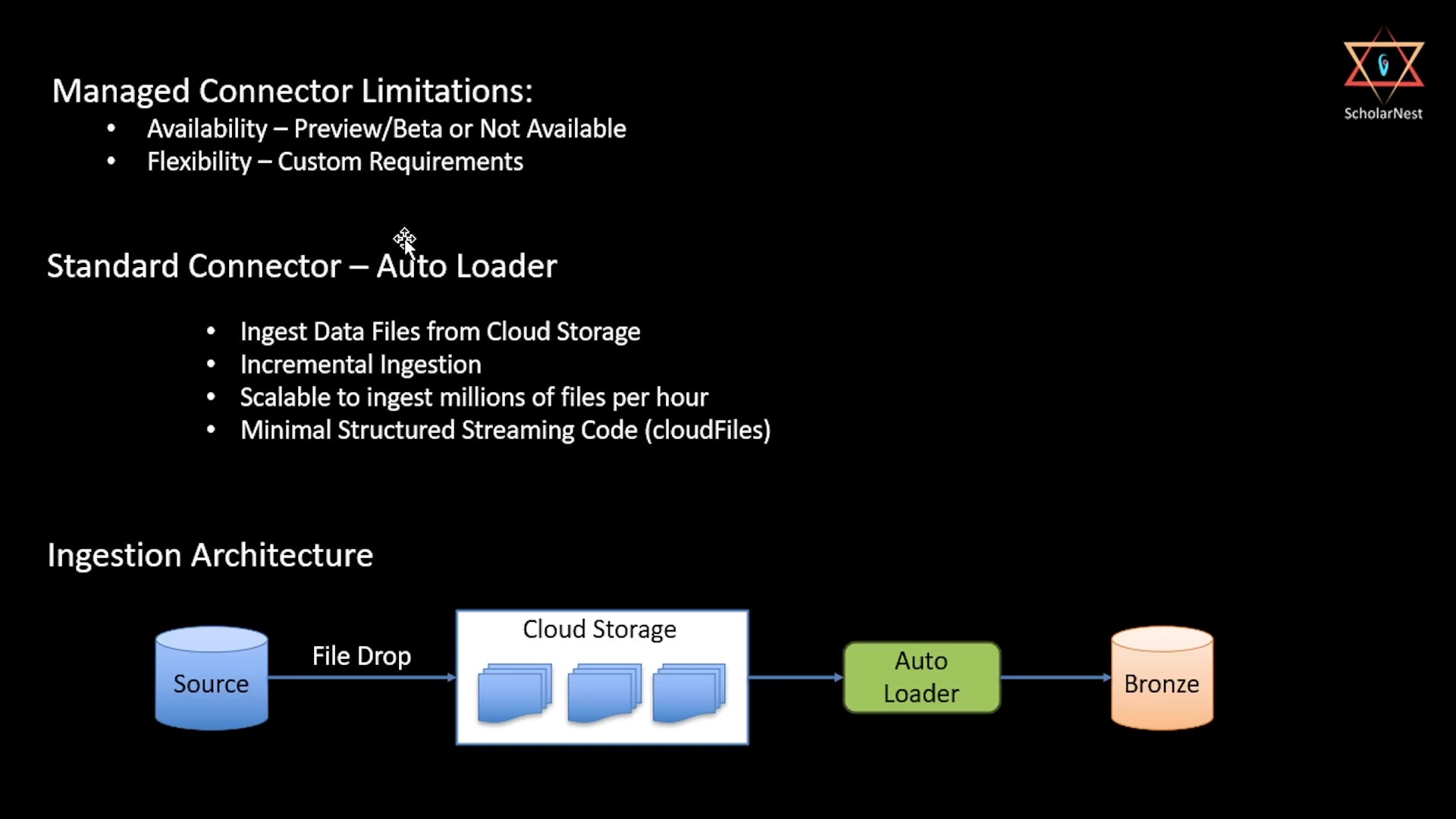 Auto Loader — why it exists, and the ingestion architecture
Auto Loader (Databricks' standard connector for file-based ingestion) fills this gap:
- Ingest data files from cloud storage — any format, any bucket.
- Incremental ingestion — only processes new files, not the whole bucket every time.
- Scalable — can handle millions of files per hour.
- Minimal Structured Streaming code — a single format,
cloudFiles, handles the heavy lifting.
Ingestion architecture: Source → File Drop → Cloud Storage → Auto Loader → Bronze. Simple, and it maps directly onto the Bronze layer principles we've already covered.
Step 1: Set Up a Landing Volume
We use a managed Unity Catalog volume as our landing location — this gives us an S3 location files can be dropped into, without needing to set up an external location or storage credential.
sql%sql USE CATALOG dev; USE SCHEMA dbx_course; CREATE VOLUME IF NOT EXISTS dev.dbx_course.landing;
python%python # Folder structure inside the volume — one subfolder per source table. # Auto Loader watches these paths for new files. dbutils.fs.mkdirs("/Volumes/dev/dbx_course/landing/orders") dbutils.fs.mkdirs("/Volumes/dev/dbx_course/landing/customers")
Before running the ingestion cells, upload the provided batch-1 files into the volume via Catalog Explorer (Catalog → dev → dbx_course → landing → orders / customers → Upload):
batch1_orders.csv→/Volumes/dev/dbx_course/landing/orders/batch1_customers.csv→/Volumes/dev/dbx_course/landing/customers/
This represents a realistic "2024-01-20 file drop" — exactly the kind of event Auto Loader is designed to pick up.
Step 2: Auto Loader — Orders
python%python from pyspark.sql.functions import col, lit landing_path = "/Volumes/dev/dbx_course/landing" orders_schema_location = f"{landing_path}/_schemas/orders" orders_checkpoint_location = f"{landing_path}/_checkpoints/orders" orders_raw = ( spark.readStream .format("cloudFiles") #Structured Streaming source for Autoloader .option("cloudFiles.format", "csv") .option("cloudFiles.inferColumnTypes", "true") .option("cloudFiles.schemaLocation", orders_schema_location) .option("header", "true") .load(f"{landing_path}/orders") ) orders_bronze = ( orders_raw .withColumn("_ingest_timestamp", col("_metadata.file_modification_time")) .withColumn("_source", lit("s3_landing_autoloader")) .withColumn("_source_file", col("_metadata.file_path")) ) (orders_bronze.writeStream .option("checkpointLocation", orders_checkpoint_location) .option("mergeSchema", "true") .trigger(availableNow=True) .toTable("dev.dbx_course.bronze_orders_v2") .awaitTermination() )
Let's unpack the two settings that make this whole pattern work:
cloudFiles.schemaLocation— this is what enables schema inference and evolution. Auto Loader writes its inferred schema here, and checks every new file against it going forward. Combined with.option("mergeSchema", "true")on the write side, this means Auto Loader can gracefully handle a source that adds new columns over time.checkpointLocation— this is what makes ingestion incremental. On the next run, Auto Loader consults this checkpoint and only processes files it hasn't already seen — exactly the same underlying principle as the cursor column and CDC mechanisms from the last two lectures, just applied to files instead of database rows.
Notice .trigger(availableNow=True) — this tells the stream to process everything currently available, then stop (rather than running forever). This is the right trigger mode for a batch-like, scheduled ingestion pattern — you'd typically run this notebook on a schedule (e.g., via a Lakeflow Job), rather than leaving it running continuously.
The _metadata Column — Bronze Convention From a Real File Source
This is worth calling out specifically: col("_metadata.file_modification_time") and col("_metadata.file_path") come from Spark's built-in _metadata column — automatically available on any file-based read. This is exactly how we implement our familiar Bronze convention (_ingest_timestamp, _source, _source_file) when the source is real files, rather than the inline DataFrames we used in the original Bronze lecture.
Step 3: Verify the Result
sql%sql DESCRIBE TABLE dev.dbx_course.bronze_orders_v2;
sql%sql SELECT order_id, customer_id, order_date, status, quantity, unit_price, discount_code, _ingest_timestamp, _source, _source_file, _rescued_data FROM dev.dbx_course.bronze_orders_v2 ORDER BY order_id;
Notice the _rescued_data column in this query — this is another Auto Loader convenience, created automatically alongside your schema. Any data that doesn't fit the inferred schema (a malformed row, an unexpected extra field, a type mismatch) gets captured here instead of silently dropped or causing the whole ingestion to fail. This is Auto Loader's own version of Bronze's "never reject records" principle — genuinely useful for catching source data quality issues without losing anything.
Output / NoteWorth doing yourself: go check the actual
schemaLocationandcheckpointLocationpaths in the volume — you'll see Auto Loader's own tracked state, sitting right there as real files.
Step 4: Auto Loader — Customers
Same pattern, applied to the customers feed:
python%python customers_schema_location = f"{landing_path}/_schemas/customers" customers_checkpoint_location = f"{landing_path}/_checkpoints/customers" customers_raw = ( spark.readStream .format("cloudFiles") .option("cloudFiles.format", "csv") .option("cloudFiles.inferColumnTypes", "true") .option("cloudFiles.schemaLocation", customers_schema_location) .option("header", "true") .load(f"{landing_path}/customers") ) customers_bronze = ( customers_raw .withColumn("_ingest_timestamp", col("_metadata.file_modification_time")) .withColumn("_source", lit("s3_landing_autoloader")) .withColumn("_source_file", col("_metadata.file_path")) ) (customers_bronze.writeStream .option("checkpointLocation", customers_checkpoint_location) .option("mergeSchema", "true") .trigger(availableNow=True) .toTable("dev.dbx_course.bronze_customers_v2") .awaitTermination() )
sql%sql SELECT customer_id, customer_name, tier, region, _ingest_timestamp, _source, _source_file FROM dev.dbx_course.bronze_customers_v2 ORDER BY customer_id;
Exactly the same shape as orders — separate schema and checkpoint locations, per source, so each stream tracks its own independent state.
Why This Matters: Auto Loader vs. What We've Seen So Far
| Query-Based (DB) | CDC (DB) | Auto Loader (Files) | |
|---|---|---|---|
| Source | Database table, polled | Database, continuous native CDC | Files landing in cloud storage |
| Incremental mechanism | Cursor column | Gateway + Staging + Sequence by | checkpointLocation |
| Schema handling | Fixed at table selection | Fixed at table selection | Inferred + evolves via schemaLocation |
| Bad/unexpected data | N/A (structured source) | N/A (structured source) | Captured in _rescued_data |
| Setup complexity | Wizard-based, no code | Wizard-based, no code (plus Gateway) | Requires writing Structured Streaming code |
This is the trade-off from the "connector tiers" lecture, made concrete: Auto Loader (a standard connector) requires you to write real ingestion code — but in exchange, it works with any file source, and gives you fine-grained control (schema evolution behavior, rescued data handling, trigger mode) that a no-code managed connector wouldn't expose.
Summary
| Concept | Key Point |
|---|---|
cloudFiles format | Auto Loader's Structured Streaming source — the core of file-based ingestion |
cloudFiles.schemaLocation | Enables schema inference and evolution; tracks Auto Loader's inferred schema over time |
checkpointLocation | Makes ingestion incremental — only new files are processed on each run |
_metadata column | Built-in Spark column, used here to populate Bronze's _ingest_timestamp and _source_file from real files |
_rescued_data | Auto Loader's automatic column for data that doesn't fit the inferred schema — nothing gets silently dropped |
.trigger(availableNow=True) | Processes everything currently available, then stops — ideal for scheduled, batch-like runs |
With this, we've now covered all three of Lakeflow Connect's ingestion patterns hands-on: managed connectors (SaaS, and CDC/query-based for databases) and Auto Loader (files) — giving you the full toolkit for getting data into your Bronze layer, whatever the source.
See you again. Keep learning, and keep growing!