Designing the Bronze Layer
In this lecture, let's build the Bronze layer of our Medallion pipeline, hands-on — and understand exactly why its design rules are as strict as they are.
Design Principle: Bronze Has One Job
Preserve what arrived. No more, no less.
In production, the Bronze layer is the contract between your pipeline and the outside world. Everything upstream of Bronze is someone else's system — a source database, an API, a file drop on S3. You don't control it. It can change schema without warning. It can send duplicates. It can send nulls in columns that should never be null. Bronze absorbs all of that, without complaint.
That's exactly why Bronze's design rules are so strict: store everything as-is, add source metadata, never transform, never filter, never reject. Break any of these rules, and Bronze stops being Bronze — and you lose your audit trail in the process.
Setup
We'll use a single notebook — 01-medallion-pipeline — that builds the complete Bronze → Silver → Gold pipeline across this chapter's lectures. Set your catalog and schema (dev / dbx_course) at the top, and make sure they already exist from earlier lectures.
Step 1: Simulate the Source Data
In a real pipeline, source files would arrive via Lakeflow Connect or a scheduled copy job from S3. For this exercise, we'll simulate that with inline CSV data:
python%python # Inline source data — simulates daily CSV files arriving from S3 # In production these arrive via Lakeflow Connect or a scheduled copy job orders_csv = """order_id,customer_id,product_id,quantity,unit_price,order_date,status 1001,C001,P01,2,29.99,2024-01-15,completed 1002,C002,P02,1,149.99,2024-01-15,completed 1003,C001,P03,3,9.99,2024-01-16,completed 1004,C003,P01,1,29.99,2024-01-16,pending 1005,C002,P02,2,149.99,2024-01-17,completed 1006,C004,P04,1,199.99,2024-01-17,cancelled 1007,C001,P01,4,29.99,2024-01-18,completed 1008,C003,P03,2,9.99,2024-01-18,completed 1001,C001,P01,2,29.99,2024-01-15,completed""" #The orders feed has a duplicate — order 1001 appears twice. orders_header_row =[row.split(',') for row in orders_csv.strip().split('\n')[:1]][0] orders_data_rows = [row.split(',') for row in orders_csv.strip().split('\n')[1:]] customers_csv = """customer_id,first_name,last_name,email,city,signup_date,tier C001,Aisha,Patel,aisha.patel@email.com,New York,2023-03-10,gold C002,Marcus,Chen,marcus.chen@email.com,San Francisco,2023-05-22,silver C003,Priya,Nair,priya.nair@email.com,Chicago,2023-07-14,bronze C004,James,Okafor,james.okafor@email.com,Austin,2023-11-30,bronze C001,Aisha,Patel,aisha.patel@email.com,New York,2023-03-10,gold""" customers_header_row =[row.split(',') for row in customers_csv.strip().split('\n')[:1]][0] customers_data_rows = [row.split(',') for row in customers_csv.strip().split('\n')[1:]] # The customers feed has a duplicate too — C001 appears twice. # This is intentional. Real source systems send duplicates. Bronze accepts them. We will deal with them in Silver. orders_df = spark.createDataFrame(orders_data_rows, orders_header_row) customers_df = spark.createDataFrame(customers_data_rows, customers_header_row) print(f"Orders rows: {orders_df.count()}") print(f"Customers rows: {customers_df.count()}")
Notice — deliberately — both feeds contain a duplicate record (order_id 1001, customer_id C001). This is realistic: real source systems genuinely do send duplicates. And per Bronze's design rule, we are not going to remove them here. That's Silver's job, in the next lecture.
Step 2: Add Pipeline Metadata Columns
This is what actually makes Bronze an audit trail, rather than just a copy of the source:
python%python # Add pipeline metadata columns — these make Bronze an audit trail # _ingest_timestamp: when did this batch arrive # _source: which feed produced this record # _source_file: which file specifically (important for debugging) # Underscore prefix is convention: pipeline-generated columns, not source data from pyspark.sql import functions as F import datetime ingest_ts = F.lit(datetime.datetime(2024, 1, 19, 8, 0, 0)) orders_bronze = ( orders_df .withColumn("_ingest_timestamp", ingest_ts) .withColumn("_source", F.lit("orders_feed")) .withColumn("_source_file", F.lit("orders_20240119.csv")) ) customers_bronze = ( customers_df .withColumn("_ingest_timestamp", ingest_ts) .withColumn("_source", F.lit("customers_feed")) .withColumn("_source_file", F.lit("customers_20240119.csv")) )
Three columns, each with a specific purpose:
_ingest_timestamp— when this batch arrived. Critical for debugging, and for Silver's deduplication logic later._source— which feed produced this record (useful once you have many source systems landing into the same catalog)._source_file— the specific file this record came from — invaluable when you need to trace a bad record back to its exact origin.
The underscore prefix is a deliberate convention: it visually distinguishes pipeline-generated columns from actual source data, at a glance.
Step 3: Write the Bronze Tables
sql%sql -- Drop for clean demo run DROP TABLE IF EXISTS dev.dbx_course.bronze_orders; DROP TABLE IF EXISTS dev.dbx_course.bronze_customers;
python%python # Write Bronze tables # Production note: use mode("append") for incremental daily loads # overwrite is used here only to support clean demo re-runs ( orders_bronze.write .format("delta") .mode("overwrite") #In production, your Bronze write mode is almost never `overwrite`. It is `append`. .saveAsTable("dev.dbx_course.bronze_orders") ) ( customers_bronze.write .format("delta") .mode("overwrite") #In production, your Bronze write mode is almost never `overwrite`. It is `append`. .saveAsTable("dev.dbx_course.bronze_customers") ) print("Bronze tables written.")
Read that comment carefully — it's one of the most important practical notes in this whole lecture. We use overwrite here purely so this demo can be re-run cleanly from scratch. In a real production Bronze pipeline, your write mode is almost never overwrite — it's append. Bronze is meant to accumulate a complete history of everything that has ever arrived. Overwriting it on every run would destroy exactly the audit trail Bronze exists to provide.
Step 4: Verify — Duplicates Are Present, As Expected
sql%sql -- Verify Bronze orders — duplicate 1001 should appear twice SELECT * FROM dev.dbx_course.bronze_orders ORDER BY order_id;
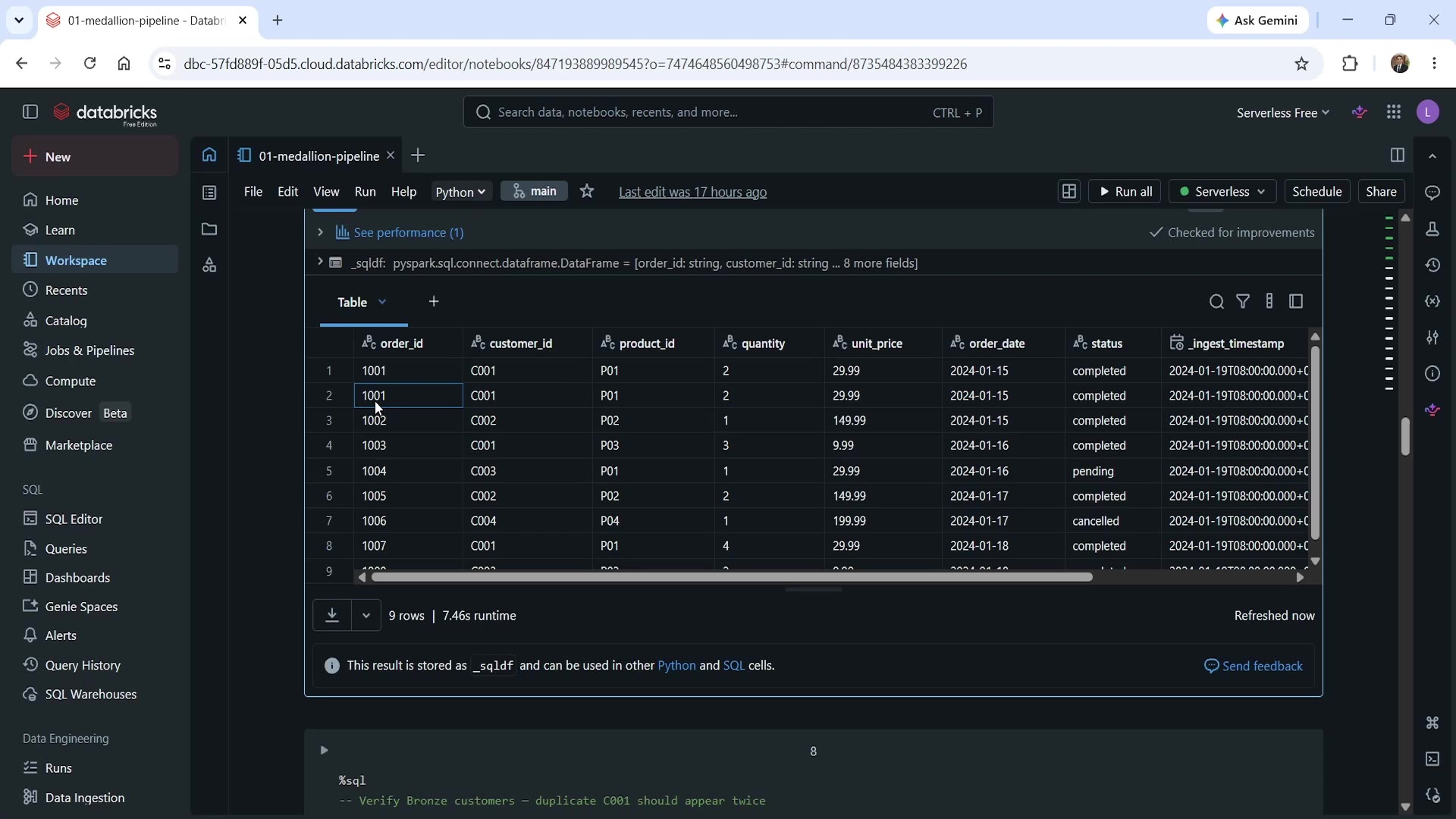 Bronze orders table — order 1001 appears twice
Running this confirms exactly what we expect: order_id 1001 appears twice in the result, sitting right alongside the _ingest_timestamp metadata column we added. This is Bronze working correctly — it made no judgment about whether this duplicate should exist. It simply preserved what arrived.
sql%sql -- Verify Bronze customers — duplicate C001 should appear twice SELECT * FROM dev.dbx_course.bronze_customers ORDER BY customer_id;
Same story for the customers table — C001 appears twice, untouched.
Step 5: Confirm the Metadata Columns and Schema
sql%sql -- Confirm metadata columns are present DESCRIBE TABLE dev.dbx_course.bronze_orders;
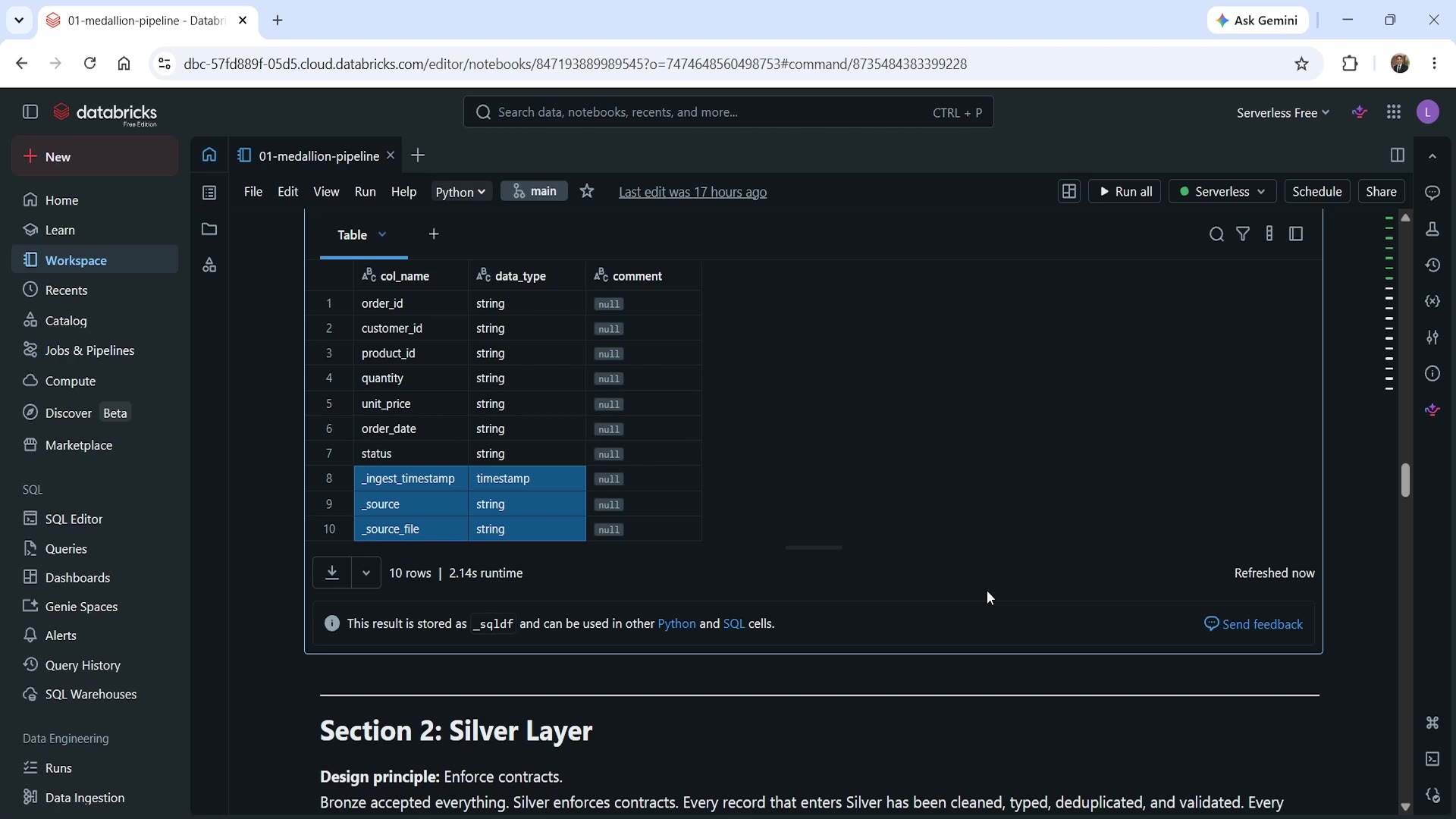 DESCRIBE TABLE output — everything is a string, plus metadata columns
Two things worth noticing here:
- Every business column —
order_id,quantity,unit_price,order_date— is typed asstring. Bronze never casts types. Even thoughquantityis clearly meant to be a number, andorder_dateis clearly meant to be a date, Bronze keeps them exactly as they arrived: raw text. Type enforcement is Silver's responsibility, not Bronze's. - The three pipeline metadata columns (
_ingest_timestamp,_source,_source_file) are present, confirming our audit trail is correctly attached to every record.
Why This Design Matters
Let's connect this back to the design principle we started with. Because Bronze:
- Never transforms — if a business rule turns out to be wrong later, you can re-derive Silver and Gold from Bronze without needing to go back to the original source (which may no longer even exist, or may have changed).
- Never filters or rejects — nothing is silently dropped. If a record looks wrong, it's still sitting in Bronze, fully inspectable.
- Never updates existing rows — combined with
appendmode in production, this means Bronze accumulates a complete, permanent history — not just the latest snapshot. - Always carries source metadata — every record can be traced back to exactly when and where it came from.
This is what makes Bronze the reliable foundation the rest of the Medallion pipeline builds on. In the next lecture, we'll build Silver on top of this — where deduplication, type casting, and validation finally happen.
Summary
| What Bronze Does | What Bronze Never Does |
|---|---|
| Stores data exactly as received (including duplicates) | Transform or cast types |
Adds pipeline metadata (_ingest_timestamp, _source, _source_file) | Filter or reject records |
Accumulates a complete history (via append in production) | Update existing rows |
Key production note: Bronze write mode should be append, not overwrite. overwrite was used in this demo purely to allow a clean re-run — never do this in a real pipeline.
See you again in the next lecture, where we build the Silver layer. Keep learning, and keep growing!