DELETE, UPDATE and Idempotent Writes
In this lecture, let's cover three things: how DELETE and UPDATE actually work internally in Delta Lake, and how to make your batch writes idempotent — safe to run more than once.
Setup
Open (or create) a notebook — 09-delete-and-update — connect a cluster, and set your catalog/schema:
sqlUSE CATALOG workspace; USE SCHEMA default;
Part 1: How DELETE Actually Works
If you know SQL, there's nothing new about DELETE syntax in Delta tables — it's the exact same SQL you already know. What's genuinely interesting is what happens behind the scenes.
Setting Up
sqlDROP TABLE IF EXISTS customers; CREATE OR REPLACE TABLE customers ( customer_id INT, name STRING, email STRING, tier STRING, updated_at TIMESTAMP ) USING DELTA; INSERT INTO customers VALUES (1, 'Alice Nguyen', 'alice@example.com', 'gold', '2024-06-20 10:00:00'), (2, 'Bob Patel', 'bob@example.com', 'silver', '2024-06-20 10:00:00'), (3, 'Carol Santos', 'carol@example.com', 'platinum', '2024-06-20 10:00:00'), (4, 'David Kim', 'david@example.com', 'bronze', '2024-06-20 10:00:00'), (5, 'Eva Müller', 'eva@example.com', 'silver', '2024-06-20 10:00:00'), (6, 'Frank Osei', 'frank@example.com', 'bronze', '2024-06-20 10:00:00'), (7, 'Grace Lin', 'grace@example.com', 'gold', '2024-06-20 10:00:00');
Two transactions so far: table creation, and inserting 7 records. At this point, checking the underlying S3 bucket would show exactly one Parquet data file (holding all 7 rows) and two transaction log entries.
A GDPR-Style Delete Scenario
Let's simulate a realistic use case: customers requesting their data be erased, tracked in a separate table.
sqlCREATE OR REPLACE TABLE erasure_requests ( customer_id INT, requested_at DATE ) USING DELTA; INSERT INTO erasure_requests VALUES (2, '2024-06-25'), (4, '2024-06-26'), (5, '2024-06-27');
sqlDELETE FROM customers WHERE customer_id IN ( SELECT customer_id FROM erasure_requests );
This deletes 3 records. Simple SQL — but what actually happens to the underlying files?
Deletion Vectors (Not Copy-on-Write)
Historically, Delta implemented deletes via copy-on-write: read the entire data file, remove the deleted rows in memory, and write out a brand-new Parquet file with the remaining rows. Straightforward, but expensive — especially for large files where only a few rows changed.
Today, Delta uses deletion vectors instead. Rather than rewriting the whole file, Delta creates a small, separate metadata file — the deletion vector — that simply records which row positions in the original file are now considered deleted. When a reader queries the table, Delta reads the original data file and the deletion vector, and simply skips the deleted rows on the fly.
Checking the S3 bucket after this delete confirms it:
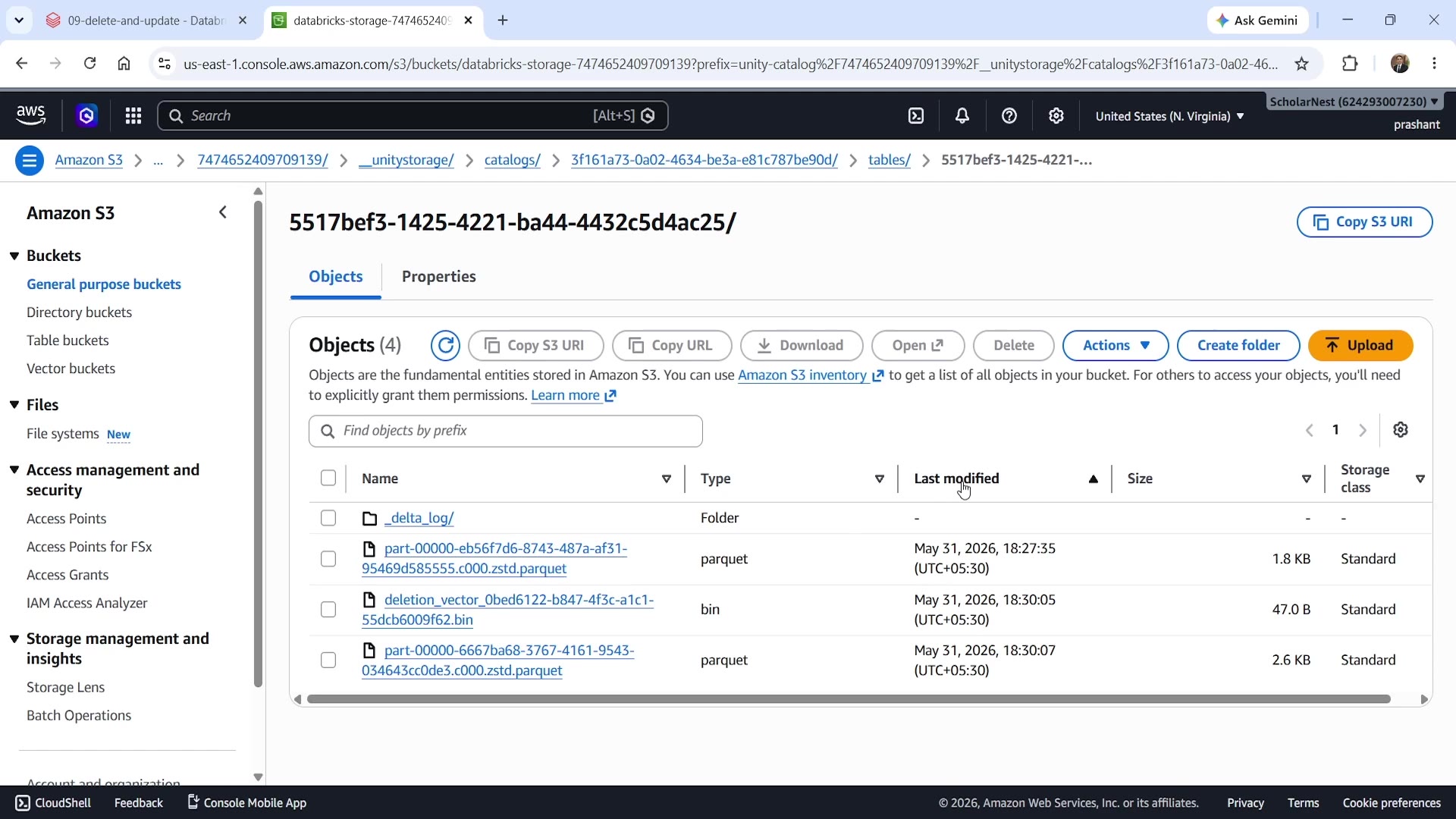 S3 bucket showing deletion vector and auto-optimize
You can see:
- The original Parquet file (created first, holding all 7 rows).
- A
deletion_vector_...binfile, created ~2 seconds later — this is what records the 3 deleted rows. - A new, optimized Parquet file, created just 2 seconds after that.
That last part deserves its own explanation.
Databricks Auto-Optimizes After Delete, Update, and Merge
Databricks has baked automatic OPTIMIZE into DELETE, UPDATE, and MERGE. Once your delete transaction completes, Databricks automatically triggers a separate, immediate OPTIMIZE operation — compacting the original file + deletion vector into a clean, new Parquet file. Going forward, reads use this new optimized file directly — no deletion vector lookup needed on every query.
This same deletion-vector-then-auto-optimize behavior applies uniformly to DELETE, UPDATE, and MERGE.
Confirming via History
sqlDESCRIBE HISTORY customers;
You'll see the full sequence: CREATE OR REPLACE TABLE, WRITE (the insert), DELETE, and then an automatically triggered OPTIMIZE — four transactions, matching the four transaction log JSON files you'd find in _delta_log/.
An Important GDPR Caveat
Here's something to know if you're implementing an actual GDPR-style erasure workflow: DELETE alone does not truly erase the data. Because of Delta's time travel capability, the deleted customer records are still fully accessible by querying an older version of the table. For genuine, complete erasure, you need two steps: first DELETE, and then VACUUM (after your retention window has passed) — since VACUUM is what actually removes the old files from storage permanently.
Part 2: UPDATE
UPDATE behaves the same way internally as DELETE — deletion vector, then automatic optimize.
sqlCREATE OR REPLACE TABLE customer_spend ( customer_id INT, total_spend DOUBLE ) USING DELTA; INSERT INTO customer_spend VALUES (1, 8200.00), -- Alice: high spender (3, 12500.00), -- Carol: very high spender (6, 350.00); -- Frank: low spender
sqlUPDATE customers SET tier = 'platinum' WHERE customer_id IN ( SELECT customer_id FROM customer_spend WHERE total_spend > 5000 );
This updates 2 records to platinum tier, based on a subquery against a separate spend table. (This kind of logic could also be expressed as a MERGE, but plain UPDATE is perfectly fine when you're not also handling inserts.)
Checking the S3 bucket again confirms the same pattern: a new deletion vector is created for the update, immediately followed by an automatic optimize pass.
Part 3: Idempotent Writes
The Problem: Pipelines Run More Than Once
In real-world systems, it's very common for a batch pipeline to execute more than once — even when you don't intend it to. Common causes:
- Job retries — your job is programmed to retry if it believes a previous attempt failed.
- Spark task speculation — Spark may launch speculative duplicate tasks if some tasks are running slowly.
- At-least-once delivery — systems like Kafka or Kinesis guarantee at least one delivery, which can mean more than one.
- Manual reruns — someone re-triggers a job manually, believing the earlier attempt failed.
In all these cases, if you're writing to plain storage — or even to a Delta table without any special handling — you're at risk of producing duplicate records, silently, with no error.
Delta's Solution: txnAppId and txnVersion
Delta lets you tag each write with two pieces of information:
txnAppId— a unique name identifying your pipeline.txnVersion— a unique version number for this specific run (e.g., increasing by 1 each day/schedule).
Before committing, Delta checks the transaction log for a previous commit with the same txnAppId and txnVersion. If one already exists, Delta simply skips the write entirely — the transaction is not re-applied. This gives you exactly-once semantics, built directly into Delta's write path, with no external coordination code required.
Seeing It in Action
sqlCREATE OR REPLACE TABLE orders ( order_id INT, customer_id INT, amount DOUBLE, order_date DATE ) USING DELTA;
python%python batch_1 = [ (1001, 1, 199.99, "2024-07-01"), (1002, 3, 449.00, "2024-07-01"), (1003, 6, 89.50, "2024-07-01"), ] df = spark.createDataFrame(batch_1, ["order_id", "customer_id", "amount", "order_date"]).selectExpr( "CAST(order_id AS INT) AS order_id", "CAST(customer_id AS INT) AS customer_id", "amount", "CAST(order_date AS DATE) AS order_date" ) df.write \ .format("delta") \ .mode("append") \ .option("txnAppId", "orders_daily_pipeline") \ .option("txnVersion", 1) \ .saveAsTable("orders") count = spark.table("orders").count() print(f"Row count after write: {count}")
Run this once — you get 3 rows. Now, run this exact same cell again, unchanged — same txnAppId, same txnVersion. The row count stays at 3. No matter how many times you re-execute it, as long as the app ID and version stay the same, Delta will not commit it again.
sqlDESCRIBE HISTORY orders;
Even after multiple runs, the history shows just two transactions: CREATE OR REPLACE TABLE and one WRITE — the repeated writes were silently skipped, exactly as intended.
In practice: txnVersion should increase on each new scheduled run (today's run might be version 1, tomorrow's version 2, and so on) — but should stay the same across retries within the same scheduled run. That's what gives you protection against duplicates from retries, while still allowing genuinely new runs to write their data.
Summary
DELETE:
- Atomic operation.
- Historically implemented via copy-on-write; now uses deletion vectors (a lightweight marker file, rather than rewriting the whole data file).
- Databricks automatically triggers
OPTIMIZEimmediately afterward, compacting the deletion vector + original file into a clean new file. - Doesn't provide true erasure by itself — old data remains reachable via time travel until
VACUUMruns past your retention window. For GDPR-style erasure, you need bothDELETEandVACUUM.
UPDATE:
- Behaves the same way internally as
DELETE— deletion vector, then automatic optimize.
Idempotent writes:
- Job retries and at-least-once delivery are simply facts of life in real pipelines.
.option("txnAppId", "pipeline_name").option("txnVersion", run_id)gives you exactly-once semantics for batch writes, with zero external coordination needed — it's built directly into Delta's write path.
See you again. Keep learning, and keep growing!