Passing Parameters to Python Script Task, Task Value, Repair Runs
The last lecture covered job parameters, task parameters, and dynamic value references. This lecture covers the fourth mechanism — task values — and, along the way, how to receive parameters in a Python script task, which works differently from a notebook task. We'll also hit a real failure and use it to learn repair runs.
Publishing a Task Value
The dq_check_gold notebook already calculates row_count for the given run_date. The goal now:
publish that row count so a downstream task can use it, without recomputing it. This is a single
line, using dbutils.jobs.taskValues.set:
python# Publish row_count for downstream tasks dbutils.jobs.taskValues.set(key="row_count", value=row_count)
That's the entire mechanism for exposing a value from one task to any task that runs after it in the same job.
A Third Task: Python Script Reporting
A new task was added to the job — a very simple report, generated after the pipeline runs and the DQ check passes. This is written as a Python script rather than a notebook, specifically to demonstrate how parameter-passing differs for this task type.
Here's the complete dq_report.py:
python# dq_report.py # ============================================================ # Reporting script # # Python script task reads job parameters as sys.argv. # Job config maps: arg[1] = run_date # via dynamic value reference: ["{{job.parameters.run_date}}"] # ============================================================ import sys from pyspark.sql import SparkSession from pyspark.dbutils import DBUtils def main(): if len(sys.argv) < 2: raise ValueError("Usage: dq_report.py <run_date>") run_date = sys.argv[1] spark = SparkSession.builder.getOrCreate() dbutils = DBUtils(spark) # Read taskValue from upstream DQ check try: dq_row_count = dbutils.jobs.taskValues.get( taskKey="dq_check_gold", key="row_count", debugValue=0 # returned when running outside a job context ) except Exception: dq_row_count = 0 # Skip the report if no data found. # This might happen in debug mode or error in reading task vale if dq_row_count == 0: print(f"No data found for {run_date}. Report skipped.") return # Generate the report print(f"Generating report for run_date={run_date}") table = "dev.dbx_course.gold_daily_revenue" df = spark.table(table).filter(f"order_date = '{run_date}'") total = df.agg({"total_revenue": "sum"}).collect()[0][0] print(f"Date : {run_date}") print(f"Rows : {dq_row_count}") print(f"Total revenue : {total:,.2f}") print("Report complete.") if __name__ == "__main__": main()
Why this script looks different from a notebook
A few things here don't exist in any notebook task from earlier lectures, and each one is a direct consequence of a Python script not being a Databricks notebook:
sys.argv, notdbutils.widgets. Notebooks receive parameters via widgets. Python scripts can't use widgets at all — Databricks passes parameters to a script as plain command-line arguments instead.sys.argv[1]is the first parameter; if a script needed more than one parameter, their order would matter, since scripts receive them positionally, not by name.- A Spark session has to be created explicitly.
SparkSession.builder.getOrCreate()— a notebook has this ready automatically; a script does not. dbutilshas to be instantiated explicitly too, viaDBUtils(spark), passing in the Spark session just created. Again, a notebook does this for you; a script starts with nothing.dbutils.jobs.taskValues.get(...)is how this script reads whatdq_check_goldpublished. Three things matter here:taskKeymust exactly match the task name that set the value (dq_check_gold),keymust match the key used in.set()(row_count), anddebugValueis what gets returned if this script is run outside a job context entirely — during local development, for instance, where there's no upstream task to read from at all.- The
try/exceptaround thetaskValues.getcall is a safety net: if the task name doesn't match, or the previous task never set that value, this falls back todq_row_count = 0rather than crashing outright — and a row count of0is treated as "skip the report," not an error.
Adding the Task to the Job
Adding dq_report as a new task uses Python script as the type, pointing at
.../pipelines/notebooks/dq_report.py in the workspace. Compute is serverless (same as the notebook
task — Python script tasks need compute specified explicitly, just like notebook tasks do). The
dependency is set to dq_check_gold, so this task only runs once the DQ check has actually passed.
Passing the parameter — with a twist
Job parameters are automatically pushed down to notebook tasks and pipeline tasks — but not to
Python script tasks. The reason is exactly the mechanism difference described above: a Python
script's parameters arrive as sys.argv, and if a script needs more than one, their order on the
command line matters. So rather than a simple key/value push-down, a Python script task's parameters
field expects a quoted, comma-separated list — the first item becomes argv[1], the second becomes
argv[2], and so on.
For this task, that list has exactly one entry: the same run_date job parameter, referenced via
dynamic value reference syntax:
["{{job.parameters.run_date}}"]
Every job parameter is automatically available as a dynamic value reference too — so rather than
redefining run_date as a separate task parameter, the existing job-level value is simply piped
through.
The First Run: A Bug, and a Real Failure
Running with run_date = 2024-03-02 (a date known to have data) let both the pipeline and the DQ
check succeed — but the new reporting task failed:
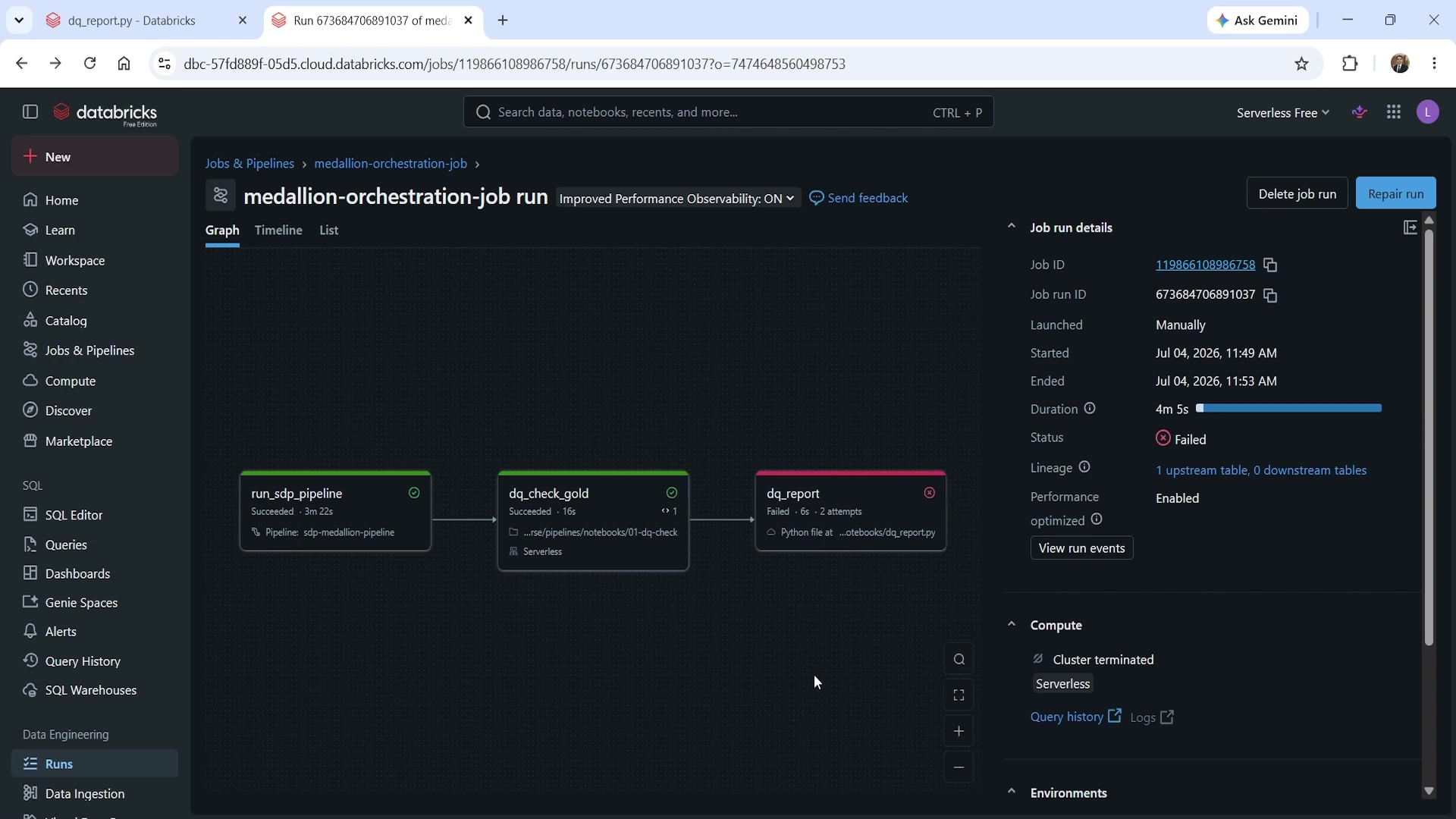 Three-task job — dq_report failed
The traceback showed NameError: row_count is not defined. The bug: the print statement referenced
row_count, but the actual variable holding that value (returned from taskValues.get) was named
dq_row_count. A straightforward typo — but a good illustration of how variable naming mistakes
surface differently in a script than a notebook, since there's no interactive cell-by-cell execution
to catch it early.
Repair Run
With the bug fixed in the script, the obvious option is to rerun the entire job from scratch. That works — the pipeline is fully incremental, so rerunning it doesn't reprocess data unnecessarily — but in a real production pipeline processing meaningful data volume, a full rerun could mean waiting through 30 minutes or more of already-successful work just to retry one broken task.
Repair run solves exactly this. Triggering it from the failed run shows a panel confirming which parameters carry forward into the repaired run:
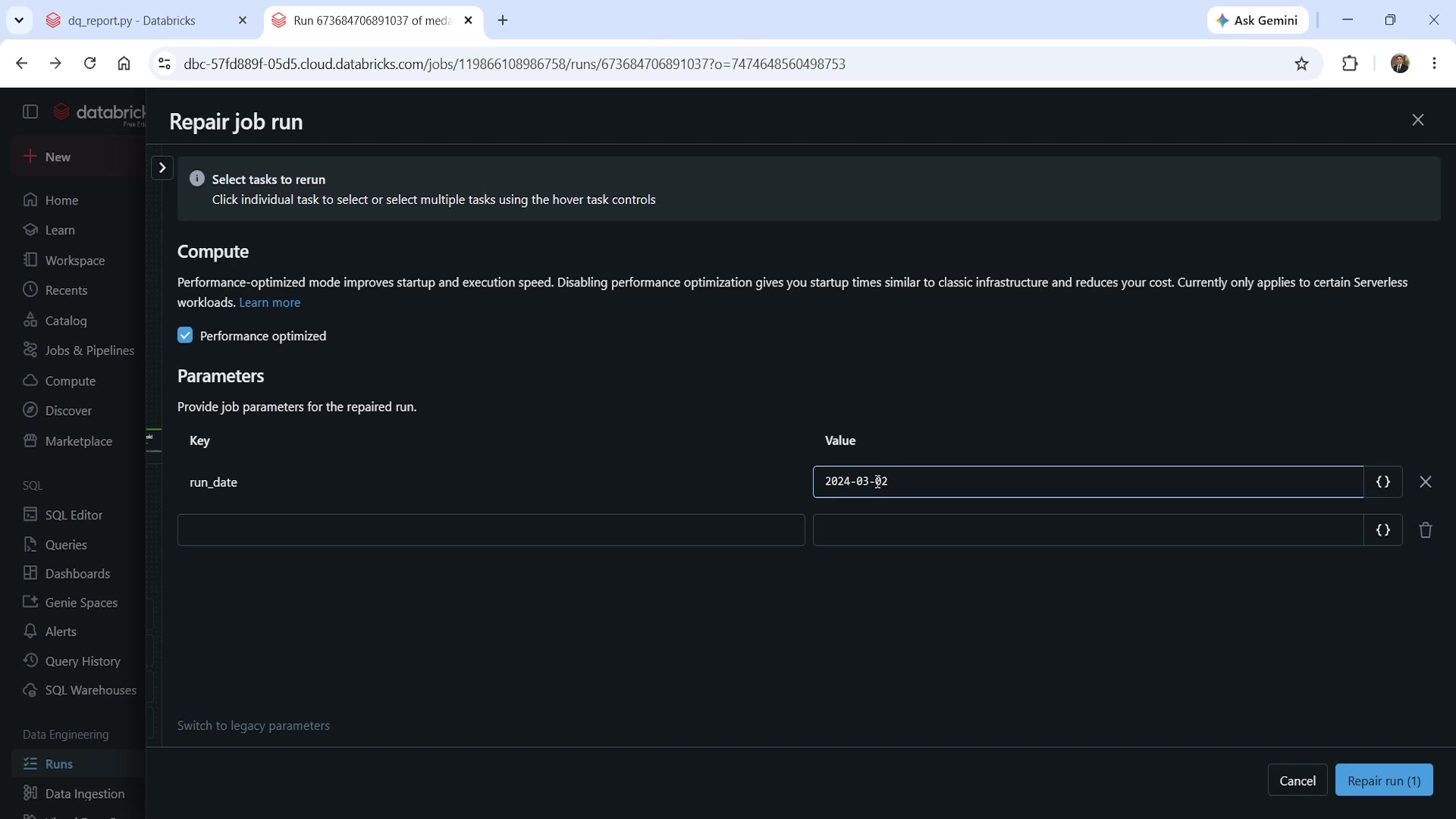 Repair job run panel — parameters carried forward
The run_date value (2024-03-02) is preserved automatically — no need to re-enter it. Confirming
the repair only restarts the task(s) that actually failed; anything that already succeeded is left
untouched:
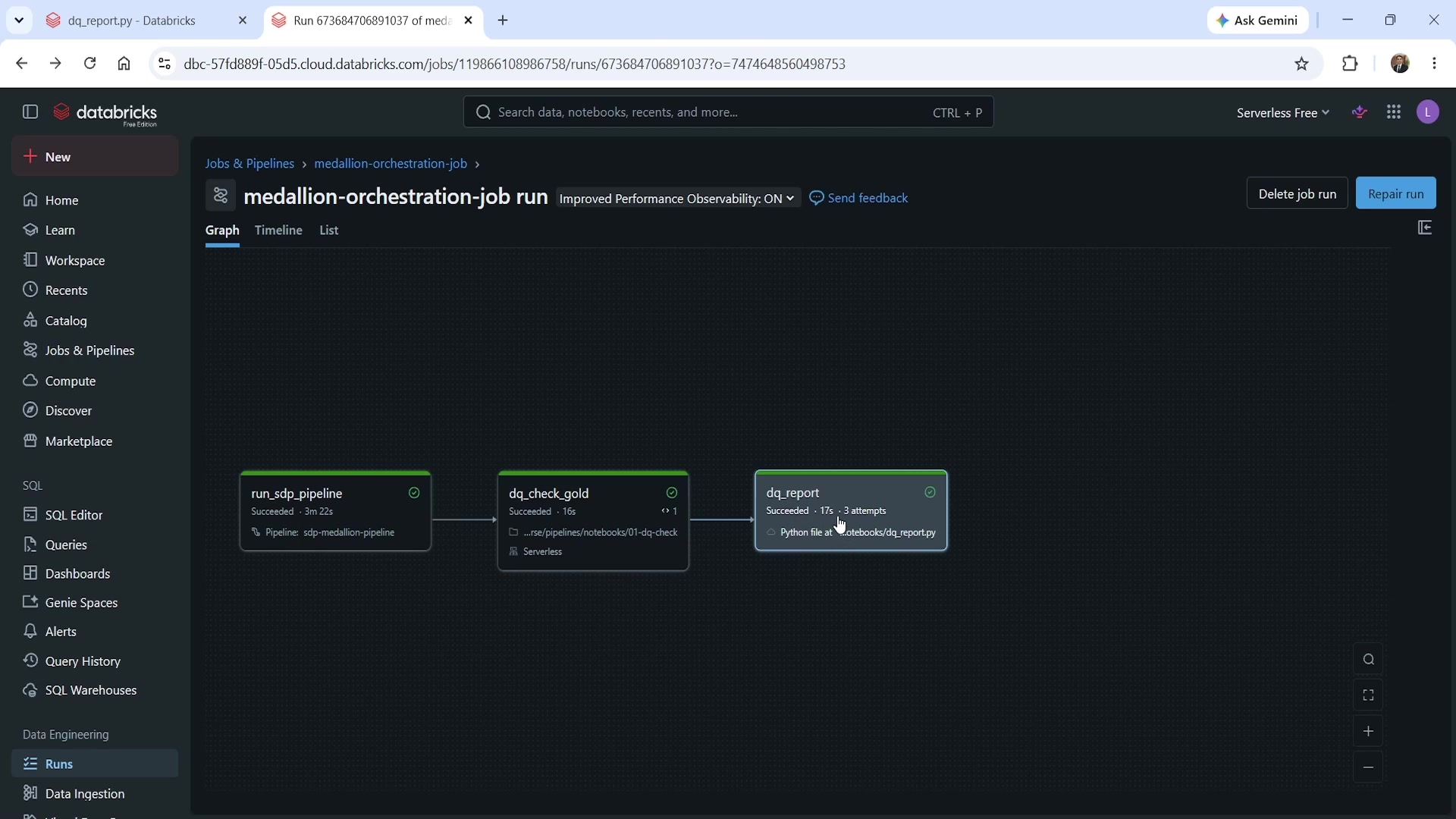 Three-task job succeeded after repair — only dq_report was rerun
Look closely at the durations: run_sdp_pipeline still shows the exact same 3m 22s from the
original run, and dq_check_gold shows the same 16s — neither was touched by the repair.
dq_report shows 3 attempts (the original failure, its automatic retry, and this repair's
success) and a fresh duration of 17s. This is the entire value of repair run in one screenshot:
only the broken piece reran, and everything upstream of it was left exactly as it was.
Summary
| Concept | Key point |
|---|---|
dbutils.jobs.taskValues.set(key, value) | Publishes a value from the current task, readable by any downstream task in the same run |
dbutils.jobs.taskValues.get(taskKey, key, debugValue) | Reads a published value; taskKey must match the task name, not the notebook/script name |
| Notebook parameter mechanism | dbutils.widgets |
| Python script parameter mechanism | sys.argv, positional — order matters when passing more than one |
| Python script task setup cost | Must create its own SparkSession and DBUtils instance — neither exists automatically like in a notebook |
| Job parameters → Python script tasks | Not auto-pushed like notebook/pipeline tasks; must be explicitly listed as a quoted, comma-separated array using dynamic value reference syntax |
debugValue | What taskValues.get returns when run outside a job context — useful for local script testing |
| Repair run | Reruns only failed task(s) from a job run; successful upstream tasks and their outputs are left untouched |
| Repair run parameters | Automatically carried forward from the original run — no need to re-enter them |
See you again. Keep learning, and keep growing!