Introduction to Databricks Workspace
In this lecture, let's take a high-level tour of the Databricks Workspace — what it is, and how the serverless and classic workspaces compare.
What Is a Workspace?
Think of the Databricks workspace as your go-to place for all data engineering work — essentially, an IDE and collaboration platform rolled into one. This is where you and your team will develop, test, and debug your projects. It's the interface you'll be living in throughout this course (and in real projects).
As we've covered before, Databricks offers two types of workspaces:
- Serverless workspace — available on both the free and paid accounts.
- Classic workspace — available only on the paid account.
One useful thing to know: the serverless workspace looks and works exactly the same whether you're on the free account or the paid account. So even if you're only using the free edition, everything in this lecture about the serverless side applies to you too.
Comparing Serverless and Classic Workspaces
At a glance, the two workspaces look nearly identical. The home page — with suggested items, favorites, popular items, Mosaic AI, and "what's new" — looks the same in both.
The most important part of any workspace is the left-side navigation menu. Let's walk through it, comparing serverless and classic side by side.
What's the Same
Almost everything in the sidebar is identical between the two workspace types:
- Workspace — opens the workspace explorer (your file/notebook browser). Identical in both.
- Catalog — this is where you access your metadata catalog (Unity Catalog). Same in both — on a fresh workspace, both start out empty/raw.
- Jobs & Pipelines — create and monitor jobs and pipelines. Same in both.
- SQL menu items (SQL Editor, Queries, Dashboards, Genie Spaces, Alerts, Query History, SQL Warehouses) — used mainly for data warehousing work. Same in both.
- Data Engineering section (Runs, Data Ingestion) — these are shortcuts into functionality that's also available elsewhere in the workspace. Same in both.
- AI/ML menu items — Databricks' AI and machine learning capabilities. Same in both.
So structurally, from the top-level menu perspective, the two workspaces are essentially the same tool.
What's Different: Compute
The real difference between serverless and classic workspaces comes down to one area: Compute.
Classic workspace — Compute:
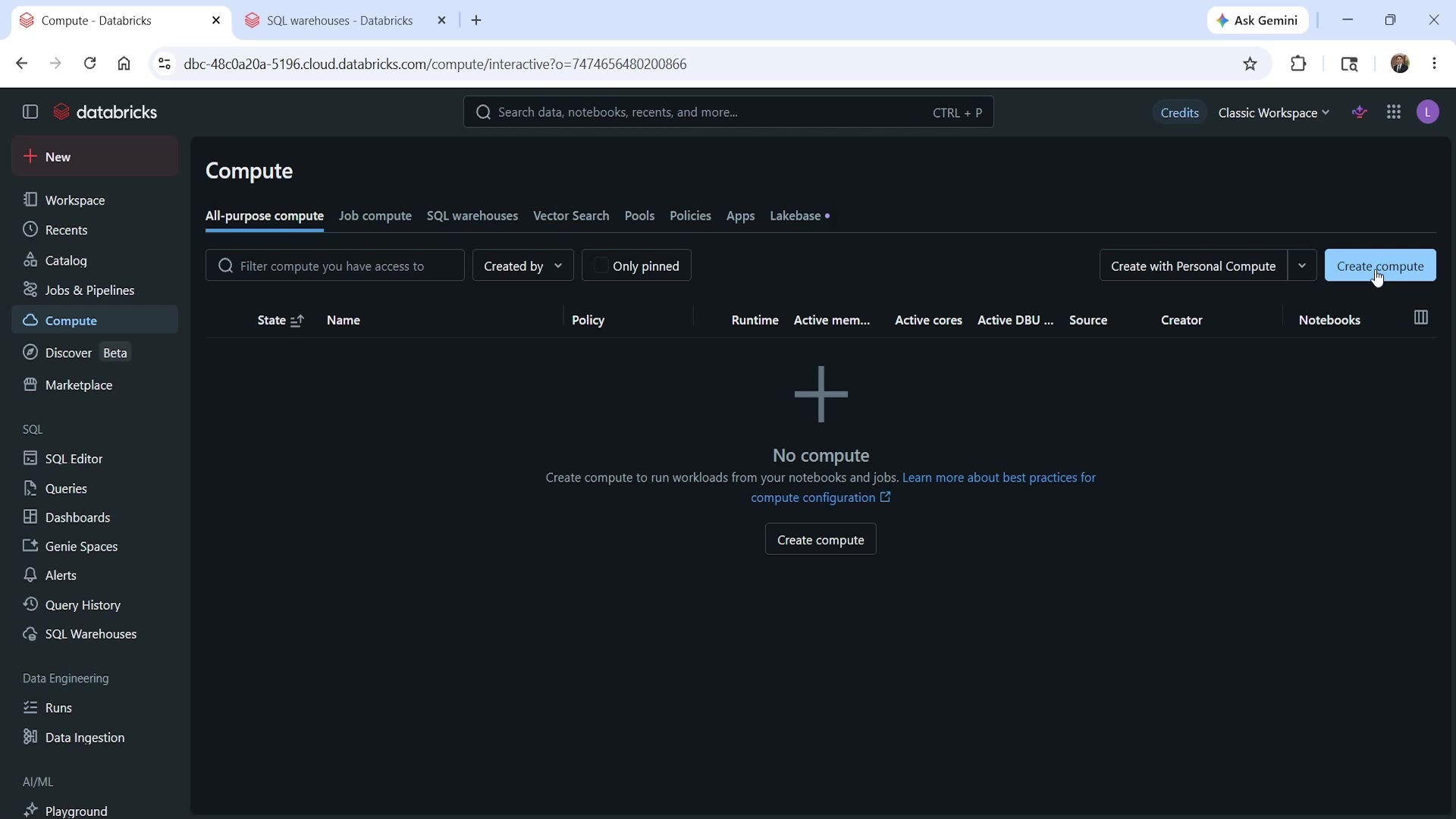 Classic workspace Compute menu
Here you'll see: All-purpose compute, Job compute, SQL warehouses, Vector Search, Pools, Policies, Apps, Lakebase.
Serverless workspace — Compute:
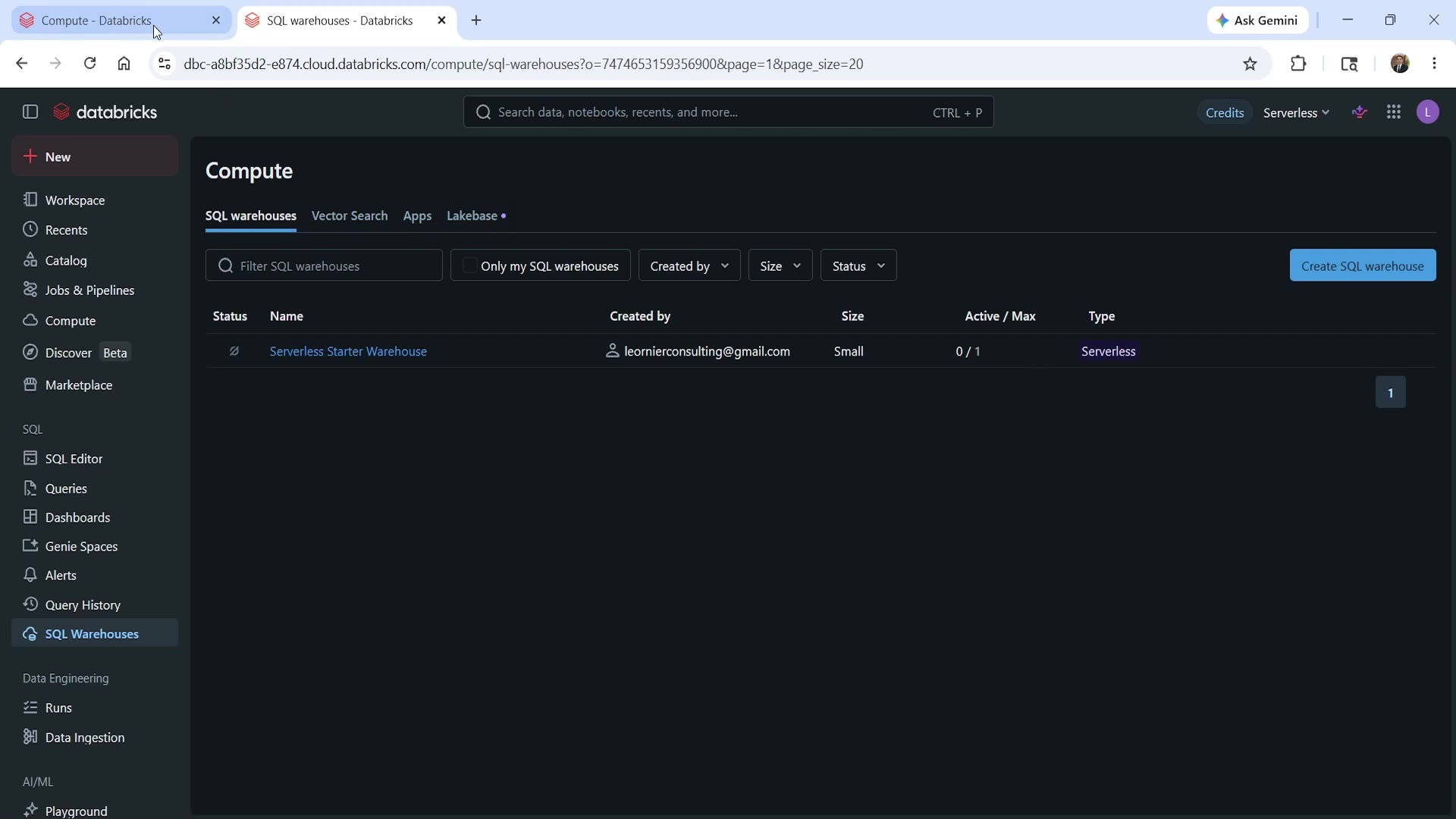 Serverless workspace Compute menu
Here you'll only see: SQL warehouses, Vector Search, Apps, Lakebase.
Notice what's missing in serverless: All-purpose compute, Job compute, Pools, and Policies. These four items are all related to dedicated compute — and that's exactly the capability serverless workspaces don't have.
This lines up with what we learned in the architecture lectures: a classic workspace lets you create dedicated, all-purpose clusters — choose your own node count, instance types, and so on. A serverless workspace only runs on Databricks-managed serverless compute — you don't get to spin up your own dedicated cluster.
One more detail worth knowing: a classic workspace can do both — it supports dedicated compute and serverless compute, giving you the choice. A serverless workspace, by contrast, can only ever use serverless compute.
We'll go deeper into all-purpose compute, job compute, pools, and policies in later lectures — for now, just remember this is the one place the two workspaces genuinely diverge.
A Few Other Things Worth Knowing
Switching workspaces: Click your workspace name (top area of the sidebar), and you'll get the option to switch to another workspace, or jump to the Databricks Account Management Console. This works the same way from both serverless and classic workspaces.
Settings: Clicking the settings icon takes you to workspace settings — configuration and administration options for that specific workspace. Both workspace types offer this, though (as you'd expect) the compute-related settings differ between them, for the same reason as above — serverless doesn't have dedicated compute to configure.
Getting back home: Click the Databricks logo at any time to return to the workspace home page.
Summary
| Area | Serverless Workspace | Classic Workspace |
|---|---|---|
| Workspace explorer, Catalog, Jobs & Pipelines, SQL menus, AI/ML | ✅ Same | ✅ Same |
| Compute — SQL Warehouses, Vector Search, Apps, Lakebase | ✅ | ✅ |
| Compute — All-purpose compute, Job compute, Pools, Policies (dedicated clusters) | ❌ Not available | ✅ Available |
| Can use serverless compute | ✅ | ✅ (in addition to dedicated) |
| Can use dedicated compute | ❌ | ✅ |
That's the quick tour of the Databricks workspace. We'll be spending a lot of time here throughout this course, so don't worry if some of these menu items don't fully make sense yet — we'll explore each one in detail as we go.
The key takeaway: the workspace is your integrated development environment — the collaboration platform where your entire data engineering team will work on Databricks projects.
See you again. Keep learning, and keep growing!