SDP Design Decisions and Production Patterns
Across this chapter, we built a complete CDC pipeline — bronze, silver, gold — entirely in Lakeflow SDP. This closing lecture consolidates the decisions made along the way into rules you can carry into your own production pipelines, and covers the gotchas that don't show up in a happy-path demo but will absolutely show up in a real deployment.
Three Design Decisions
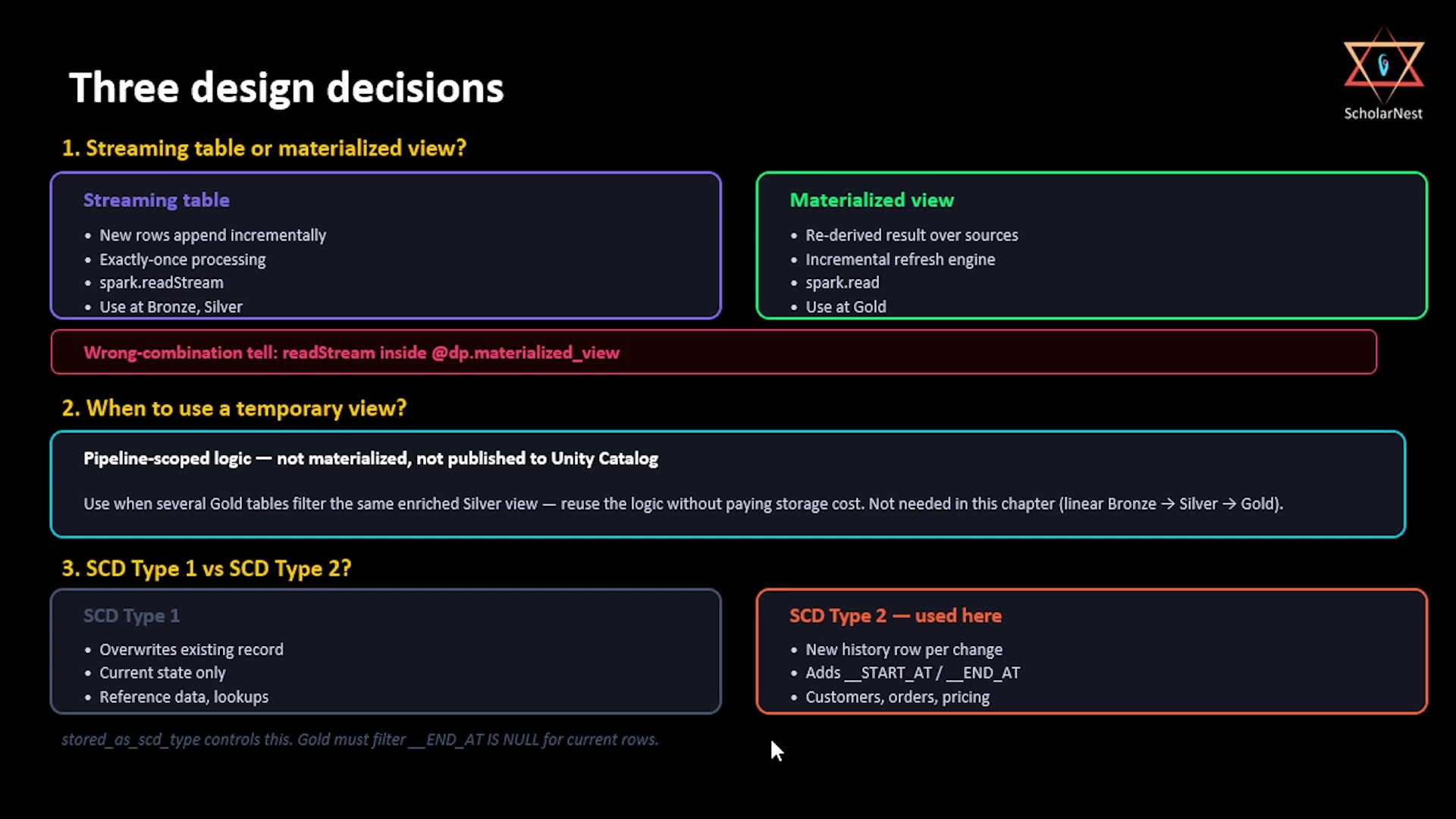 Three design decisions — streaming table vs MV, temp view, SCD Type 1 vs 2
1. Streaming table or materialized view?
The rule is simpler than most documentation makes it look:
- Streaming table — use it when your source grows by appending new rows: new CDC events, new
Kafka messages, new files landing in a volume. Each row needs to be processed exactly once and
never reprocessed. Streaming tables give you exactly-once semantics and incremental append
processing, built on
spark.readStream. Use them at bronze and silver. - Materialized view — use it when the output is a transformation or aggregation that should
reflect the current state of its source, not individual new rows arriving — a re-derived view of
the whole dataset. MVs are right for joins, aggregations, and analytical summaries, built on
spark.read. SDP's incremental refresh engine handles the "only process what changed" logic for you behind the scenes. Use them at gold.
One gotcha baked directly into this decision: if you find yourself writing spark.readStream inside
a function decorated with @dp.materialized_view, stop — that's the wrong combination, full stop.
2. When to use a temporary view?
Temporary views are pipeline-scoped: they aren't materialized to storage, and they're never published to Unity Catalog. They're pure logic, nothing more.
Use one when you have a complex intermediate transformation that multiple downstream tables need to reference, and you don't want to pay the storage cost of materializing it. This chapter's pipeline didn't need one, because bronze → silver → gold is a clean linear chain — each layer has exactly one consumer. But picture a real pipeline with five or six gold tables, all reading from the same filtered, enriched silver view: that shared intermediate transformation is exactly what a temporary view is for. You get the logic reused everywhere it's needed, without ever storing the intermediate result itself.
3. SCD Type 1 or SCD Type 2?
- SCD Type 1 overwrites the existing record — you get current state only, one row per key, and
no
__START_AT/__END_ATcolumns at all. Use it when history genuinely doesn't matter: reference data, lookup tables, configuration records. - SCD Type 2 creates a new history row for every change — you get a full audit trail and the ability to run point-in-time queries. Use it when history matters: customer records, order lifecycle, pricing changes. This is what this chapter's pipeline used throughout.
The stored_as_scd_type parameter on create_auto_cdc_flow is what controls this choice. And
whichever type you choose, one rule is fundamental enough to be worth a shared utility function
rather than repeating everywhere it's needed: in gold, always filter __END_AT IS NULL when
reading silver, to get current records only.
Six Production Gotchas
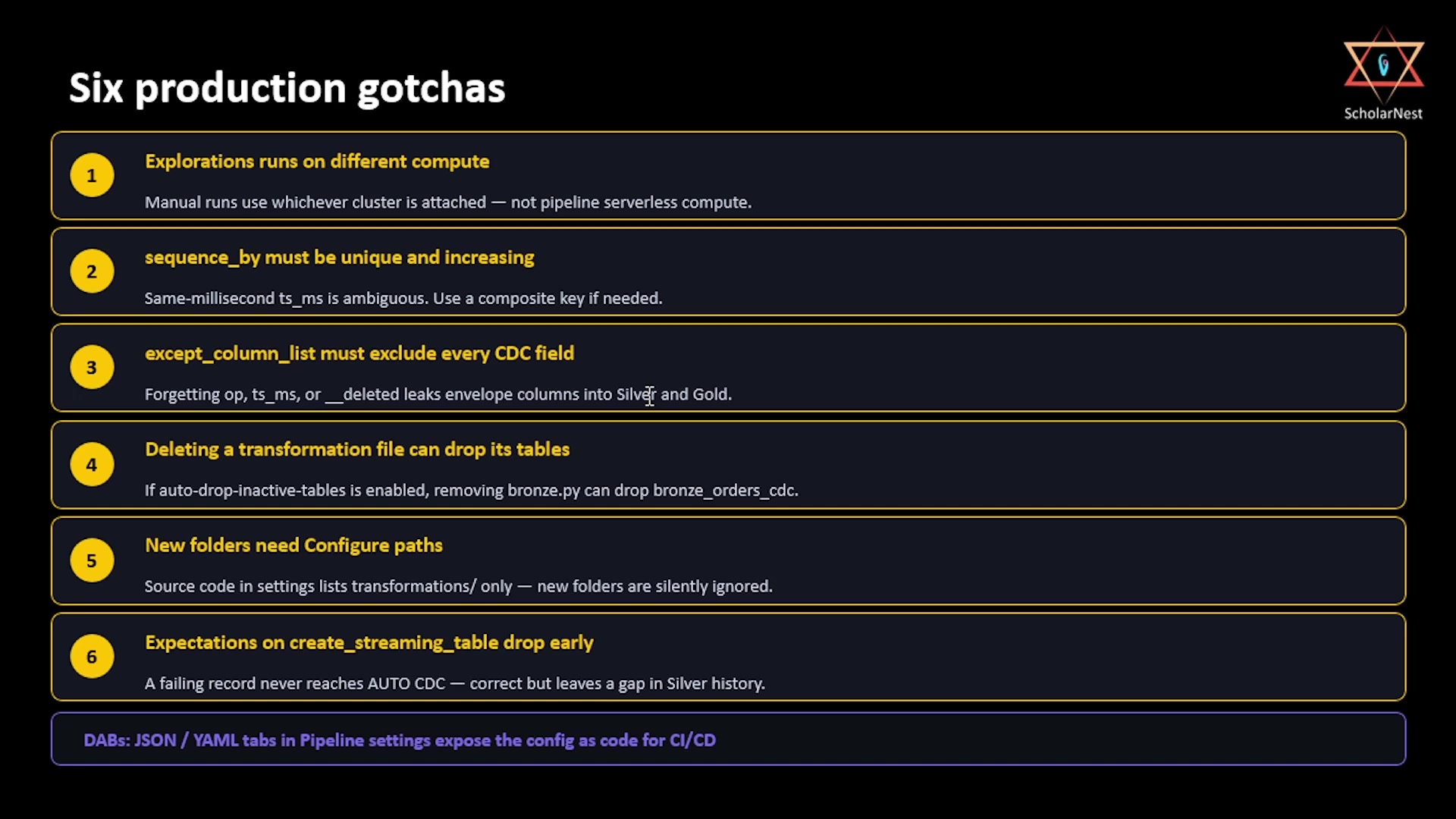 Six production gotchas
-
Explorations run on different compute. Files inside the
explorationsfolder never run during a pipeline update — but when you run them manually from the editor, they execute on whatever compute is attached to that file, which may be an entirely different cluster from your pipeline's serverless compute. If an exploration notebook queries tables the pipeline just created, make sure that compute has access to the same Unity Catalog. -
sequence_bymust be unique and monotonically increasing. AUTO CDC uses this column to resolve out-of-order events. If two events share the exact same value — which can genuinely happen when a CDC tool like Debezium processes multiple changes within the same millisecond — AUTO CDC has no way to determine which one actually came last. If your source can produce same-timestamp events, use a composite sequence (for example, a struct combiningts_mswith another tiebreaker column) instead of a single timestamp field. In this chapter's demo, plaints_mswas sufficient — but know the limit before you hit it in production. -
except_column_listmust exclude every CDC envelope column. Forgetting to excludeop,ts_ms, or__deletedmeans those columns silently land in your silver table — and propagate straight through to gold. Analysts end up staring atop = 'c'orop = 'u'in a dashboard with no idea what it means. Be explicit and complete withexcept_column_listat both the silver and gold layers. -
Deleting a transformation file can drop its tables. As of early 2026, pipelines have a setting to automatically drop "inactive" tables — datasets whose definitions no longer appear anywhere in the source code. If that setting is enabled and you delete
bronze.py, the very next pipeline run can dropbronze_orders_cdcandbronze_customers_cdcstraight out of Unity Catalog. Know whether auto-drop is enabled in your environment before deleting any source file. -
New source folders need "Configure paths." The pipeline's source code setting only evaluates the folders explicitly listed there — by default, just
transformations. If you add a second folder (say,transformations_v2during a refactor) and put a@dp.table-decorated file in it without adding that folder via the "Configure paths" button in pipeline settings, SDP will silently ignore it. No error, no warning — the table simply never gets created. -
Expectations on
create_streaming_tabledrop records before AUTO CDC ever sees them. Whenexpect_all_or_dropis set on the streaming table AUTO CDC targets, those expectations apply to incoming records before the CDC merge logic runs at all. A record that fails never reaches the target — it isn't merged, and it doesn't update an existing row. For CDC specifically, this is a double-edged outcome: a bad update event can't corrupt your target table, which is good — but it also leaves a genuine gap in silver's history, since that event is simply gone. Monitor your expectation violation metrics in the Tables tab; this is not something to set and forget.
One extra note worth knowing even though it wasn't covered hands-on in this chapter: the pipeline settings panel has JSON and YAML tabs that expose the entire pipeline configuration as code — useful for wiring a pipeline into CI/CD via Databricks Asset Bundles (DABs).
Summary
| Decision / Gotcha | Rule |
|---|---|
| Streaming table vs. MV | Streaming table for incremental appends (bronze/silver); MV for re-derived aggregations (gold) |
spark.readStream inside @dp.materialized_view | Always wrong — hard stop |
| Temporary view | Use when multiple downstream tables share complex intermediate logic you don't want to materialize |
| SCD Type 1 vs. Type 2 | Type 1 for history-doesn't-matter reference data; Type 2 for anything needing an audit trail |
| Gold reading silver | Always filter __END_AT IS NULL — worth a shared utility function |
| Explorations folder compute | Runs on whatever compute is attached manually — not pipeline serverless compute |
sequence_by | Must be unique and monotonically increasing; use a composite key if same-millisecond events are possible |
except_column_list | Must exclude every CDC envelope column at both silver and gold, or envelope fields leak into dashboards |
| Deleting source files | Can silently drop their tables if auto-drop-inactive-tables is enabled — check first |
| New source folders | Must be added via "Configure paths," or SDP silently ignores them |
Expectations on create_streaming_table | Drop bad records before AUTO CDC ever processes them — protects the target, but creates a silver history gap worth monitoring |
That closes out this chapter. What started as raw CDC files landing in a cloud volume is now a production-grade, fully declarative pipeline — bronze, silver, and gold — with a materialized view ready for any BI tool to query directly.
See you again. Keep learning, and keep growing!