Incremental Ingestion from Database Using Query-Based Connector
In the last two lectures, we covered Lakeflow Connect's two architecture shapes, and built a SaaS ingestion pipeline from GitHub. In this lecture, let's ingest from a database — specifically PostgreSQL — and look closely at the query-based approach: an alternative to full Change Data Capture (CDC), for situations where CDC isn't available or isn't necessary.
Two Ways to Ingest From a Database
When setting up a database ingestion pipeline, Databricks asks you to choose between two capture modes:
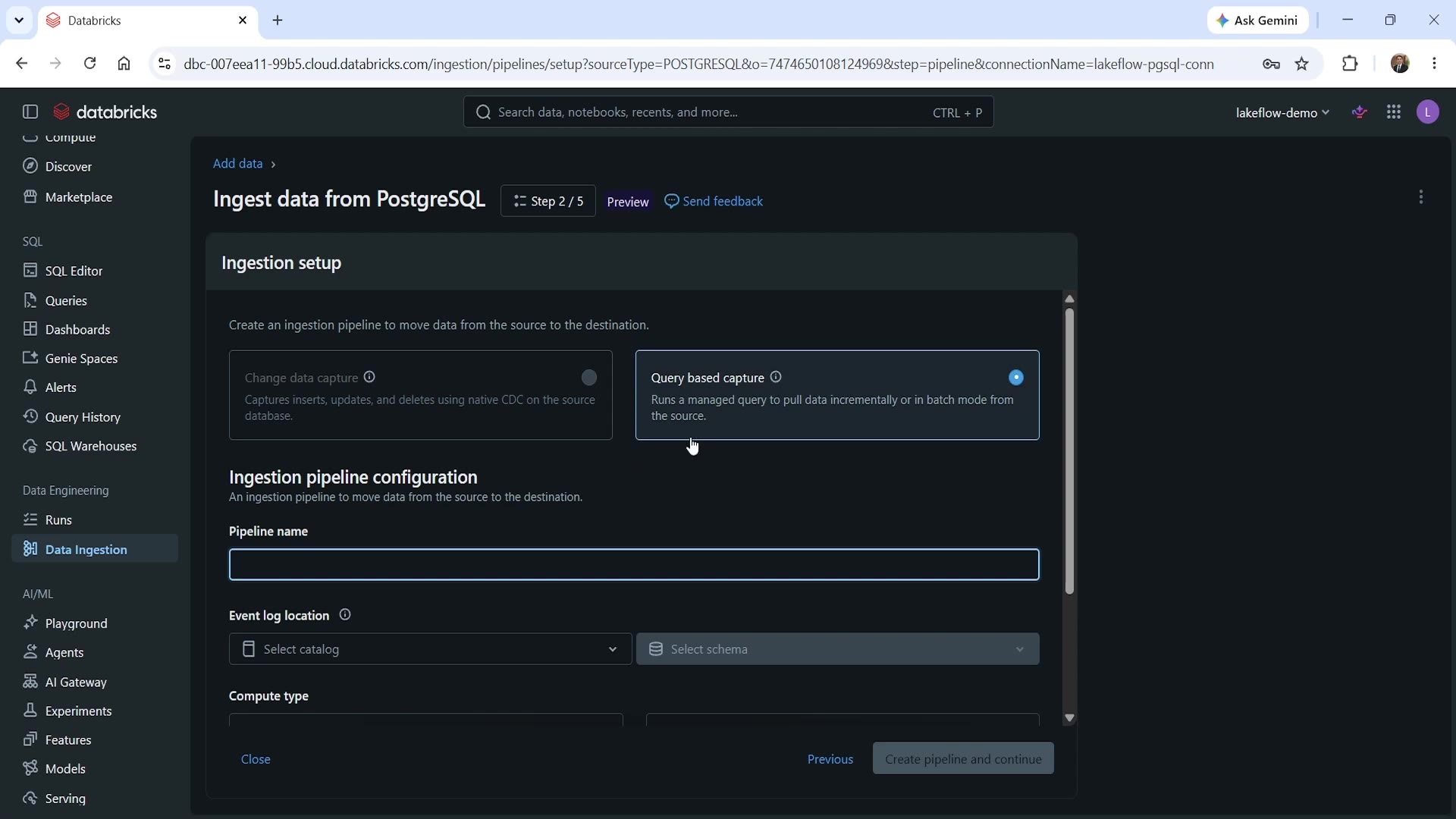 Query-based capture vs. Change data capture
- Change data capture (CDC) — captures inserts, updates, and deletes using native CDC on the source database. This is the gateway/staging pattern we covered in the "two shapes" lecture — continuous, low-latency, captures every single change event.
- Query based capture — runs a managed query to pull data incrementally or in batch mode from the source, on a schedule.
Why would you choose query-based over CDC? A few realistic reasons: your database might not have native CDC enabled (it often requires special configuration, replication slots, or elevated permissions your DBA team hasn't granted). You might not need change-by-change granularity — a periodic pull might be entirely sufficient for your use case. Or you might simply want a simpler, lower-overhead mechanism to start with, and can always move to CDC later if your requirements grow.
For this lecture, we'll use query-based capture.
Step 1: Start the Ingestion Wizard
From Data Ingestion, start a new ingestion pipeline from PostgreSQL. This opens the familiar 5-step wizard — connection, ingestion setup, source, destination, and schedule — matching the same overall flow as our earlier GitHub ingestion, just with a database-specific twist at Step 2.
Step 2: Choose the Capture Mode and Configure the Pipeline
At Step 2 — Ingestion setup, select Query based capture (as shown above), then configure:
- Pipeline name — e.g.,
lakeflow-pgsql-pipeline. - Event log location — the catalog/schema where pipeline event logs should be written (e.g., your
lakeflow_democatalog). - Compute type — Serverless (requires Databricks private connectivity/PrivateLink to your source database) or Classic (uses classic compute in a VPC/VNet you've configured — required if your source isn't reachable from the public internet, or if you need private connectivity).
Step 3: Configure the Source Table — The Cursor Column
This is the genuinely important, non-obvious part of query-based ingestion. At Step 3 — Source, select your table (e.g., lakeflowdb.public.orders), and configure:
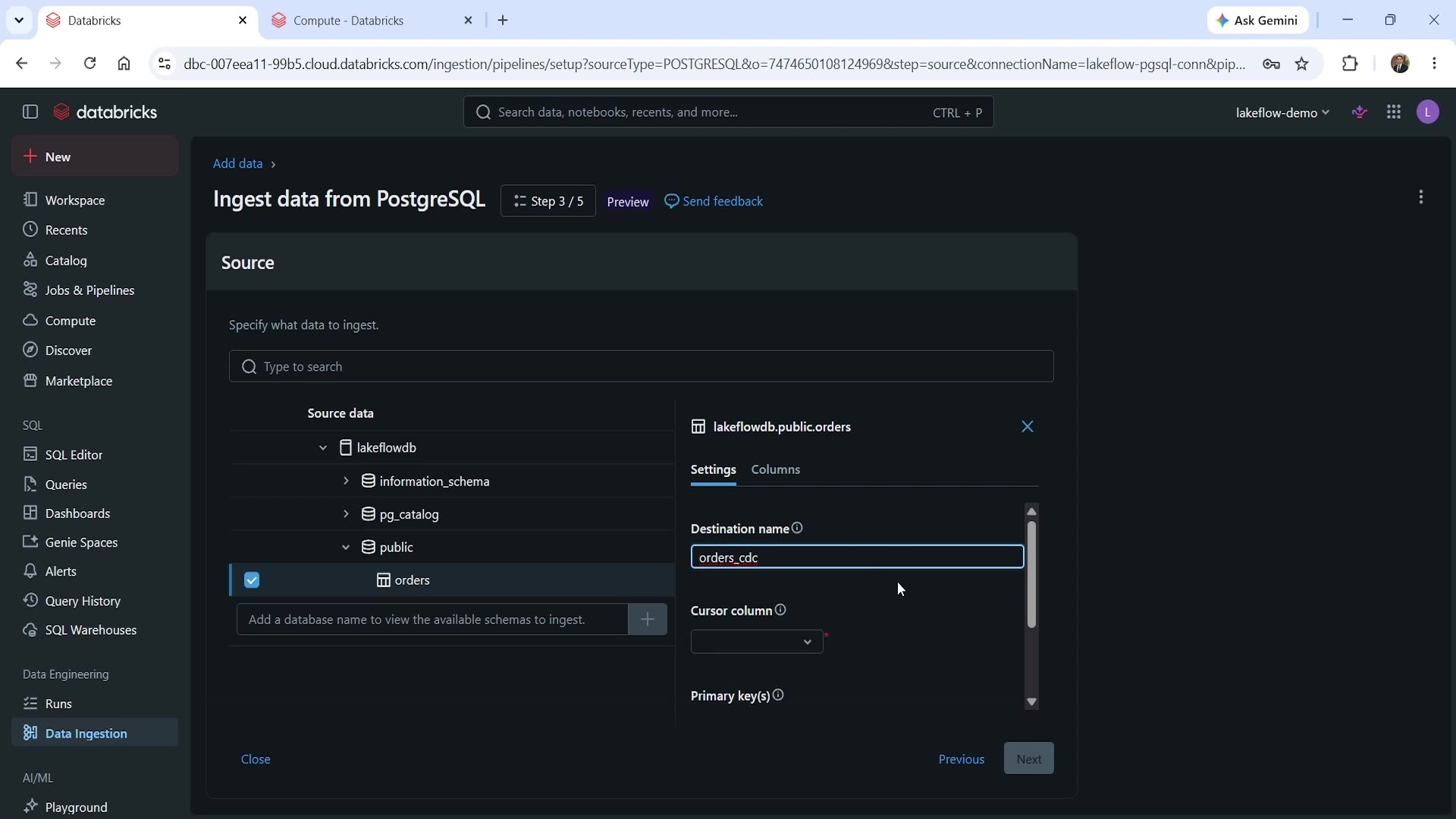 Query-based table settings — the cursor column
- Destination name — what to call the resulting table (e.g.,
orders_cdc). - Cursor column — this is the key setting. It tells Databricks which column to use to detect new or changed rows on each run — typically a monotonically increasing column like an auto-incrementing ID, or an
updated_attimestamp. - Primary key(s) — the column(s) that uniquely identify a row, used so Databricks knows how to upsert correctly (update an existing row vs. insert a new one).
Why does the cursor column matter so much? Because this is exactly what makes the ingestion incremental rather than a full reload every time. On each run, Databricks runs a managed query that looks at the cursor column, and only pulls rows that are new or have changed since the last successful run — rather than re-reading the entire source table from scratch every single time. Get the cursor column wrong (e.g., pick a column that doesn't reliably increase, or that doesn't get updated on every change), and you risk silently missing updates.
Step 4 & 5: Destination and Schedule
Step 4 — Destination: choose the Unity Catalog catalog/schema the table should land in — same governed, no-code experience as before.
Step 5 — Schedules and notifications: set how often the pipeline should run (e.g., Every 1 day), and optionally add email notifications — you can choose to be notified on success, on failure, or both. For a production pipeline, at minimum, enabling failure notifications is a good habit, so you find out about a broken ingestion before your downstream Silver/Gold tables start showing stale data.
Click Save and run pipeline to kick off the first load.
Verifying the First Load
Once the pipeline completes, we can confirm the data landed correctly:
sql%sql SELECT * FROM lakeflow_demo.pgsql_db.orders_cdc;
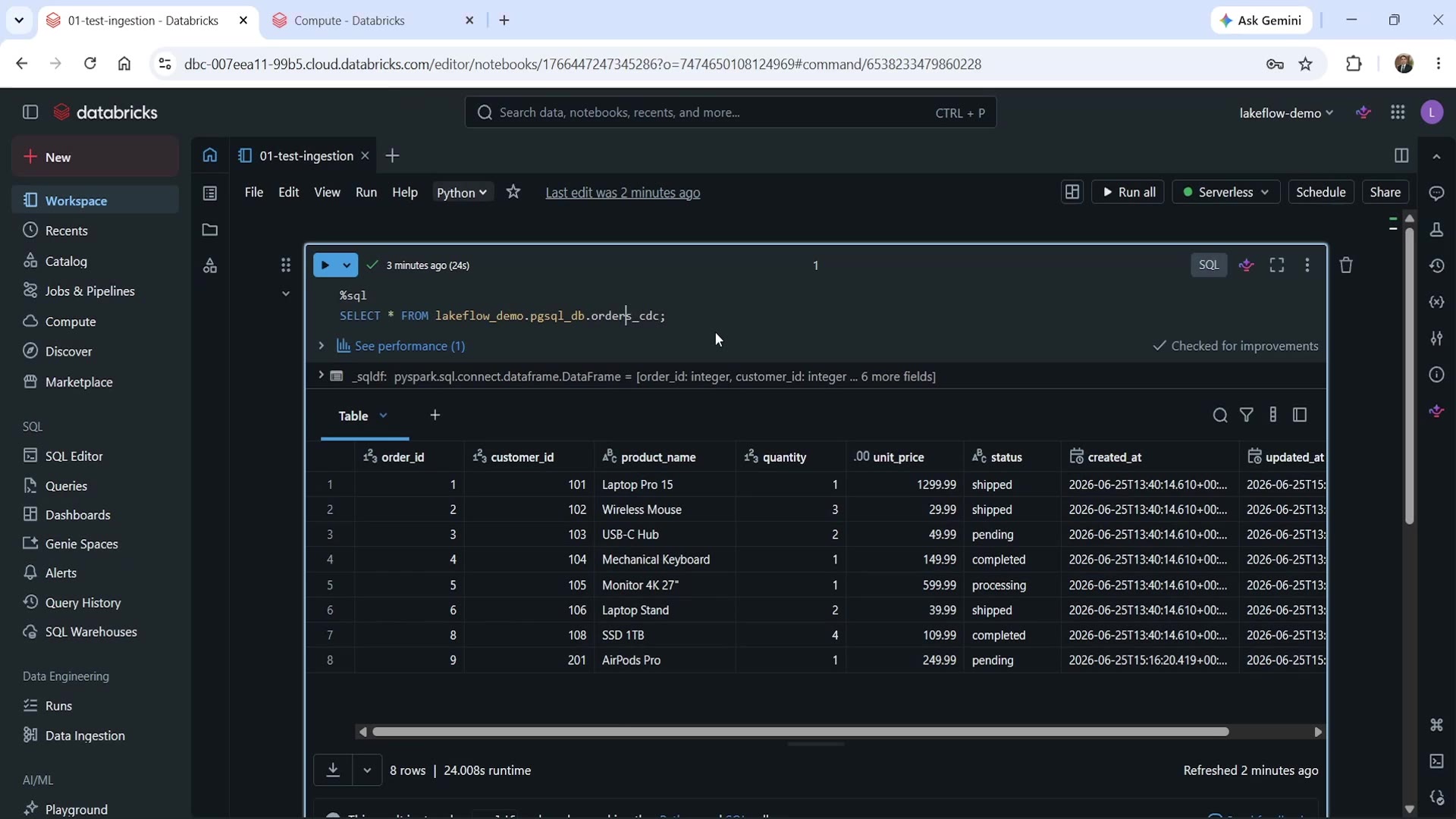 Query-based ingestion result — orders_cdc table
The result shows 8 rows, with real order data (order_id, customer_id, product_name, quantity, unit_price, status), plus created_at and updated_at columns — exactly what we'd expect from a first full load of the source table.
Proving It's Actually Incremental
Here's the real test: what happens when the source table changes, and we run the pipeline again?
If new rows are inserted (or existing rows updated) in the source PostgreSQL orders table, and we trigger the pipeline a second time, we should see it pick up only those changes — not the entire table again.
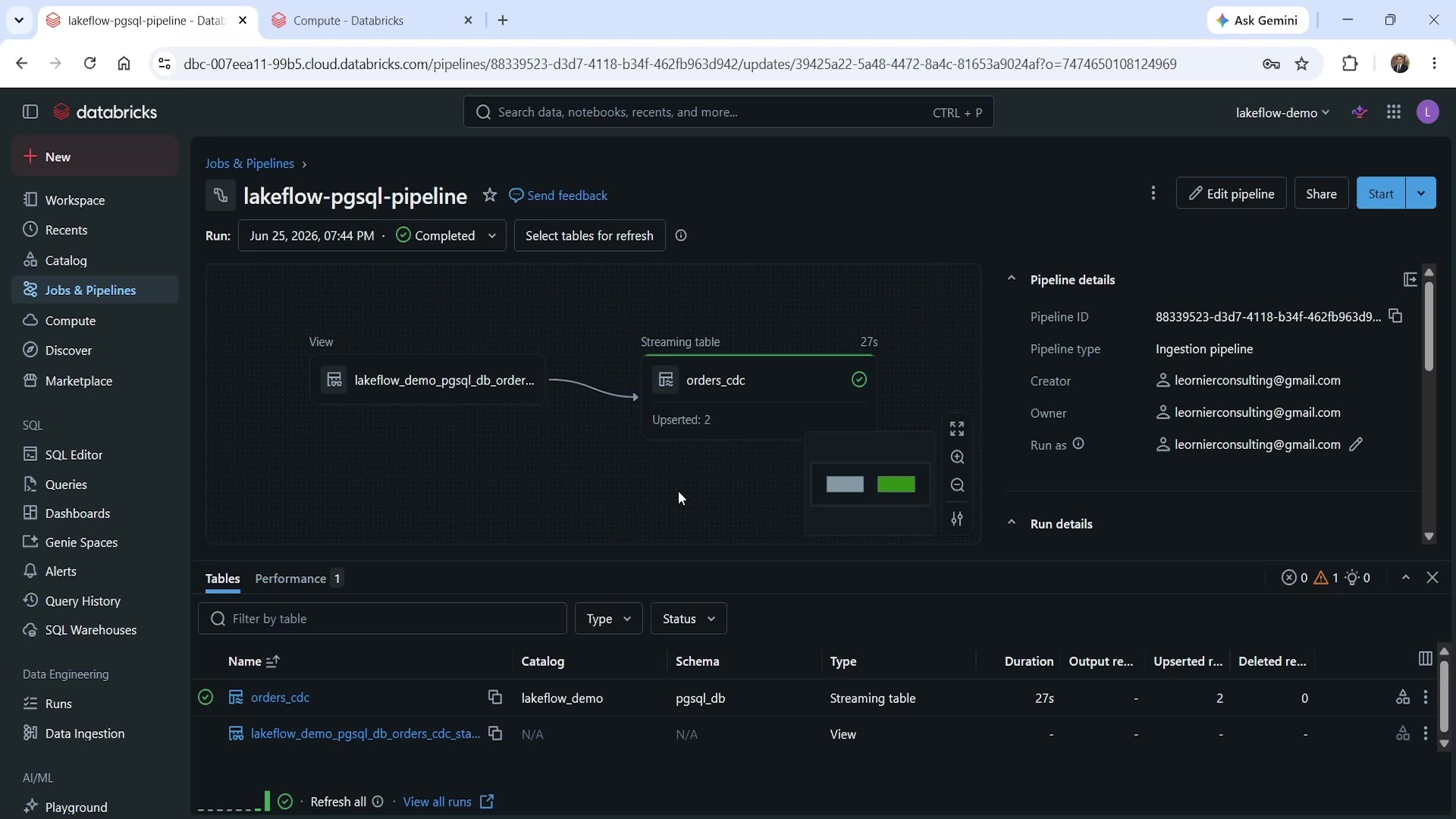 Second pipeline run — Upserted: 2
Looking at this second run's details: the orders_cdc streaming table shows "Upserted: 2" — confirming exactly 2 rows were affected by this run, not all 8 (or 10) rows in the table. This is the cursor column doing its job: the managed query recognized which rows were new or changed since the last run, based on the cursor column's value, and processed only those.
This is the core value proposition of query-based incremental ingestion: you get efficient, incremental loading without needing native CDC on your source database — as long as your table has a reliable cursor column to track changes by.
Summary
| Concept | Key Point |
|---|---|
| Query-based vs. CDC | CDC captures every insert/update/delete continuously via native database CDC; query-based runs a managed query to pull data incrementally or in batch, on a schedule |
| When to use query-based | No native CDC available, change-by-change granularity isn't required, or you want a simpler starting point |
| Cursor column | The column Databricks uses to detect new/changed rows since the last run — the mechanism that makes ingestion genuinely incremental |
| Primary key(s) | Used to correctly upsert — update existing rows vs. insert new ones |
| Compute type | Serverless (needs PrivateLink) or Classic (needs VPC/VNet configuration) — pick based on your source database's network accessibility |
| Proof of incrementality | A second pipeline run only processes new/changed rows (e.g., "Upserted: 2"), not the full table again |
See you again. Keep learning, and keep growing!