What is Lakeflow Connect — The Ingestion Pillar
Welcome to a new chapter. Now that we understand the Medallion Architecture — Bronze, Silver, Gold — the natural next question is: how does data actually get into Bronze in the first place? That's exactly what Lakeflow Connect is for.
Lakeflow: Three Pillars, One Platform
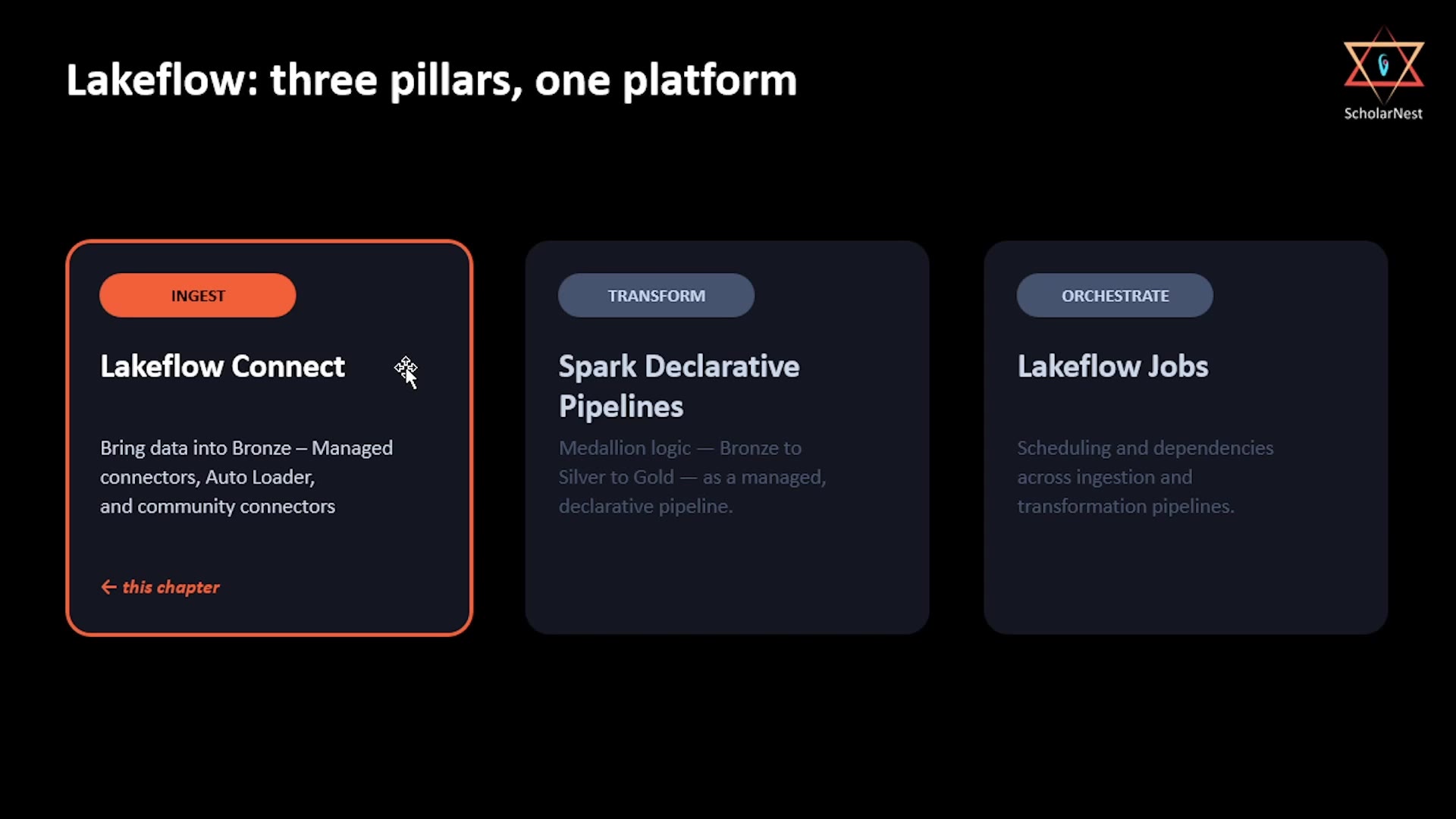
Before diving into Connect specifically, it helps to see where it fits. Lakeflow is Databricks' overall platform for building data pipelines, and it's made up of three pillars:
 Lakeflow: three pillars, one platform
- Ingest — Lakeflow Connect. Brings data into Bronze, via managed connectors, Auto Loader, and community connectors. This is the chapter we're covering now.
- Transform — Spark Declarative Pipelines. The Medallion logic — Bronze to Silver to Gold — expressed as a managed, declarative pipeline. We'll cover this in an upcoming chapter.
- Orchestrate — Lakeflow Jobs. Scheduling and managing dependencies across both ingestion and transformation pipelines. Also an upcoming chapter.
Three pillars, one integrated platform. In this chapter, we focus entirely on the first one: ingestion.
Lakeflow Connect: The Ingestion Pillar
Lakeflow Connect's job is simple to state: bring data into Bronze, using managed connectors, Auto Loader, and community connectors. But to understand why it's built the way it is, it helps to look at the different real-world scenarios it needs to handle.
Data capture scenarios Lakeflow Connect deals with:
- Files being dropped into cloud storage — the classic batch pattern: someone (or some system) drops CSV, JSON, or Parquet files into an S3 bucket on a schedule.
- Change events streaming from an operational database — Change Data Capture (CDC): every insert, update, and delete happening in a production database, streamed continuously.
- Records syncing from a SaaS application — pulling data from systems like Salesforce or Workday, via their APIs.
These three scenarios are genuinely different in shape — files sitting still, a continuous stream of database changes, and API-based syncing — and Lakeflow Connect needs a coherent way to handle all three.
Lakeflow Architecture Pattern — Two Shapes
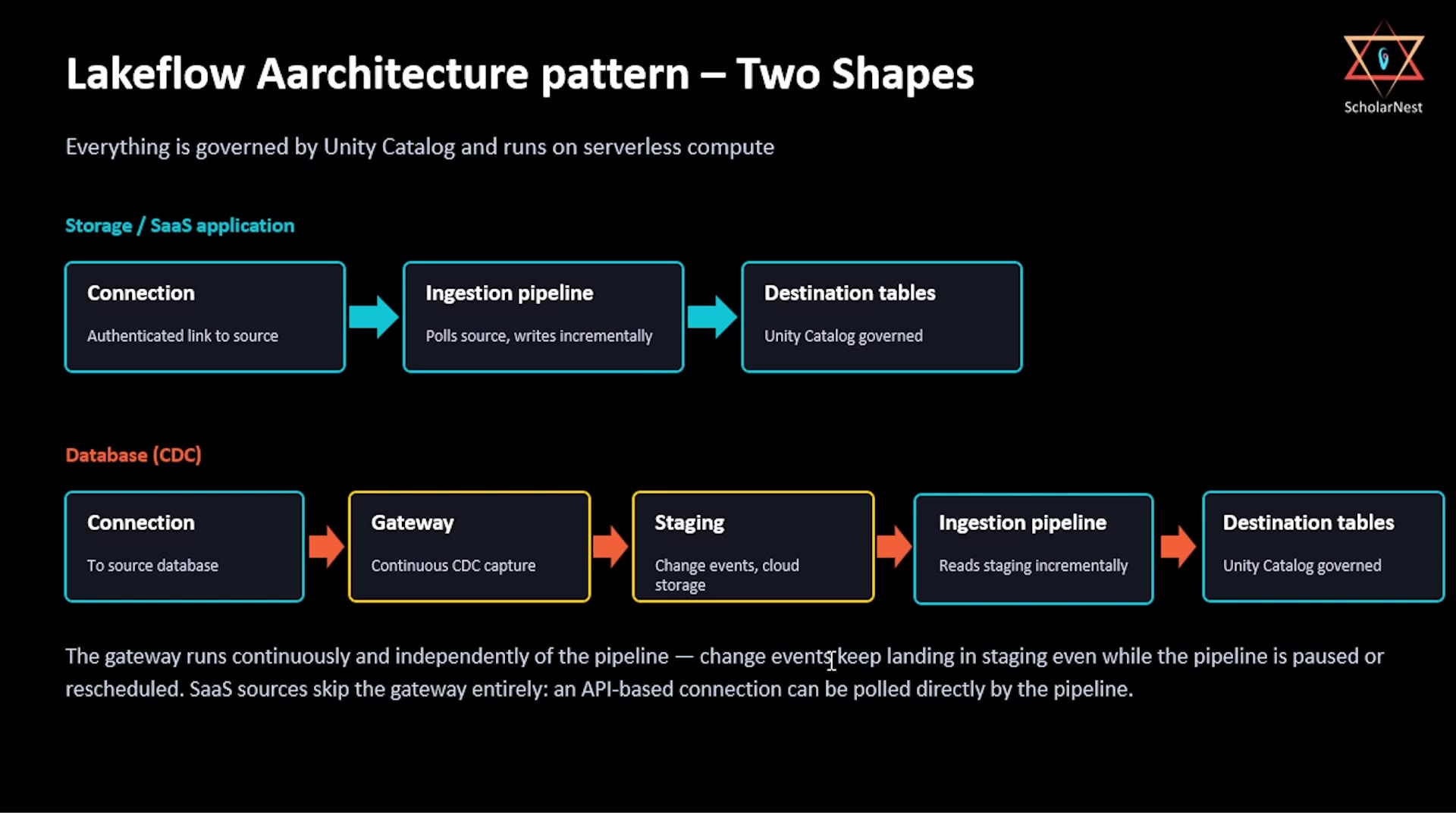
Here's the key architectural insight: despite the variety of sources, Lakeflow Connect ultimately reduces to two underlying shapes — and everything is governed by Unity Catalog and runs on serverless compute, regardless of which shape applies.
 Lakeflow architecture pattern — two shapes
Shape 1: Storage / SaaS Application
Connection (authenticated link to source)
    → Ingestion pipeline (polls source, writes incrementally)
        → Destination tables (Unity Catalog governed)
Simple and direct: a connection authenticates to the source, an ingestion pipeline polls it and writes incrementally, and the result lands as Unity Catalog–governed tables.
Shape 2: Database (CDC)
Connection (to source database)
    → Gateway (continuous CDC capture)
        → Staging (change events, cloud storage)
            → Ingestion pipeline (reads staging incrementally)
                → Destination tables (Unity Catalog governed)
This one has two extra steps compared to Shape 1 — a Gateway and a Staging area — and understanding why is genuinely important:
Output / NoteThe gateway runs continuously and independently of the pipeline — change events keep landing in staging even while the pipeline is paused or rescheduled.
This is a deliberate design decision. Database change events don't wait around — if your ingestion pipeline is paused, rescheduled, or temporarily down, you still don't want to lose changes happening in the source database in the meantime. The gateway solves this by continuously capturing CDC events into a staging area (cloud storage), completely decoupled from whether the downstream ingestion pipeline happens to be running at that exact moment. The pipeline itself just reads from staging incrementally, whenever it does run.
One more detail worth remembering: SaaS sources skip the gateway entirely — since they're accessed via an API, the pipeline can poll them directly, no continuous capture layer required. The gateway/staging pattern is specific to the database CDC case.
Connector Tiers: Effort vs. Flexibility
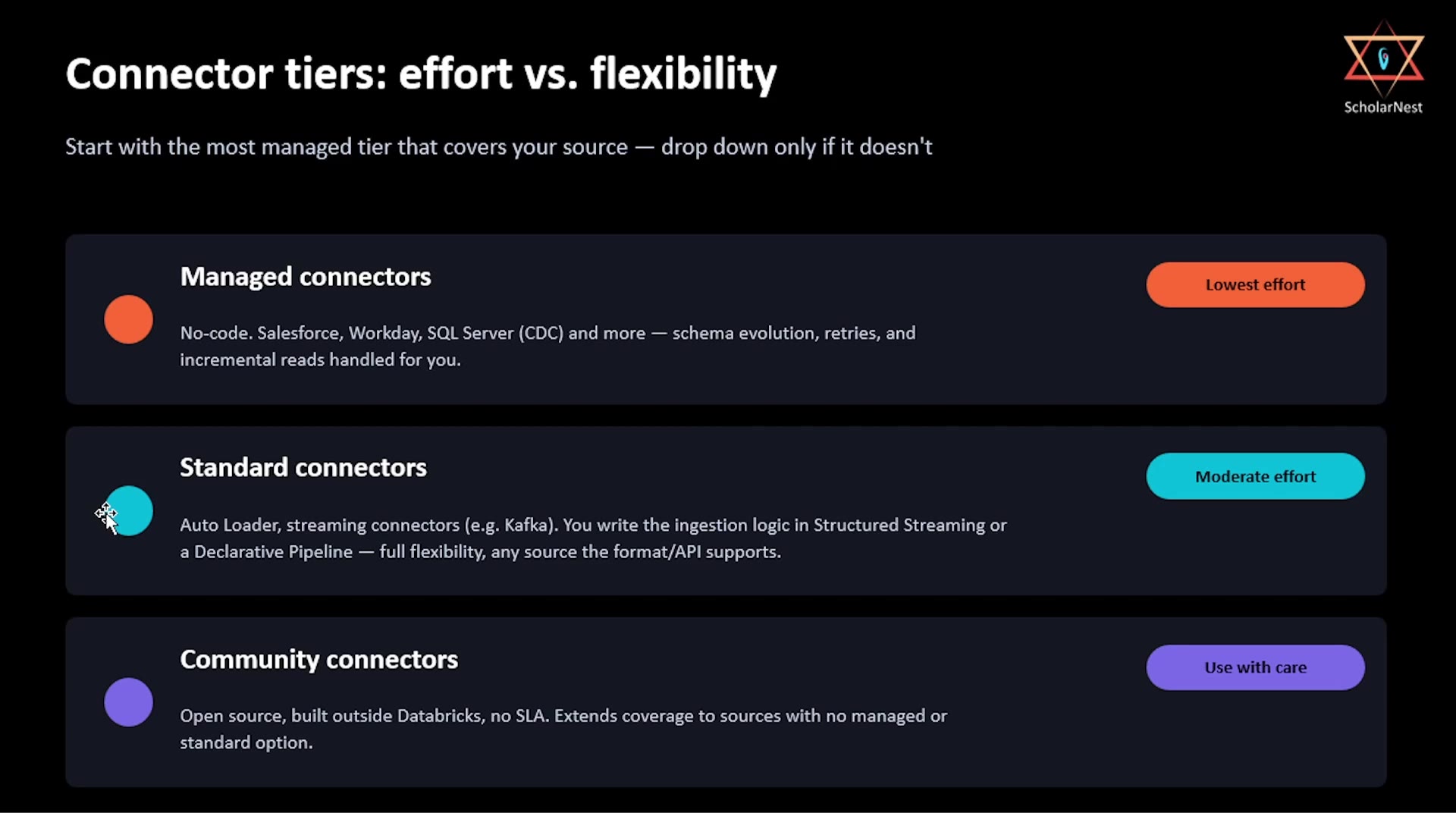
Not every source has the same level of built-in support. Lakeflow Connect organizes its connectors into three tiers, trading off effort against flexibility:
 Connector tiers: effort vs. flexibility
Start with the most managed tier that covers your source — drop down only if it doesn't.
- Managed connectors — Lowest effort. No-code. Covers sources like Salesforce, Workday, SQL Server (CDC), and more. Databricks handles schema evolution, retries, and incremental reads for you.
- Standard connectors — Moderate effort. Auto Loader, streaming connectors (e.g., Kafka). You write the ingestion logic yourself, using Structured Streaming or a Declarative Pipeline — full flexibility, works with any source the format or API supports.
- Community connectors — Use with care. Open source, built outside Databricks, with no SLA. These extend coverage to sources that have no managed or standard option — but you're relying on community maintenance, not Databricks' own support.
Choosing the Right Tier
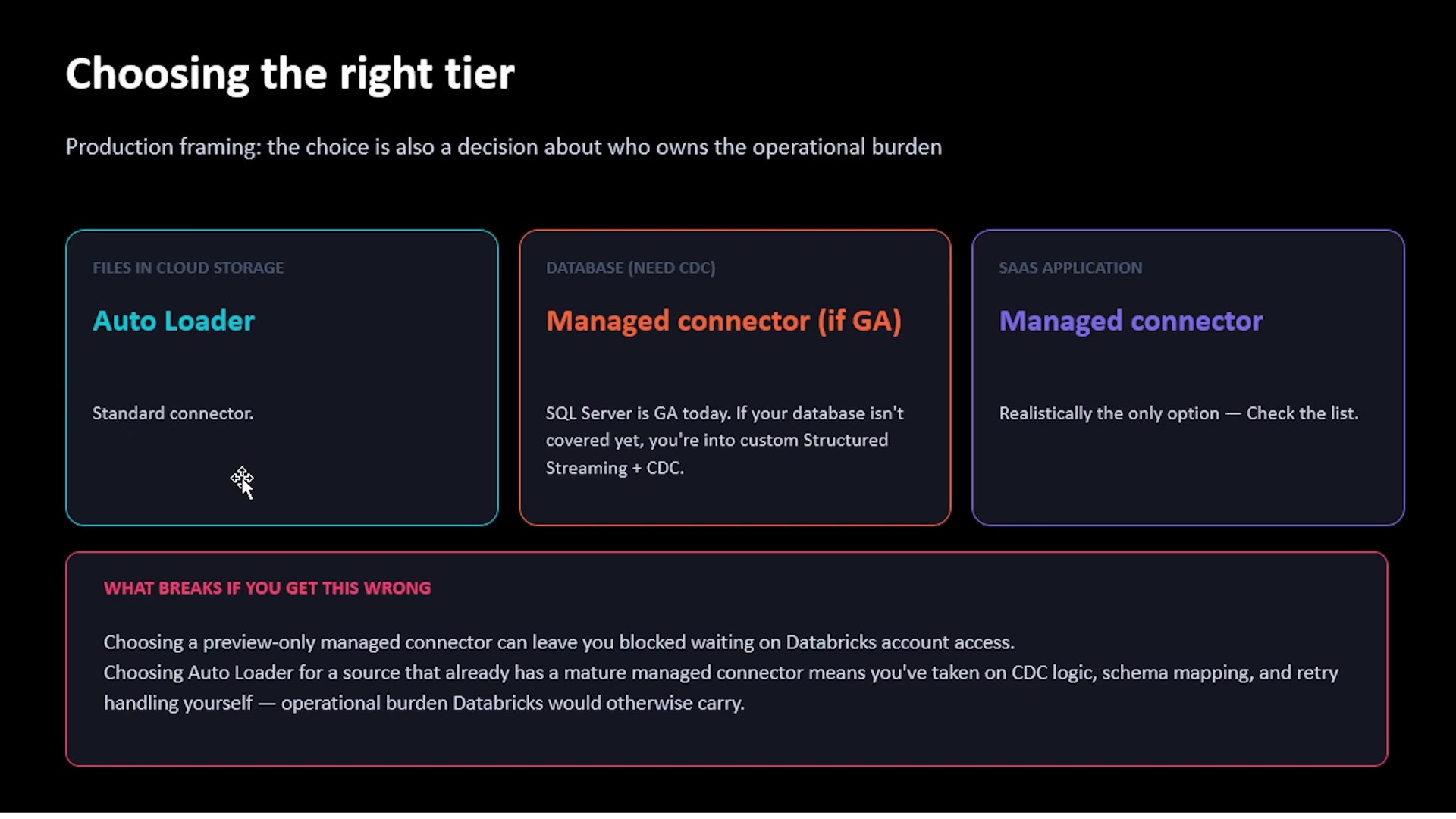
Here's the practical, production framing: this choice is also a decision about who owns the operational burden — you, or Databricks.
 Choosing the right tier
- Files in cloud storage → Auto Loader (a standard connector).
- Database, need CDC → Managed connector, if it's GA (generally available) for your database. SQL Server is GA today; if your specific database isn't covered yet, you're looking at building custom Structured Streaming + CDC logic yourself.
- SaaS application → Managed connector, realistically the only sensible option — check Databricks' current connector list to confirm your specific SaaS source is supported.
What Breaks If You Get This Wrong
Two concrete failure patterns worth knowing about, before they cost you time in a real project:
- Choosing a preview-only managed connector can leave you blocked, waiting on Databricks account access — preview features often require explicit enablement, and you may not find this out until you're already committed to that path.
- Choosing Auto Loader for a source that already has a mature managed connector means you've taken on CDC logic, schema mapping, and retry handling yourself — real operational burden that Databricks would otherwise carry for you, for no real benefit.
The lesson: always check whether a managed connector already exists and is GA for your source, before reaching for a more manual, standard-tier approach.
Summary
| Concept | Key Point |
|---|---|
| Lakeflow's three pillars | Ingest (Lakeflow Connect), Transform (Spark Declarative Pipelines), Orchestrate (Lakeflow Jobs) |
| Data capture scenarios | Files in cloud storage, CDC from a database, records syncing from a SaaS app |
| Shape 1 (Storage/SaaS) | Connection → Ingestion pipeline → Destination tables |
| Shape 2 (Database/CDC) | Connection → Gateway (continuous) → Staging → Ingestion pipeline → Destination tables |
| Why the gateway exists | Runs independently of the pipeline, so CDC events are never lost while the pipeline is paused |
| Connector tiers | Managed (lowest effort) → Standard (moderate effort, full flexibility) → Community (use with care, no SLA) |
| Choosing a tier | Start with the most managed option that covers your source; only drop down if it doesn't |
In the next lecture, we'll get hands-on — actually building ingestion pipelines using Lakeflow Connect.
See you again. Keep learning, and keep growing!