Reading and Writing Delta — Batch and Streaming
In this lecture, we'll cover two things:
- Writing and reading Delta tables in batch mode — including two different approaches for reading.
- Mixing streaming writes with batch reads on the same Delta table — and seeing why this works safely, with zero coordination code.
Part 1: Batch Write and Read
Create a new notebook (we'll call it 03-reading-and-writing-batch), attach a cluster, and set your catalog/schema:
sql%sql USE CATALOG workspace; USE SCHEMA default;
Output / NoteMake sure you're using a catalog and schema that actually exist in your own environment.
Creating Sample Data
For this demo, we'll generate a small batch of event data directly in code — no external files needed:
pythonfrom pyspark.sql import Row from datetime import datetime, timedelta import random # Build a small batch of event rows inline — no external data needed base_time = datetime(2024, 1, 15, 9, 0, 0) batch_1 = [ Row(event_id=i, event_type=random.choice(["click", "view", "purchase"]), user_id=random.randint(100, 199), event_ts=base_time + timedelta(seconds=i * 30)) for i in range(1, 11) ] df_batch_1 = spark.createDataFrame(batch_1) display(df_batch_1)
Writing the First Batch
pythondf_batch_1.write \ .format("delta") \ .mode("append") \ .saveAsTable("events") print("Batch 1 written — 10 rows appended.")
Since the events table doesn't exist yet, this creates it — using the schema inferred directly from the DataFrame — and loads all 10 rows. The mode is append: new rows are added alongside whatever's already there. Since the table started empty, these are simply the first 10 rows.
A Second Batch — This Time With Overwrite
pythonbase_time_2 = datetime(2024, 1, 15, 14, 0, 0) batch_2 = [ Row(event_id=i, event_type=random.choice(["click", "view", "purchase"]), user_id=random.randint(200, 299), event_ts=base_time_2 + timedelta(seconds=i * 30)) for i in range(11, 21) ] df_batch_2 = spark.createDataFrame(batch_2) df_batch_2.display()
pythondf_batch_2.write \ .format("delta") \ .mode("overwrite") \ .saveAsTable("events") print("Batch 2 written — table overwritten with 10 new rows.")
This time the mode is overwrite — the table now contains only these 10 new rows; the first batch is gone.
Here's the important part to understand: overwrite in Delta is atomic. It is not "delete all rows, then write new ones" as two separate steps. Under the hood, Delta marks the old Parquet files as removed and adds the new ones — all within a single transaction log commit. A reader querying the table at the exact moment of the overwrite will always see either the complete old state or the complete new state — never a mix, and never an empty table in between.
Confirming With DESCRIBE HISTORY
sql%sql DESCRIBE HISTORY events;
You'll see two commits: version 0 for the first write, version 1 for the overwrite — each a single atomic transaction. This is the transaction log making overwrites safe.
Two Ways to Read a Delta Table
Approach 1: Path-Based (Direct From Storage)
pythonlocation = spark.sql("DESCRIBE DETAIL events") \ .select("location") \ .collect()[0][0] print(f"Delta table path: {location}")
pythondf_path = spark.read.format("delta").load(location) print(f"Reading from: {location}") print(f"Row count: {df_path.count()}") display(df_path)
Important: this approach is valid syntax, but it will not actually work here — because our events table is a managed table, and its S3 location is fully managed by Unity Catalog. Managed table locations cannot be accessed directly — if they could, it would completely bypass Unity Catalog's permission system, which defeats the purpose of having it.
This path-based approach only works for external tables (where you control the storage location) — and even then, Unity Catalog still needs to grant you permission to access that location. It's most useful when reading from an external table in a shared bucket, or in situations where the catalog itself isn't available.
Approach 2: Catalog-Based (By Table Name) — The Standard Approach
pythondf_catalog = spark.table("events") print(f"Row count: {df_catalog.count()}") display(df_catalog)
This is the clean, short, and properly governed way to read a Delta table — access control and lineage tracking apply automatically, and the result is identical to the path-based read (when that would even work). In Databricks pipelines, this is the approach you should use by default. Only reach for path-based reads when you have a specific reason to bypass the catalog.
Part 2: The Unified Table — Batch and Streaming Together
Here's the real power of Delta Lake: the same table can serve concurrent batch writes, streaming writes, batch reads, and streaming reads — all at once, with zero coordination code.
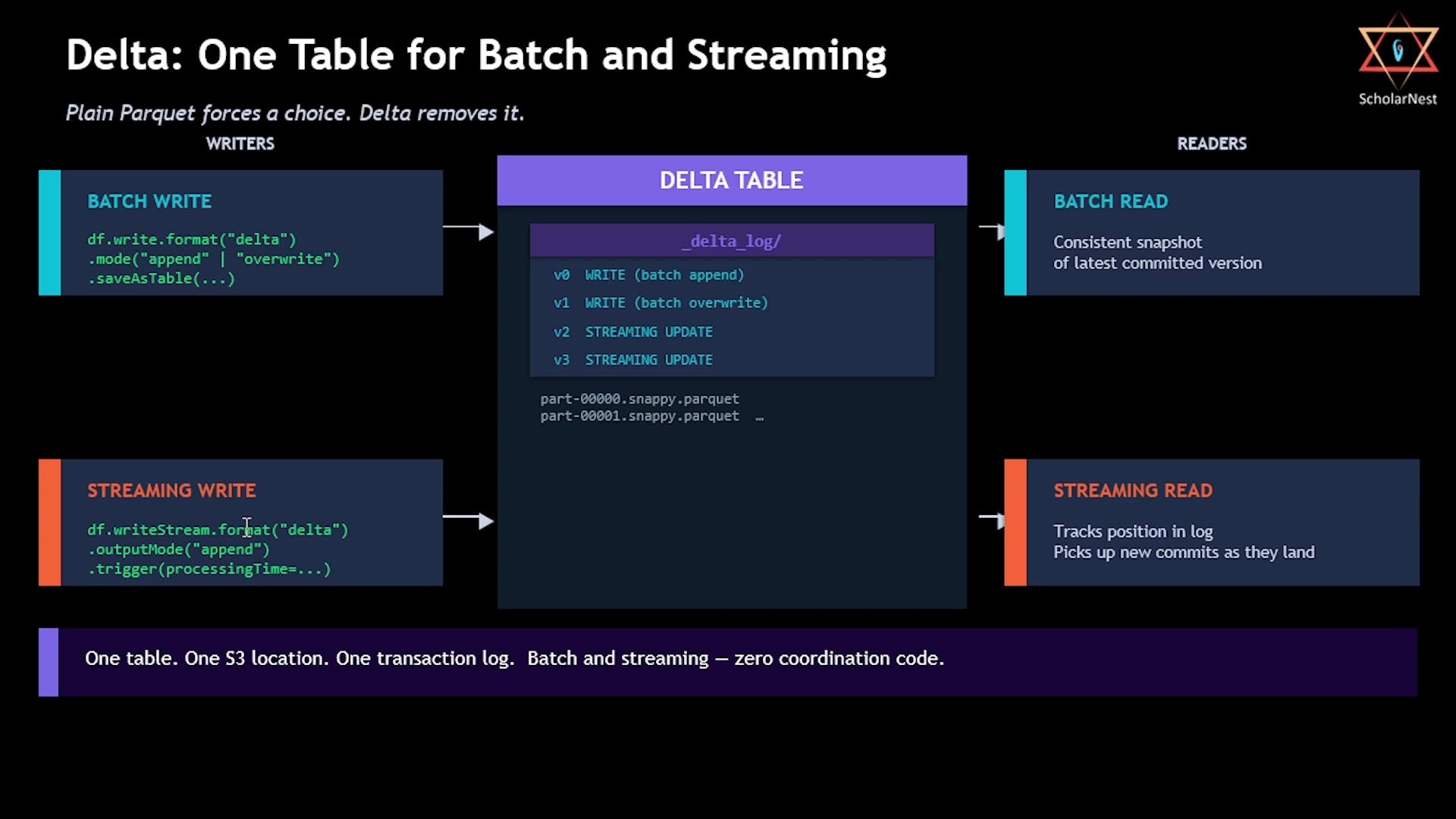 Delta: One table for batch and streaming
Plain Parquet forces you to choose — batch or streaming, one writer at a time, careful coordination required. Delta removes that constraint entirely: one table, one S3 location, one transaction log, serving everyone safely.
Let's simulate this.
Setup
Create a second notebook, 04-unified-write-read-delta, and attach a dedicated cluster this time — not serverless. Why? We're about to create a continuously running stream, and serverless clusters don't support that kind of infinite streaming workload.
sql%sql USE CATALOG workspace; USE SCHEMA default;
Step 1: Create a Streaming DataFrame
We'll use Spark's built-in rate source — a mock streaming source that generates data at a fixed rate, purely for testing/demo purposes:
pythonfrom pyspark.sql.functions import col, current_timestamp, expr stream_df = spark.readStream \ .format("rate") \ .option("rowsPerSecond", 1) \ .load() \ .select( col("value").cast("int").alias("event_id"), expr("CASE WHEN value % 3 = 0 THEN 'purchase' " " WHEN value % 3 = 1 THEN 'click' " " ELSE 'view' END").alias("event_type"), expr("cast(500 + (value % 100) as int)").alias("user_id"), current_timestamp().alias("event_ts") )
This generates one new record every second, matching the same structure as our events table.
Step 2: Start the Streaming Write
pythonquery = stream_df.writeStream \ .format("delta") \ .outputMode("append") \ .option("checkpointLocation", "/Volumes/workspace/default/temp/checkpoints/events_stream/") \ .trigger(processingTime="5 seconds") \ .toTable("events") print("Streaming query started. Writing to main.default.events every 5 seconds.")
A few notes:
checkpointLocationis required for Spark Structured Streaming — it enables fault tolerance and safe restarts.trigger(processingTime="5 seconds")means the stream processes and commits a new micro-batch every 5 seconds — roughly 4-5 new records per batch, given our 1 row/second source.
Run this, and the stream starts — writing to the same events table we used for batch writes earlier.
Step 3: Read While the Stream Is Running
Wait at least 10 seconds after starting the stream, then run:
pythoncount_1 = spark.table("events").count() print(f"Row count (read 1): {count_1}")
Step 4: Wait, Then Read Again
Wait another 15 seconds, then run:
pythoncount_2 = spark.table("events").count() print(f"Row count (read 2): {count_2}") print(f"New rows landed by stream: {count_2 - count_1}")
The count is higher. The stream wrote new rows while we were waiting — and our batch query saw them immediately. No cache to invalidate, no delay, no coordination code of any kind. Every micro-batch commit becomes instantly visible to any batch reader.
This is the unified table in action: the same Delta table, the same S3 files, the same transaction log — simultaneously serving a streaming writer and a batch reader, safely.
Step 5: Stop the Stream
Don't leave the stream running indefinitely:
pythonquery.stop() print("Stream stopped.")
Step 6: Check the Final State
pythonfinal_count = spark.table("events").count() print(f"Final row count: {final_count}")
sql%sql DESCRIBE HISTORY events;
Looking at the history now, you'll see many versions — version 0 (the initial batch write), version 1 (the overwrite), and then a long series of streaming update commits, one per micro-batch, as the stream ran. (You may also notice an OPTIMIZE entry appear automatically along the way — we'll cover what that means in an upcoming lecture.)
Summary
| Concept | Key Point |
|---|---|
mode("append") | Adds new rows alongside existing data |
mode("overwrite") | Atomically replaces all data — readers never see a partial/empty state mid-write |
DESCRIBE HISTORY | Shows every version/commit made to the table |
Path-based read (spark.read.format("delta").load(location)) | Only works for external tables with granted permissions; bypasses Unity Catalog |
Catalog-based read (spark.table("table_name")) | Standard approach — governed, tracked, and the default choice for pipelines |
Streaming write (writeStream...toTable(...)) | Continuously commits micro-batches to the same Delta table |
| Unified table | One Delta table safely serves concurrent batch and streaming reads/writes — no coordination code needed |
That's the power of Delta Lake in practice: a single table that behaves consistently and safely, no matter how many different processes — batch or streaming — are reading from or writing to it at the same time.
See you again. Keep learning, and keep growing!