Type Widening and the Variant Data Type
In this lecture, we'll cover two Delta Lake features that give you flexibility on the schema side: type widening and the Variant data type.
Setup
Open (or create) a notebook — 11-type-widening-and-variant — connect a cluster, and set your catalog/schema:
sqlUSE CATALOG workspace; USE SCHEMA default;
Part 1: Type Widening
We've already learned that Delta lets you add, rename, or drop columns — but changing the data type of an existing column is not allowed by default. Type widening is the controlled exception to this: it lets you promote a column's type to a broader one — without rewriting any existing data.
Examples of "broader": INT → LONG, FLOAT → DOUBLE, DATE → TIMESTAMP.
Setting Up
sqlCREATE OR REPLACE TABLE sensor_readings ( sensor_id STRING, reading_value INT, recorded_at TIMESTAMP ) USING DELTA COMMENT 'IoT sensor readings — type widening demo';
sqlINSERT INTO sensor_readings VALUES ('S001', 1842, '2024-07-01 09:00:00'), ('S002', 2103, '2024-07-01 09:01:00'), ('S003', 987, '2024-07-01 09:02:00'), ('S004', 31500, '2024-07-01 09:03:00');
reading_value is defined as INT. This works fine as long as incoming values stay within integer range.
The Problem: Values Now Exceed INT Range
Imagine the source system upgrades, and sensors start reporting higher-precision values — beyond what an INT can hold (max ~2.1 billion):
python%python from pyspark.sql import Row from pyspark.sql.types import StructType, StructField, StringType, LongType, TimestampType from datetime import datetime schema_long = StructType([ StructField('sensor_id', StringType(), False), StructField('reading_value', LongType(), False), StructField('recorded_at', TimestampType(), False), ]) long_readings = [ Row(sensor_id='S001', reading_value=3_200_000_000, # exceeds INT max (2,147,483,647) recorded_at=datetime(2024, 7, 1, 10, 0, 0)), Row(sensor_id='S005', reading_value=4_100_000_000, recorded_at=datetime(2024, 7, 1, 10, 1, 0)), ] df_long = spark.createDataFrame(long_readings, schema_long) # This will FAIL — type widening is not yet enabled df_long.write \ .format('delta') \ .mode('append') \ .option('mergeSchema', 'true') \ .saveAsTable('sensor_readings')
Even with mergeSchema set to true, this fails — "Failed to merge fields reading_value and reading_value." Here's the important nuance: INT → LONG genuinely is a valid type-widening upgrade — but Delta won't do it automatically, even when mergeSchema is enabled. Type widening is a separate, explicitly-opt-in feature — it doesn't happen just because the target type happens to be wider.
Enabling Type Widening
sqlALTER TABLE sensor_readings SET TBLPROPERTIES ('delta.enableTypeWidening' = 'true');
This property is false by default. Once enabled, you have two ways to actually widen the column:
Option A — Explicit ALTER TABLE:
sqlALTER TABLE sensor_readings ALTER COLUMN reading_value TYPE LONG;
This upgrades reading_value from INT to LONG without touching any data — it's purely a transaction log entry.
Option B — Let mergeSchema handle it automatically:
python%python df_long.write \ .format('delta') \ .mode('append') \ .option('mergeSchema', 'true') \ .saveAsTable('sensor_readings') display(spark.table('sensor_readings').orderBy('sensor_id', 'recorded_at'))
Now that type widening is enabled on the table, this same write that failed earlier now succeeds. The two long values are inserted, and the column's type is upgraded to BIGINT (Spark's name for LONG) as part of the same operation.
The Gotcha: Widening Only Works Within a Type Family
This is the detail to really internalize: type widening only works along specific, predefined paths:
- Integer family:
BYTE → SHORT → INT → LONG - Floating-point family:
FLOAT → DOUBLE - Date family:
DATE → TIMESTAMP
You cannot widen across families — for example, LONG to DOUBLE is not allowed, even though DOUBLE might seem "wider" in some intuitive sense.
python%python from pyspark.sql.types import DoubleType schema_double = StructType([ StructField('sensor_id', StringType(), False), StructField('reading_value', DoubleType(), False), # DOUBLE — wider than LONG but outside the family StructField('recorded_at', TimestampType(), False), ]) double_readings = [ Row(sensor_id='S006', reading_value=1842.75, # fractional precision recorded_at=datetime(2024, 7, 2, 9, 0, 0)), ] df_double = spark.createDataFrame(double_readings, schema_double) df_double.write \ .format('delta') \ .mode('append') \ .option('mergeSchema', 'true') \ .saveAsTable('sensor_readings')
This fails, even with type widening enabled — because LONG → DOUBLE crosses type families. If you genuinely need this kind of cross-family type change, there's only one path: rewrite the table. Create a new table with the desired schema, read from the old table, write into the new one, and retire the old table. There's no shortcut around this.
Part 2: The Variant Data Type
Now let's talk about a different kind of schema flexibility — one specifically designed for semi-structured JSON data.
The Design Problem: Storing JSON in Delta
Whenever JSON data arrives in your pipeline, you face a real, recurring design decision: how do you store it?
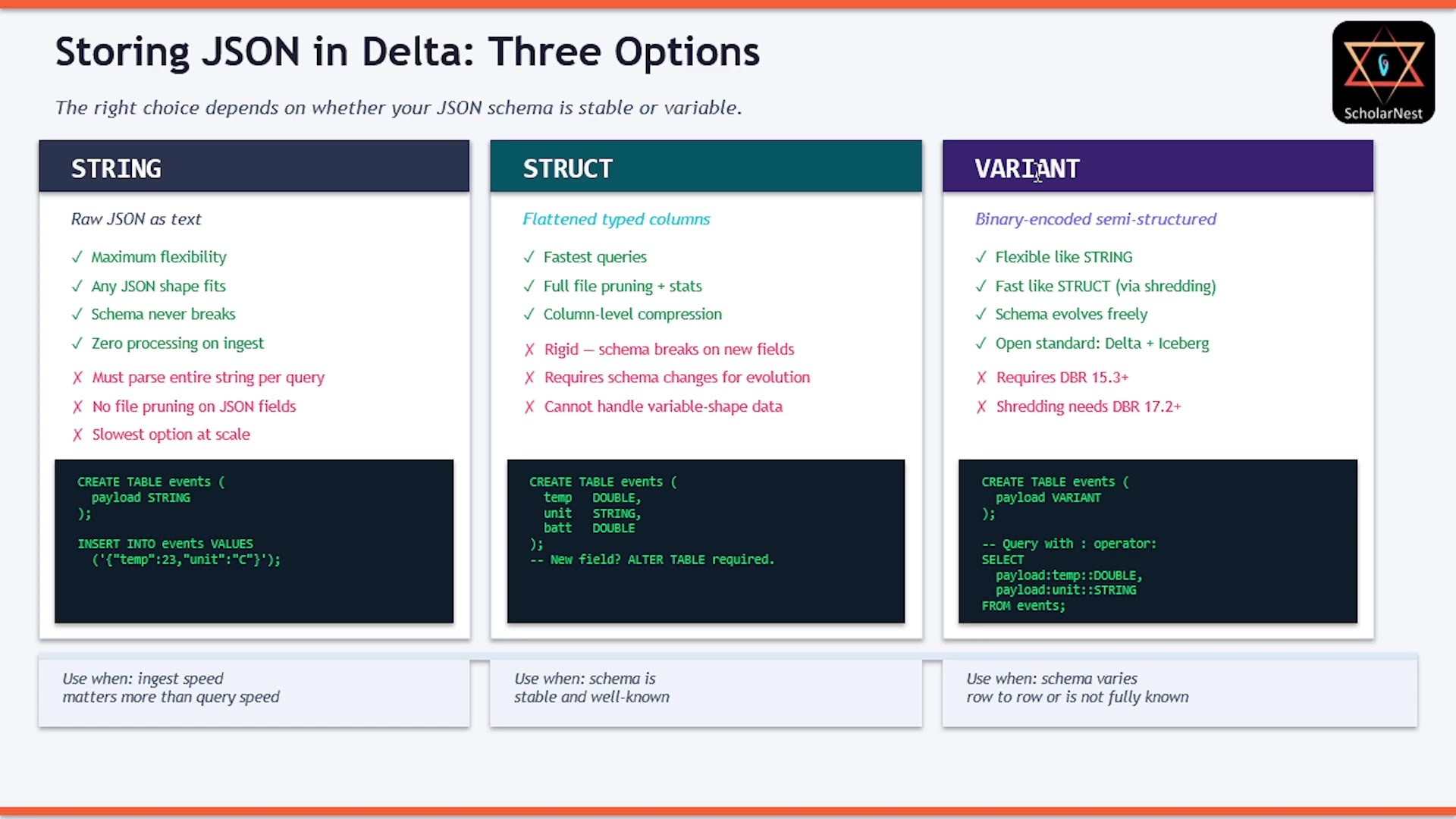 Storing JSON in Delta: Three Options
Option 1 — String. Dump the raw JSON text into a STRING column.
- ✅ Maximum flexibility — any JSON shape fits, schema never breaks, zero processing overhead on ingest.
- ❌ Every query must parse the entire JSON string, even for a single field — a serious performance cost at scale (millions of events/day).
Option 2 — Struct. Flatten the JSON into a typed STRUCT column upfront.
- ✅ Fastest queries — proper column-level statistics, pruning, and compression.
- ❌ Rigid — you must define the schema in advance, and if the JSON shape changes (new fields), you're straight back into the schema evolution problem.
Option 3 — Variant. A native Delta type (added in Delta 4.0) purpose-built for this.
- Stores JSON in a compact binary encoding — not plain text, not a fixed struct.
- Queries on specific fields are fast, thanks to shredding: frequently accessed JSON paths get physically stored as separate columns inside the Parquet file itself, automatically.
- You get flexibility close to
STRING, with performance close toSTRUCT. - It's an open standard — ratified in Apache Parquet, and supported across Delta Lake, Apache Iceberg, and Apache Spark. Not a Databricks-proprietary feature.
The rule of thumb: use STRUCT when your JSON schema is stable and well-known. Use VARIANT when your JSON schema evolves, varies row to row, or comes from an external system you don't control. Using plain STRING for anything beyond trivial cases is generally a poor choice.
Hands-On: Creating a Variant Column
sqlCREATE OR REPLACE TABLE iot_events ( event_id INT, received_at TIMESTAMP, payload VARIANT ) USING DELTA COMMENT 'IoT events — variable-schema JSON stored as VARIANT';
Loading Varying JSON Shapes
sqlINSERT INTO iot_events VALUES (1, '2024-07-01 09:00:00', PARSE_JSON('{"sensor_id":"S001","temp":23.4,"unit":"C","battery":0.92}')), (2, '2024-07-01 09:01:00', PARSE_JSON('{"sensor_id":"S002","temp":71.2,"unit":"F"}')), (3, '2024-07-01 09:02:00', PARSE_JSON('{"sensor_id":"S003","pressure":1013.2,"unit":"hPa","location":{"lat":51.5,"lon":-0.12}}')), (4, '2024-07-01 09:03:00', PARSE_JSON('{"sensor_id":"S004","temp":19.8,"unit":"C","calibration":{"last_date":"2024-06-01","offset":-0.3}}')), (5, '2024-07-01 09:04:00', PARSE_JSON('{"sensor_id":"S005","temp":22.1,"unit":"C","battery":0.78,"tags":["indoor","lab"]}'));
Look closely: every single JSON shape here is different. Record 1 has battery; record 2 doesn't. Record 3 has a nested location object and a completely different field (pressure instead of temp). Record 4 has a nested calibration object. This is exactly the kind of variability that would break a rigid STRUCT schema — but VARIANT handles it without any issue.
Notice: writing JSON into a VARIANT column requires the PARSE_JSON() function — it converts the JSON string into the binary representation VARIANT actually stores.
Querying Variant Fields: : and ::
sqlSELECT event_id, received_at, payload:sensor_id AS sensor_id, payload:temp AS temp_raw, -- raw VARIANT payload:temp::DOUBLE AS temp_double, -- cast to DOUBLE payload:unit::STRING AS unit, payload:battery::DOUBLE AS battery -- NULL when field absent FROM iot_events ORDER BY event_id;
Two operators to know:
:— extracts a field from the variant (similar tostruct.field, but with a colon instead of a dot).::— casts the result to a specific type. By default, a:-extracted value is itself still aVARIANT— most SQL functions don't accept that directly, so you'll cast it to your target type almost every time you use it.
Notice payload:battery::DOUBLE — for records where battery wasn't present in the JSON, this simply returns NULL. No error, no exception — missing fields are handled gracefully.
Navigating Nested Objects
sqlSELECT event_id, payload:sensor_id::STRING AS sensor_id, payload:location:lat::DOUBLE AS latitude, payload:location:lon::DOUBLE AS longitude, payload:calibration:last_date::STRING AS last_calibrated, payload:calibration:offset::DOUBLE AS cal_offset FROM iot_events ORDER BY event_id;
Chaining : operators lets you drill into nested JSON objects — payload:location:lat reaches straight into the nested location.lat field, exactly the way you'd navigate nested JSON normally. Again, for records where location or calibration don't exist (records 1, 2, and 5 for location), the result is simply NULL — no errors.
Filtering on a Variant Field
sqlSELECT event_id, payload:sensor_id::STRING AS sensor_id, payload:temp::DOUBLE AS temp FROM iot_events WHERE payload:unit::STRING = 'C' ORDER BY event_id;
You can use variant fields in a WHERE clause too — just remember to cast first. payload:unit alone is a VARIANT, and you can't directly compare a VARIANT to a STRING literal — casting with ::STRING makes the comparison valid.
Summary
Type Widening:
- A Delta 4.0 feature that lets you promote a column's type to a wider one (
INT → LONG,FLOAT → DOUBLE,DATE → TIMESTAMP) without rewriting any Parquet files. - Must be explicitly enabled:
ALTER TABLE ... SET TBLPROPERTIES ('delta.enableTypeWidening' = 'true'). - Once enabled, either use
ALTER TABLE ... ALTER COLUMN ... TYPE ...explicitly, or letmergeSchemahandle it automatically when the incoming type is wider. - Only works within a type family (integer family, float family, date family) — crossing families requires a full table rewrite.
- Requires Databricks Runtime 15.4+.
- The right tool when a source system increases numeric precision and a full table rewrite isn't feasible.
Variant:
- A native Delta type for variable-schema JSON — more flexible than
STRUCT, significantly faster thanSTRINGat scale. - Ingest with
PARSE_JSON(...). Query with:. Cast with::. Chain:to navigate nested objects. - Missing paths return
NULL— never an error. - Shredding automatically stores frequently accessed JSON paths as physical columns in the background (Databricks Runtime 17.2+), boosting performance further.
- Use
VARIANTwhen your JSON schema evolves, varies row to row, or comes from a system you don't control. UseSTRUCTwhen the schema is stable and well-known.
See you again. Keep learning, and keep growing!