Incremental Ingestion, Schema Evolution and Bad Records in Production
In the previous lecture, we wrote Auto Loader code to ingest CSV files from our landing volume into the bronze layer, for both orders and customers. The code worked. But a real pipeline doesn't run once and stop. It runs again and again, for months or years, against a source system that keeps changing.
So in this lecture, we don't write any new code. We take the exact same Auto Loader notebook from before, and put it through three things that will happen in production sooner or later:
- New files arriving — will Auto Loader reload everything, or only the new part?
- The source system changing its schema — what happens when a new column shows up?
- Bad data arriving — what happens when a source system sends a value that doesn't fit the column's data type?
Let's simulate all three, one at a time, and watch how Auto Loader actually behaves.
Scenario 1: Incremental Load
We already had batch1_orders.csv and batch1_customers.csv sitting in the landing volume, and
both were ingested in the last lecture. Now let's simulate a new day of business — upload a second
file to each folder:
batch2_orders.csv→/Volumes/dev/dbx_course/landing/orders/batch2_customers.csv→/Volumes/dev/dbx_course/landing/customers/
Now the question is: when we run the same Auto Loader code again, does it re-read everything from scratch, or does it know to pick up only the new file?
How Auto Loader remembers what it already read
Auto Loader is built on Spark Structured Streaming, and streaming keeps a memory of its own
progress in the checkpointLocation we passed in. If you open that folder in Catalog Explorer, you
can see the structure:
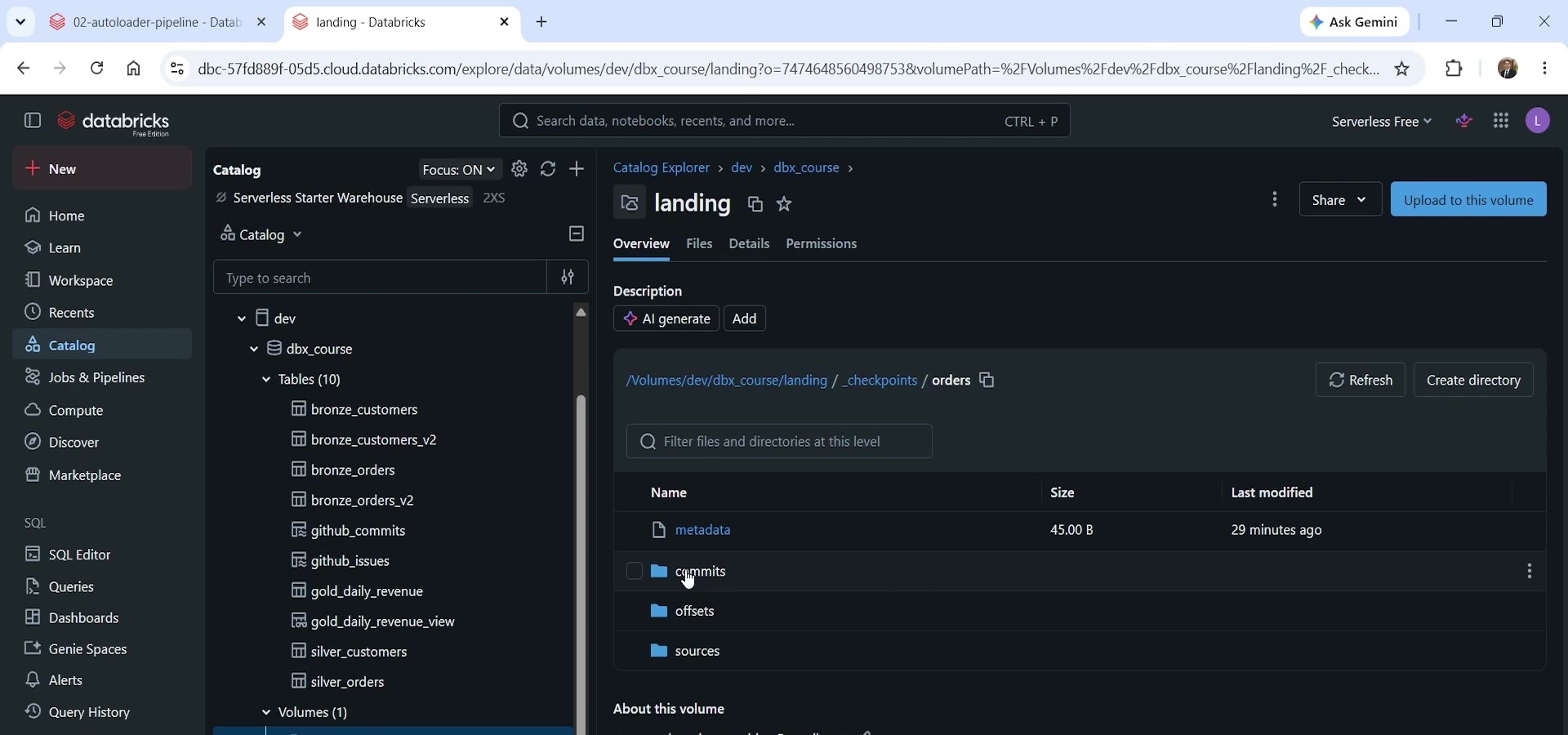 Checkpoint folder structure
Inside _checkpoints/orders, there are four things:
metadata— a small file identifying the stream.commits— one file per completed run (run 0, run 1, run 2...). This is basically the "yes, this batch is done" marker.offsets— what was planned to be read for each run.sources— the actual record of which files have already been consumed, stored internally using RocksDB (a fast, file-based database that Structured Streaming uses for efficiency).
None of this needs any code from us. It's automatic, and it's the entire reason Auto Loader can be incremental without us tracking file names or timestamps ourselves.
Running it again
We reran the same orders cell. Before the second run, the bronze table had 4 records — all from
batch1_orders.csv. After the second run, it had 7 records. The 3 new rows came from
batch2_orders.csv, and their _ingest_timestamp (which we set from _metadata.file_modification_time)
matched the new file's creation time, not the old one.
Same story for customers: 2 records became 3, and the new row's _source_file pointed at
batch2_customers.csv.
No schema change happened here, since neither new file introduced a new column — DESCRIBE TABLE
showed the exact same structure before and after. The point of this first scenario is simpler than
that: Auto Loader is naturally incremental, from the very first run, with zero code changes
needed.
Scenario 2: Schema Evolution
Now let's simulate something source systems do all the time — add a new field. We uploaded a third
orders file, batch3_orders_drift.csv, which is identical to before except it adds one new column:
discount_code.
Just like the checkpoint tracks which files were read, Auto Loader also tracks the schema it
saw, in the cloudFiles.schemaLocation path we configured
(_schemas/orders). After the first two runs, that folder only had one schema version — version 0
— because both batch1 and batch2 had identical columns. Auto Loader had no reason to register a
new version.
What happens when we run it again
Here's the important part: Auto Loader doesn't know a new column exists until it actually reads the
file. So when we ran the orders cell again with batch3_orders_drift.csv sitting in the folder, the
job failed:
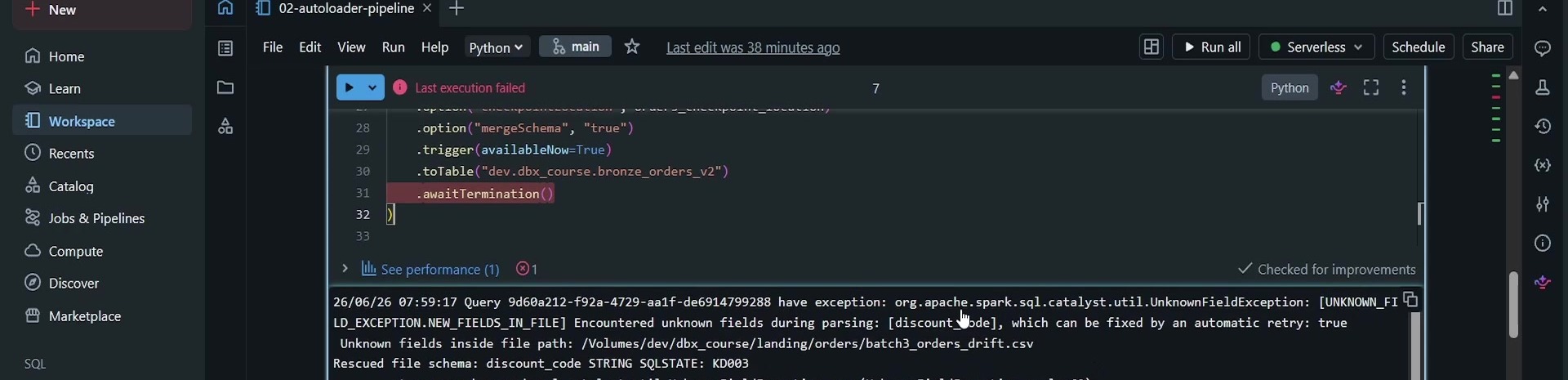 UnknownFieldException triggered by the drifted schema
The error is org.apache.spark.sql.catalyst.util.UnknownFieldException, and the message itself
tells you exactly what's going on: "Encountered unknown fields during parsing: [discount_code],
which can be fixed by an automatic retry: true."
This is not a bug, and it's not something we need to fix in code. This is how Auto Loader is designed to behave:
- At read time, Auto Loader resolves the schema of the new file and compares it against the last known schema.
- If there's a difference, it registers a new schema version (version 1, in this case) in the schema location — and then it deliberately fails the batch right there, before writing anything to the bronze table.
- On the very next run — no code change, no manual fix — it reads the newly registered schema and succeeds.
We reran the exact same cell a second time, with nothing touched, and it completed successfully.
DESCRIBE TABLE on bronze_orders_v2 now showed the new discount_code column, and querying the
table showed values only on the two newest orders (the ones that came from the batch-3 file) —
every earlier row simply got NULL for that column, since it didn't exist in their source file.
This "fail once, then succeed automatically" pattern is exactly why we set mergeSchema to true
on the write side: it's what tells the target table it's allowed to adopt the new column instead of
rejecting it. In a real production setup, this failure isn't something a person needs to notice and
manually restart — job schedulers (which we'll cover in the next chapter) are configured with a
retry policy, so the automatic retry that fixes this happens without anyone watching.
We also confirmed the opposite case: running the customers cell again with no new file in the folder does nothing. No new data, no failure, no change — the record count stayed at 3.
Scenario 3: Bad Data / Rescued Records
The third production reality: source systems send bad values. Maybe a numeric field like
quantity arrives as text instead of a number. What does Auto Loader do with a row it can't fully
parse?
Before simulating this, it's worth noticing a column we hadn't looked at yet: _rescued_data.
Auto Loader adds this column automatically to every table it manages. Up to this point it had been
NULL for every row, because nothing bad had come through.
We uploaded a fourth file, batch4_orders_bad.csv, containing one order where quantity is the
text "two" instead of a number. Running the orders cell again:
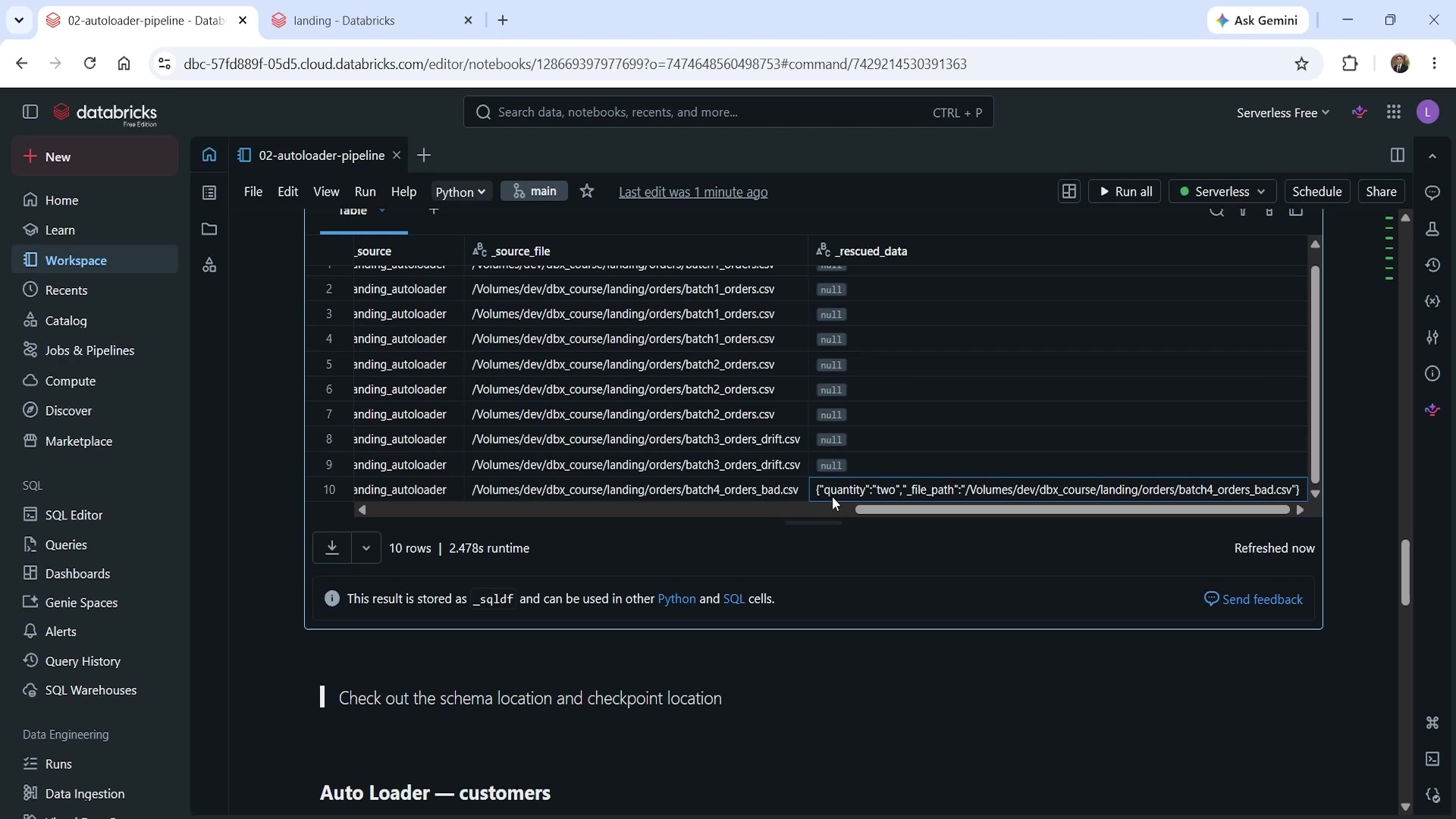 _rescued_data capturing the bad quantity value
Unlike the schema-drift case, this did not fail. The job completed normally, and the row was
still written to the bronze table — with quantity left as NULL — but the value that couldn't be
parsed was captured in _rescued_data as its own little JSON object:
json{"quantity":"two","_file_path":"/Volumes/dev/dbx_course/landing/orders/batch4_orders_bad.csv"}
That's the whole mechanism: whichever field doesn't match the expected data type gets pulled out
into _rescued_data along with the source file path, while every other field in the row loads
normally. Recovering that value — deciding whether "two" should become 2, or should be dropped,
or flagged for a human — is a separate data-correction exercise that happens downstream. It's not
something Auto Loader tries to solve for you at ingestion time, and it shouldn't be: ingestion's job
is just to get the data in without losing anything, even the broken parts.
Why This Matters: A Production Checklist
All three of these behaviors — checkpoint, schema location, and _rescued_data — were present from
the very first run of this code. We didn't add anything to "turn on" incremental loading, schema
evolution, or bad-record handling. They're built into Auto Loader from the start; they just sit
unused until the scenario that needs them actually shows up.
| Scenario | What you'll see | The lesson |
|---|---|---|
| Incremental run | New files load; old ones are skipped, silently, via the checkpoint | Never delete the checkpoint or schema location directories — doing so wipes Auto Loader's memory of what it already processed |
| Schema drift | Job fails once with UnknownFieldException, then succeeds on retry with no code change | This is expected by design, not a bug. Make sure mergeSchema is set, and make sure your job scheduler has a retry policy — the "failure" is meant to be handled automatically |
| Bad / malformed values | Job doesn't fail; the bad field is diverted into _rescued_data, rest of the row loads normally | Monitor _rescued_data for non-null rows — a rising count is an early warning sign of upstream data quality problems, long before it becomes a silver-layer issue |
See you again. Keep learning, and keep growing!