Choosing the Right Ingestion Tool
We've spent this whole chapter building ingestion pipelines: a SaaS connector, a query-based database connector, a CDC-based database connector, and a full standard-connector pipeline with Auto Loader. That's four different tools, and if you've been following along lecture by lecture, it might not be obvious yet how they all fit together.
Here's the good news: they cover exactly three source shapes — applications, databases, and files — and that's nearly everything a data platform ever needs to ingest. This lecture ties the whole chapter together into one decision tree, so that next time you're staring at a new source system, you know exactly which tool to reach for.
One Decision Tree
Every ingestion decision starts with the same question: what shape is your source?
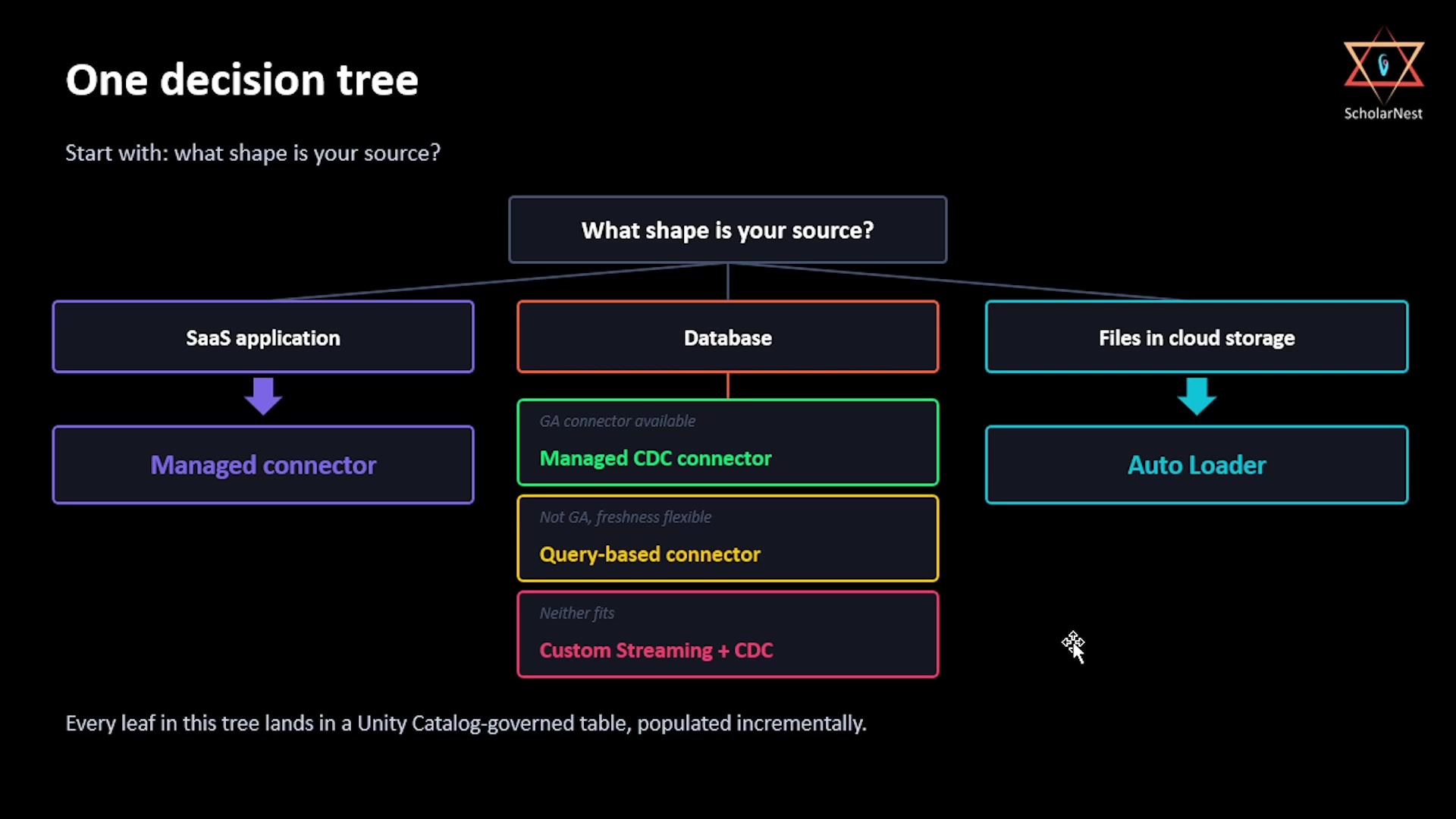 One decision tree — what shape is your source?
Source is a SaaS application
This one is almost never a hard decision. Reach for a managed connector. The only real question worth asking is whether the specific application and the specific objects you need are actually covered by an existing managed connector.
Source is a database
This branch has three possible answers, and the order you check them in matters:
- Is a managed CDC connector GA (generally available) for this database? If yes, that's your lowest-effort path — the gateway, staging, and pipeline all come pre-provisioned for you. As of this recording, SQL Server is GA; Postgres and MySQL are in preview and need account team enrollment first.
- Not GA, or near-real-time freshness isn't actually a requirement? Use a query-based connector instead. It skips CDC setup entirely, at the cost of being schedule-based rather than continuous.
- Neither of the above fits? Fall back to custom Structured Streaming with CDC. This is the highest-effort, most complex option on the tree, and it's a genuine fallback — reach for it only when the managed options don't work for your case.
Source is files in cloud storage
This one is the default: Auto Loader. It's flexible, has no managed-connector dependency, and it's the direct replacement for any ad hoc batch read pipeline you might have been tempted to write by hand.
No matter which branch you take, every leaf in this tree lands in the same place: a Unity Catalog-governed table in your bronze layer, populated incrementally.
Production Checklist
Five things from this chapter are easy to get right in a demo, and easy to get wrong once a pipeline is actually running in production:
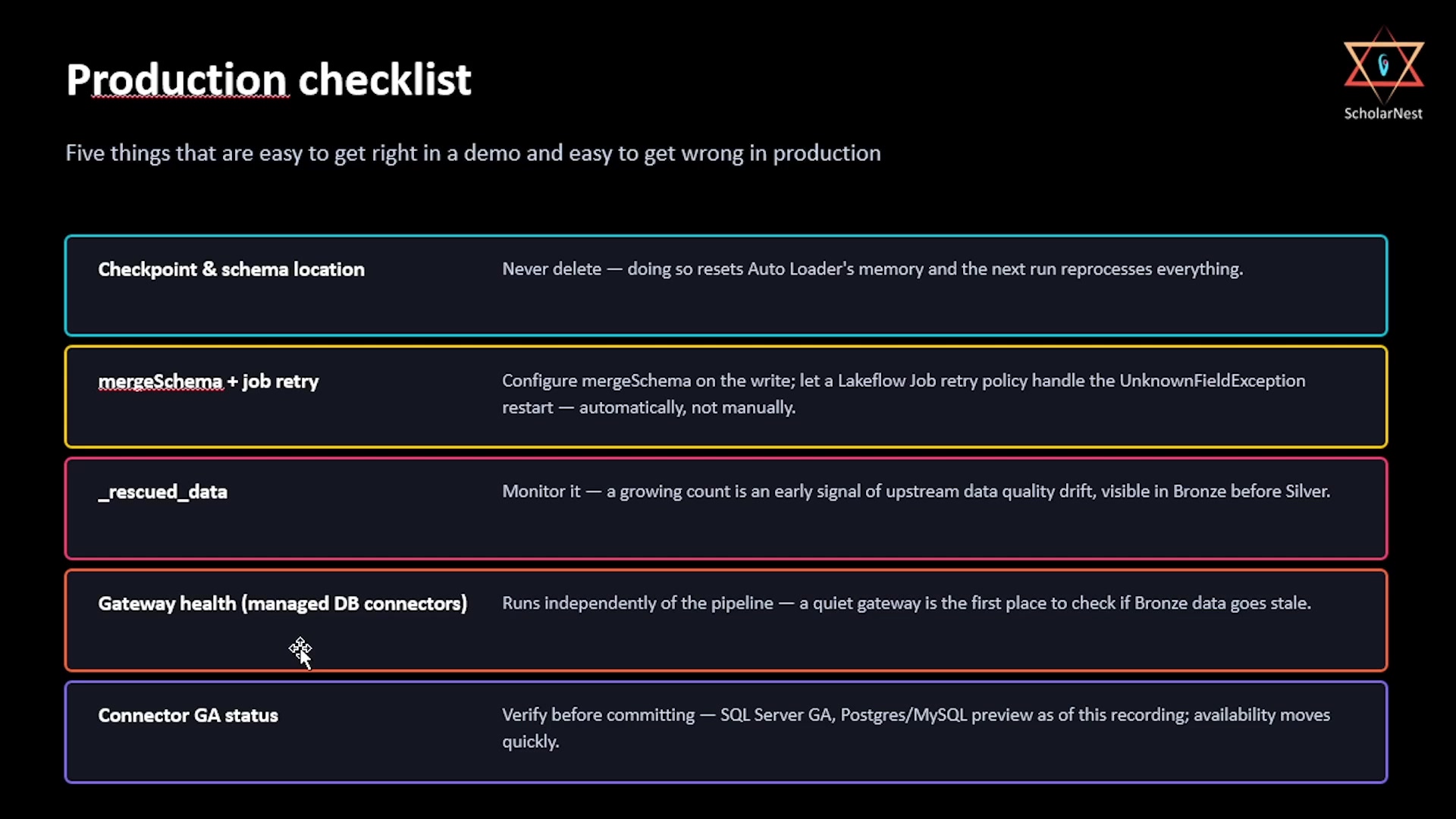 Production checklist — five things easy to get right in a demo, easy to get wrong in production
- Checkpoint & schema location — never delete these. Doing so resets Auto Loader's memory completely, and the next run will reprocess everything from scratch.
- mergeSchema + job retry — configure
mergeSchemaon the write side, and let a Lakeflow Job's retry policy handle the restart after anUnknownFieldException. That restart is supposed to happen automatically — it's not a person's job to babysit the pipeline and manually re-trigger it. _rescued_data— monitor it. A non-empty value isn't a failure by itself, but a growing count of them is an early warning sign of upstream data quality drift, and you'll see it in Bronze long before it becomes a Silver-layer problem.- Gateway health (managed DB connectors) — the gateway runs independently of the ingestion pipeline itself. If Bronze data ever goes stale on a managed database connector, a quiet gateway is the first thing to check.
- Connector GA status — verify current GA status before committing to any managed connector. Connector availability is one of the fastest-moving parts of the platform, so treat "GA as of this recording" as a snapshot, not a permanent fact — always double check against current docs before you build on it.
Summary
| Source shape | Tool | Effort | Notes |
|---|---|---|---|
| SaaS application | Managed connector | Low | Almost always the right call — just confirm the app/object is covered |
| Database (CDC available, GA) | Managed CDC connector | Low | Gateway + staging pre-provisioned |
| Database (not GA, or freshness isn't critical) | Query-based connector | Medium | Schedule-based, not continuous; no CDC setup needed |
| Database (neither fits) | Custom Structured Streaming + CDC | High | Fallback only — most complex option on the tree |
| Files in cloud storage | Auto Loader | Low | The default; replaces ad hoc batch reads |
Every path above ends the same way: an incrementally-populated, Unity Catalog-governed bronze table — the bronze layer doesn't care which type of pipeline fed it. That's the ingestion pillar complete: three connected tiers, one architecture pattern, and a consistent landing point no matter where the data came from.
See you again. Keep learning, and keep growing!