Schema Enforcement and Schema Evolution
In this lecture, let's learn about schema enforcement and schema evolution in Delta Lake.
Setup
Open (or create) a notebook — 10-schema-evolution — connect a cluster, and set your catalog/schema:
sqlUSE CATALOG workspace; USE SCHEMA default;
Schema Enforcement: On By Default
Here's the key fact to start with: Delta Lake enforces schema by default. It's not something you configure — it's always on. Let's see exactly what that means in practice, and why it's a feature, not a limitation.
Setting Up
sqlCREATE OR REPLACE TABLE products ( product_id BIGINT COMMENT 'Unique product identifier', name STRING COMMENT 'Product name', category STRING COMMENT 'Product category', price DOUBLE COMMENT 'Unit price in USD' ) USING DELTA COMMENT 'Product catalogue — used for schema evolution demos';
sqlINSERT INTO products VALUES (1, 'Wireless Headphones', 'Electronics', 79.99), (2, 'Standing Desk', 'Furniture', 349.00), (3, 'USB-C Hub', 'Electronics', 44.99), (4, 'Monitor Stand', 'Furniture', 55.00);
This works fine — data matches the schema exactly.
Bad Write 1: An Extra Column
python%python from pyspark.sql import Row bad_data_1 = [ Row(product_id=5, name='Mechanical Keyboard', category='Electronics', price=129.50, discount_pct=0.10), Row(product_id=6, name='Desk Lamp', category='Furniture', price=34.99, discount_pct=0.05), ] df_bad_1 = spark.createDataFrame(bad_data_1) # This write WILL FAIL — discount_pct is not in the table schema df_bad_1.write \ .format('delta') \ .mode('append') \ .saveAsTable('products')
This has a fifth field, discount_pct, which doesn't exist in the table. You might assume Delta would just ignore the extra field and load the other four columns — it won't. This write fails, with an error indicating a schema mismatch was detected.
This is intentional. Delta protects your table structure — it won't silently drop columns or create ambiguity about what your table's shape actually is. And critically, this protection applies to the entire write as a single transaction — even if only some rows in the batch violate the schema, none of them get written.
Bad Write 2: A Type Mismatch
python%python bad_data_2 = [ Row(product_id=5, name='Mechanical Keyboard', category='Electronics', price='129.50'), # <-- STRING, not DOUBLE ] df_bad_2 = spark.createDataFrame(bad_data_2) # This write WILL FAIL — incompatible type for the price column df_bad_2.write \ .format('delta') \ .mode('append') \ .saveAsTable('products')
Here, all four column names match — but price arrives as a string instead of a double. Schema enforcement covers both column names and column data types. This also fails — with a different error message ("failed to merge fields"), but the underlying cause is the same: schema enforcement doing its job.
The takeaway: if your incoming data has columns the table doesn't recognize (or mismatched types), Delta rejects the write and forces you to be explicit about what you actually want to happen.
Schema Evolution: Two Controlled Ways to Change the Schema
Of course, schemas legitimately need to change sometimes — a new field appears in a source system, a business requirement adds a column, an API response grows a new attribute. Delta gives you two controlled mechanisms for this:
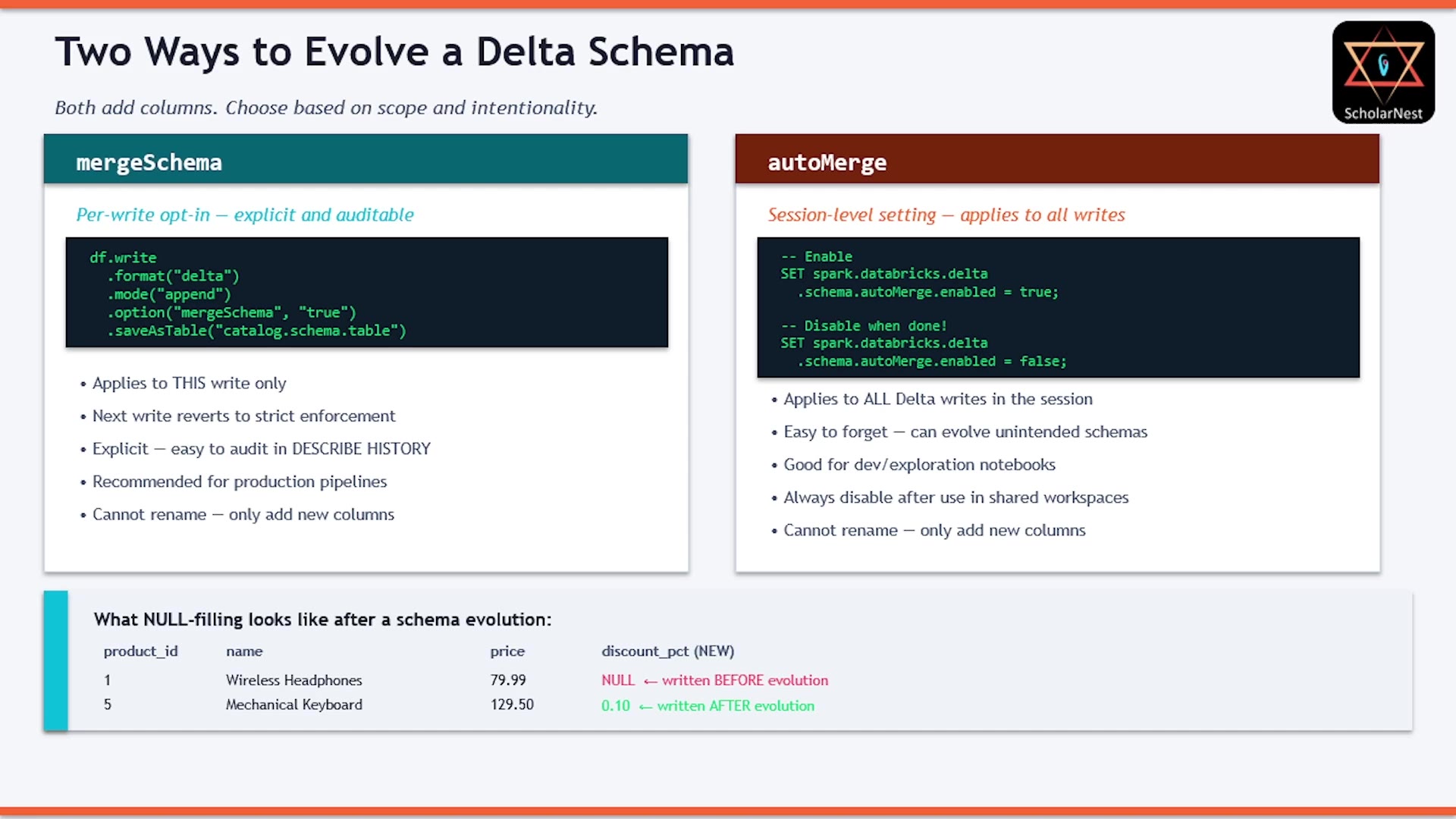 Two ways to evolve a Delta schema
1. mergeSchema — Per-Write, Explicit
python%python new_products = [ Row(product_id=5, name='Mechanical Keyboard', category='Electronics', price=129.50, discount_pct=0.10), Row(product_id=6, name='Desk Lamp', category='Furniture', price=34.99, discount_pct=0.05), ] df_new = spark.createDataFrame(new_products) # mergeSchema allows Delta to add the new column df_new.write \ .format('delta') \ .mode('append') \ .option('mergeSchema', 'true') \ .saveAsTable('products') print('Write with mergeSchema succeeded.')
With mergeSchema set to true, this succeeds — Delta compares the incoming schema against the table's, adds the new discount_pct column, and loads the data, all as one atomic transaction.
sqlDESCRIBE TABLE products;
Confirms discount_pct is now part of the table schema, with its data type (DOUBLE) inferred from the incoming data.
sqlSELECT product_id, name, price, discount_pct FROM products ORDER BY product_id;
The two new rows have real discount_pct values. The four pre-existing rows? NULL — since they were written before this column existed, and Delta never retroactively invents data. No data is ever deleted; evolution only ever adds.
mergeSchema applies to that one write only. The very next write, without this option, goes right back to strict enforcement. This makes it the recommended choice for production pipelines — it's intentional, explicit, and fully auditable in the transaction history.
2. autoMerge — Session-Level
The second mechanism is a Spark session setting:
sqlSET spark.databricks.delta.schema.autoMerge.enabled = true;
Once set, every Delta write in that session automatically merges schema — no per-write option needed. This is convenient for development and exploration, but risky in production: it's easy to forget it's switched on, and accidentally evolve a schema you never intended to touch. Always remember to disable it when you're done, especially in shared workspaces.
The Rename Gotcha
Here's a common misconception worth calling out explicitly: mergeSchema cannot rename an existing column. It can only add new ones.
python%python renamed_products = [ Row(product_id=7, name='Ergonomic Mouse', category='Electronics', price=59.99, discount_rate=0.08), # renamed column ] df_renamed = spark.createDataFrame(renamed_products) df_renamed.write \ .format('delta') \ .mode('append') \ .option('mergeSchema', 'true') \ .saveAsTable('products') print('Write succeeded. Now check the schema — you may be surprised.')
The table already has a discount_pct column. This write sends discount_rate instead — you might expect Delta to recognize this as "the same column, renamed." It doesn't. Delta has no way to know your intent; it simply sees a column name it doesn't recognize, and — since mergeSchema is on — adds it as a brand-new column.
sqlDESCRIBE TABLE products;
You'll now see both discount_pct and discount_rate in the schema — not a rename, two separate columns. The new row gets a real value for discount_rate, but NULL for discount_pct (since it wasn't provided). All previously existing rows get NULL for the new discount_rate column. This is a genuine gotcha people run into without testing carefully — worth remembering.
ALTER TABLE: The Right Way to Add, Rename, or Drop Columns
For anything beyond simple additive schema growth — and especially for renaming — the explicit, reliable approach is ALTER TABLE.
Adding a Column
sqlALTER TABLE products ADD COLUMN supplier STRING COMMENT 'Product supplier name';
Once a column is added this way, your regular df.write (without mergeSchema) will work fine — no per-write option needed, since the schema already matches.
Why prefer this over mergeSchema? It doesn't require touching your pipeline code, it's explicit about the intended data type (rather than letting it be inferred from incoming data), and it shows up clearly as its own transaction:
sqlDESCRIBE HISTORY products;
You'll see a dedicated ADD COLUMNS operation in the history.
Important performance detail: ALTER TABLE ADD COLUMN only updates the schema stored in the transaction log — it never touches the underlying Parquet files. This is why it completes in milliseconds, even on a table with billions of rows. Existing rows simply get NULL for the new column, same as with mergeSchema.
When to prefer mergeSchema instead: if you have a table whose schema genuinely evolves very frequently (weekly, monthly, unpredictably), constantly having to manually run ALTER TABLE before every pipeline run gets tedious. In that case, baking mergeSchema into your pipeline write logic for that specific table may be the more practical choice — trading a bit of explicitness for reduced operational overhead.
Renaming a Column
Renaming requires enabling column mapping on the table first:
sqlALTER TABLE products SET TBLPROPERTIES ( 'delta.columnMapping.mode' = 'name', 'delta.minReaderVersion' = '2', 'delta.minWriterVersion' = '5' );
(This may become enabled by default in future Delta versions.)
sqlALTER TABLE products RENAME COLUMN discount_rate TO discount_rate_v2;
Like ADD COLUMN, this is metadata-only — no Parquet files are rewritten, so it's fast regardless of table size.
Dropping a Column
sqlALTER TABLE products DROP COLUMN supplier;
Same story: metadata-only. The column immediately disappears from query results — but the physical data in the underlying Parquet files isn't erased right away. Full physical erasure happens later, via OPTIMIZE and VACUUM (which we covered in an earlier lecture).
Note: mergeSchema cannot rename or drop columns — only ALTER TABLE supports those operations.
Generated Columns
One more genuinely useful Delta feature: generated columns — columns whose values are automatically computed from other columns, rather than provided directly.
sqlCREATE OR REPLACE TABLE products_v2 ( product_id BIGINT, name STRING, price DOUBLE, price_with_tax DOUBLE GENERATED ALWAYS AS (ROUND(price * 1.20, 2)) ) USING DELTA COMMENT 'Products with a tax-inclusive price computed automatically';
The GENERATED ALWAYS AS (expression) clause defines how the value is computed — here, price * 1.20, rounded to 2 decimal places.
sqlINSERT INTO products_v2 (product_id, name, price) VALUES (1, 'Wireless Headphones', 79.99), (2, 'Standing Desk', 349.00), (3, 'USB-C Hub', 44.99);
Notice: the insert only provides 3 values — price_with_tax is never supplied, since it's automatically calculated.
sqlSELECT product_id, name, price, price_with_tax FROM products_v2 ORDER BY product_id;
price_with_tax is populated automatically for every row.
Important detail: generated columns are computed at write time, and physically stored in the data files — they are not computed on the fly at read time. This also means they stay correct automatically on UPDATE: if you update price, price_with_tax recalculates and gets rewritten too.
Summary
Schema enforcement is your default safety net — not a limitation. It rejects writes with extra columns or type mismatches before any bad data reaches your table.
To add new columns during a write:
mergeSchema(per-write option) — explicit, intentional, auditable viaDESCRIBE HISTORY. Recommended for production pipelines. Existing rows getNULLfor the new column. Cannot rename — only adds.autoMerge(session-level setting) — applies to every write in the session. Convenient for dev/exploration, but risky to leave on in production or shared workspaces.
ALTER TABLE is metadata-only — ADD COLUMN, RENAME COLUMN, and DROP COLUMN all update just the transaction log, never rewriting Parquet files. Instant, regardless of table size. DROP COLUMN removes the column from query results immediately, but physical erasure still requires OPTIMIZE/VACUUM.
Generated columns (GENERATED ALWAYS AS (expression)) are computed and physically stored at write time — automatically populated on every INSERT or UPDATE, no manual calculation needed in your pipeline code.
See you again. Keep learning, and keep growing!