Core concepts — Pipelines, Flows, Destinations, and the Python API
In the last lecture, we covered why SDP exists and what problem it solves. Before we touch any code, we need the vocabulary — three core concepts, each with a specific role and specific processing semantics. Getting these definitions locked in now will make the hands-on work much easier to absorb later.
Three Building Blocks
Everything in SDP fits into one of three concepts: pipeline, flow, and destination.
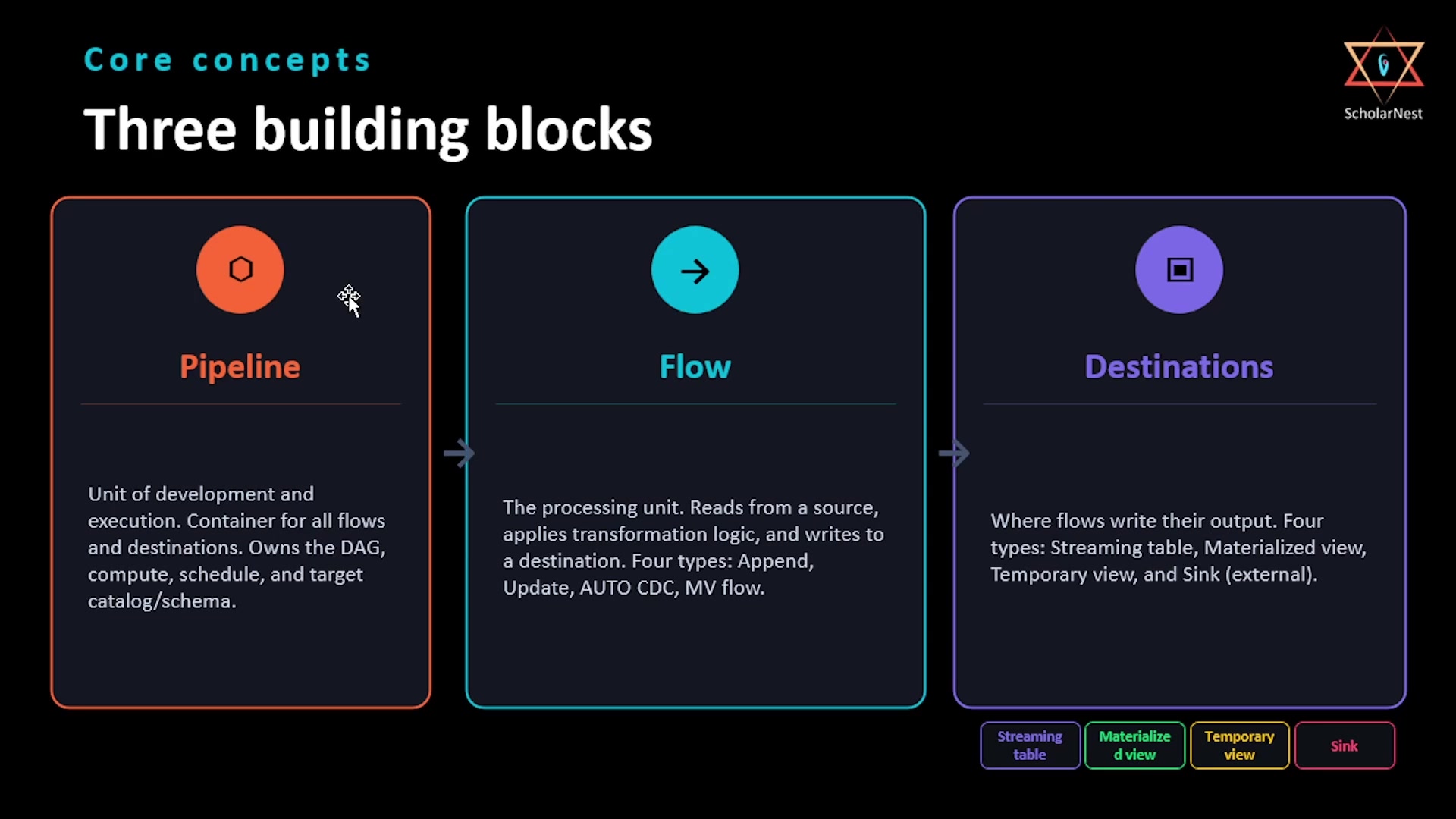 Three building blocks — Pipeline, Flow, Destinations
Pipeline is the unit of development and execution in SDP — everything else lives inside one. It's the container that holds your source code files, your target catalog and schema, your compute configuration, and your schedule. When you click Run, you run a pipeline. SDP analyzes all the pipeline's source files together, resolves dependencies across them, builds an execution plan, and then runs it. Think of it as a project.
Flow is the foundational unit of work inside a pipeline. A flow has three components — source, transformation, and destination. It reads data from a source, applies transformation logic, and writes the result to a target. Think of it as a small DAG that connects a source to a destination and carries the processing logic.
Destinations are where flows write their output. There are four types, which we'll break down in detail below.
Flows: Four Types, Pick the Right One
Databricks SDP offers four flow types, and each one exists for a different processing pattern:
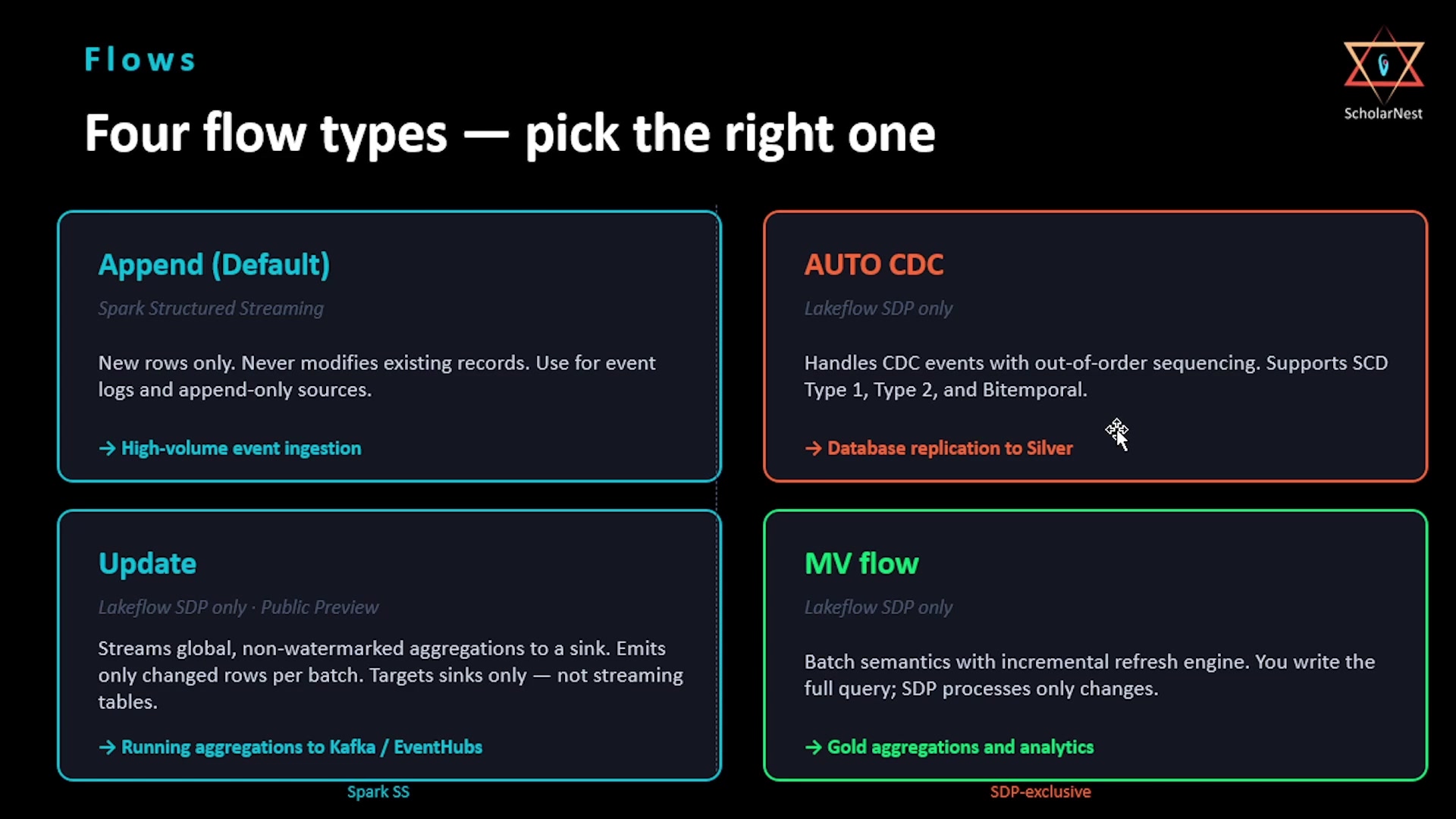 Four flow types — Append, AUTO CDC, Update, MV flow
-
Append (default) — built on Spark Structured Streaming, and also available in plain Apache Spark. It reads new records and appends them to the destination. It can technically be used with
apply changessyntax for merging, but it isn't flexible enough to properly implement CDC into the silver layer. This is the right flow for bronze layer ingestion. -
AUTO CDC — a streaming flow purpose-built for change data capture events, and this is the flow you want for the silver layer. Its defining feature: it handles out-of-order events automatically. You give it a sequence column, and it figures out the correct final state regardless of what order the events actually arrived in. It supports both SCD Type 1 and SCD Type 2, and critically, you never need to understand streaming semantics like watermarks or checkpoints yourself — you declare the CDC logic, and SDP handles the mechanics underneath. AUTO CDC is exclusive to Databricks Lakeflow; it doesn't exist in open source Apache Spark.
-
MV flow (materialized view flow) — a batch flow. You write your transformation using plain batch semantics, without worrying about incremental logic at all. SDP's incremental refresh engine figures out what changed in the source and reprocesses only the new or modified data. You write the full query; the engine optimizes execution.
-
Update flow — another Databricks-exclusive flow, currently in public preview. It's designed specifically to write results to an external sink — Kafka, Event Hub, and similar systems. The update flow cannot write to a Delta table; it exists only for external targets.
Destinations: Four Types
Once a flow produces a result, it has to land somewhere. There are four destination types, and choosing the right one is a genuine production skill:
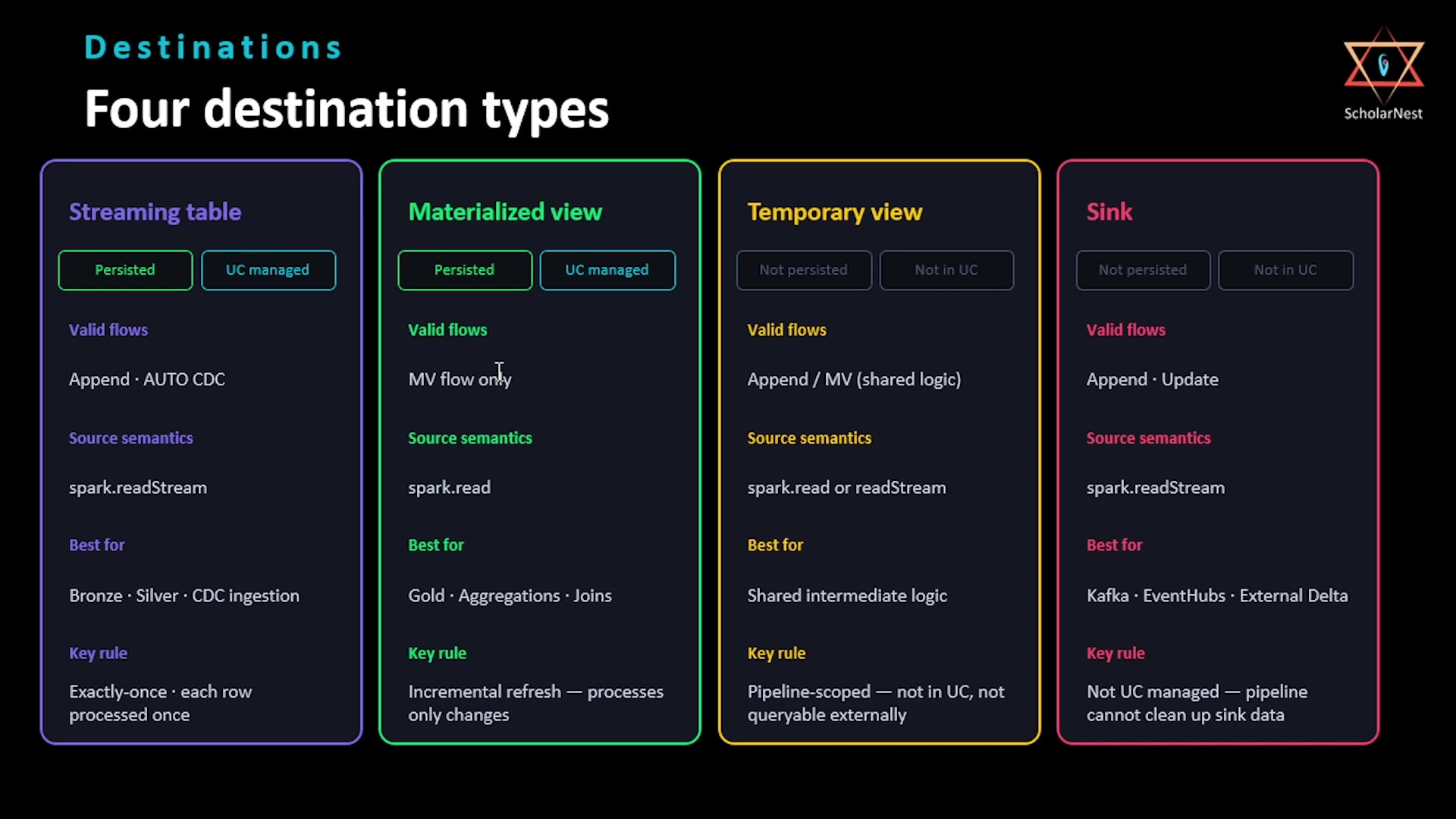 Four destination types — Streaming table, Materialized view, Temporary view, Sink
-
Streaming table — a Unity Catalog-managed table that's also a streaming target. It processes data incrementally: each pipeline run handles only new records, and once a record is processed, it's never reprocessed again. This guarantees exactly-once semantics. Streaming tables are the right choice for ingestion (pulling new files from object storage, reading from Kafka, processing CDC events from a source database) — in other words, the right choice for bronze and silver layers, paired with Append and AUTO CDC flows.
-
Materialized view — also Unity Catalog-managed, but a batch target. Its results are pre-computed and stored, and SDP's incremental refresh engine keeps it aligned with the source data automatically. This is the right choice for aggregations, joins, and analytical queries where fast read performance matters — in other words, the gold layer.
-
Temporary view — lives only inside the pipeline. You can't access it from outside the pipeline, and it's never added to Unity Catalog. It exists only for the pipeline's lifetime, and since it's a view (not a table), results are computed fresh every time it's queried — nothing is stored. This is the best choice for intermediate transformation logic you don't want to materialize as its own table.
-
Sink — a streaming target such as Kafka or Event Hub. Sinks are not governed by Unity Catalog, since they're external systems. Use a sink whenever you need to send pipeline results somewhere outside the lakehouse.
Rule of thumb: streaming tables at ingestion and silver (exactly-once, incremental row processing); materialized views at the aggregation/analytical layer; temporary views for organizing complex intermediate logic without paying the storage cost of materializing it; sinks whenever the destination is an external system.
The Python API
This is what you'll actually write. SDP is built around annotations — decorated functions — and everything else inside those functions is just ordinary Spark code.
All of SDP's Python API lives in pyspark.pipelines. The convention used throughout this chapter,
and in the official docs, is to import it as dp:
pythonfrom pyspark import pipelines as dp
That single import gives you everything you need.
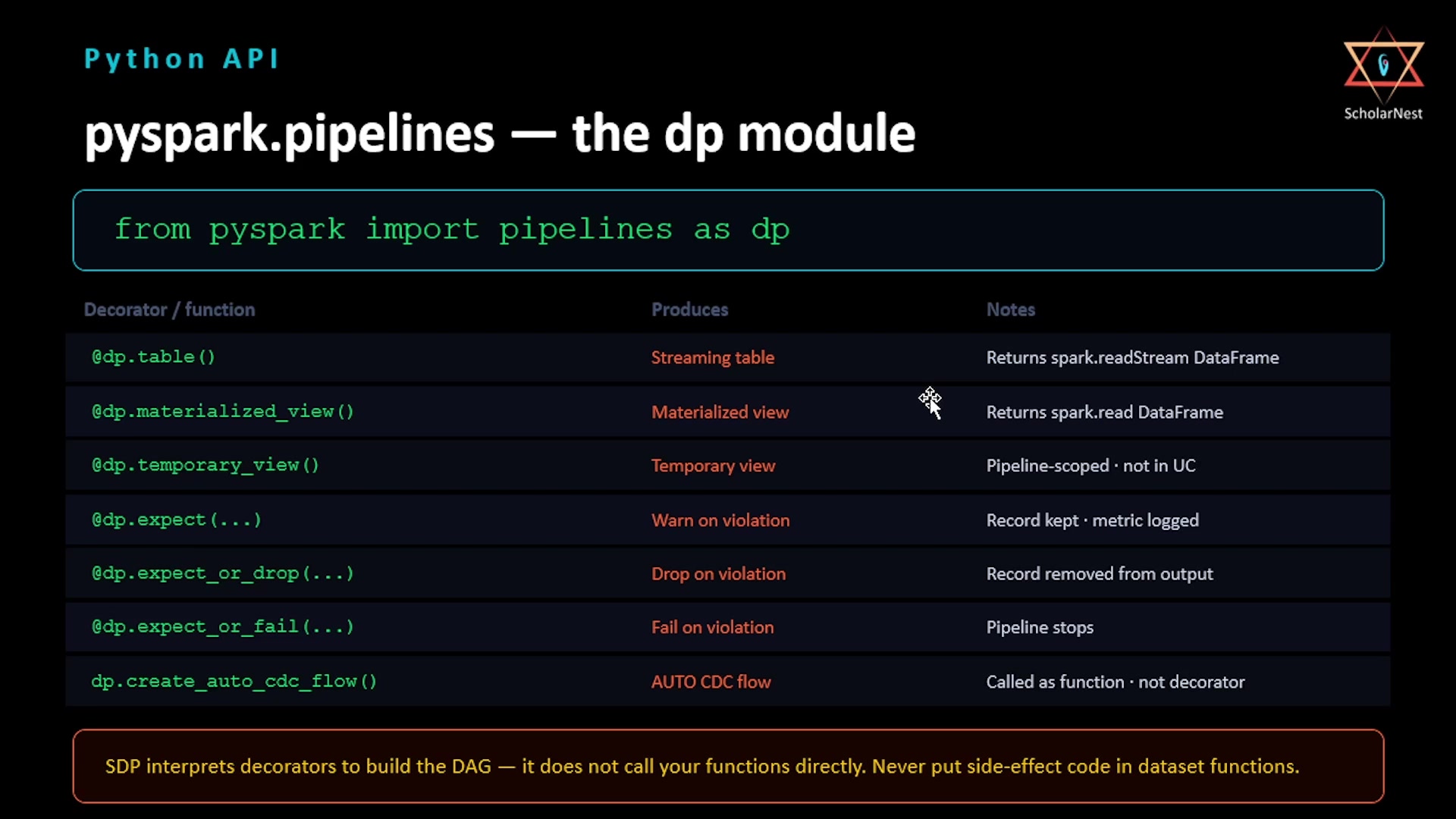 Python API — pyspark.pipelines, the dp module
| Decorator / function | Produces | Notes |
|---|---|---|
@dp.table() | Streaming table | The decorated function must return a streaming DataFrame via spark.readStream |
@dp.materialized_view() | Materialized view | The decorated function must return a batch DataFrame via spark.read |
@dp.temporary_view() | Temporary view | Pipeline-scoped only — not published to Unity Catalog |
@dp.expect(...) | Warn on violation | Record is kept; a metric is logged |
@dp.expect_or_drop(...) | Drop on violation | Record is removed from the output |
@dp.expect_or_fail(...) | Fail on violation | The entire pipeline stops |
dp.create_auto_cdc_flow() | AUTO CDC flow | This one is a function call, not a decorator — it creates an AUTO CDC flow into a target streaming table |
One important mechanical note from this table: SDP interprets these decorators to build the DAG — it does not call your functions directly during that analysis. Never put side-effect code inside a dataset function.
This isn't an exhaustive list of every decorator SDP offers, but it covers the shape of things: three decorators for declaring destinations, three for data quality expectations, and functions for creating flows like AUTO CDC. We'll pick up the rest as we go deeper into the chapter.
Summary
| Concept | Key point |
|---|---|
| Pipeline | The unit of development and execution; owns the DAG, compute, schedule, and target catalog/schema |
| Flow | The processing unit — source → transformation → destination |
| Append flow | Default, available in plain Spark too; new rows only, no CDC into silver — use for bronze |
| AUTO CDC flow | Lakeflow-exclusive; handles out-of-order CDC events via a sequence column; SCD Type 1/2/Bitemporal — use for silver |
| MV flow | Batch semantics + automatic incremental refresh; write the full query, SDP optimizes execution |
| Update flow | Lakeflow-exclusive, public preview; writes only to external sinks (Kafka, Event Hub), never to Delta |
| Streaming table | UC-managed, incremental, exactly-once — bronze/silver |
| Materialized view | UC-managed, batch, auto-refreshed — gold |
| Temporary view | Pipeline-scoped only, not in UC, recomputed on every query — intermediate logic |
| Sink | External streaming target, not UC-governed |
from pyspark import pipelines as dp | The one import that gives you the entire SDP Python API |
Next lecture, we'll get into the actual syntax for writing SDP flows and stitching sources and destinations together.
See you again. Keep learning, and keep growing!