Incremental CDC from Database Using Managed Connector
In the previous lecture, we ingested from PostgreSQL using query-based capture — a managed query, polling for changes via a cursor column. In this lecture, let's use the other database ingestion mode: native Change Data Capture (CDC), using SQL Server as our source.
Recap: Where CDC Fits
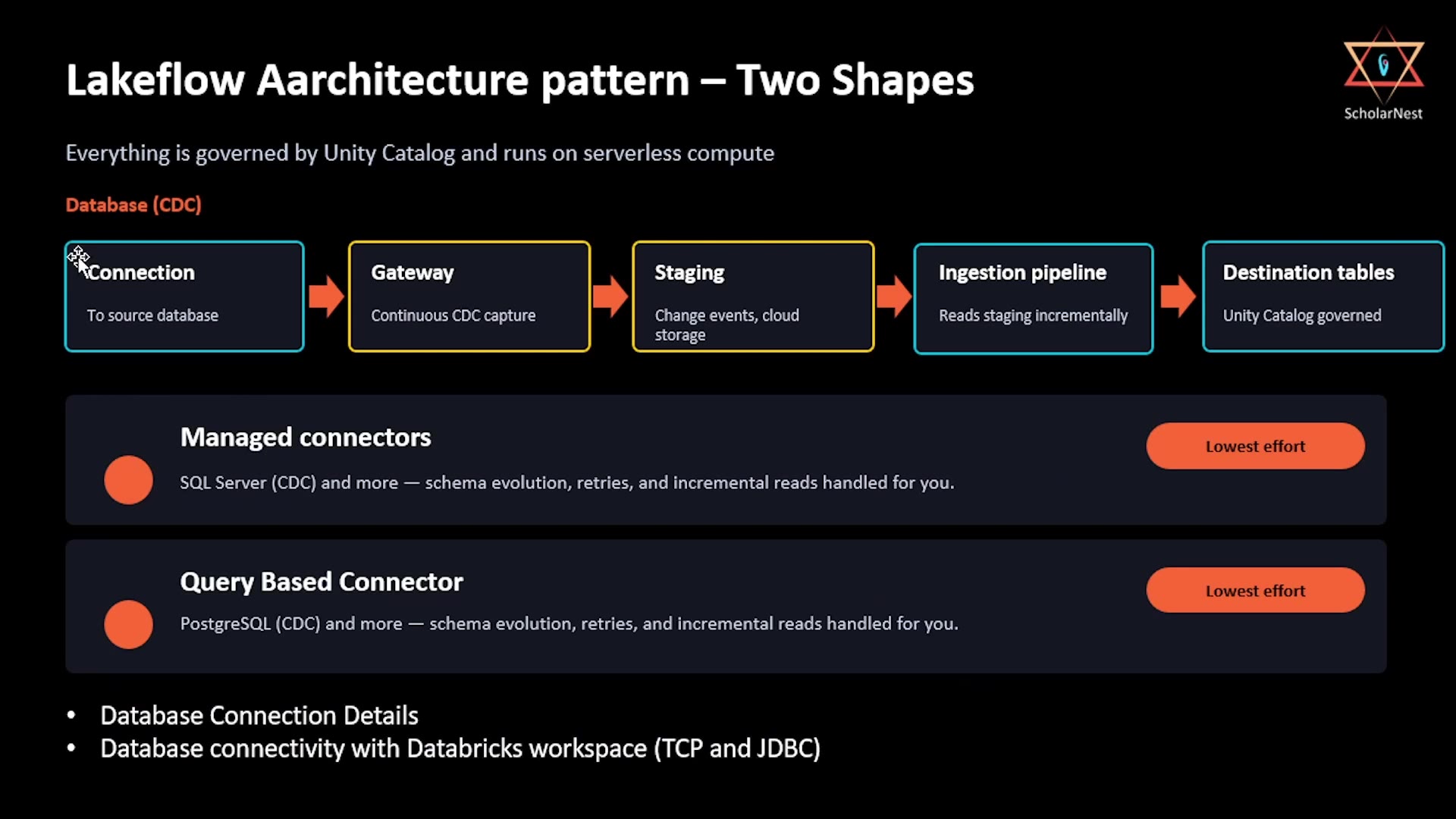 CDC architecture recap — SQL Server, Gateway, Staging
Recall from the "two shapes" lecture: the CDC path is longer than the SaaS/query-based path — it includes a Gateway and a Staging area between the connection and the ingestion pipeline:
Connection → Gateway (continuous CDC capture) → Staging → Ingestion pipeline → Destination tables
Managed connectors support this pattern for sources like SQL Server (CDC). This lecture walks through exactly that setup, plus the two prerequisites called out on this recap slide: your database connection details, and confirming database connectivity with your Databricks workspace (over TCP and JDBC).
Step 1: Create the Connection
From Data Ingestion, start a new ingestion from SQL Server. At Step 1, create the connection:
- Auth Type — Username and password (for basic testing with static credentials).
- Connection name — e.g.,
mssql-server-conn. - Host — your SQL Server database's host domain (e.g., an RDS endpoint like
lakeflow-sqlserver.xxxxxxxx.us-east-1.rds.amazonaws.com). - Username / Password — your database credentials.
- Port — defaults to
1433(SQL Server's standard port).
Step 2: Choose Change Data Capture Mode
At Step 2 — Ingestion setup, this is where SQL Server's wizard diverges from PostgreSQL's:
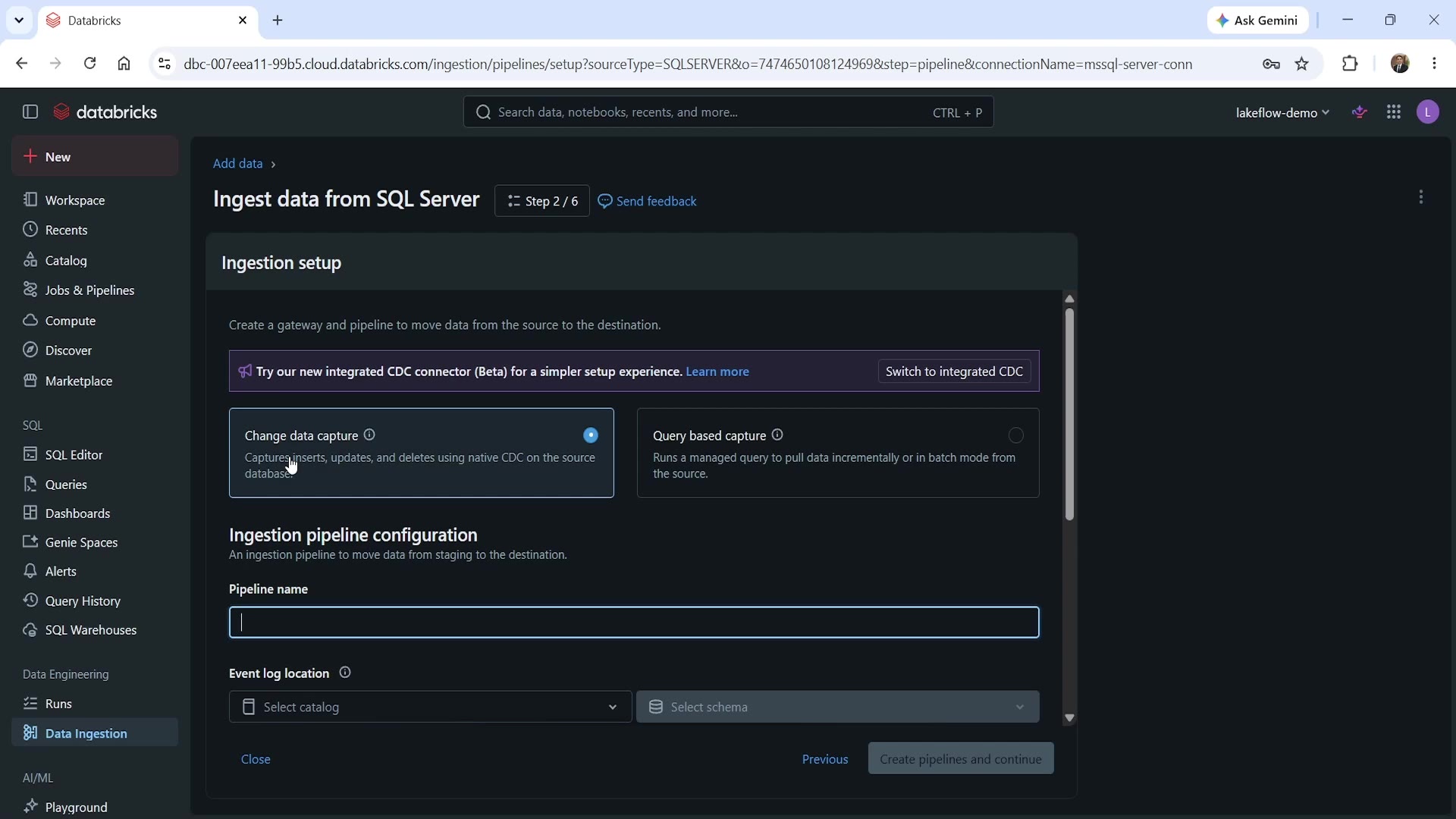 SQL Server CDC mode — 6-step wizard
- Change data capture is selected (rather than Query based capture) — this captures inserts, updates, and deletes using native CDC on the source database.
- Notice the wizard is now Step 2 of 6 — one step more than the PostgreSQL query-based flow (which was 5 steps). That extra step is the Gateway configuration, which query-based ingestion doesn't need.
- You'll also notice a callout: "Try our new integrated CDC connector (Beta) for a simpler setup experience." This is a newer, streamlined alternative — worth knowing it exists, though we'll walk through the standard flow here since it's the more broadly available option.
Fill in the Pipeline name (e.g., mssql-server-pipeline) and Event log location (e.g., lakeflow_demo.mssql_db).
Step 3: Configure the Gateway
Scroll down to the Ingestion gateway configuration section:
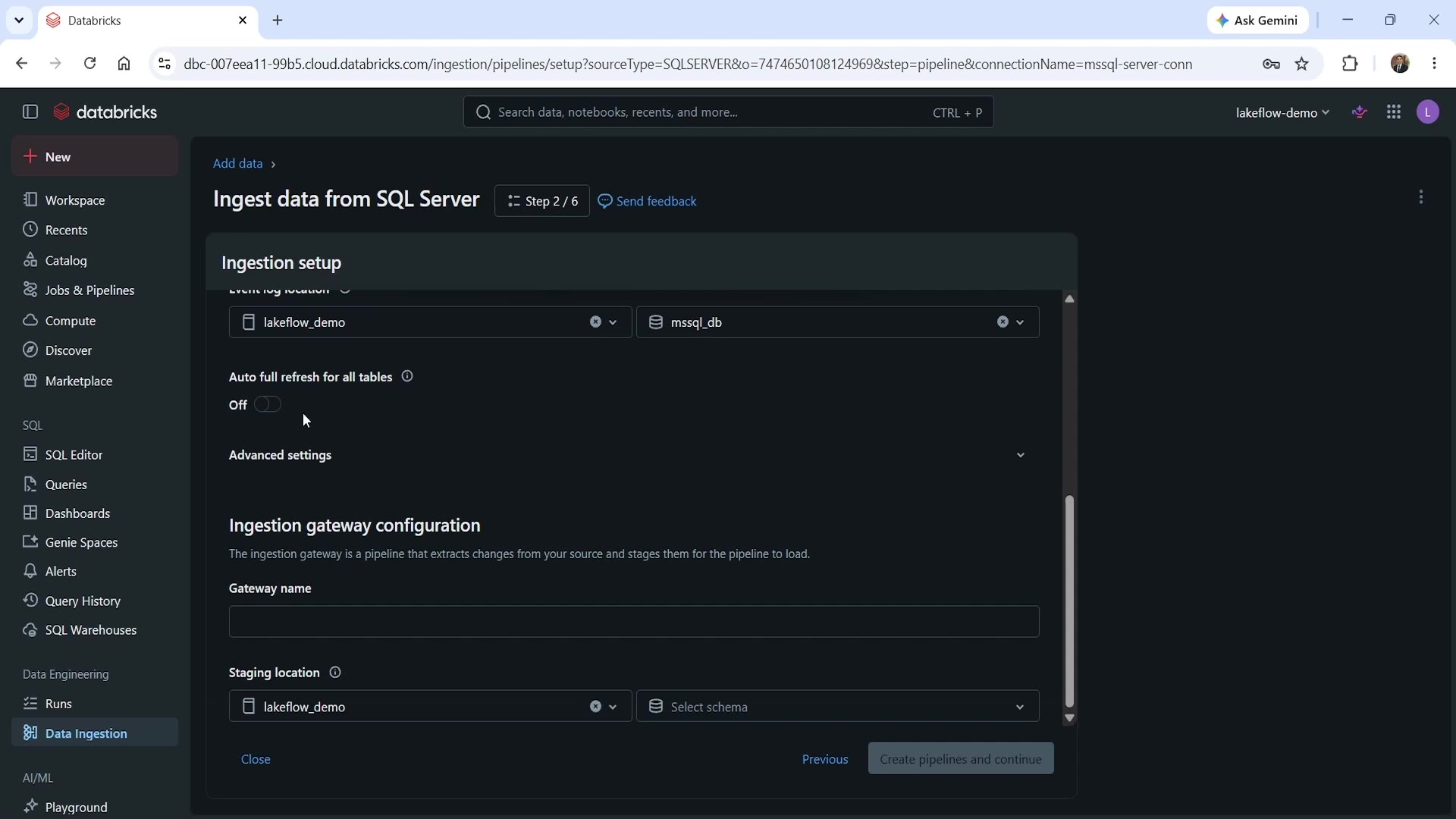 Gateway configuration fields
Databricks describes it plainly: "The ingestion gateway is a pipeline that extracts changes from your source and stages them for the pipeline to load." This is exactly the continuous, independent capture process we covered conceptually in the architecture lecture — now something you're actually configuring.
- Gateway name — a name for this gateway process.
- Staging location — the catalog/schema (technically, a Unity Catalog Volume gets created here) where captured change events are physically written before the ingestion pipeline reads them.
Click Create pipelines and continue. The gateway starts up — you'll see a status like "Gateway starting... waiting for gateway compute resources" — and once ready, it begins "analyzing the structure of your database" to prepare for CDC capture.
Step 4: Configure the Table for CDC
At Step 3 — Source, select your table (e.g., lakeflowdb.dbo.orders), and configure its CDC-specific settings:
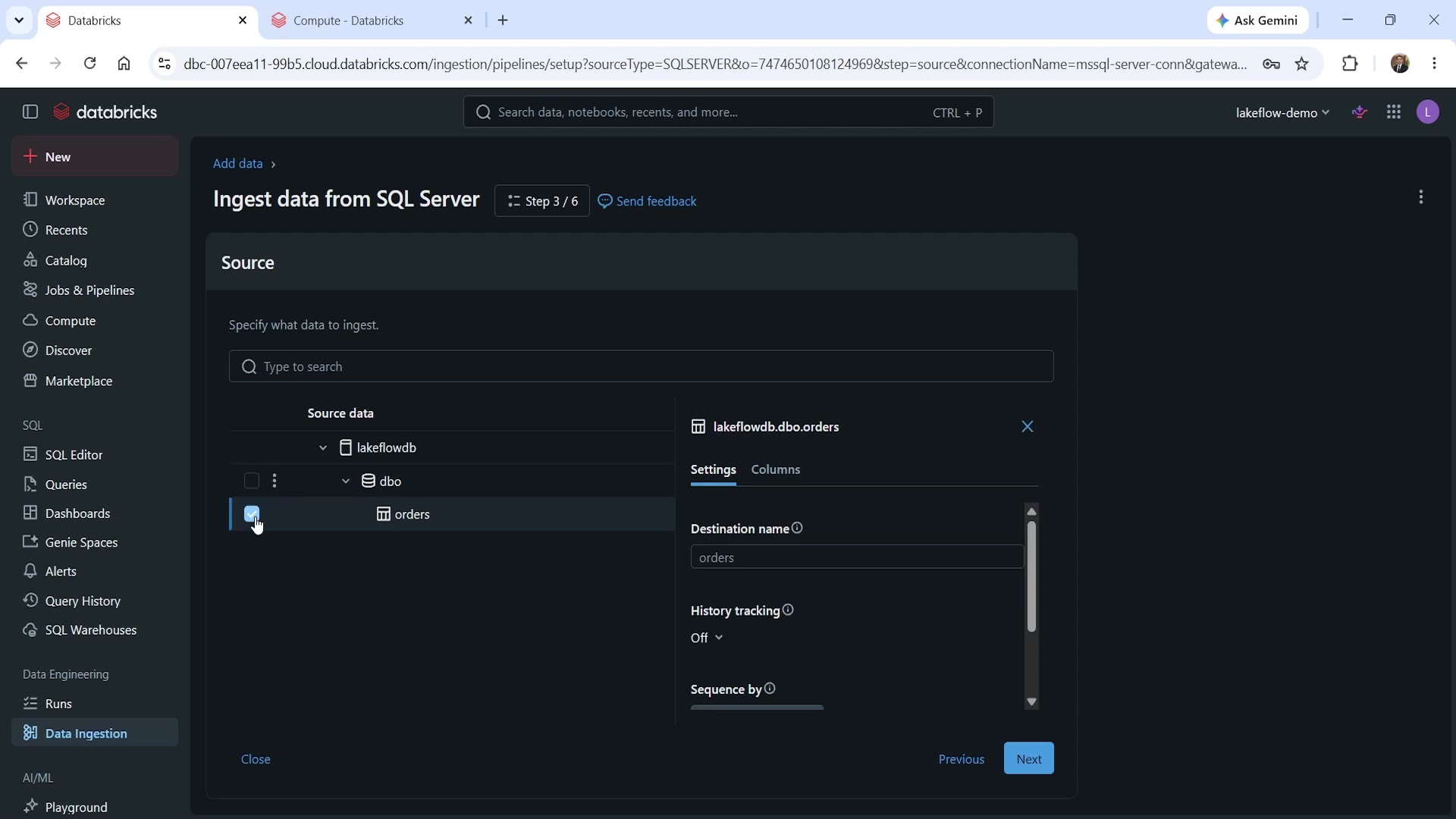 CDC table settings — History tracking and Sequence by
- Destination name — what to call the resulting table (e.g.,
orders). - History tracking — whether to retain a full history of every change to each row (an SCD Type 2–style option), or just keep the latest state (default: Off).
- Sequence by — the column CDC uses to determine the correct order of change events, ensuring updates are applied in the right sequence even if they arrive slightly out of order.
Notice these settings are genuinely different from query-based ingestion's cursor column — CDC works off native database change events, not a periodic query, so the mechanics (and the terminology) differ accordingly.
Complete the remaining steps — Destination (choose your target catalog/schema) and Schedules and notifications — the same way as the PostgreSQL flow, then save and run the pipeline.
Seeing the Gateway and Staging in Action
Here's a genuinely useful thing to actually go look at: the physical staging location the gateway writes to.
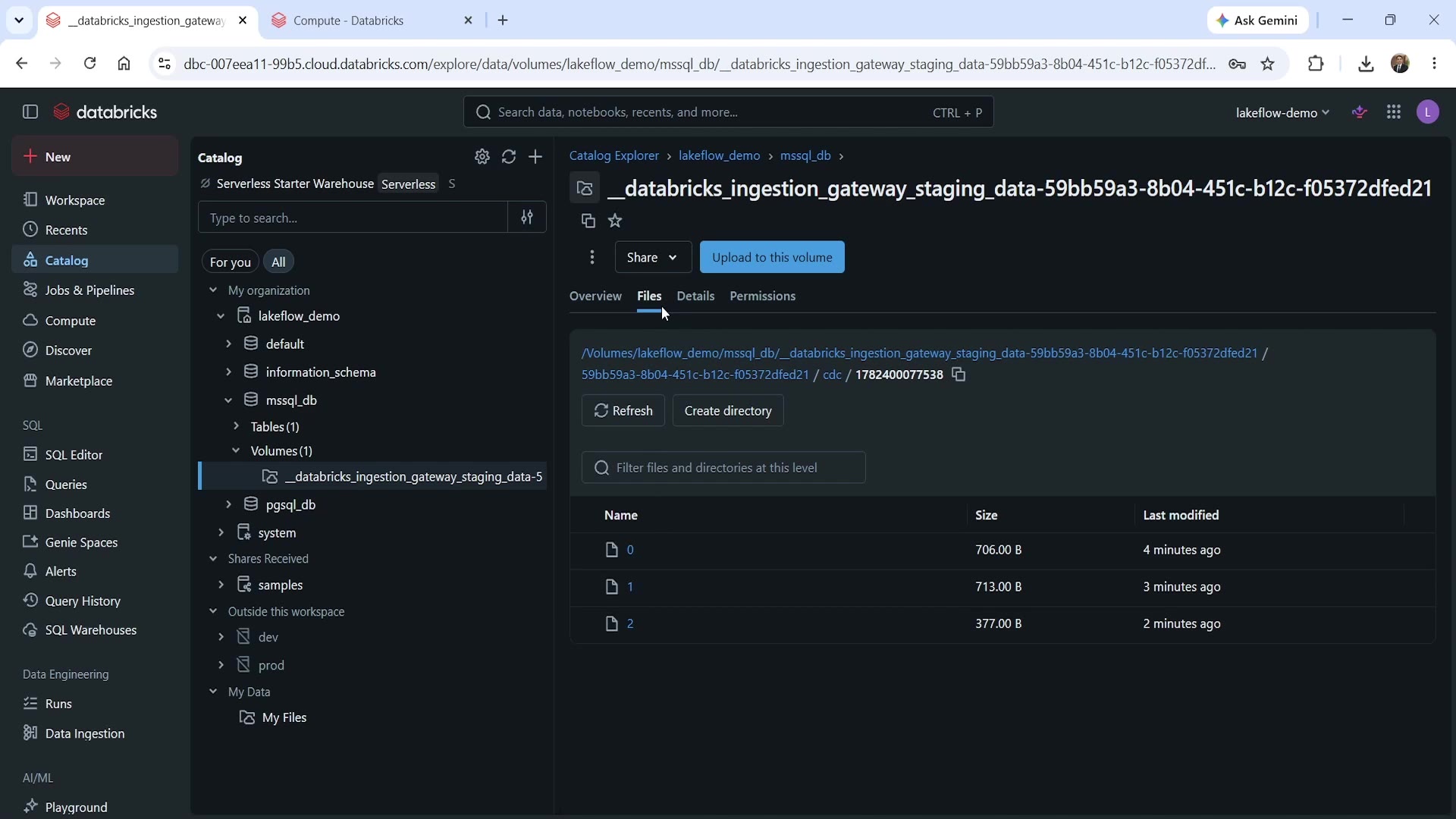 Staging volume — actual CDC change files
Navigating to Catalog → your catalog → your schema → Volumes, you'll find a volume named something like __databricks_ingestion_gateway_staging_data-<uuid>. Inside it, under a cdc subfolder, you'll find actual change event files — numbered 0, 1, 2, and so on — each one landing a few minutes apart.
This is concrete, physical proof of exactly what we learned conceptually: the gateway runs continuously and independently of the ingestion pipeline, writing new change files to staging as they occur — regardless of whether the downstream pipeline happens to be running at that moment.
Verifying the Result
sql%sql SELECT * FROM lakeflow_demo.mssql_db.orders_cdc;
This returns the ingested orders data — 8 rows in this case, with the same shape of business columns (order_id, customer_id, product_name, quantity, unit_price, status, created_at, updated_at) we saw in the PostgreSQL example, confirming the CDC pipeline successfully captured and landed the source data into Unity Catalog.
CDC vs. Query-Based: A Quick Comparison
| Query-Based Capture | Change Data Capture (CDC) | |
|---|---|---|
| Mechanism | A managed query polls the source on a schedule | A continuous gateway process captures native database change events |
| Extra components | None — pipeline connects directly to the source | Requires a Gateway and a Staging location (a Unity Catalog Volume) |
| Key config field | Cursor column — tracks new/changed rows | Sequence by — orders change events correctly; optional History tracking |
| Wizard length | 5 steps | 6 steps (extra Gateway configuration step) |
| Best for | Sources without native CDC, or where periodic polling is sufficient | Sources with native CDC support, needing low-latency, event-level capture |
Summary
| Concept | Key Point |
|---|---|
| CDC architecture | Connection → Gateway → Staging → Ingestion pipeline → Destination tables |
| Gateway | A continuously running process that extracts change events from the source and writes them to staging — independent of the ingestion pipeline's schedule |
| Staging | A physical Unity Catalog Volume holding captured change event files, visible and inspectable directly in Catalog Explorer |
| History tracking | Optional setting to retain full row-change history (SCD Type 2–style), rather than just the latest state |
| Sequence by | The column CDC uses to apply changes in the correct order |
With this, we've now seen both database ingestion patterns hands-on: query-based (simpler, no native CDC required) and CDC (continuous, event-driven, via a gateway and staging layer) — giving you the full picture of how Lakeflow Connect brings database data into your Bronze layer.
See you again. Keep learning, and keep growing!