Multi-task DAGs — Control Flow, Retries, and Backfill
Up to this point, the job has been a simple linear chain: pipeline → DQ check → report. This lecture turns that into a proper branching DAG, and covers three new capabilities along the way: branching on success/failure, branching on an arbitrary condition, controlling retries explicitly, and running a backfill — the same job, looped automatically across a date range.
The Target Shape
The finished job looks like this:
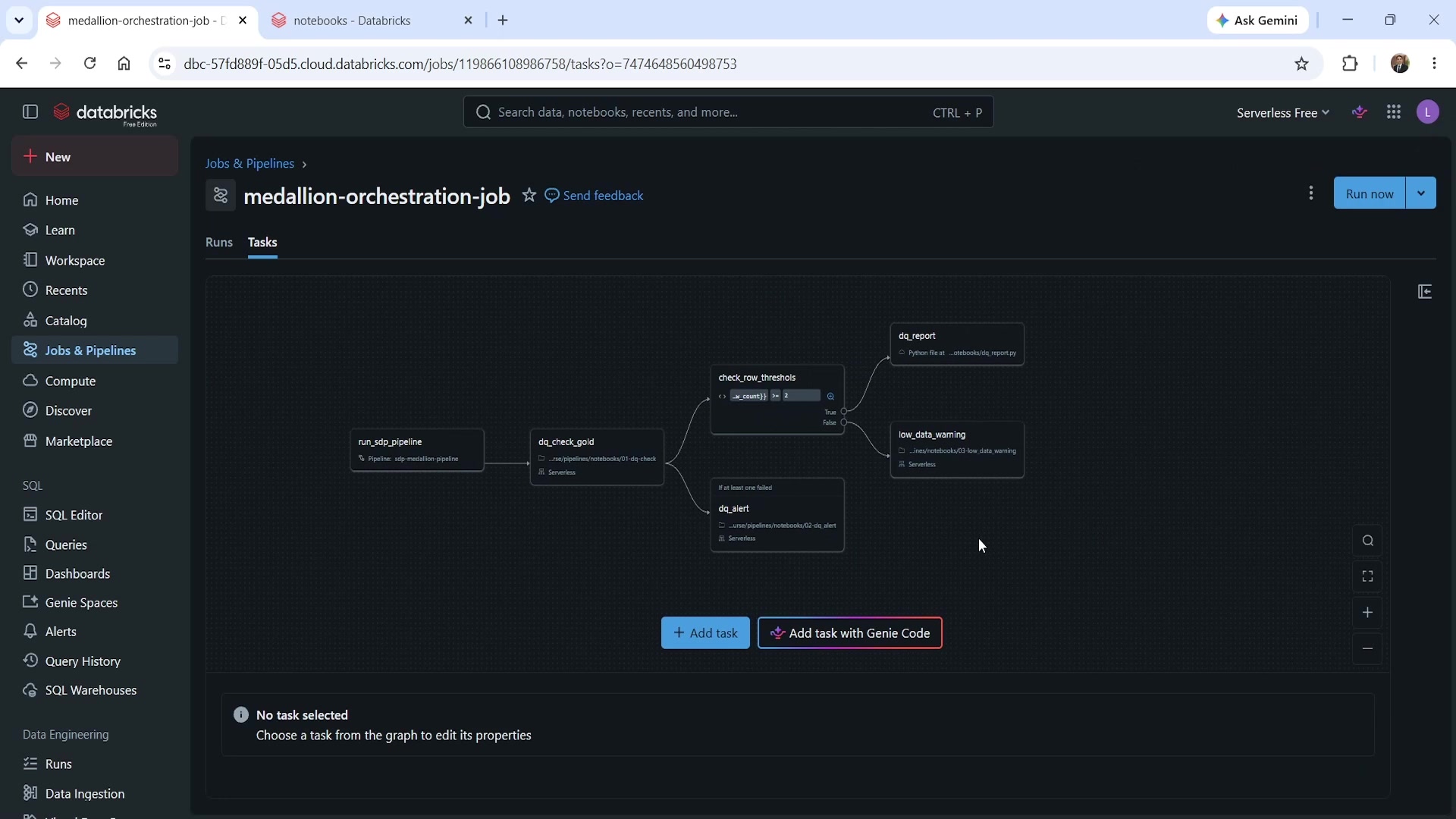 The complete branching DAG
run_sdp_pipelineruns first, as always.dq_check_goldruns next, checking data quality and publishingrow_countas a task value.- From there, the DAG branches into two independent decisions:
- If
dq_check_goldfails → rundq_alert, regardless of what threshold logic exists elsewhere. - If
dq_check_goldsucceeds → runcheck_row_threshold, an if/else condition task that checks whetherrow_count >= 2:- True → run
dq_report(the existing reporting task). - False → run
low_data_warning, a new task.
- True → run
- If
Two different kinds of branching are at work here: branching on success/failure of a task
(dq_alert), and branching on an arbitrary condition evaluated from a value (check_row_threshold).
The Two New Notebooks
dq_alert — runs only if dq_check_gold fails
python# ============================================================ # DQ alert task # # Run if: AT_LEAST_ONE_FAILED on dq_check_gold. # Reads run_date to include in the alert message. # ============================================================ dbutils.widgets.text("run_date", "2024-01-15", "Run Date") run_date = dbutils.widgets.get("run_date") # Production pattern: write to an audit log table print("=" * 60) print(f"DQ ALERT: gold_daily_revenue failed quality checks") print(f"Run date : {run_date}") print(f"Table : dev.dbx_course.gold_daily_revenue") print("Action : investigate pipeline output before next run") print("=" * 60)
This notebook doesn't check why it's running — it doesn't inspect the previous task's status at
all. That logic lives entirely in the job's dependency configuration, not in the notebook. The
notebook's only job is to generate the alert; deciding when it runs is the DAG's responsibility. In
a real project, the print here would become a write to an audit log table, or a call to an
alerting API — the comment flags exactly that.
low_data_warning — the if/else "false" branch
python# ============================================================ # Low data warning (if/else False branch) # # Runs when row_count < 1 for the run_date. # Expected on dates with no orders — not necessarily a failure. # ============================================================ dbutils.widgets.text("run_date", "2024-01-15", "Run Date") run_date = dbutils.widgets.get("run_date") try: row_count = dbutils.jobs.taskValues.get( taskKey="dq_check_gold", key="row_count", debugValue=0 ) except Exception: row_count = 0 print(f"WARNING: Less data found in gold_daily_revenue for {run_date}.") print(f"Row count : {row_count}") print("Skipping report generation — less nmber of orders recorded for this date.") print("If this is unexpected, check the pipeline run for this date.")
Same taskValues.get pattern used in the reporting script — pulling row_count back from
dq_check_gold purely so the warning message can state the actual number, not just that it was low.
Note the tone here versus dq_alert: this is a warning, not an error. A low (but non-zero) row
count is an expected outcome on some dates, not necessarily a sign anything is broken — worth
logging, not worth paging anyone.
Configuring Retries Explicitly
Before wiring the branches, retries were addressed directly. Every task's properties panel has a Retries section:
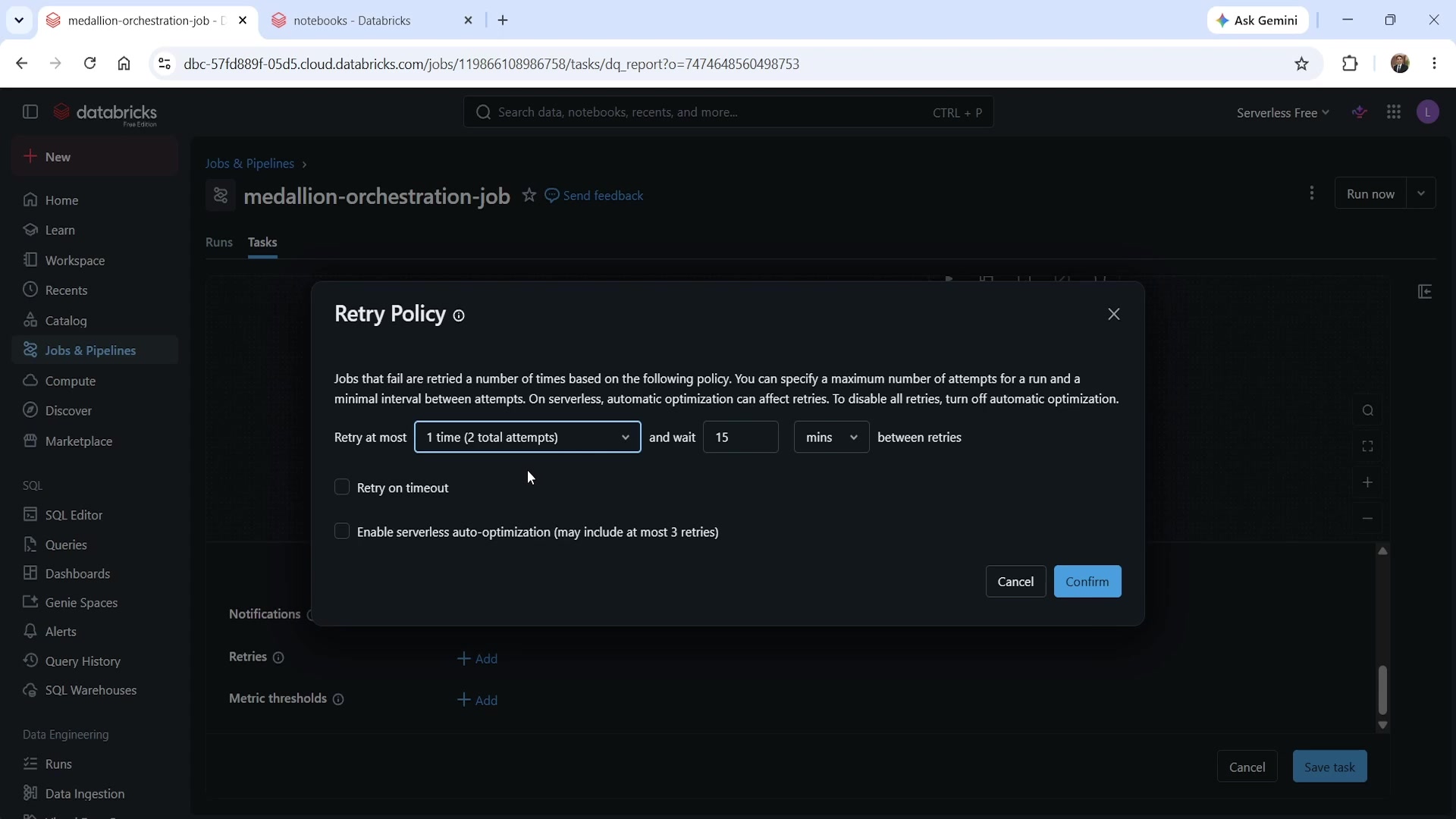 Retry Policy dialog
- Enable serverless auto-optimization lets Databricks decide retry behavior automatically (up to three retries). This is what every task had been using by default up to this lecture.
- Turning that off and leaving retries empty means zero retries — a failure fails immediately, with no automatic second attempt.
- A specific retry count can be set instead — "1 time" means 2 total attempts (1 original + 1 retry), with a configurable cooldown between attempts (minutes, seconds, or milliseconds).
Retries were explicitly removed from dq_check_gold and dq_report. The reasoning: if
dq_check_gold fails, the correct response is to branch to dq_alert immediately — not to quietly
retry two or three times and only branch after burning that time. Retries stayed enabled on
dq_alert itself, though, since an alert failing to send is exactly the kind of thing worth
retrying — the alert's entire job is to reliably notify someone, so it should try harder to succeed
than the pipeline steps around it.
Wiring the Branches
dq_alert— a notebook task, depends ondq_check_gold, with Run if dependencies: At least one failed. This is the success/failure branch: it only fires when the upstream task didn't succeed.check_row_threshold— an if/else condition task type, which needs no source code at all; the condition is defined directly in the job UI. It depends ondq_check_goldwith Run if dependencies: All succeeded. Its condition references the published task value via dynamic reference syntax —{{tasks.dq_check_gold.values.row_count}}— compared against a threshold (>= 2in this demo, standing in for a more realistic value like 100 in production).dq_report— its dependency was changed fromdq_check_golddirectly tocheck_row_threshold's True branch.low_data_warning— a new notebook task, depending oncheck_row_threshold's False branch.
Seeing the Branches Actually Branch
Running the job for a date with a low (but non-zero) row count shows exactly what conditional execution looks like in practice:
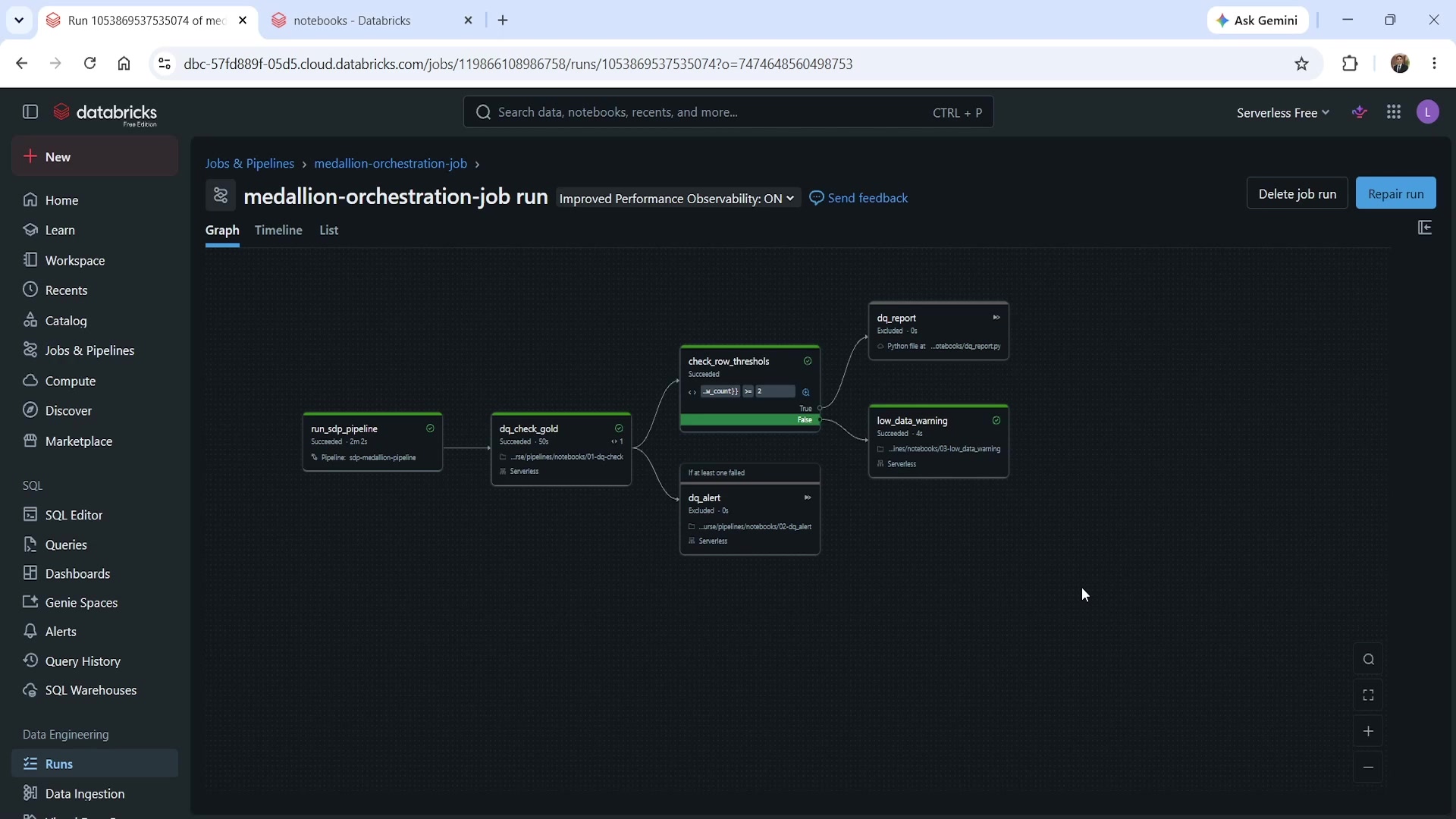 A run where dq_report and dq_alert are excluded
dq_check_gold succeeded, so dq_alert shows Excluded — it never had a reason to run.
check_row_threshold evaluated to False (the row count didn't clear the threshold), so
dq_report also shows Excluded, while low_data_warning actually ran and succeeded. This is the
DAG making a real decision, not just executing every node unconditionally — exactly the behavior the
dependency and condition settings were built for.
Backfill: Running the Same Job Across a Date Range
A backfill is what you reach for when a pipeline needs to be run for several past dates in one go — recovering from a period the pipeline wasn't running, or populating history for a metric that didn't exist before. Rather than manually triggering the job once per date, Run backfill loops the same job automatically:
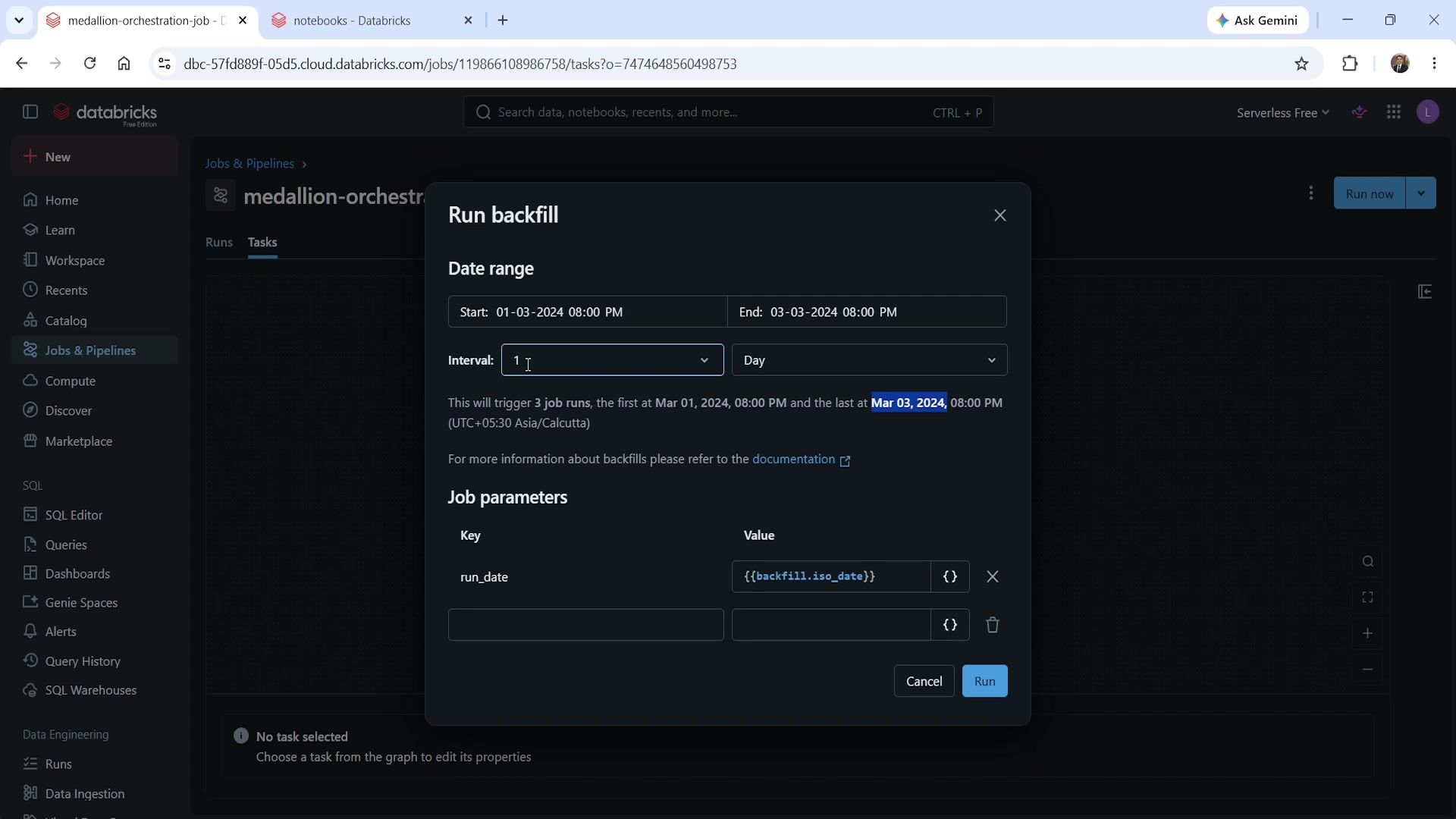 Run backfill dialog
Configuring a start date, end date, and interval (here: March 1–3, 2024, daily) tells Databricks
exactly how many runs this will trigger — the dialog confirms "This will trigger 3 job runs"
before anything executes. The run_date job parameter isn't set to a fixed value here; instead, it
uses another dynamic value reference — {{backfill.iso_date}} — which resolves to a different date
on each iteration of the loop.
Each iteration runs as a completely normal job run, taking whichever branch its own data warrants —
in this case, all three days had at least one order, so check_row_threshold evaluated to True
every time, and dq_report ran for all three (no date low enough to trigger low_data_warning, and
no failure severe enough to trigger dq_alert, in this particular backfill).
Reviewing the run history afterward shows the full picture — the parent backfill run and each of its
three child runs, each carrying its own run_date value:
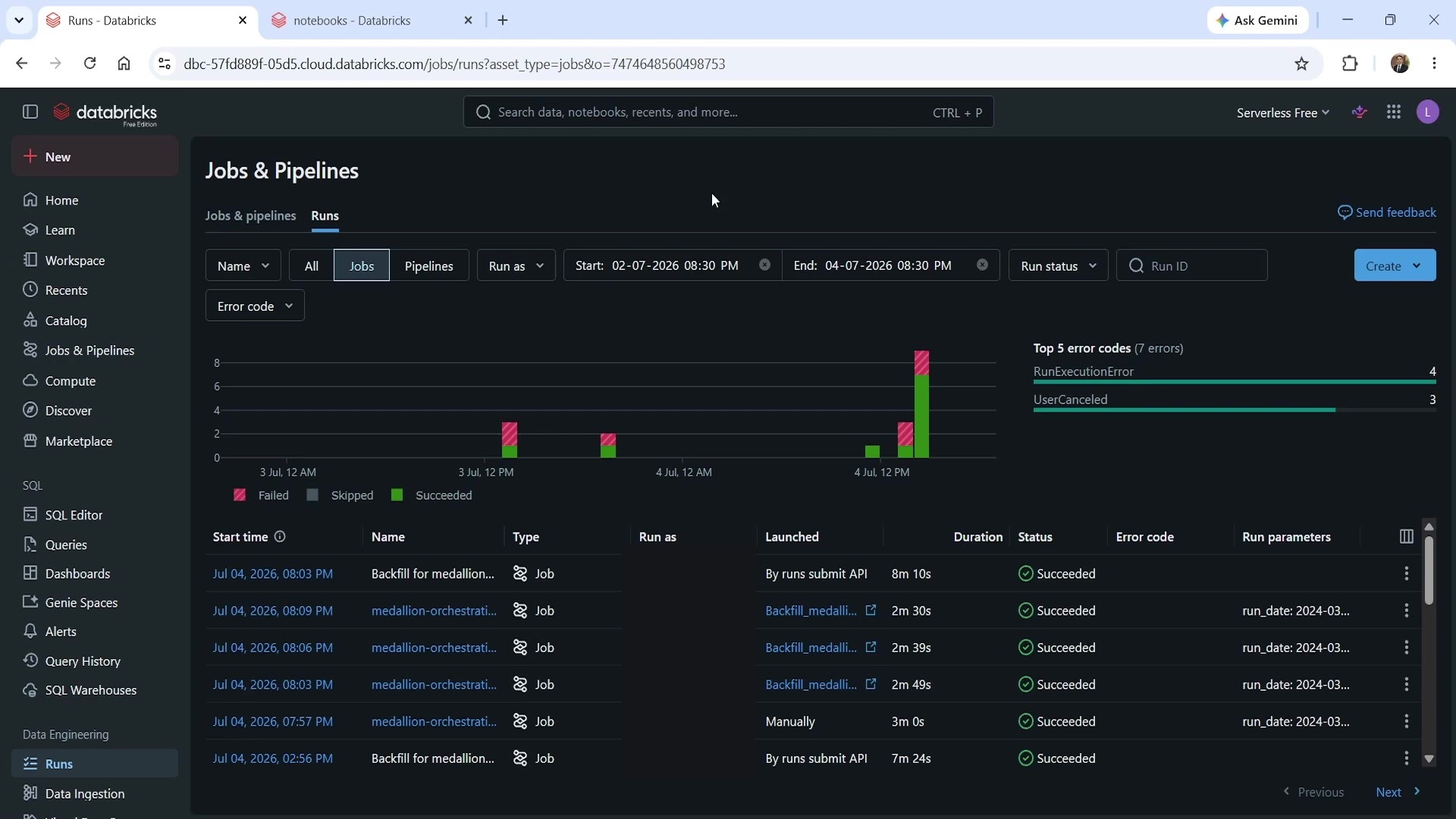 Backfill run history — parent run and three child runs
Summary
| Concept | Key point |
|---|---|
| Branching on success/failure | Run if dependencies: At least one failed — routes to an alert/recovery path |
| Branching on a condition | An if/else condition task type; no source code, just a UI-defined expression comparing a dynamic value reference against a threshold |
| Referencing a task value in a condition | {{tasks.<task_name>.values.<key>}} |
| Retry configuration | Per-task; either serverless auto-optimization (up to 3), a custom attempt count + cooldown, or none at all |
| Why remove retries selectively | A task that should branch to an alert path on failure shouldn't silently retry first and delay that branch |
| Why keep retries on an alert task | The alert's job is to reliably notify — worth retrying even though the pipeline steps around it don't |
Excluded status | Shown on a task whose dependency/condition determined it shouldn't run this time — not a failure |
| Backfill | Loops the same job across a date range/interval, automatically |
{{backfill.iso_date}} | The dynamic value reference that supplies each iteration's date to a job parameter |
| Backfill confirmation | The dialog states the exact number of runs it will trigger before you commit |
See you again. Keep learning, and keep growing!